Syllabus & Goals 3 min
Cambridge 1.3 · Data storage and file compression Paper 1 · Computer Systems
By the end of this lesson you can:
- State the units of storage from bit and nibble up to PiB, using the IEC (× 1024) system.
- Calculate the file size of a bitmap image and how many images fit on a device.
- Calculate the file size of a mono or stereo sound file, in KiB, MiB or GiB.
Textbook: Chapter 1, §1.3.1–1.3.2 (pp. 32–34)
Recap / Warm-Up 5 min
Last lesson you saw that more pixels, more colour depth, a higher sample rate or a larger resolution all make bigger files. Now you put numbers on it.
Quick starter
How many bits are in one byte? How many bits in a nibble?
Reveal the answer
1 byte = 8 bits. A nibble is 4 bits — half a byte, one hex digit. Every file size starts from these.
Key Concept 14 min
1 · Units of storage
A bit (0 or 1) is the basic unit. A nibble is 4 bits. A byte is 8 bits — the smallest unit of memory a computer addresses. Bigger sizes are measured in multiples of bytes.
Memory is built in powers of 2, so the IEC (International Electrotechnical Commission) units step up by 2¹⁰ = 1024 each time. The syllabus uses only these units.
| Unit | Symbol | Bytes (power of 2) | Bytes (denary) |
|---|---|---|---|
| 1 kibibyte | KiB | 210 | 1 024 |
| 1 mebibyte | MiB | 220 | 1 048 576 |
| 1 gibibyte | GiB | 230 | 1 073 741 824 |
| 1 tebibyte | TiB | 240 | 1 099 511 627 776 |
| 1 pebibyte | PiB | 250 | 1 125 899 906 842 624 |
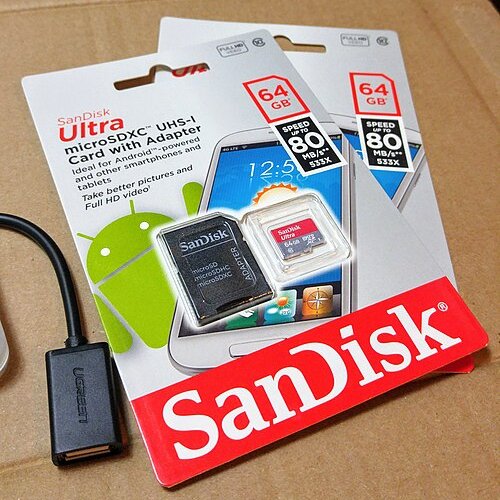
2 · Why a "64 GB" card shows less space
Some manufacturers still label storage in SI units, where a gigabyte (GB) is 1 000 000 000 bytes. Computers measure in GiB (1 073 741 824 bytes). The two do not match.
3 · The two formulas
Both formulas give an answer in bits. Then walk down the ladder:
Worked Example 12 min
Worked example 1 · image size in MiB
Question: a photo is 2 560 × 1 440 pixels with a colour depth of 24 bits. Calculate its size in MiB.
- Pixels = 2 560 × 1 440 = 3 686 400.
- Bits = 3 686 400 × 24 = 88 473 600 bits.colour depth is bits per pixel, so this is the total number of bits.
- Bytes = 88 473 600 ÷ 8 = 11 059 200 bytes.
- KiB = 11 059 200 ÷ 1024 = 10 800 KiB.
- MiB = 10 800 ÷ 1024 = 10.55 MiB (to 2 d.p.).each ÷ 1024 moves one rung down the IEC ladder.
Worked example 2 · how many photos fit?
Question: photos are 1 600 × 1 200 pixels with 24-bit colour. How many fit on a 16 GiB memory card?
- Pixels = 1 600 × 1 200 = 1 920 000.
- Size of one photo = 1 920 000 × 24 ÷ 8 = 5 760 000 bytes.
- Card = 16 × 1024 × 1024 × 1024 = 17 179 869 184 bytes.both sizes must be in the same unit before dividing.
- 17 179 869 184 ÷ 5 760 000 = 2 982.62.
- Answer: 2 982 photos.round down — a part-photo cannot be stored.
Worked example 3 · stereo sound in MiB
Question: a 45-second clip is recorded in stereo at 48 000 Hz with a 16-bit sample resolution. Calculate the file size in MiB.
- One channel = 48 000 × 16 × 45 = 34 560 000 bits.
- Stereo × 2 = 69 120 000 bits.stereo stores two channels, so twice the samples.
- Bytes = 69 120 000 ÷ 8 = 8 640 000 bytes.
- MiB = 8 640 000 ÷ 1 048 576 = 8.24 MiB (to 2 d.p.).
The image calculation as code
// Size of a bitmap image in MiB
DECLARE Width, Height, ColourDepth : INTEGER
DECLARE Bits, Bytes : INTEGER
DECLARE SizeMiB : REAL
Width ← 2560
Height ← 1440
ColourDepth ← 24
Bits ← Width * Height * ColourDepth
Bytes ← Bits DIV 8
SizeMiB ← Bytes / (1024 * 1024)
OUTPUT "Image size: ", SizeMiB, " MiB"
width = 2560
height = 1440
colour_depth = 24
bits = width * height * colour_depth
size_bytes = bits // 8
size_mib = size_bytes / (1024 * 1024)
print("Image size:", size_mib, "MiB")
Image size: 10.546875 MiB
Try It Yourself 12 min
Goal: how many bytes are in 4 KiB? How many KiB are in 3 MiB? Show the multiplication.
Goal: a 30-second mono sound is sampled at 44 100 Hz using 8 bits. Calculate its size in bits, bytes and MiB (to 2 d.p.).
Goal: songs last 4 minutes and are stored in stereo at 44 100 Hz, 16 bits. How many whole songs fit on a 700 MiB disc?
Hint
Find one song in bytes (don't forget × 2 and × 240 s), change 700 MiB to bytes, divide and round down.
📝 Exam Practice 10 min
(a) State how many bits are in one nibble. (b) State how many bytes are in one mebibyte.
Mark scheme
- (a) 4 (1).
- (b) 1 048 576 / 2²⁰ / 1024 × 1024 (1).
An image is 32 768 pixels wide and 4 096 pixels high. It is saved as a 256-colour bitmap. Calculate the size of the file in gibibytes. Show your working.
Mark scheme
- 256 colours → colour depth of 8 bits (1).
- 32 768 × 4 096 × 8 ÷ 8 = 134 217 728 bytes (1).
- ÷ (1024 × 1024 × 1024) =
0.125 GiB(1).
A 2-minute voice memo is recorded in mono at 32 000 Hz with a 16-bit sample resolution. Calculate the file size in MiB, to 2 decimal places.
Mark scheme
- 32 000 × 16 × 120 = 61 440 000 bits (1).
- ÷ 8 = 7 680 000 bytes (1).
- ÷ 1 048 576 =
7.32 MiB(1).
A memory stick has a capacity of 32 GiB. How many 25 KiB files could be stored on it?
Mark scheme
- 32 × 1024 × 1024 ÷ 25 (working in KiB) / 32 × 2³⁰ ÷ (25 × 1024) (1).
- = 1 342 177.28 →
1 342 177files, rounded down (1).
Recap & Key Terms 3 min
Storage is measured in IEC units that step up by 1024 (KiB, MiB, GiB, TiB, PiB). An image's size is resolution × colour depth; a sound's is rate × resolution × seconds (× 2 for stereo). Both give bits: divide by 8 for bytes, then by 1024 per unit. Round down when counting how many files fit.
- Bit / nibble / byte
- A bit is a single 0 or 1; a nibble is 4 bits; a byte is 8 bits.
- Kibibyte (KiB)
- 2¹⁰ = 1024 bytes.
- Mebibyte (MiB)
- 2²⁰ = 1 048 576 bytes (1024 KiB).
- Gibibyte (GiB)
- 2³⁰ = 1 073 741 824 bytes (1024 MiB).
- Image file size
- Image resolution (pixels) × colour depth (bits).
- Sound file size
- Sample rate (Hz) × sample resolution (bits) × length (s); × 2 for stereo.
Homework 1 min
Task (≤ 15 min): a photo is 1920 × 1080 pixels with a colour depth of 24 bits. Calculate its size in (a) bytes and (b) MiB, to 2 decimal places. (c) How many of these photos fit on a 4 GiB card? [4]
Model answer
- Bits = 1920 × 1080 × 24 = 49 766 400 (1)
- (a) Bytes = 49 766 400 ÷ 8 = 6 220 800 bytes (1)
- (b) MiB = 6 220 800 ÷ 1 048 576 = 5.93 MiB (1)
- (c) 4 × 1 073 741 824 ÷ 6 220 800 = 690.42 → 690 photos (1)