Challenge 1
Keep it swinging. Change the wait until your pendulum still swings strongly after a full sixty seconds. Time it. Some swings start big and slowly die. That does not pass. You want a swing that stays the same size, or grows.
Quick Learn — the model, the instructions, the program and the challenges. The theory is in Full Lesson.
EV3 Robotics›Level 1 · Beginner›Lesson 13
Level 1 · Lesson 13 · EV3-L01-1360 minutes · Ages 7+ · Model: Clock Ticking
The Clock Ticking: a tall frame with a heavy pendulum hanging from it. A Medium Motor gives the pendulum little pushes to keep it swinging.
Most models so far did what their numbers said. You asked for 60 degrees and got 60 degrees. The Pirate Ship in Lesson 7 was different. It had its own swing. This model is a pendulum too. It will argue with you!
A pendulum has a rhythm of its own. Your program cannot choose it. Your program has to find it, and push in time. You will find it by trying, not by working it out.
By the end, tiny pushes will make your pendulum swing wide and steady. And you will find the one number that makes it work.
For nearly three hundred years, the best clocks had a weight on a rod. Look inside an old wall clock. Behind the glass is a brass disc, swinging. Tick, tock, tick.
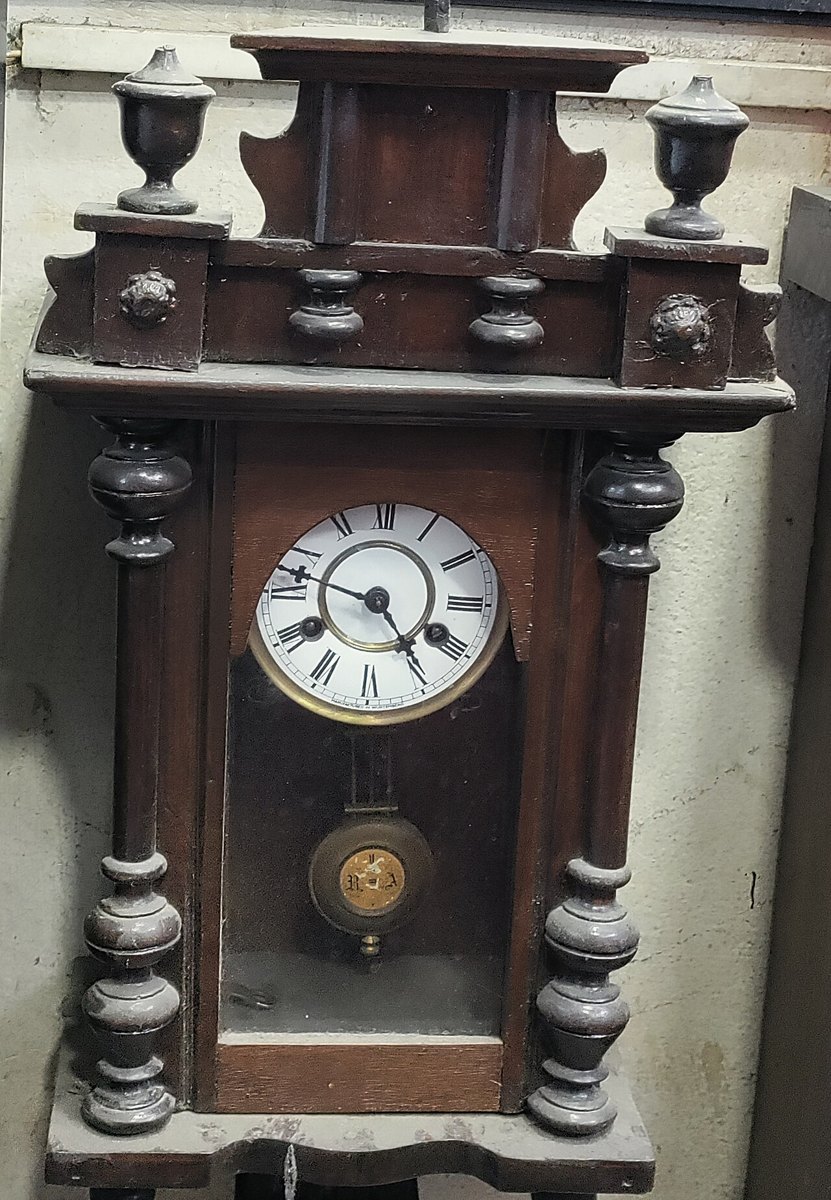
A pendulum helps because it is stubborn. That means it will not change. Give it a small push or a big one. It still takes the same time to swing across and back. That time is called its period. A clock counts periods, the way you count footsteps.
Here is the part that shocks everyone. The period comes from the pendulum’s length. Nothing else you can change makes a difference. Not how heavy the weight is. Not how far you pull it back. Make it longer, and it swings slower. That is why a big floor clock has to be tall.
Your body already knows this. On a playground swing, you do not kick any old time. You kick in time. Small kicks in time build a huge swing. Kick at the wrong time, and you stop.
If nothing pushed it, a clock’s pendulum would stop in a minute. Air and rubbing take a little from every swing. So every pendulum clock has a part that gives it a tiny push. It pushes once each swing, at just the right moment. That push makes the ticking sound.
A small push at the right moment beats a big push at the wrong one. Push at the wrong time, and you are not helping the swing. You are fighting it.
Some machines take their rhythm from the motor. A pendulum does not. It has its own rhythm, and your program has to match it.
| Kind of machine | Who sets the rhythm |
|---|---|
| A wiper, a saw, a fan arm: the motor moves it straight | The motor. Speed it up, and the machine goes faster. Simple. |
| A pendulum, a swing, a bouncing spring | The machine. It has one speed it likes. Push at that speed, and the swing grows. Push at any other speed, and it fights you. |
You already have the block for this. It lets you choose when, not how much.
wait (0.5) seconds
Until now, a wait block was just a rest. The program sat there while a motor ran. Here it does real work. Change 0.5 to 0.4. Now the whole machine acts in a new way. And no motor block changed!
The wheel turns at a steady rate and the slider does not. Watch the two ends: it stops dead at both of them without the motor ever stopping.
Some machines have their own rhythm. The program’s job is to fit in with it. Not to boss it about.
A motor does exactly one thing: it goes round. Everything that wipes, saws, pumps, nods or waves is a mechanism converting that rotation into oscillation — a movement that goes one way, stops, and comes back.
Put a pin near the edge of a turning wheel and connect a rod from the pin to something that can only slide in a straight line. The wheel keeps turning one way; the slider goes out, stops, comes back and stops, once per revolution.
A crank with the rod attached to a pivoting arm rather than a slider gives a rocking motion instead of a sliding one. Same mechanism, and it is how a windscreen wiper works.
The wheel turns at a steady rate and the slider does not. Watch the two ends: it stops dead at both of them without the motor ever stopping.
A pendulum swings at a rhythm of its own, and that rhythm is set by exactly one thing you can control: its length. Longer means slower. Specifically the period goes as the square root of the length, so making it four times as long makes each swing twice as slow.
Two things students expect to matter and which do not:
This is worth meeting because it is the first mechanism in the course whose timing is not yours to program. If a nodding or swinging model has to keep a particular beat, you change its geometry, not its code.
| Rhythm set by | To change it | |
|---|---|---|
| Crank mechanism | the motor | change the motor speed — see Motor speed |
| Pendulum | the mechanism | change its length |
Push a free-swinging thing at its own rhythm and the swings grow — that is resonance, and it is how a child on a swing goes higher without anybody pushing harder. Push at the wrong rhythm and you fight it. A model that has to swing widely is far easier to build by matching the push to the mechanism than by pushing harder.
Engines run this backwards: the up-and-down of a piston becomes the round-and-round of a crankshaft, using exactly the linkage above. Sewing machines, pumps, saws and metronomes are all in the same family, and a clock is a pendulum used as a ruler for time.
Waiting is how a program gives the physical world time to catch up. There are two kinds, and choosing between them is one of the first real design decisions in robotics.
| Block | What it does |
|---|---|
wait (1) seconds | Holds the program for a fixed length of time, whatever else is happening. |
wait until <> | Holds the program until a condition becomes true — usually a sensor reading. |
Most sensors bring their own ready-made wait block, already coloured to match the sensor and with its comparison built in. They are all the same idea — hold here until this is true — and they live in the sensor’s own palette rather than in Control.
| Sensor | Block | Waits until |
|---|---|---|
| Touch | [1 v] wait until [pressed v] :: sensors | the button is pressed. The dropdown also offers released and bumped. |
| Colour | [3 v] wait until color is [red v] :: sensors | the surface underneath is that one of the eight colours. |
| Ultrasonic | [4 v] wait until distance [< v] (15) [cm v] :: sensors | something is nearer than 15 cm. Flip the dropdown to > to wait for something to move away. |
| Gyro | [2 v] wait until angle [< v] (45) :: sensors | the robot has turned past that angle. |
| Brick buttons | wait until [center v] button is [pressed v] :: sensors | somebody presses that button on the Brick. No port — it is built in. |
Some readings have no wait block of their own — reflected light, ambient light, the timer, and a motor’s degrees counted. For those, drop the matching boolean into the plain wait until from Control. It does exactly the same job:
wait until <[3 v] is reflected light intensity [< v] (30) %? :: sensors>
wait until <[3 v] is ambient light intensity [> v] (50) %? :: sensors>
wait until <(timer) > (5)>
wait until <([A v] degrees counted :: sensors) > (720)>
This is also the way to wait for two things at once, which no ready-made block can do — the sensor blocks each take one condition, but a boolean can be combined:
wait until <<[1 v] is pressed? :: sensors> or <(timer) > (5)>>
That one says “stop waiting when the button is pressed, or after five seconds, whichever comes first” — which is how you stop a wait hanging for ever when the thing you are waiting for never happens.
Two robots, the same job: drive up to the wall and stop. One waits two seconds; the other waits for the wall. Let it run several times — the interesting part is what happens on the second and third run.
wait for a length of time
wait for a condition
Each orange dash is where a previous timed run finished. The sensing robot has never left a second mark, because it has never stopped anywhere else.
The timed robot is not being careless. Two seconds is a perfectly good guess, and on the first run it may look exactly right. But a second covers a different distance on a fresh battery, on a dusty floor, or with a heavier load, so the robot finishes somewhere new every run — sometimes short, sometimes into the wall. The sensing robot has never had to guess.
Prefer waiting for a condition wherever a sensor can tell you. Keep timed waits for things with no sensor to check — letting a sound finish, or pausing so a person can watch.
A lift that waits three seconds for its doors is guessing; one that waits for the door sensor knows. The first eventually closes on somebody.
Say this back before moving on: “The pendulum’s speed comes from its length. All I can change is when I push.”
Find the parts with cables first. There are two.
| Part | What it is doing here |
|---|---|
| EV3 Intelligent Brick | Runs the program. It stands upright as the body of the clock. |
| Medium Motor | Gives the pendulum its push. It is the flat one. It has a small red part on its end for the axle. It is the right motor here. The job is light and quick. That is the opposite of the Walking Bot. |
Do this with the Brick switched off. You will need the answer soon.
Half of that number is a good place to start. The pendulum passes the motor twice in each whole swing. So you push at every pass. That is twice each period.
Sensors go in ports 1, 2, 3, 4. Motors go in ports A, B, C, D. You cannot swap them. If you do, nothing warns you. The robot just will not work.
| Part | Port | Why this one |
|---|---|---|
| Medium Motor (nudges the pendulum) | A | One motor with its own job goes in A. Every program on this page says A. |
| Sensors | none | Nothing here watches the pendulum. The program cannot see it. It only keeps time. That is why the timing has to be right. |
Check your own build now:
Two routes, and either is fine. USB is the reliable one and the one to fall back on when a room’s Bluetooth is busy; Bluetooth leaves the robot free to move, which some models need.
Do these in order. Naming the Brick after you go looking for it in the list is how groups end up driving each other’s robots.
EV3 until somebody changes it.EV3.The two failures, every class, every time. The Brick has gone to sleep while you were building — press the centre button to wake it. Or you have paired with the group at the next table, which is why the name matters.
The long version, including Port View and how to read the port tiles, is in the Brick & Bluetooth guide.
Keep the cable off the pendulum. A cable touching the swinging rod acts like a brake. It will look just like bad timing. Put the cable behind the frame.
This part is the heart of the lesson. Change one thing, and run it. Watch for a full ten seconds before you decide. At first, a growing swing looks a lot like one that is not.
Think about step 5. Nothing in the program changed. But the machine stopped working. The number in your wait block was never really about the program. It was about the pendulum, written down in the program.
Shorter pendulum, faster swing, smaller wait. Longer pendulum, slower swing, bigger wait.
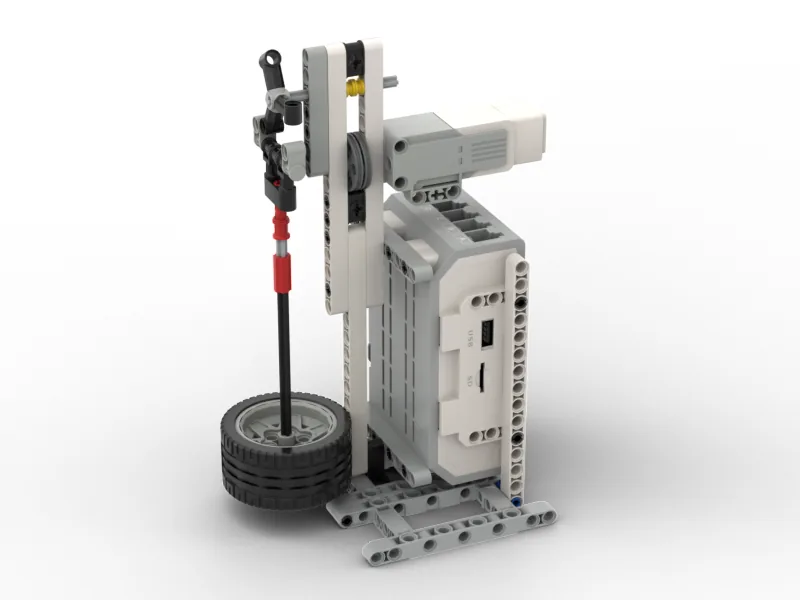
Build the model before you read any further. Everything after this is about making it do something, and none of it will make much sense with nothing on the table in front of you.
One page at a time — use Next and Previous, or the ← → keys. Fullscreen makes it big enough to build from.
Check the finished build against the picture before you switch anything on. A motor mounted the wrong way round is far easier to spot now than it is to debug later, when it looks like a program fault.
Six blocks. A small push out, the same push back, then a wait. Then round again, forever. To begin, put half your period in the wait block.
when program starts :: events hat
[A v] set speed to (25) % :: motors
forever
  [A v] run [clockwise v] for (25) [degrees v] :: motors
  [A v] run [counterclockwise v] for (25) [degrees v] :: motors
  wait (0.5) seconds
end
Go through it in the order the Brick runs it:
What success looks like: start the pendulum by hand. Then run the program. The swing should slowly grow, not get smaller. The push should come as the bob swings back to the motor. Never as it moves away.
It will almost surely not work first time. That is the lesson, not a mistake. Your 0.5 was just a first guess. Next, you will find the right number.
Work through them in order — each is harder than the last. The extra challenge comes after all three, and it is meant to make you plan before you build.
Keep it swinging. Change the wait until your pendulum still swings strongly after a full sixty seconds. Time it. Some swings start big and slowly die. That does not pass. You want a swing that stays the same size, or grows.
Build the swing up on purpose. Start with the pendulum hanging still. Your program must get it moving. It must grow the swing to its biggest. Then it must hold it there. It must not keep growing until it hits something. You may change how big the nudge is. But once you have found the timing, you may not change it.
Show how two things are linked. Move the bob to make the pendulum a different length. The bob is the weight at the end. Then measure the new period, and change the wait to match. The period is the time for one swing there and back. Do this for three different lengths. Write down all three pairs of numbers. Then say the rule you found in one sentence. As the pendulum gets shorter, what must the wait do?
Build a clock that keeps itself going. Your pendulum must run for three minutes without a break. The swing must not die away. No one may touch the model. It must also be able to get going again. Someone may stop the pendulum with a hand. The machine should then start it again by itself. You should not need to restart the program. Plan on paper before you build. Starting again is a different job from keeping going. A still pendulum and a swinging one need different things from the same program. Work out what could get a stopped pendulum moving. Do this before you write anything. You will be asked two questions when you show it. What sets your pendulum's period? How do you know it is not the weight of the bob? And why does a nudge at the wrong moment slow the swing down? Why does it not just help less?