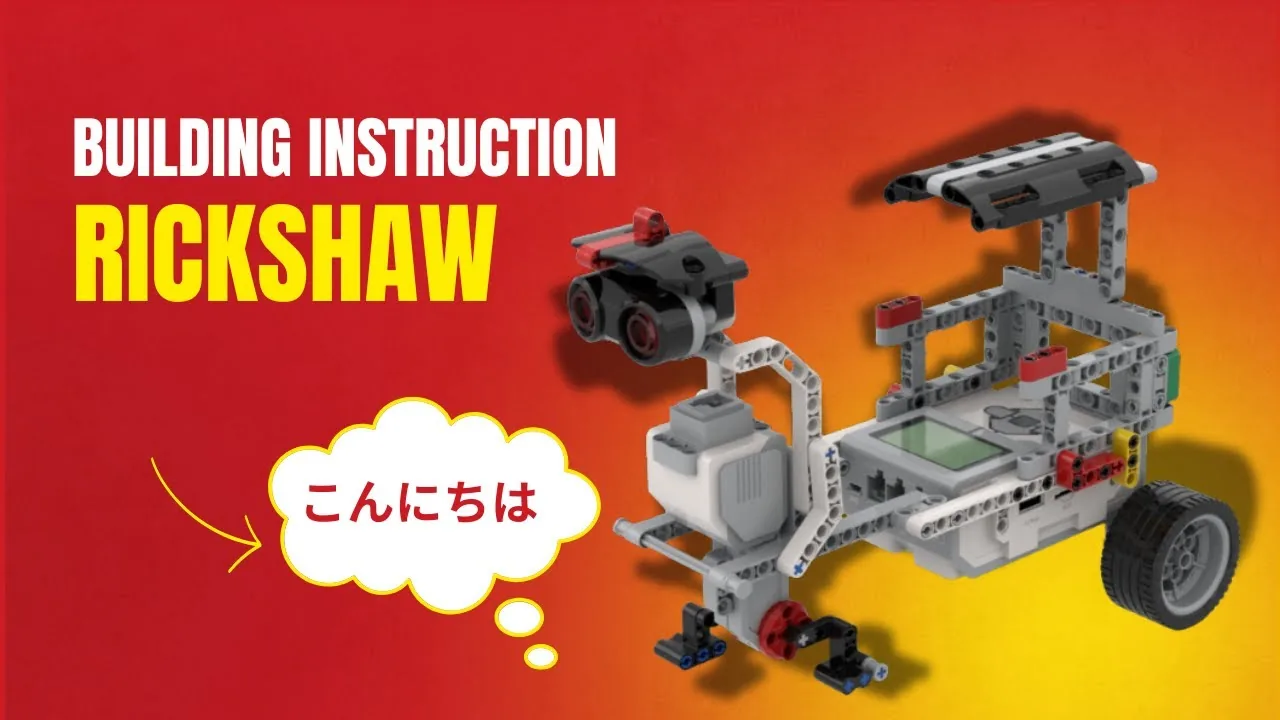
The Rickshaw: a three-wheeled passenger cart driven by a single Large Motor, with a screen that says where it is going and a beep when it arrives.
A rickshaw driver does not think in seconds. Nobody has ever asked to be taken “forward for four seconds”. They ask to be taken to the end of the road — a distance.
Your robot has been measuring in seconds for most of Level 1 without you noticing the difference. Today you find out what that has been costing you.
In the real world 5 min
Where you have seen it
The beca — the trishaw — still working in Rome and Cairo, decorated to within an inch of its life and usually playing music. Three wheels, a rider pedalling, and one or two passengers sitting up front.
A trishaw is geared low — the pedals turn a lot for a little movement. That makes it slow, and it makes it able to start from a standstill with two passengers and a hill in front of it.
It also means the rider can tell you exactly how far they have gone without looking up. Every turn of the pedals is the same distance along the road — a full turn might be two metres, whether the rider is fresh or exhausted, whether the load is one passenger or two. Tiredness changes how long the journey takes. It does not change how far one pedal stroke goes.
What would go wrong without it
Imagine a driver who measured in time instead: “the museum is four minutes away”. Fine on an empty road at midday. Useless in traffic, useless uphill, useless with a heavy passenger — and they would put you down in a different place every single trip.
Time tells you how long you tried. Rotations tell you how far you got.
The main concept — three ways to say “how far” 6 min
One block, one little dropdown, three completely different promises.
[A v] run for (3) [rotations v] at (40) % speed :: motors
The dropdown after the number is the one that matters. Open it: rotations, degrees, seconds.
Unit
What the Brick actually promises
Reach for it when…
seconds
“I will keep the power on for this long.” It makes no promise about distance at all.
The duration is the point — a fan that runs for a minute, a light that stays on.
rotations
“I will turn the shaft round this many times, however long that takes.”
Distance matters. This is the everyday choice for anything that drives.
degrees
The same promise as rotations, in smaller pieces. 360 degrees is one rotation.
You need part of a turn — a quarter, a third, an arm lifted to an angle.
Rotations and degrees are the same unit wearing different clothes. The real split is between them and seconds, because seconds is the only one that is not measuring the shaft at all.
Why seconds drift
Set a motor to run for 3 seconds at 40% and it does not always travel the same distance:
A fresher battery pushes harder, so it goes further.
A passenger in the seat slows it down, so it goes less far.
A carpet instead of a table slows it down again.
Set it to 3 rotations and none of that matters. A heavy rickshaw takes longer to do 3 rotations, and then it has still done 3 rotations. The Brick counts the shaft going round and does not stop until the count is reached.
ComponentMotion5 min
Rotations and degrees
There are two ways to tell an EV3 motor how much to move: give it a length of time, or give it an amount of turn. Only the second one is repeatable, and that difference decides whether a machine works reliably or only sometimes.
One rotation means one full turn of this shaft — not one turn of the wheel or gear it drives. Gearing between the two changes how far the mechanism actually moves.
Blocks reference
Block
What it does
[A v] run [clockwise v] for (1) [rotations v] :: motors
One full turn of the motor shaft, then stop. The program waits for it.
[A v] run [clockwise v] for (180) [degrees v] :: motors
Half a turn. 360 degrees is one rotation.
Count it as it turns
The counters below tick up in step with the shaft, so you can watch a rotation being counted rather than take it on trust.
The program begins. Nothing has turned yet, so both counters read zero.Turning. Watch the two motor counters climb together — they are one movement counted two ways.Exactly 2 rotations, exactly 720°. The big gear has turned only two thirds of a turn.Finished — it will run again in a moment.
stopped
The two motor read-outs are the same measurement — 1 rotation is 360°. Use whichever makes the number easier to read.
Rotations or degrees?
Notice that the two motor counters finish together: 2.00 rotations and 720° are the same instant, because they are the same measurement in different units. So pick whichever makes the number easier to read. A winch that needs eight full turns is clearest in rotations. A gate that lifts a quarter turn is clearest in degrees — 90 rather than 0.25.
Gearing changes the answer
The third counter is the one that catches people out. The block counts turns of the motor, not of the thing it drives — and the gear in the demo is three times the size, so two motor rotations move it only 0.67 of a turn. Ask for two rotations and the mechanism does not move two rotations’ worth unless the gearing is one to one.
That is why a number that works on one build has to be retuned when the gearing changes — the program is right, the mechanism is different.
Why it matters
A printer feeds paper an exact distance; a lift stops level with the floor; a robot arm returns to the same place a thousand times. None of that is possible by timing a motor — they all count turns.
Seconds measure your effort. Rotations measure the result. Level 2 is about results.
▶Turning part of the way — degrees360 degrees to a rotation, and why a fraction of a turn is sometimes the only sensible unit. Open it before Lesson 4.Show meHide
ComponentMotion5 min
Moving to an exact angle
Everything so far has been relative: move 90 degrees from wherever you are now. Sometimes what you actually want is absolute: go to the 90-degree position, whatever position you happen to be in at the moment.
The motor counts its own turning all the time, so it always knows where this shaft is — which is what makes going to an exact position possible.
Relative drifts, absolute does not
Both pointers below do the same job over and over: swing out a quarter turn, then come home. The only difference is the block that brings them back. Watch one trip and they look identical — so let it run for several.
relative — by an amount
A run clockwise for 90degrees
A run counterclockwise for 90degrees
absolute — to a place
A run clockwise for 90degrees
A run to position 0
0°relative, off home0°absolute, off home1trip
Relative: 0° from home and growingAbsolute: home, exactly
Both pointers are at home, on the black mark.Out a quarter turn. Both use the same relative move to get there.And back home — one by moving 90° the other way, one by going to position 0.Look at the left pointer against the black mark. Then let it go round again.Finished — it will run again in a moment.
at rest
Let it loop. Nothing about the left program is wrong — it is just that every trip starts from wherever the last one finished, so a small error is never corrected, only added to.
A pointer moved relatively slowly wanders: each movement starts from wherever the last one finished, so any small error is carried forward and added to. Each orange dash is a trip that called a slightly different place “home”. Nothing about that program is wrong — it is simply that a relative move has no idea where it is supposed to end up.
An absolute movement has no memory of the error. Told to go to position 0, it goes to position 0 — the same place every time, however wrong it was beforehand. That makes it the right tool for a home position: the known place a mechanism returns to before it starts work.
Every motor knows where it is
This is possible because an EV3 motor counts its own turning all the time. Its position can be read back, and can be reset to zero — which is how you tell the motor that here is what you mean by zero, usually at the start of a program with the mechanism held at its resting place.
Why it matters
A clock hand returns to twelve; a car’s steering returns to centre; a 3D printer homes its head before every print. All of them go to a position rather than moving by an amount.
Say this back before moving on: “Seconds is how long. Rotations is how far.”
What’s in this build 4 min
Part
What it is doing here
EV3 Intelligent Brick
Rides on the cart and counts the motor’s rotations. That counting is what makes today’s program reliable.
Large Motor — the drive
One motor, driving the rear axle. Because there is only one, the rickshaw goes where its wheels are pointed and cannot steer itself.
Ultrasonic Sensor
Faces forward. Today it is only used as a safety stop at the end of the run — you will do far more with it in Lesson 9.
The Brick screen and speaker
The rickshaw’s way of telling a passenger what is happening. Not decoration — it is how you check the program reached the end.
Measure your wheel before you program anything
One rotation of the motor moves the rickshaw a fixed distance. Find out what that distance is and rotations stop being an abstract number.
Line the rickshaw up against a ruler with the front wheel on zero.
Turn the drive motor by hand, exactly one full turn of the shaft.
Measure how far it moved. Write it on your sheet: 1 rotation = ___ cm.
Do it twice more and check you get the same answer. If you do not, a wheel is slipping — fix that now.
Ports — and the rule 4 min
Sensors go in ports 1, 2, 3, 4. Motors go in ports A, B, C, D. They are not interchangeable, and nothing will tell you politely if you swap them.
Part
Port
Why this one
Drive motor (Large)
A
A single drive motor is a job, not a steering pair — so it takes a Motor block on A rather than the Movement blocks you would use for a two-motor base.
Ultrasonic Sensor
4
Ultrasonic is always port 4 in this course, in every lesson, every level.
Check your own build now:
Follow the axle from the driven wheels back to the motor. Put that motor in A.
Ultrasonic in 4, pointing forward and level — a sensor tilted at the floor measures the floor.
Clear a run of at least a metre. This model travels, and rotations are easier to believe over a long distance than a short one.
Connect the Brick 4 min
Two routes, and either is fine. USB is the reliable one and the one to fall back on when a room’s Bluetooth is busy; Bluetooth leaves the robot free to move, which some models need.
▶How to connect the BrickUSB and Bluetooth, step by step, with a photograph of every screen. Open it if you have not done this before — or if pairing is not working.Show meHide
USB — the reliable one
Switch the Brick on with the dark grey centre button.
Cable into the Brick’s PC port — the small square socket beside the numbered ports, not one of the numbered ones.
Other end into the computer.
Bluetooth — name it first
Do these in order. Naming the Brick after you go looking for it in the list is how groups end up driving each other’s robots.
Name your Brick. On the Brick: Settings (the spanner) → Brick Name. Type something nobody else will pick, then press the tick. Every Brick is called EV3 until somebody changes it.
Turn Bluetooth on. Settings → Bluetooth. Tick Bluetooth and Visibility. Leave iPhone/iPad/iPod unticked.
Connect from EV3 Classroom. Click the Brick icon at the top of the programming area, find your Brick by name, and click Connect.
Say yes on the Brick. It asks “Connect?” with the computer’s name — choose the tick, then accept the passkey, which is already 1234.
Where to read it. The name sits in the bar across the very top of the screen, on every screen — so you can check which Brick you are holding at any moment without going into a menu. This one is EV3VE. A Brick nobody has renamed says EV3.Step 3, and the reason step 1 exists. Three Bricks in range — read the name before you click Connect. Pairing with the wrong one is not an error: it works perfectly, on somebody else’s robot.
Step 2.Bluetooth switches the radio on; Visibility is what lets the computer find you. With Visibility off your Brick works perfectly and simply never appears in the list.Step 4. Look at the Brick. It asks whether to accept and names the computer. Choose the tick.Then the passkey, already 1234. Press the tick again and you are connected.
The two failures, every class, every time. The Brick has gone to sleep while you were building — press the centre button to wake it. Or you have paired with the group at the next table, which is why the name matters.
The long version, including Port View and how to read the port tiles, is in the Brick & Bluetooth guide.
Bluetooth for this one. A USB cable on a driving model drags, and drag is exactly the variable this lesson is trying to prove does not matter. Prove it without a rope attached.
Confirm the connection 2 min
Check the Brick icon: connected, or not.
One Large Motor tile on A, one Ultrasonic tile on 4.
Push the rickshaw along the table by hand and watch tile A’s number climb. You are watching the exact counter your program is about to use.
Put your hand in front of the Ultrasonic and watch its number fall. If it stays at 255, it is facing nothing at all.
Change it and test 8 min
The point of today is a comparison, so run these in pairs and mark where the rickshaw stops each time with a strip of tape. Two lines of tape close together is a reliable robot; two far apart is not.
Change rotations to seconds, keeping the number at 5. Run it. Mark where it stops.
Now put a heavy passenger in the seat — a spare Brick, a pencil case — and run the seconds version again. Mark it. How far apart are the two marks?
Change back to rotations and repeat both runs, loaded and unloaded. Mark both. Compare the gap with step 2.
Try degrees with the number 1800. Predict where it will stop before you press Play. (1800 ÷ 360 = 5.)
Add a stop at the kerb: put [4 v] wait until distance [< v] (15) [cm v] before the motor block, and hold your hand in front of the sensor. The rickshaw waits for a clear road, then drives its five rotations.
Step 3 is the evidence. The two rotation marks should be close enough to touch, and the two seconds marks should not be — same robot, same floor, same battery, and only the dropdown changed.
If your robot has to end up somewhere, never measure it in seconds.
This is what you are building: the EV3 Ricksaw.
Build it 15 min
Build the model before you read any further. Everything after this is about making it do something, and none of it will make much sense with nothing on the table in front of you.
Use the viewer's own controls to zoom and turn pages. Fullscreen makes it big enough to build from.
Check the finished build against the picture before you switch anything on. A motor mounted the wrong way round is far easier to spot now than it is to debug later, when it looks like a program fault.
Make it move 10 min
A rickshaw journey: announce it, drive a measured distance, arrive, say so.
when program starts :: events hat
clear display :: display
write [Jalan!] at line (1) :: display
[A v] run for (5) [rotations v] at (40) % speed :: motors
play beep (60) for (0.3) seconds :: sound
write [Sampai] at line (3) :: display
Five rotations. Not five seconds — and the difference is the whole lesson.
clear display wipes whatever the last run left behind, so line 1 is genuinely line 1.
write Jalan! at line 1 — Malay for “go”. The passenger knows the trip has started.
run for 5 rotations at 40% — the Brick counts the shaft round five times. It will not stop early on a heavy carpet; it will just take longer.
beep, then write Sampai at line 3 — “arrived”. This only happens once the five rotations are genuinely finished, which is what makes it a useful signal.
What success looks like: mark the start and finish with two pieces of tape. Run it three times from the same start line and it should stop at the same finish line every time.
If it stops in a different place each run, the wheels are slipping. The motor has honestly turned five times; the wheel just did not take the rickshaw with it. Rotations measure the shaft, and they cannot see a skid.
Challenges 27 min
Work through them in order — each is harder than the last. The extra challenge comes after all three, and it is meant to make you plan before you build.
Challenge 1
Stop on the line, three times running. Put a strip of tape on the floor, choose a starting point, and make the rickshaw stop with its front wheel on the tape. Then do it twice more from the same start without changing the program. All three stops must be within a tyre's width of each other.
Challenge 2
Run two different fares. The rickshaw must make a short trip and a long trip, one after the other, announcing each one on the screen before it sets off and beeping when it arrives. The two distances must be visibly different and both must be repeatable.
Challenge 3
Carry a passenger the same distance. Run your trip empty and mark where it stops. Load the seat with something heavy, run exactly the same program, and mark it again. The two marks must be close enough to touch. If they are not, the wheels are slipping — say what you did about it.
Extra challenge
Turn your rickshaw into a machine that takes an order in centimetres.
A passenger does not think in rotations. They say "take me forty centimetres down the road". Your machine has to do the conversion.
Start from the measurement you took in section 5: one rotation moves the rickshaw a fixed number of centimetres. Build a small table on paper — 20 cm, 40 cm, 60 cm, 80 cm — and work out the rotations each one needs. Show your working.
Then build the trips and prove the table. Mark each target distance on the floor with tape before you run it, so the machine is being tested against a prediction rather than being measured afterwards.
Two questions when you present it. Which distance came out worst, and is the error a fixed amount every time or does it grow with the distance? And if somebody swapped your wheels for larger ones, exactly which number in your table would still be right and which would all be wrong?