Challenge 1
Make a flight with a clear take-off and a clear glide, and have the screen name which one is happening. Somebody across the room should be able to say when it switched without being told what to look for.
Quick Learn — the model, the instructions, the program and the challenges. The theory is in Full Lesson.
EV3 Robotics›Level 2 · Intermediate›Lesson 8
Level 2 · Lesson 8 · EV3-L02-0860 minutes · Ages 9–16 · Model: EV3 Dinosaur Pterosaur
The Pterosaur: a flying reptile with a long crested head and a wingspan far wider than its body, its wings driven up and down by a single motor through a linkage.
Lesson 13 taught your ride to decide whether to do something. This model needs more than that. A pterosaur is never doing nothing — it is either flapping or it is gliding, and it is always doing one of them.
That is a different kind of question. Not “should I?” but “which one?”
Pteranodon hangs from the ceiling of natural history museums with a wingspan of six or seven metres and a body no heavier than a large dog. It lived at the same time as the dinosaurs — and was not one — and it fished the seas that covered much of North America.
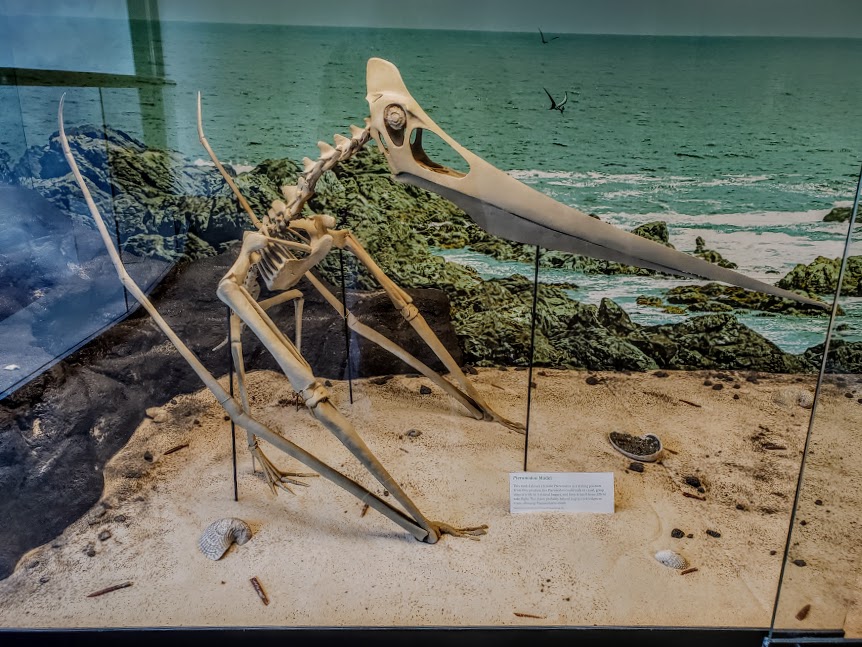
Flapping is expensive. Moving those wings takes far more energy than holding them still, so a big flier does as little of it as it can get away with — it flaps to gain height or speed, then locks its wings and glides, losing height slowly while spending almost nothing.
Seabirds still do exactly this. An albatross can cross an ocean barely flapping at all, using the wind rising off the waves, and its wings are long and narrow for the same reason Pteranodon’s were.
A flier that could only flap would run out of energy long before it found food. A flier that could only glide would sink to the sea and never get up again. Neither behaviour is any use on its own — the animal needs both, and needs to switch between them.
Some choices are not do-it-or-do-nothing. Some are always one thing or the other.
The Switch grows a second mouth. Whatever is in the hexagon, exactly one of the two halves runs — never both, and never neither.
if <([A v] degrees counted) < (1440)> then
  [A v] set speed to (70) % :: motors
  write [FLAP] at line (3) :: display
else
  [A v] set speed to (15) % :: motors
  write [GLIDE] at line (3) :: display
end
| if / then | if / then / else | |
|---|---|---|
| Condition true | Runs the inside. | Runs the top half. |
| Condition false | Does nothing at all. | Runs the bottom half. |
| Use it for | Something extra, sometimes. | Picking between two behaviours. |
Lesson 13 ended with a beep that would not stop, because once the condition became true it stayed true and the if fired on every pass. An if/else has no equivalent problem for this job: whichever way the answer goes, exactly one thing happens per pass, so the machine settles into a behaviour instead of piling actions up.
That is not a rule about which block is better. It is a reason to ask what you actually want: an extra thing sometimes, or one of two things always.
Up to now a robot has been able to wait for a sensor. Deciding is different: the robot checks the sensor and does one thing or another depending on the answer — and then carries on either way.
| Block | What it does |
|---|---|
if <> then end | Runs the blocks inside only when the condition is true. Otherwise skips them. |
if <> then else end | Runs one set of blocks when true and a different set when false. |
A decision made once, at the start, is almost never what you want. Here are two robots with the identical if-else, testing the identical sensor against the identical number — one inside a loop and one not.
decision inside a loop
the same decision, once
A decision is only worth as much as the last time it was made. Inside a loop, that is a few milliseconds ago.
Nothing is wrong with the right-hand program’s decision. It asked the question, got a truthful answer, and acted on it correctly. It simply never asked again, and the world moved on. Decisions belong inside a loop, so the robot keeps re-deciding as things change.
when program starts :: events hat
forever
  if <([4 v] distance in [cm v] :: sensors) < (15)> then
    stop moving :: movement
  else
    start moving [straight: 0] :: movement
  end
endOnce there is more than one question, decisions can be arranged in four ways. They look nearly identical stacked up in the editor, which is exactly why they get muddled — the thing that differs is not what the blocks say, it is which routes through them exist.
One question sorts them almost completely:
| Are the questions… | Use | How many bodies can run |
|---|---|---|
| independent — any combination can be true | separate ifs | none, some, or all |
| one question, two answers | if / else | exactly one |
| the second only matters when the first is true | nested if | one, and only via the outer |
| mutually exclusive cases — exactly one should win | chained if / else | exactly one, the first that matches |
Each if is asked no matter what the others answered, so any number of them can fire on the same pass. That is the right shape when the conditions genuinely have nothing to do with each other.
forever
  if <[3 v] is ambient light intensity [< v] (20) %? :: sensors> then
    [A v] start motor [clockwise v] :: motors
  end
  if <[4 v] is distance [< v] (15) [cm v]? :: sensors> then
    [D v] start motor [clockwise v] :: motors
  end
endExactly one branch runs, every time. Reach for this whenever the robot must do something either way — and in preference to two ifs testing opposite conditions, which is the same idea written twice and can drift apart.
Putting one if inside another means the inner question is only ever asked when the outer one is true. Use it when the second question is meaningless otherwise: there is no point asking which side an obstacle is on when there is no obstacle.
if <[4 v] is distance [< v] (15) [cm v]? :: sensors> then
  if <([2 v] angle :: sensors) < (0)> then
    start moving [right: 50] :: movement
  end
end
When not to nest. If you only want “both true” and nothing happens at the outer level, an and says it in one block and reads better:
if <<[4 v] is distance [< v] (15) [cm v]? :: sensors> and <([2 v] angle :: sensors) < (0)>> then
  start moving [right: 50] :: movement
end
Nesting earns its place when something happens at the outer level too, or when there is an else at each level and the two mean different things.
This is the shape for a list of cases where exactly one should win: colour bands, distance bands, speed ranges. EV3 Classroom has no else-if block, so you build a chain by putting the next if inside the else of the last one.
And here is why it matters, because this is the single commonest bug in this whole module. Three bands written as three separate ifs are each perfectly correct, and together they are wrong: a reading of 20 is under 30 and under 60 and under 90, so all three run and the last one to run is the one that sticks.
three separate ifs
chained — if / else / if
↑ the rest is inside the else — never asked
Separate ifs are not wrong here so much as unguarded: nothing stops a second one matching. Chaining is what makes “the first one wins” true.
The rule to carry away: if the cases are meant to be exclusive, they must be made exclusive. Chaining does it by construction. Separate ifs only work if you are careful to write non-overlapping bands yourself — light < 30, 30 to 60, 60 and over — which is more to get right and easy to break later.
This is the point at which a machine stops following a script and starts responding. A thermostat, an automatic door, a robot vacuum — all of them are a decision inside a loop.
If/then adds something. If/then/else chooses something.
A sensor that reports a number cannot be used to make a decision on its own — 23 is neither true nor false. An operator turns that number into an answer by comparing it with something.
| Block | What it does |
|---|---|
<(x) > (50)> | True when the left value is bigger than the right. |
<(x) < (50)> | True when it is smaller. |
<<> and <>> | True only when both conditions are true. |
<<> or <>> | True when at least one of them is. |
Forget the symbols for a moment. A comparison is a question about position on a number line: is x to the left of the other number, or to the right? Left is smaller, right is bigger — and that is the whole of it.
Drag the orange x and the black marker, and change the comparison. The green stretch is every position of x that would make the answer true — so you can see where the answer flips before you get there. Turn not on and watch the green jump to the other side.
Drag either marker, or use the arrow keys.
is x to the LEFT of it?
The lab above asks one question at a time: is this x true? A robot never has just one x, though — a sensor reading slides up and down all the time, so what really matters is which stretch of the line makes the condition true. This one draws the whole answer at once.
Drag the circle to move the number you are comparing against, and change the comparison. Everything shaded green is a value of x that would make it true.
Drag the circle, or use the arrow keys. It moves in steps of 0.2.
Every number to the left of 0.2 — but not 0.2 itself, so the circle is hollow.
Watch the circle, because it carries the part everyone gets wrong:
Now turn not on with x > 2 selected and watch two things happen together. The shading jumps to the other side, and the circle fills in — because “not greater than 2” means 2 or less, and 2 has to be part of it. That pairing is the whole reason a hollow circle is worth drawing.
Why a robot cares. Two conditions that look almost identical — light < 30 and not (light > 30) — differ by exactly one value, the reading of precisely 30. A robot sitting right on its threshold behaves differently under the two, and that is the sort of bug that only shows up occasionally and looks like a broken sensor.
These three join answers together rather than numbers. The trap is that English is looser than a program: “stop if it is close and the bumper is pressed” sounds like it covers both situations, when it covers neither on its own.
Flip the two conditions and watch the table. There are only four possible situations in total, and and and or differ on exactly two of them.
| close | bumper | and | or |
|---|---|---|---|
| true | true | true | true |
| true | false | false | true |
| false | true | false | true |
| false | false | false | false |
and is fussy: it wants both. Three of the four rows are false.
Two sensors are running below: an Ultrasonic reporting a number, and a Touch Sensor reporting true or false. Watch the comparison turn the number into an answer, and watch and and or disagree.
and was true in one row out of four. or was true in three. That is the whole difference, and it is why one of them makes a robot look broken.
The comparison is doing one job: it takes a reading that is neither true nor false and, by holding it against a number you chose, produces something a decision can use. The moment the blue fill crosses the black marker is the moment the answer changes.
The number you compare against is a design decision, not a fact. “Close” for a parking sensor might be 15 cm; for a robot arm it might be 3. Pick it by measuring what the sensor actually reads in the situation you care about, then leave a margin.
and narrows: both must hold, so the robot acts less often but more certainly — stop only if something is close and the bumper is pressed. or widens: either will do, so the robot acts more readily — stop if something is close or the bumper is pressed.
In the four situations above, and was true in one of them and or in three. That is the practical difference: swapping one for the other does not adjust a robot slightly, it changes how often it reacts at all.
Watch the direction of the comparison. This lesson uses less than, so the interesting behaviour is at the start and the calm one at the end. Turn the arrow round and your pterosaur glides first and flaps later — which is a perfectly good animal, but it is a different one.
Say this back before moving on: “One of the two always runs.”
| Part | What it is doing here |
|---|---|
| EV3 Intelligent Brick | Chooses between two behaviours, several times a second, and reports which one it picked. |
| One motor — the wings | Drives both wings through a linkage, so they always beat together. Its encoder is also where the condition’s number comes from. |
| The wing linkage (not electronic) | Turns rotation into a beat. Like the Hammer Bot’s cam, it is heavier at one point in the cycle than another — which is why a slow glide sounds different from a fast flap, not just slower. |
| The Brick screen and speaker | Say which branch is running. On a machine that chooses, being able to see the choice is most of the debugging. |
Sensors go in ports 1, 2, 3, 4. Motors go in ports A, B, C, D. They are not interchangeable, and nothing will tell you politely if you swap them.
| Part | Port | Why this one |
|---|---|---|
| Wing motor | A | One job motor. Its port appears in the start block, both speed blocks and the condition — four places, all of which must agree. |
| Sensors | none | The pterosaur decides from its own wingbeat count, not from anything it senses about the world. |
Check your own build now:
Two routes, and either is fine. USB is the reliable one and the one to fall back on when a room’s Bluetooth is busy; Bluetooth leaves the robot free to move, which some models need.
Do these in order. Naming the Brick after you go looking for it in the list is how groups end up driving each other’s robots.
EV3 until somebody changes it.EV3.The two failures, every class, every time. The Brick has gone to sleep while you were building — press the centre button to wake it. Or you have paired with the group at the next table, which is why the name matters.
The long version, including Port View and how to read the port tiles, is in the Brick & Bluetooth guide.
Bluetooth if you can. A cable near a pair of beating wings gets caught, and a caught cable stalls the motor mid-branch.
One change per run, and watch the word on the screen — it tells you which branch is running without you having to guess from the wings.
Step 5 is worth pausing on. Turning the comparison round and swapping the branches produce identical behaviour, which means there is more than one correct way to write the same decision. Pick whichever one reads more like the sentence you would say out loud.
An empty else is not the same as no else — but it looks the same from the outside, which is what makes it worth knowing.
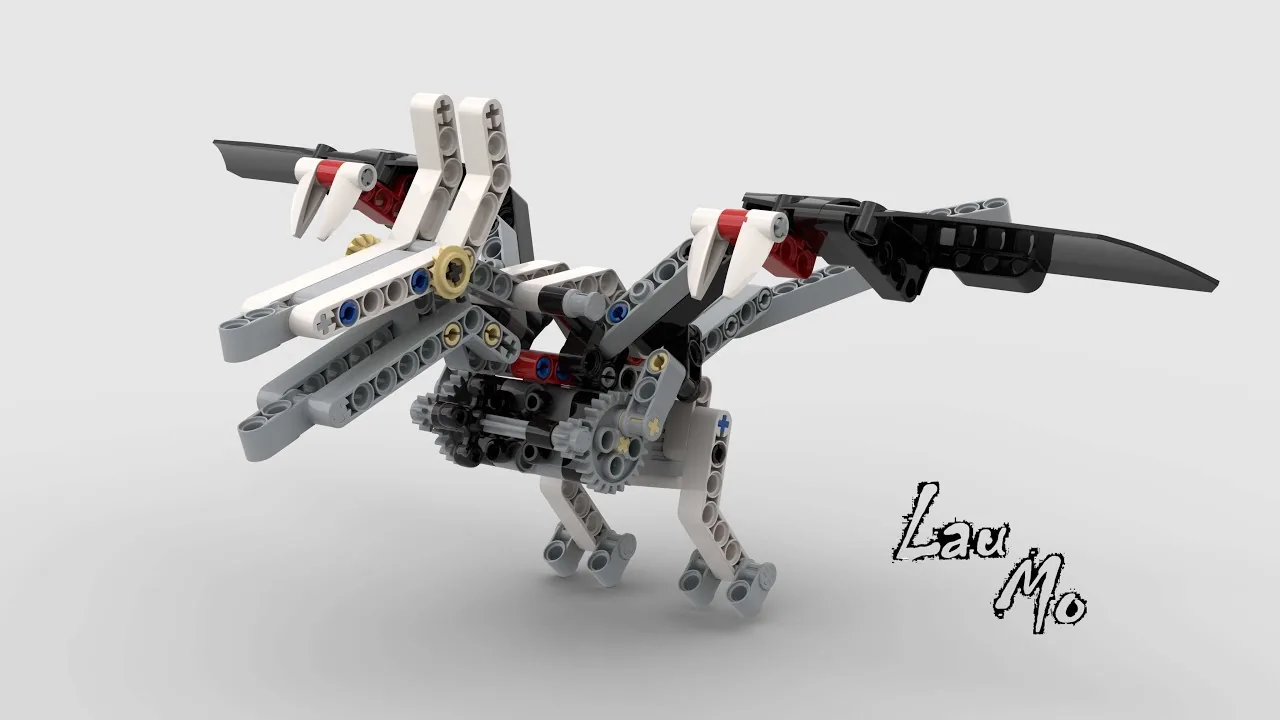
Take off with hard flapping, then settle into a glide — and say which it is doing the whole time.
when program starts :: events hat
clear display :: display
[A v] reset degrees counted :: motors
write [PTEROSAUR] at line (1) :: display
[A v] start motor at (70) % speed :: motors
repeat (30)
  if <([A v] degrees counted) < (1440)> then
    [A v] set speed to (70) % :: motors
    write [FLAP ] at line (3) :: display
  else
    [A v] set speed to (15) % :: motors
    write [GLIDE] at line (3) :: display
  end
  wait (0.2) seconds
end
[A v] stop motor :: motors
write [MENDARAT] at line (5) :: displayWhat success looks like: fast, noisy flapping for the first few seconds with FLAP on screen, then a clear change to a slow heavy beat with GLIDE on screen. The transition should happen once and stay.
If it flickers between FLAP and GLIDE, your threshold is sitting right where the count happens to be hovering — most likely the wings are stalled and the count is barely moving. Look at the model rather than the program.
Build the model before you read any further. Everything after this is about making it do something, and none of it will make much sense with nothing on the table in front of you.
Use the viewer's own controls to zoom and turn pages. Fullscreen makes it big enough to build from.
The same build on Google Drive — sometimes a video, sometimes a scan:
Use the viewer's own controls to zoom and turn pages. Fullscreen makes it big enough to build from.
Check the finished build against the picture before you switch anything on. A motor mounted the wrong way round is far easier to spot now than it is to debug later, when it looks like a program fault.
Work through them in order — each is harder than the last. The extra challenge comes after all three, and it is meant to make you plan before you build.
Make a flight with a clear take-off and a clear glide, and have the screen name which one is happening. Somebody across the room should be able to say when it switched without being told what to look for.
Fly a whole journey: flap up, glide, then flap again to land. That is two changes of behaviour, not one, so one Switch will not be enough — say what you used and why.
Write the same decision two different ways. Once with less-than and the branches one way round, once with greater-than and the branches swapped, so both produce identical flight. Then say which of the two you would keep and why — the answer is about reading, not about running.
Design a flight for an animal that has to save its energy. Your pterosaur is crossing water and cannot afford to flap the whole way. It has a fixed amount of flapping in it, and the rest of the journey has to be gliding. Decide the rule first, in a sentence, before any blocks: what makes it flap, what makes it glide, and how it knows. Write the sentence down — you will be marked against whether the machine does what your sentence says. Then build it and fly it. Time the whole flight and count roughly how much of it was spent flapping. Two questions when you present it. What fraction of the flight was flapping, and could you cut it further without the animal sinking? And your pterosaur decides from its own wingbeat count — it has no idea where the water ends. Describe what you would add so it could flap because it needed to rather than because the count said so.