Challenge 1
Build a routine with a beat you can clap along to. Eight bars, a beep on every downbeat, and a move that changes within each bar. If a person can clap it, it has a rhythm.
Quick Learn — the model, the instructions, the program and the challenges. The theory is in Full Lesson.
EV3 Robotics›Level 2 · Intermediate›Lesson 23
Level 2 · Lesson 23 · EV3-L02-2360 minutes · Ages 9–16 · Model: EV3 Dancing Robot
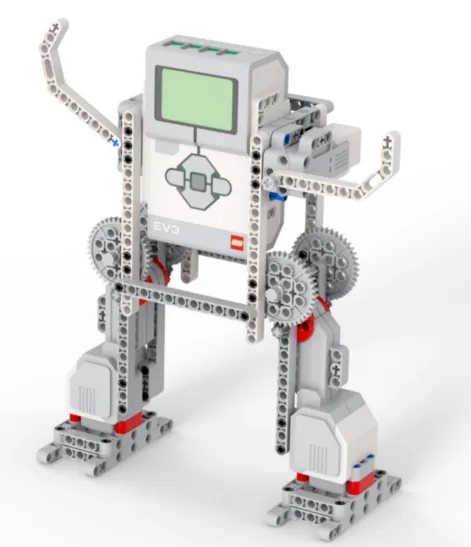
The Dancing Robot: two Large Motors driving the legs and a Medium Motor swinging the arms, with the Brick calling out the moves.
The last two lessons both made one decision. The swing ride sped up and stayed fast; the pterosaur started gliding and kept gliding. Once the answer changed, it never changed back.
A dance is not like that. A dance is a decision taken over and over — this move, now that one, now back to the first — and today you build a condition that can answer differently every few seconds.
Street dance at a festival, a line of dancers moving together, changing figure on a count that everybody in the line is keeping in their head. Nobody is calling out instructions — they all know the pattern and they all know where they are in it.

Dance is built on counts. Eight beats of one figure, eight of the next, and back again. The count is what lets forty people change at the same instant without anyone shouting — each dancer is asking themselves the same question on every beat: where am I in the eight?
And crucially the count resets. It runs one to eight and starts again, which is what makes a dance repeat rather than wander off.
A count that only went up would give you a performance that changed once and then did the same thing for ever. That is a machine, not a dance. Everything that has a rhythm — music, walking, breathing, a heartbeat — depends on something coming back round to the start.
A question worth asking repeatedly is one whose answer can change back.
Every condition you have written so far was built on a motor’s degree count, and a degree count only ever climbs. That is why your machines changed once.
(timer) :: sensors
reset timer :: sensors
The timer climbs like anything else. What makes it different is that you can reset it whenever you like, and a value you can send back to zero is a value a condition can answer both ways about, over and over.
repeat (8)
  reset timer :: sensors
  repeat until <(timer) > (2)>
    if <(timer) < (1)> then
      write [KIRI ] at line (3) :: display
    else
      write [KANAN] at line (3) :: display
    end
  end
endFollow the timer rather than the blocks. It is reset to 0, climbs past 1 — so the answer flips from the top branch to the bottom — and then past 2, which ends the inner loop and sends it back to the reset. That is a cycle, and a cycle is what a rhythm is.
| Value | Goes up | Comes back down | So a condition on it… |
|---|---|---|---|
| degrees counted | Yes | Only if you reset it, or drive the motor backwards. | Flips once and stays. Good for a stage of a task. |
| timer | Yes | Yes — whenever you reset it. | Can flip back and forth for ever. Good for a rhythm. |
A wait pauses for a length of time. The timer is different: it runs in the background and can be read at any moment, so the robot can know how long something has taken while it is still happening.
| Block | What it does |
|---|---|
(timer) | Reports the seconds since the timer was last reset. |
reset timer | Sets it back to zero, so the next reading counts from here. |
The most valuable use of a timer is escaping a wait that might never end. A robot told to drive until it sees a wall will drive for ever if the wall is not there. Combined with a timer, it can give up:
Repeat until the wall is close or five seconds have passed. That one change turns a program that can hang into one that always finishes. Both robots below are looking for a wall that is not there.
no way out
with a timeout
The sensor is not faulty and the program is not wrong. There is simply no wall, and only one of these two programs has a way of noticing that.
The left-hand robot is not broken, and neither is its sensor. Its condition is simply one that will never come true, so the program sits on that block for ever — with nothing on the Brick to say so. The right-hand program asks the same question with an escape route bolted on, and finishes every time.
Real systems time themselves out constantly — a lift that cannot close its doors eventually gives up and beeps rather than trying for ever. A robot with no timeout simply stops responding, and there is nothing on screen to say why.
If you want a machine to keep changing its mind, give it something that keeps changing.
Machines repeat. A wiper sweeps, a conveyor runs, a ride goes round — and none of that should mean copying the same blocks over and over. A loop says “do this again” once.
| Block | What it does |
|---|---|
repeat (10) end | Runs the blocks inside a set number of times, then carries on below. |
forever end | Runs the blocks inside over and over, and never carries on below. |
repeat until <> end | Repeats until a condition becomes true — a loop with a sensor as its exit. |
Anything placed after a forever loop will never run. Not “runs late” — never. Both programs below end with the same block: set the status light green.
repeat (3)
forever
↑ this block never runs
Both programs contain the same green-light block. Let it run as long as you like — the right-hand ring will never turn green.
The repeat loop counts its three passes, stops, and moves on to the block underneath, so its light turns green. The forever loop reaches the bottom of its own blocks and jumps straight back to the top, so the block underneath is never reached — however long you leave it. If a program seems to stop half way through, look for a forever loop above the blocks that are not happening.
A program is a list, and the Brick works down it once. Every block runs, in order, and when the last one is done the program is over. That is fine for a list of instructions — drive, turn, beep, stop — because each is a thing you do once.
A sensor is not a thing you do once. Asking is 1 pressed? gives you an answer about this instant, and an instant later it may be wrong. Checking a sensor once tells you what the world was like at the moment the program started — which is almost never what you wanted to know.
So a program that has to react must ask again, and again, for as long as it is running. That is the whole job of the loop: not to repeat an action, but to keep the question being asked.
Wrap a sensor check and the motor it controls in a forever loop and you have built a closed-loop control system — the pattern behind every line follower, thermostat and cruise control:
It is called closed because the output feeds back round to the input: the motors move the robot, moving the robot changes what the sensor sees, and what the sensor sees changes the motors. Break the circle at any point and the robot stops responding.
when program starts :: events hat
forever
  if <[1 v] is pressed? :: sensors> then
    [A v] start motor [clockwise v] :: motors
  else
    [A v] stop motor :: motors
  end
end
Read it as a sentence and it is almost too simple to need explaining: for ever, if the button is pressed run the motor, otherwise stop it. The motor now follows the button for as long as the program is running.
This is the mistake nearly everybody makes first, and it is a hard one to spot because nothing about it looks wrong:
when program starts :: events hat
if <[1 v] is pressed? :: sensors> then
  [A v] start motor [clockwise v] :: motors
else
  [A v] stop motor :: motors
end
The logic is perfect. The ports are right. Nothing is misspelled. And the robot will ignore the button completely — because the Brick reaches that if/else a few milliseconds after you press Run, finds the button not pressed, takes the else branch, stops the motor, runs out of blocks and ends. By the time a finger arrives, there is no program left to notice it.
with forever — a closed loop
without it — the common mistake
↑ running — for the only time
Both programs contain exactly the same if/else. The only difference is the forever block around one of them.
Both programs contain exactly the same if/else. The counter is what gives it away: one keeps checking for as long as it runs, the other is stuck on the single check it made before anybody touched anything. A student who has seen this once stops writing it.
The tell on a real robot is a program that ends the instant you start it — the Brick returns to its menu almost immediately. If a sensor program finishes rather than waits, the loop is what is missing.
Say this back before moving on: “Reset the timer and the answer can change back.”
| Part | What it is doing here |
|---|---|
| EV3 Intelligent Brick | Keeps the count and calls the moves. The timer it is reading is inside the Brick, not in any motor. |
| Large Motor ×2 — the legs | Ports B and C, driven as a pair. Equal speeds step in place; opposite speeds spin — both of which are dance moves. |
| Medium Motor — the arms | Runs on its own, at its own speed, using the non-waiting start from Lesson 7. The arms keep going while the legs change figure. |
| The Brick screen and speaker | Call the move and keep the beat, so an audience can hear the count the robot is dancing to. |
Sensors go in ports 1, 2, 3, 4. Motors go in ports A, B, C, D. They are not interchangeable, and nothing will tell you politely if you swap them.
| Part | Port | Why this one |
|---|---|---|
| Left leg (Large) | B | B is left, and the Movement blocks assume it. |
| Right leg (Large) | C | C is right. |
| Arms (Medium) | A | Off the movement pair, so the arms can run at their own speed while the legs are being driven as a pair. |
Check your own build now:
Two routes, and either is fine. USB is the reliable one and the one to fall back on when a room’s Bluetooth is busy; Bluetooth leaves the robot free to move, which some models need.
Do these in order. Naming the Brick after you go looking for it in the list is how groups end up driving each other’s robots.
EV3 until somebody changes it.EV3.The two failures, every class, every time. The Brick has gone to sleep while you were building — press the centre button to wake it. Or you have paired with the group at the next table, which is why the name matters.
The long version, including Port View and how to read the port tiles, is in the Brick & Bluetooth guide.
Bluetooth. This one spins on the spot repeatedly, and a cable will be wound round its legs within about two bars.
Change one number at a time and clap along with the beeps — if you can clap it, it has a rhythm.
reset timer above the repeat (8). Run it and watch the dance stop after one bar. Then explain in one sentence why.Step 3 is the lesson in one change. Move the reset out of the loop and the value stops coming back down — and the moment it stops coming back down, the Switch answers the same way for ever and you are back to Lesson 14.
The reset is not tidying up. The reset is what makes it a rhythm.
Work through them in order — each is harder than the last. The extra challenge comes after all three, and it is meant to make you plan before you build.
Build a routine with a beat you can clap along to. Eight bars, a beep on every downbeat, and a move that changes within each bar. If a person can clap it, it has a rhythm.
Make an uneven rhythm — one move that lasts noticeably longer than the other, repeating. Then say which number you changed and what a dancer would call that.
Give the arms a rhythm of their own that does not match the legs. The two must run at different speeds and change at different moments, so the robot is doing two rhythms at once. Say how you kept them independent.
Choreograph a routine and teach it to somebody else. Write a routine down as a dance is actually written down: a list of bars, and for each bar what the legs do, what the arms do, and what the Brick says or plays. Decide the tempo before you write any blocks. Build exactly what you wrote. If the robot ends up doing something your sheet does not say, either fix the robot or fix the sheet — but they must agree at the end. Then hand your written routine, and only the routine, to another group and ask them to build it on their robot. Do not help. Two questions when you present it. What did the other group get wrong, and was that their mistake or a gap in how you wrote it down? And your routine repeats identically every time — describe what you would add so that two performances were recognisably the same dance without being exactly the same.
Build the model before you read any further. Everything after this is about making it do something, and none of it will make much sense with nothing on the table in front of you.
Use the viewer's own controls to zoom and turn pages. Fullscreen makes it big enough to build from.
The same build on Google Drive — sometimes a video, sometimes a scan:
Use the viewer's own controls to zoom and turn pages. Fullscreen makes it big enough to build from.
Check the finished build against the picture before you switch anything on. A motor mounted the wrong way round is far easier to spot now than it is to debug later, when it looks like a program fault.
Eight bars of a two-move routine: step left, step right, arms going the whole time.
when program starts :: events hat
set movement motors to [B v] and [C v] :: movement
clear display :: display
write [MENARI] at line (1) :: display
[A v] start motor at (60) % speed :: motors
repeat (8)
  reset timer :: sensors
  play beep (70) for (0.1) seconds :: sound
  repeat until <(timer) > (2)>
    if <(timer) < (1)> then
      write [KIRI ] at line (3) :: display
      start moving at (30) (-30) % speed :: movement
    else
      write [KANAN] at line (3) :: display
      start moving at (-30) (30) % speed :: movement
    end
  end
end
stop moving :: movement
[A v] stop motor :: motors
write [TAMAT] at line (5) :: displayWhat success looks like: a beep every two seconds, and between beeps the robot turns one way then the other, with the arms swinging continuously. The screen alternates KIRI and KANAN in time with the movement.
If it only ever goes one way, the timer is not being reset — check the
reset timeris inside the outerrepeat (8)and not above it. Reset once and the timer is past 2 for ever after the first bar.