Challenge 1
Make a gait you can hear: a burst of steps, a pause, repeating. Someone with their eyes shut should be able to say how many bursts there were and how many steps were in each.
Quick Learn — the model, the instructions, the program and the challenges. The theory is in Full Lesson.
EV3 Robotics›Level 2 · Intermediate›Lesson 1
Level 2 · Lesson 1 · EV3-L02-0160 minutes · Ages 9–16 · Model: Spider
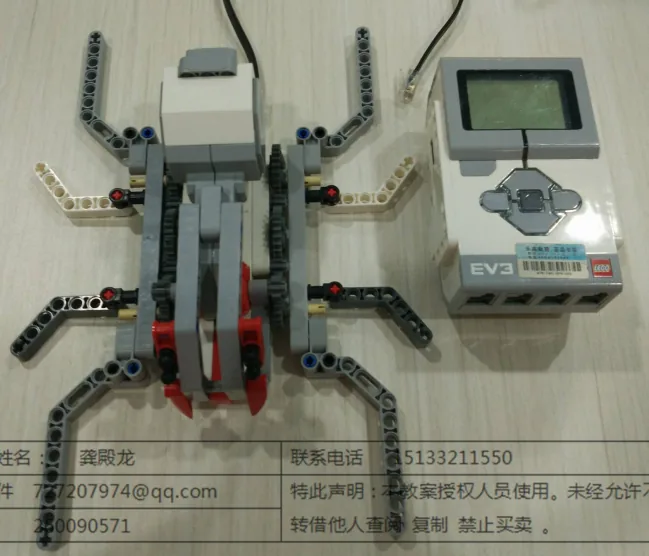
The Spider: eight legs driven from a single Large Motor, walking in the alternating pattern that every eight-legged walker uses.
A spider does not walk at a steady pace. It runs a few quick steps, stops dead, waits, then runs again — and that stop-start pattern is far more of what makes something look like a spider than the number of legs is.
That is a pattern made of patterns. Several steps make a dash; several dashes make a journey. And the way you write that is one loop inside another.
Jumping spiders are the ones that look back at you. They are small, common across Southeast Asia, and they move in short bursts — a quick run, then absolute stillness, then another run.

A spider always keeps some legs on the ground while others swing forward, which is why it never falls over even standing still — with eight legs there is always a stable tripod down. Your model does the same thing mechanically: one motor, a linkage, and legs that take turns.
The stopping matters too. A jumping spider sees badly while it is moving, so it stops in order to look. The bursts are not hesitation — they are how it alternates between travelling and seeing, because it cannot do both at once.
A spider that walked at one constant speed would be easy to spot and easy to follow, and it would never get a clear look at anything. The rhythm is camouflage and it is perception, both at once.
Movement that stops is not movement interrupted. Often the stopping is the point.
There is no new block today. There is a new shape: a repeat block sitting inside another repeat block.
repeat (4)
  repeat (3)
    [A v] run for (360) [degrees v] at (40) % speed :: motors
  end
  wait (1) seconds
endRead it from the inside out, because that is the order it happens:
| Where a block sits | How often it runs |
|---|---|
| Inside the inner loop | 12 times — 3 × 4. The counts multiply. |
| Inside the outer loop, outside the inner | 4 times — once per dash. |
| Outside both | Once. |
The counts multiply, and that catches everybody. A student who wants twelve steps and writes repeat (12) in both loops gets a hundred and forty-four. Decide what one pass of each loop means before you pick either number.
Ask what it belongs to. The stepping belongs to the dash, so it goes inside. The pause belongs between dashes, so it goes in the outer loop after the inner one. A beep announcing a new dash would go at the top of the outer loop, before the inner one starts.
Move a block from one loop to the other and you have not made a small adjustment — you have changed how many times it happens, and usually by a lot.
Machines repeat. A wiper sweeps, a conveyor runs, a ride goes round — and none of that should mean copying the same blocks over and over. A loop says “do this again” once.
| Block | What it does |
|---|---|
repeat (10) end | Runs the blocks inside a set number of times, then carries on below. |
forever end | Runs the blocks inside over and over, and never carries on below. |
repeat until <> end | Repeats until a condition becomes true — a loop with a sensor as its exit. |
Anything placed after a forever loop will never run. Not “runs late” — never. Both programs below end with the same block: set the status light green.
repeat (3)
forever
↑ this block never runs
Both programs contain the same green-light block. Let it run as long as you like — the right-hand ring will never turn green.
The repeat loop counts its three passes, stops, and moves on to the block underneath, so its light turns green. The forever loop reaches the bottom of its own blocks and jumps straight back to the top, so the block underneath is never reached — however long you leave it. If a program seems to stop half way through, look for a forever loop above the blocks that are not happening.
A program is a list, and the Brick works down it once. Every block runs, in order, and when the last one is done the program is over. That is fine for a list of instructions — drive, turn, beep, stop — because each is a thing you do once.
A sensor is not a thing you do once. Asking is 1 pressed? gives you an answer about this instant, and an instant later it may be wrong. Checking a sensor once tells you what the world was like at the moment the program started — which is almost never what you wanted to know.
So a program that has to react must ask again, and again, for as long as it is running. That is the whole job of the loop: not to repeat an action, but to keep the question being asked.
Wrap a sensor check and the motor it controls in a forever loop and you have built a closed-loop control system — the pattern behind every line follower, thermostat and cruise control:
It is called closed because the output feeds back round to the input: the motors move the robot, moving the robot changes what the sensor sees, and what the sensor sees changes the motors. Break the circle at any point and the robot stops responding.
when program starts :: events hat
forever
  if <[1 v] is pressed? :: sensors> then
    [A v] start motor [clockwise v] :: motors
  else
    [A v] stop motor :: motors
  end
end
Read it as a sentence and it is almost too simple to need explaining: for ever, if the button is pressed run the motor, otherwise stop it. The motor now follows the button for as long as the program is running.
This is the mistake nearly everybody makes first, and it is a hard one to spot because nothing about it looks wrong:
when program starts :: events hat
if <[1 v] is pressed? :: sensors> then
  [A v] start motor [clockwise v] :: motors
else
  [A v] stop motor :: motors
end
The logic is perfect. The ports are right. Nothing is misspelled. And the robot will ignore the button completely — because the Brick reaches that if/else a few milliseconds after you press Run, finds the button not pressed, takes the else branch, stops the motor, runs out of blocks and ends. By the time a finger arrives, there is no program left to notice it.
with forever — a closed loop
without it — the common mistake
↑ running — for the only time
Both programs contain exactly the same if/else. The only difference is the forever block around one of them.
Both programs contain exactly the same if/else. The counter is what gives it away: one keeps checking for as long as it runs, the other is stuck on the single check it made before anybody touched anything. A student who has seen this once stops writing it.
The tell on a real robot is a program that ends the instant you start it — the Brick returns to its menu almost immediately. If a sensor program finishes rather than waits, the loop is what is missing.
The inner loop is one burst. The outer loop is how many bursts. Never confuse the two.
Everything so far has been relative: move 90 degrees from wherever you are now. Sometimes what you actually want is absolute: go to the 90-degree position, whatever position you happen to be in at the moment.
Both pointers below do the same job over and over: swing out a quarter turn, then come home. The only difference is the block that brings them back. Watch one trip and they look identical — so let it run for several.
relative — by an amount
absolute — to a place
Let it loop. Nothing about the left program is wrong — it is just that every trip starts from wherever the last one finished, so a small error is never corrected, only added to.
A pointer moved relatively slowly wanders: each movement starts from wherever the last one finished, so any small error is carried forward and added to. Each orange dash is a trip that called a slightly different place “home”. Nothing about that program is wrong — it is simply that a relative move has no idea where it is supposed to end up.
An absolute movement has no memory of the error. Told to go to position 0, it goes to position 0 — the same place every time, however wrong it was beforehand. That makes it the right tool for a home position: the known place a mechanism returns to before it starts work.
This is possible because an EV3 motor counts its own turning all the time. Its position can be read back, and can be reset to zero — which is how you tell the motor that here is what you mean by zero, usually at the start of a program with the mechanism held at its resting place.
A clock hand returns to twelve; a car’s steering returns to centre; a 3D printer homes its head before every print. All of them go to a position rather than moving by an amount.
Say this back before moving on: “Inside the inner loop, the counts multiply.”
| Part | What it is doing here |
|---|---|
| EV3 Intelligent Brick | The body. It is also most of the weight, and on a walking model that decides which legs actually grip. |
| Large Motor — the gait | Drives all eight legs through one linkage. One rotation is one complete step cycle, which is what makes 360 degrees mean “one step”. |
| The leg linkage (not electronic) | Puts the legs out of phase so some are always down. Look at it turning slowly — half the legs lift while the other half push. |
| The Brick screen and speaker | Count the dashes and the steps, so you can hear the nesting rather than having to trust it. |
Sensors go in ports 1, 2, 3, 4. Motors go in ports A, B, C, D. They are not interchangeable, and nothing will tell you politely if you swap them.
| Part | Port | Why this one |
|---|---|---|
| Gait motor (Large) | A | One motor drives all eight legs, so there is exactly one thing to plug in. |
| Sensors | none | The spider walks blind. It stops because the program says to, not because it has seen anything — which is the opposite of the real animal, and worth noticing. |
Check your own build now:
Two routes, and either is fine. USB is the reliable one and the one to fall back on when a room’s Bluetooth is busy; Bluetooth leaves the robot free to move, which some models need.
Do these in order. Naming the Brick after you go looking for it in the list is how groups end up driving each other’s robots.
EV3 until somebody changes it.EV3.The two failures, every class, every time. The Brick has gone to sleep while you were building — press the centre button to wake it. Or you have paired with the group at the next table, which is why the name matters.
The long version, including Port View and how to read the port tiles, is in the Brick & Bluetooth guide.
Bluetooth. This one walks, and a cable trailing behind a legged model catches on its own back legs almost immediately.
Predict the total number of steps before every run, out loud, and count the low beeps to check. Getting the prediction right is the skill being tested.
wait (1) seconds inside the inner loop. Run it. The spider now pauses after every step — the same blocks, in a different loop, giving a completely different animal.Steps 3 and 4 are the lesson. Nothing was added or deleted; a block moved from one loop to the other. The spider stopped looking like a spider, and the only thing that changed was how many times that block runs.
Which loop a block sits in is not a tidiness question. It decides how often it happens.
Four dashes of three steps each, with a pause between and the Brick counting both.
when program starts :: events hat
clear display :: display
write [LABAH-LABAH] at line (1) :: display
repeat (4)
  write [Lari] at line (3) :: display
  play beep (75) for (0.1) seconds :: sound
  repeat (3)
    [A v] run for (360) [degrees v] at (45) % speed :: motors
    play beep (60) for (0.05) seconds :: sound
  end
  write [Diam] at line (3) :: display
  wait (1) seconds
end
write [TAMAT] at line (5) :: displayWhat success looks like: listen rather than watch. You should hear high, low-low-low, silence, four times over. If you hear a pause between every single step, the wait has ended up inside the inner loop.
Count the low beeps. There should be exactly twelve. If you hear a different number, the two loop counts are not what you think they are — and this is a much faster way to find that out than watching the legs.
Work through them in order — each is harder than the last. The extra challenge comes after all three, and it is meant to make you plan before you build.
Make a gait you can hear: a burst of steps, a pause, repeating. Someone with their eyes shut should be able to say how many bursts there were and how many steps were in each.
Get exactly twenty steps out of the spider using two loops, with more than one burst. There is more than one pair of numbers that works — find two of them and say which makes a better-looking spider.
Move one block between the loops on purpose. Take a working gait, move a single block from the inner loop to the outer one, and predict what will change before you run it. Then run it and say whether you were right.
Give the spider a journey with a shape to it. A spider crossing a room does not do the same thing all the way. It might dash three times to reach cover, wait longer than usual, then dash twice more. Your job is to build a crossing with at least three distinct phases and make the structure of the program match the structure of the journey. Plan it on paper first as a diagram of loops — draw the outer one as a box and the inner one as a box inside it, and write next to each how many times it goes round and what one pass means. Work out the total number of steps from your diagram before you build anything. Then build it and count the steps as it runs. The count you predicted and the count you hear must agree. Two questions when you present it. Where did your predicted step count differ from the real one, and which loop was responsible? And your spider stops because the program says so, while a real one stops in order to look — describe what you would add so that yours stopped for a reason.
Build the model before you read any further. Everything after this is about making it do something, and none of it will make much sense with nothing on the table in front of you.
Use the viewer's own controls to zoom and turn pages. Fullscreen makes it big enough to build from.
Check the finished build against the picture before you switch anything on. A motor mounted the wrong way round is far easier to spot now than it is to debug later, when it looks like a program fault.