Challenge 1
Play five rounds and have the Brick name the winner each time, with a beep that sounds only on the start signal.
Quick Learn — the model, the instructions, the program and the challenges. The theory is in Full Lesson.
EV3 Robotics›Level 2 · Intermediate›Lesson 47
Level 2 · Lesson 47 · EV3-L02-4760 minutes · Ages 9–16 · Model: Hand Speed Competition
The Hand Speed Competition: a two-player reaction game. A button on each side, a turntable in the middle, and a Brick that decides who was quicker.
This is the first model in the course built to be played rather than watched. Two people sit opposite each other. Something happens. Whoever hits their button first wins the round.
By the end of the lesson the Brick will name the winner — and you will have met the block that makes a fair race possible at all.
Every quiz show has a row of buzzers. Contestants slam them at almost the same moment, and one light comes on. Nobody argues, because the machine decided in a fraction of a second.
A buzzer system is not really watching for a press. It is watching for any press, from anyone, and then asking a second question: which one was it? Those are two different jobs, and mixing them up is the commonest way a home-made quiz game ends in an argument.
Human reaction time is about a fifth of a second. Two people going for the same buzzer are often within a hundredth of each other, so the system has to lock out the losers the instant the first press lands — otherwise everybody’s light comes on.
Check player one, then check player two, and player one wins every genuinely close round — because they were asked first. The game would be unfair in a way nobody could see, which is worse than being obviously broken.
Waiting for “either” is a different question from waiting for “this one” twice.
or, and the question it leaves behind 6 minIn Lesson 14 the Forklift needed and: both conditions true, or nothing happens. Today you need its twin. or is true when either side is true.
wait until <<[1 v] is pressed? :: sensors> or <[2 v] is pressed? :: sensors>>
| Button 1 | Button 2 | and (Lesson 17) | or (today) |
|---|---|---|---|
| up | up | false | false |
| down | up | false | true |
| up | down | false | true |
| down | down | true | true |
and is fussy — one row out of four. or is generous — three rows out of four. Both are asking about the same two switches; they just want different answers.
or tells you that something happened. It never tells you what. When the wait ends, the program knows a button went down and knows nothing else. To name the winner it has to ask a second question.
wait until <<[1 v] is pressed? :: sensors> or <[2 v] is pressed? :: sensors>>
if <[1 v] is pressed? :: sensors> then
  write [PEMAIN 1] at line (2) :: display
else
  write [PEMAIN 2] at line (2) :: display
end
or stops the clock. The if reads the scoreboard. Two separate jobs, two separate blocks.And notice why this is fair. Both sensors were being watched at the same instant by one block, so neither player was asked first. The if afterwards only runs once somebody has already won.
A sensor that reports a number cannot be used to make a decision on its own — 23 is neither true nor false. An operator turns that number into an answer by comparing it with something.
| Block | What it does |
|---|---|
<(x) > (50)> | True when the left value is bigger than the right. |
<(x) < (50)> | True when it is smaller. |
<<> and <>> | True only when both conditions are true. |
<<> or <>> | True when at least one of them is. |
Forget the symbols for a moment. A comparison is a question about position on a number line: is x to the left of the other number, or to the right? Left is smaller, right is bigger — and that is the whole of it.
Drag the orange x and the black marker, and change the comparison. The green stretch is every position of x that would make the answer true — so you can see where the answer flips before you get there. Turn not on and watch the green jump to the other side.
Drag either marker, or use the arrow keys.
is x to the LEFT of it?
The lab above asks one question at a time: is this x true? A robot never has just one x, though — a sensor reading slides up and down all the time, so what really matters is which stretch of the line makes the condition true. This one draws the whole answer at once.
Drag the circle to move the number you are comparing against, and change the comparison. Everything shaded green is a value of x that would make it true.
Drag the circle, or use the arrow keys. It moves in steps of 0.2.
Every number to the left of 0.2 — but not 0.2 itself, so the circle is hollow.
Watch the circle, because it carries the part everyone gets wrong:
Now turn not on with x > 2 selected and watch two things happen together. The shading jumps to the other side, and the circle fills in — because “not greater than 2” means 2 or less, and 2 has to be part of it. That pairing is the whole reason a hollow circle is worth drawing.
Why a robot cares. Two conditions that look almost identical — light < 30 and not (light > 30) — differ by exactly one value, the reading of precisely 30. A robot sitting right on its threshold behaves differently under the two, and that is the sort of bug that only shows up occasionally and looks like a broken sensor.
These three join answers together rather than numbers. The trap is that English is looser than a program: “stop if it is close and the bumper is pressed” sounds like it covers both situations, when it covers neither on its own.
Flip the two conditions and watch the table. There are only four possible situations in total, and and and or differ on exactly two of them.
| close | bumper | and | or |
|---|---|---|---|
| true | true | true | true |
| true | false | false | true |
| false | true | false | true |
| false | false | false | false |
and is fussy: it wants both. Three of the four rows are false.
Two sensors are running below: an Ultrasonic reporting a number, and a Touch Sensor reporting true or false. Watch the comparison turn the number into an answer, and watch and and or disagree.
and was true in one row out of four. or was true in three. That is the whole difference, and it is why one of them makes a robot look broken.
The comparison is doing one job: it takes a reading that is neither true nor false and, by holding it against a number you chose, produces something a decision can use. The moment the blue fill crosses the black marker is the moment the answer changes.
The number you compare against is a design decision, not a fact. “Close” for a parking sensor might be 15 cm; for a robot arm it might be 3. Pick it by measuring what the sensor actually reads in the situation you care about, then leave a margin.
and narrows: both must hold, so the robot acts less often but more certainly — stop only if something is close and the bumper is pressed. or widens: either will do, so the robot acts more readily — stop if something is close or the bumper is pressed.
In the four situations above, and was true in one of them and or in three. That is the practical difference: swapping one for the other does not adjust a robot slightly, it changes how often it reacts at all.
The Touch Sensor is the simplest input the EV3 has: a button that is either pressed or not. That sounds trivial, but it is how a robot knows it has hit a wall, reached the end of a track, or been told to start by a person.
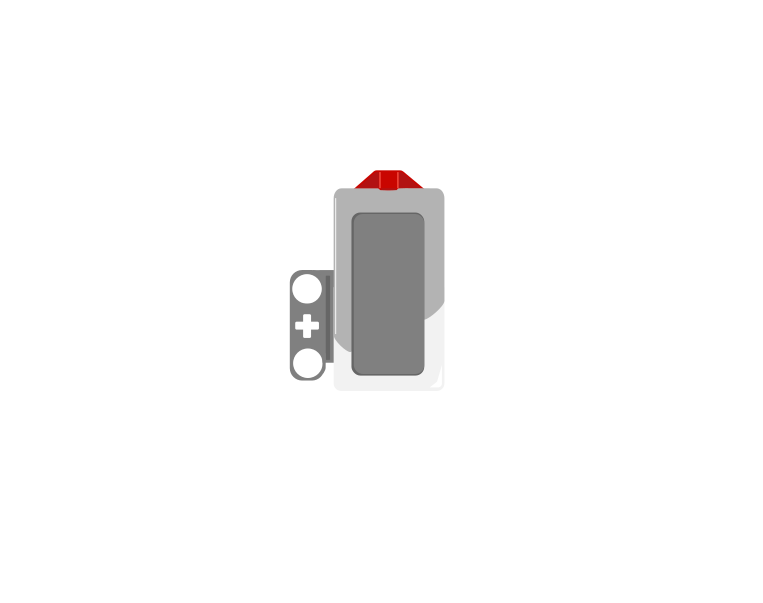 released
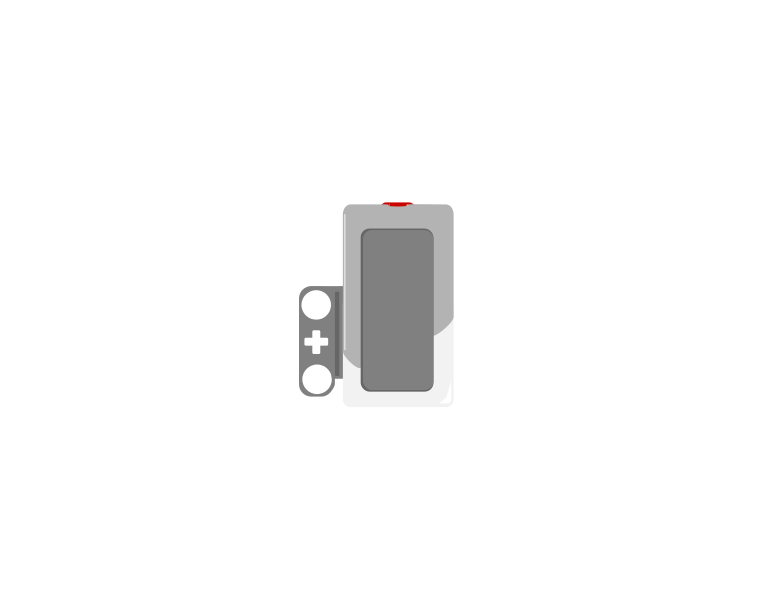 pressed
| Block | What it does |
|---|---|
wait until <[1 v] is pressed? :: sensors> | Holds the program here until somebody presses the sensor. |
<[1 v] is pressed? :: sensors> | Reports true or false. Drop it into a condition to make a decision rather than a wait. |
[1 v] when [bumped v] :: events hat | Starts a whole stack of its own. The dropdown chooses the moment: pressed, released or bumped. |
A button is not only “pressed”. One press is three things: the moment it goes down, the time it stays down, and the moment it comes back up. Watch what a single press does to three programs at once.
versus two hat blocks
The middle counter is the one that surprises people. Nothing is wrong with it — a loop really does check that fast, and every check really is a separate answer.
Nothing there is broken. A loop really does get round hundreds of times a second, and each time it asks is pressed? the honest answer is still yes — so if that loop plays a sound or counts something, it does it hundreds of times from one finger. The two hat blocks each fire once, and they fire at different moments: pressed the instant the button goes down, bumped only when it comes back up.
The three options, and what each is for:
when program starts :: events hat
set movement motors to [B v] and [C v] :: movement
start moving [straight: 0] :: movement
wait until <[1 v] is pressed? :: sensors>
stop moving :: movement
The robot drives until something presses the sensor. Note that the movement is started unmeasured on purpose — the sensor decides when to stop, not a distance.
Touch sensors are everywhere in machines you cannot see into: a lift knows the doors are shut, a printer knows the lid is closed, a washing machine will not spin until it is latched. They are safety devices as much as inputs.
Use or to know that it happened. Use an if afterwards to know which.
Up to now a robot has been able to wait for a sensor. Deciding is different: the robot checks the sensor and does one thing or another depending on the answer — and then carries on either way.
| Block | What it does |
|---|---|
if <> then end | Runs the blocks inside only when the condition is true. Otherwise skips them. |
if <> then else end | Runs one set of blocks when true and a different set when false. |
A decision made once, at the start, is almost never what you want. Here are two robots with the identical if-else, testing the identical sensor against the identical number — one inside a loop and one not.
decision inside a loop
the same decision, once
A decision is only worth as much as the last time it was made. Inside a loop, that is a few milliseconds ago.
Nothing is wrong with the right-hand program’s decision. It asked the question, got a truthful answer, and acted on it correctly. It simply never asked again, and the world moved on. Decisions belong inside a loop, so the robot keeps re-deciding as things change.
when program starts :: events hat
forever
  if <([4 v] distance in [cm v] :: sensors) < (15)> then
    stop moving :: movement
  else
    start moving [straight: 0] :: movement
  end
endOnce there is more than one question, decisions can be arranged in four ways. They look nearly identical stacked up in the editor, which is exactly why they get muddled — the thing that differs is not what the blocks say, it is which routes through them exist.
One question sorts them almost completely:
| Are the questions… | Use | How many bodies can run |
|---|---|---|
| independent — any combination can be true | separate ifs | none, some, or all |
| one question, two answers | if / else | exactly one |
| the second only matters when the first is true | nested if | one, and only via the outer |
| mutually exclusive cases — exactly one should win | chained if / else | exactly one, the first that matches |
Each if is asked no matter what the others answered, so any number of them can fire on the same pass. That is the right shape when the conditions genuinely have nothing to do with each other.
forever
  if <[3 v] is ambient light intensity [< v] (20) %? :: sensors> then
    [A v] start motor [clockwise v] :: motors
  end
  if <[4 v] is distance [< v] (15) [cm v]? :: sensors> then
    [D v] start motor [clockwise v] :: motors
  end
endExactly one branch runs, every time. Reach for this whenever the robot must do something either way — and in preference to two ifs testing opposite conditions, which is the same idea written twice and can drift apart.
Putting one if inside another means the inner question is only ever asked when the outer one is true. Use it when the second question is meaningless otherwise: there is no point asking which side an obstacle is on when there is no obstacle.
if <[4 v] is distance [< v] (15) [cm v]? :: sensors> then
  if <([2 v] angle :: sensors) < (0)> then
    start moving [right: 50] :: movement
  end
end
When not to nest. If you only want “both true” and nothing happens at the outer level, an and says it in one block and reads better:
if <<[4 v] is distance [< v] (15) [cm v]? :: sensors> and <([2 v] angle :: sensors) < (0)>> then
  start moving [right: 50] :: movement
end
Nesting earns its place when something happens at the outer level too, or when there is an else at each level and the two mean different things.
This is the shape for a list of cases where exactly one should win: colour bands, distance bands, speed ranges. EV3 Classroom has no else-if block, so you build a chain by putting the next if inside the else of the last one.
And here is why it matters, because this is the single commonest bug in this whole module. Three bands written as three separate ifs are each perfectly correct, and together they are wrong: a reading of 20 is under 30 and under 60 and under 90, so all three run and the last one to run is the one that sticks.
three separate ifs
chained — if / else / if
↑ the rest is inside the else — never asked
Separate ifs are not wrong here so much as unguarded: nothing stops a second one matching. Chaining is what makes “the first one wins” true.
The rule to carry away: if the cases are meant to be exclusive, they must be made exclusive. Chaining does it by construction. Separate ifs only work if you are careful to write non-overlapping bands yourself — light < 30, 30 to 60, 60 and over — which is more to get right and easy to break later.
This is the point at which a machine stops following a script and starts responding. A thermostat, an automatic door, a robot vacuum — all of them are a decision inside a loop.
Say this back before moving on: “or ends the race. if names the winner.”
Look at your machine. Which electronic parts can you find, and how many of each? Two of one kind is the answer that matters today.
| Part | What it is doing here |
|---|---|
| EV3 Intelligent Brick | The referee. It watches both buttons and it is the only thing in the room fast enough to call a close round. |
| Touch Sensor — player one | The left button. Physically identical to the other one. |
| Touch Sensor — player two | The right button. Nothing on the part tells you which player it is — only the cable does. |
| Large Motor — the turntable | Swings the whole turntable round. Large because it is moving the arm and everything mounted on it. |
| Medium Motor — the arm | Rides on the turntable and drives the pointer arm. Medium because it has to be carried, and light matters when it is spinning. |
Level 1’s Machine Gun met this first: two Touch Sensors look the same, feel the same and report the same thing. The port is the only difference between them. Swap the two cables and the game will run perfectly and name the wrong winner every time — with no error anywhere.
Put a sticker on each button now. 1 and 2. Thirty seconds of tape saves a very confusing ten minutes at step 9.
Sensors go in ports 1, 2, 3, 4. Motors go in ports A, B, C, D. They are not interchangeable, and nothing will tell you politely if you swap them.
| Part | Port | Why this one |
|---|---|---|
| Player one’s button | 1 | The course’s standing home for a Touch Sensor. |
| Player two’s button | 2 | Normally the Gyro’s slot — but this model has no Gyro, so 2 is free. Said out loud here rather than quietly broken. |
| Arm motor (Medium) | A | A motor doing its own job. The manual puts the Medium Motor here too. |
| Turntable motor (Large) | D | A second motor doing a separate job takes D, skipping B and C so nobody drives the two as a pair. The manual agrees: “Large motors connect to port D.” |
The manual wires the two buttons to ports 1 and 4, not 1 and 2. Either works — the sensors are identical and a cable moves in a second — but this lesson’s programs say 1 and 2, so move the second cable to port 2 or change every 4 in your conditions. Do not do half of each.
Check your own wiring now:
Two routes, and either is fine. USB is the reliable one and the one to fall back on when a room’s Bluetooth is busy; Bluetooth leaves the robot free to move, which some models need.
Do these in order. Naming the Brick after you go looking for it in the list is how groups end up driving each other’s robots.
EV3 until somebody changes it.EV3.The two failures, every class, every time. The Brick has gone to sleep while you were building — press the centre button to wake it. Or you have paired with the group at the next table, which is why the name matters.
The long version, including Port View and how to read the port tiles, is in the Brick & Bluetooth guide.
Two players will be lunging at this machine. Whichever route you choose, get the cables off the table edge and out of the way of two pairs of hands moving fast.
Stuck? The long version, with a photograph of every screen, is in the Brick & Bluetooth guide.
One change at a time, and play a real round after each. This is a game, so the test is whether it is fun and whether it is fair.
or with two separate waits — first [1 v] wait until [pressed v] then the same for 2. Play five rounds. Player two can now only win by pressing after player one, which is the opposite of a race.or back and change wait (3) seconds to wait (pick random (2) to (6)) seconds. Now the start cannot be predicted. Does the game get better?or to an and and run it. The wait only ends when both buttons are held together — the game becomes a cooperation puzzle. Same two sensors, one word different.or inside an or — a referee’s abort button.forever loop with a wait (3) seconds at the end. Now it plays round after round without being restarted.Step 1 is the one to talk about afterwards. The program was not broken — no error, no crash, it named a winner every round. It was simply asking the wrong question, and only playing it revealed that. Some bugs cannot be found by reading.
Checking two things one after the other is not the same as watching both at once.
Build the model before you read any further. Everything after this is about making it do something, and none of it will make much sense with nothing on the table in front of you.
Use the viewer's own controls to zoom and turn pages. Fullscreen makes it big enough to build from.
The same build on Google Drive — sometimes a video, sometimes a scan:
Use the viewer's own controls to zoom and turn pages. Fullscreen makes it big enough to build from.
Check the finished build against the picture before you switch anything on. A motor mounted the wrong way round is far easier to spot now than it is to debug later, when it looks like a program fault.
One round of the game: get ready, a random-feeling pause, go, and a winner.
```ev3blocks The beep is the start gun. The or is the finish line. The if is the photograph that decides it.
when program starts :: events hat
clear display :: display
write [BERSEDIA] at line (1) :: display
[A v] start motor [clockwise v] :: motors
wait (3) seconds
[A v] stop motor :: motors
write [MULA!] at line (1) :: display
play beep (76) for (0.3) seconds :: sound
wait until <<[1 v] is pressed? :: sensors> or <[2 v] is pressed? :: sensors>>
if <[1 v] is pressed? :: sensors> then
write [PEMAIN 1 MENANG] at line (3) :: display
else
write [PEMAIN 2 MENANG] at line (3) :: display
end
play sound [Communication / Hello v] until done :: sound
1. **The arm spins during BERSEDIA** and stops on *MULA!*. It gives the players something to watch so nobody can time the beep by counting. Port **A** is the arm — swap in **D** if you would rather the whole turntable swung.
2. **The beep and the screen change together.** Sound reaches a player faster than a screen does, so the beep is the real start signal — the text is for the audience.
3. **One block watches both buttons.** This is the fair bit. Neither sensor is checked before the other.
4. **Then, and only then, the `if` asks who.** By the time it runs, the race is already over.

**What success looks like:** the arm spins for three seconds, the Brick beeps, two people dive for their buttons, and the screen names one of them before either has let go.

> **If it always says PEMAIN 2**, player one’s button is not reaching port 1 — go back to step 8. If it declares a winner *before* the beep, somebody is leaning on a button; the `or` is doing exactly what it was told.
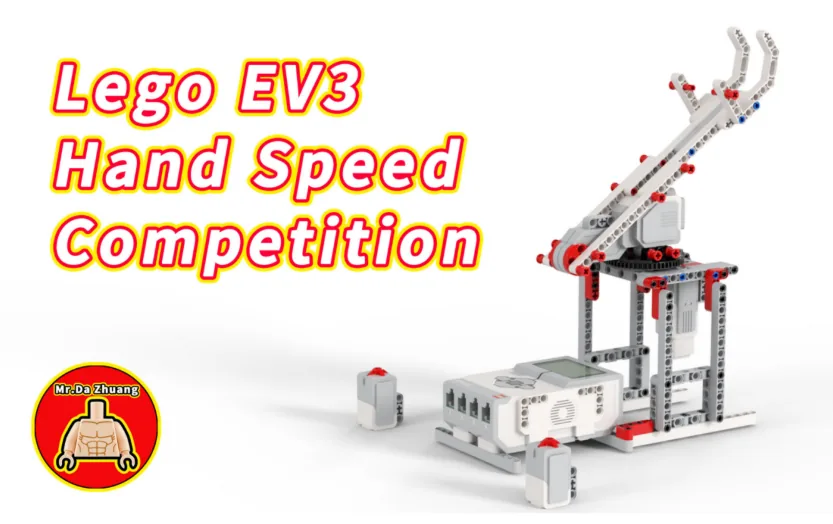
Work through them in order — each is harder than the last. The extra challenge comes after all three, and it is meant to make you plan before you build.
Play five rounds and have the Brick name the winner each time, with a beep that sounds only on the start signal.
Keep score. The first player to three wins ends the game with a different sound, and both scores stay on the screen throughout.
Catch a false start. A player who presses before the start beep loses the round automatically, and the screen says why.
Design a fair three-round tournament for four players sharing two buttons. It must handle false starts, keep and show running scores, refuse to start a round until both buttons are released, and announce an overall winner. Write your rules down first, then test them against somebody actively trying to cheat.