Challenge 1
Add a second sweep speed. Call "sweep" a third time in your program with a number you have not used yet — something very slow, like 8. Watch the lure. A real anglerfish varies its motion because prey judges by movement alone.
Quick Learn — the model, the instructions, the program and the challenges. The theory is in Full Lesson.
EV3 Robotics›Level 2 · Intermediate›Lesson 41
Level 2 · Lesson 41 · EV3-L02-4160 minutes · Ages 9–16 · Model: EV3 Anglerfish
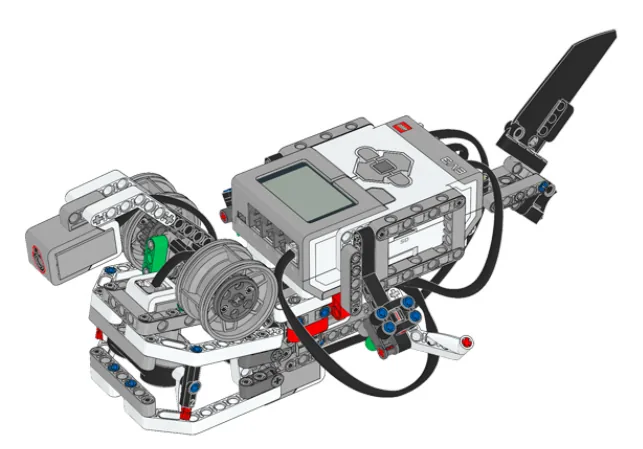
The Anglerfish: a deep-sea ambush predator with a hinged jaw, and a lure on a stalk that arches out over its own mouth.
A Medium Motor waves the lure. A Large Motor works the jaw. A Gyro Sensor tells the fish whether it is being moved. Almost nothing about this model is fast — it is a machine built around waiting, and the waiting is the point.
By the end of the lesson you will have one block called sweep that can wave the lure gently, wildly, or anywhere in between — without a second copy of it existing anywhere in your program.
Two hundred metres down, sunlight has run out. Below a thousand metres there is none at all. Food in that water is scarce and unpredictable — most of it drifts down from far above — and an animal that swam about looking for a meal would spend more energy hunting than the meal would return.

So the anglerfish does the opposite of hunting. It hangs almost still and dangles a light in front of its own mouth. The rod is a modified fin spine called the illicium; the glowing tip is the esca, and it does not make its own light — it is packed with bioluminescent bacteria that live there and are fed by the fish.
The lure is not waved at one speed. A slow, drifting wave looks like a small swimming animal. A short twitch looks like something injured. The fish varies the motion because the same movement at a different size means a different thing to whatever is watching — and it is watching in the dark, judging by almost nothing.
The economics are brutal. A deep-sea anglerfish may eat a handful of times a year. Every wave of that lure costs energy it cannot easily replace, so the motion has to be worth making.
A lure that only ever moved one way would attract only one kind of prey — and only until that prey learned. A fish that could vary its motion from lazy to frantic without growing a second rod has one piece of equipment doing many jobs.
One piece of equipment, many sizes of movement. That is exactly what you are about to build in blocks.
Last lesson you named a routine. This lesson the name gets a slot in it — a number you fill in each time you use the block. It is called an input, and it is the difference between a block that does one thing and a block that does one kind of thing.
Suppose the lure must sweep gently at first and wildly when something is close. Without inputs you need two blocks:
define sweep slow
repeat (4)
  [A v] run [clockwise v] for (40) [degrees v] at (15) % speed :: motors
  [A v] run [counterclockwise v] for (40) [degrees v] at (15) % speed :: motors
end

define sweep fast
repeat (4)
  [A v] run [clockwise v] for (40) [degrees v] at (60) % speed :: motors
  [A v] run [counterclockwise v] for (40) [degrees v] at (60) % speed :: motors
end
This is Lesson 1’s problem wearing a name badge. Giving a routine a name stopped the copies appearing in the main program. It did not stop the copies — it just moved them.
define sweep (speed)
repeat (4)
  [A v] run [clockwise v] for (40) [degrees v] at (speed) % speed :: motors
  [A v] run [counterclockwise v] for (40) [degrees v] at (speed) % speed :: motors
end
speed is the input — a value the caller supplies, used wherever it appears inside.when program starts :: events hat sweep (15) :: custom sweep (60) :: custom sweep (15) :: custom
| Word | What it means | Where you see it |
|---|---|---|
| Input | The empty slot in the block’s name. | In the define hat: sweep (speed) |
| Argument | The actual number you put in when you use it. | In the program: sweep (60) |
| Inside the block | The input behaves like a number. Drag it from the define hat into any slot. | at (speed) % speed |
speed, times, degrees. Never number1.define hat and drop it into a slot. You cannot type its name — you have to drag the real thing.A My Block is a block you make yourself. You take a group of blocks that do one job, give the group a name, and from then on that name is the block.
| Block | What it does |
|---|---|
define grab | The head of a definition. Whatever is attached under it is what the block does. There is exactly one of these per My Block. |
grab :: myblocks | Runs the definition. Use it as many times as you like. |
define turn (degrees) | A definition with an input. degrees is a name for whatever number the caller types. |
turn (90) :: myblocks | Runs it with 90 in place of that name. |
Copying blocks works perfectly — right up until the copied thing has to change. Here are two robots driving a square, one with a My Block and one with the blocks copied four times, and then somebody asks for a bigger square.
a My Block, used four times
the same thing copied
↑ the fourth copy still says 2
The bug is not in any block. It is in the fact that the same idea was written down four times, and only three of them were updated.
The right-hand robot is not running a broken program. It is running four programs that were supposed to be identical, and three of them were updated. Nothing is misspelled, nothing reports an error, and the only evidence is a square that does not close.
The left-hand program is these two listings, and nothing else:
define side
move [forward v] for (3) [rotations v] :: movement
move [right: 100 v] for (0.5) [rotations v] :: movement
when program starts :: events hat
repeat (4)
  side :: myblocks
end
A My Block can take a value. Turn-right is useful; turn (degrees) is far more useful, because one definition then serves every turn in the program. The value is given a name when the block is made, and that name is used inside the definition wherever the number belongs.
The name is the part that trips people up. Inside the definition, (cm) is not a variable you have to set anywhere — it is a hole, and it is filled in with whatever the caller typed, every time the block is called.
EV3 movement blocks count wheel turns, and nobody measures a table in wheel turns. One turn of a standard driving wheel carries the robot about 17.5 cm, so driving 50 cm means asking for 50 ÷ 17.5 rotations. Doing that sum in your head, at every movement block, all program long, is how mistakes get in.
Put the sum inside a My Block once and the whole program can be written in centimetres. Change the two numbers below and watch where they end up.
These two numbers are the whole interface. Everything below is what the definition does with them.
what you write in the program
drive (50) cm at (75) % :: myblocks
the definition — (cm) and (speed) are names, not values
define drive (cm) cm at (speed) %
set movement speed to (speed) % :: movement
move [forward v] for ((cm) / (17.5)) [rotations v] :: movement
the same blocks, with your two numbers put in
set movement speed to (75) % :: movement
move [forward v] for ((50) / (17.5)) [rotations v] :: movement
The green division block is doing the only real work: the movement block underneath counts wheel turns, and you asked in centimetres. One turn of these wheels carries the robot 17.5 cm, so 50 cm is 50 ÷ 17.5 = 2.86 turns.
Set the distance to 17.5, 35 or 70 and the part turn disappears — those are whole numbers of wheel turns. Every other distance leaves a fraction, which is exactly why the division belongs inside the My Block and not in your head.
Two inputs, and the definition is three blocks. Note what has actually been gained: not fewer blocks — the same blocks run either way — but a program you can check against a ruler. drive (50) cm at (75) % is either right or wrong about the table, and you can tell which without running it.
Typing a fixed number inside the definition instead of using the input is the classic slip — the block then ignores whatever it is given and always drives the same distance:
define drive (cm) cm at (speed) %
set movement speed to (speed) % :: movement
move [forward v] for ((50) / (17.5)) [rotations v] :: movement
That block takes a distance and throws it away. It will pass every test you run at 50 cm.
Here are those two My Blocks and a 100 × 100 cm mat. Drag blocks into the script, set the numbers, and press Run — the base always starts in the left-hand corner facing up the mat. Say where you think it will finish before you press it; the ruler is there to settle the argument.
Two My Blocks, a 100 × 100 cm mat and a ruler. Drag blocks into the script — or press one to add it — set the numbers, then Run and see whether the base ends up where you said it would.
my blocks — drag or press
the script — 0 / 8 blocks
Empty. Drag a block in from above, or press one.
Nothing to run yet. A square is four drives and four turns — try predicting the distance before you press Run.
Eight blocks is enough for a square with 40 cm sides, and not enough for anything you cannot picture. If a shape needs more than that, it wants a repeat (4) around it — which is the next thing a My Block usually grows into.
The Gyro Sensor gives an accurate turn, and it costs five blocks every time: reset the angle, start turning, wait until the reading is a few degrees short of the target, stop. Those five blocks are about the sensor. What the program wants to say is turn 90.
define turn (degrees)
[2 v] reset angle :: sensors
start moving [right: 30 v] :: movement
wait until <([2 v] angle :: sensors) > ((degrees) - (4))>
stop moving :: movement
The − 4 is the overshoot allowance from the Gyro Sensor module: the robot carries on turning for a moment after the motors are told to stop, so the block asks for less than it wants and lets it coast in. Written here, it is decided once. Written out at every corner, it is eleven chances to forget it.
Now the input earns its keep — because the shape a robot draws is decided entirely by that one number. A closed shape turns through 360° in total, so a shape with n corners turns 360 ÷ n at each one.
the whole program
when program starts :: events hat
repeat (4)
  move [forward v] for (2) [rotations v] :: movement
  turn (90) :: myblocks
end
what turn is, once
define turn (degrees)
[2 v] reset angle :: sensors
start moving [right: 30] :: movement
wait until <([2 v] angle :: sensors) > ((degrees) - (4))>
stop moving :: movement
Nothing in the program mentions the gyro. It is all inside turn, which is the point: the sensor is an implementation detail of turning, and the program should be about the shape.
Same definition, same drive block, same length of side. The only edit between a triangle and a pentagon is turn (120) :: myblocks becoming turn (72) :: myblocks. That is what a well-chosen input does: it turns a program that draws one shape into a program that draws shapes.
The same block also turns left, if you let it. Give the definition an if … then … else and a negative input means anticlockwise:
define turn (degrees)
[2 v] reset angle :: sensors
if <(degrees) > (0)> then
  start moving [right: 30 v] :: movement
  wait until <([2 v] angle :: sensors) > ((degrees) - (4))>
else
  start moving [left: 30 v] :: movement
  wait until <([2 v] angle :: sensors) < ((degrees) + (4))>
end
stop moving :: movement
One block, two directions, and every program that uses it gets the left turn for free the moment this definition is edited.
The signal is repetition: the same sequence appearing in more than one place. That is the moment to name it. Making a My Block for something used once adds a layer without adding clarity.
The second signal is a unit. If the blocks convert between what you think in (centimetres, degrees, seconds) and what the hardware counts (rotations, sensor readings), that conversion is worth a name — it is the thing you will otherwise get wrong.
The Gyro Sensor measures how far the robot has turned, in degrees. Wheels slip and floors vary, so counting wheel rotations is a poor way to turn accurately — the gyro measures the turn itself rather than inferring it.
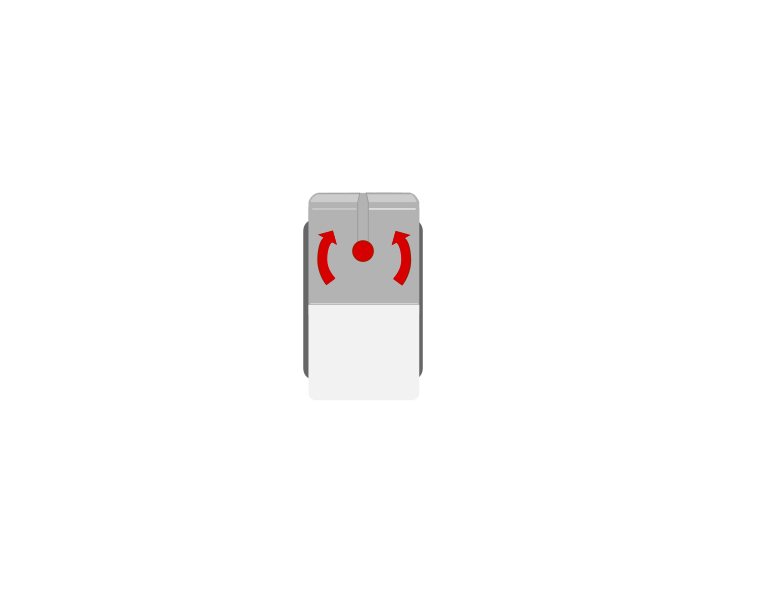 from above
 front
front| Block | What it does |
|---|---|
([2 v] angle :: sensors) | Reports how far the robot has turned since the angle was last reset. |
[2 v] reset angle :: sensors | Sets the current heading as zero. |
The angle is measured from wherever it was last zeroed — not from where this turn started. Here are two robots given the same instruction, one with a reset block and one without.
reset first
no reset
Both programs are correct about what they asked for. Only the left one asked the question from a known starting point.
Both programs did exactly what they said. Both gyros stopped at 90. But the robot on the right had 34 degrees already on the clock, so it only turned 55 — and nothing about the program looks wrong. Watch the first step too: neither robot is moving and the reading is still climbing. That is drift, and it is why the reset belongs immediately before the turn.
Reset with the robot completely still, as late as you can.
when program starts :: events hat
[2 v] reset angle :: sensors
start moving [straight: 0] :: movement
wait until <([2 v] angle :: sensors) > (90)>
stop moving :: movement
That program is the obvious one to write, and it will not give you a 90 degree turn. The next section is why.
Asking to stop at 90 does not stop the robot at 90. Between the gyro reaching 90 and the wheels actually standing still there is a delay — the sensor has to be read, the next block has to run, and the motors have to physically brake. The robot is still turning through all of it, so it ends up past where you asked.
The fix is to ask for less than you want. Aim for a 90 degree turn by waiting for 86: the robot coasts the last few degrees on its own and settles at roughly 89 to 91.
ask for exactly 90
stop 4° early
The tolerance has to match the speed. At 50°/s the number that lands this turn on 90° is 86 — let it loop, and watch that number change when the speed does.
The size of that gap is not a fixed property of the robot — it is the delay multiplied by how fast you are turning. The delay stays about the same whatever you do, so a turn at double the speed carries you about double the distance past the mark.
| Turn speed | Carried past the stop | Wait for | Ends up at |
|---|---|---|---|
| slow | about 4° | 86 | about 90° |
| fast | about 10° | 80 | about 90° |
So the tolerance and the speed have to be chosen together. Turn faster and you must give up more; if you speed a turn up and forget to lower the number, the robot starts overshooting every corner and the program that worked last week no longer does.
when program starts :: events hat
[2 v] reset angle :: sensors
start moving [right: 30] :: movement
wait until <([2 v] angle :: sensors) > (86)>
stop moving :: movement
Find your own number rather than copying this one — it depends on your robot’s weight, its wheels and the speed you turn at. Run the turn, measure where it actually stops, and move the number by however far it missed. Two or three tries is usually enough.
The other half of the answer is to slow down. A slower turn overshoots less, so it needs less guessing and repeats more reliably — which is why a turn worth getting right is rarely worth rushing.
A gyro slowly loses its zero even when nothing is moving. Leave a robot sitting still for a minute and the angle may have wandered several degrees all by itself. That is drift, and it is a property of the hardware, not a bug in your program.
Two habits deal with it: reset the angle as late as possible before a turn, and keep the robot dead still while the reset happens. Resetting while the robot is rolling bakes the error in permanently.
Aircraft, ships and phones all use gyros to know their orientation — it is how a phone knows you have turned it sideways. A robot that can turn exactly 90 degrees on any surface is far more reliable than one that guesses with wheel rotations.
A block with an input does one kind of job at any size. A block without one does exactly one job.
The Gyro Sensor measures how far the robot has turned, in degrees. Wheels slip and floors vary, so counting wheel rotations is a poor way to turn accurately — the gyro measures the turn itself rather than inferring it.
from abovefront| Block | What it does |
|---|---|
([2 v] angle :: sensors) | Reports how far the robot has turned since the angle was last reset. |
[2 v] reset angle :: sensors | Sets the current heading as zero. |
The angle is measured from wherever it was last zeroed — not from where this turn started. Here are two robots given the same instruction, one with a reset block and one without.
reset first
no reset
Both programs are correct about what they asked for. Only the left one asked the question from a known starting point.
Both programs did exactly what they said. Both gyros stopped at 90. But the robot on the right had 34 degrees already on the clock, so it only turned 55 — and nothing about the program looks wrong. Watch the first step too: neither robot is moving and the reading is still climbing. That is drift, and it is why the reset belongs immediately before the turn.
Reset with the robot completely still, as late as you can.
when program starts :: events hat
[2 v] reset angle :: sensors
start moving [straight: 0] :: movement
wait until <([2 v] angle :: sensors) > (90)>
stop moving :: movement
That program is the obvious one to write, and it will not give you a 90 degree turn. The next section is why.
Asking to stop at 90 does not stop the robot at 90. Between the gyro reaching 90 and the wheels actually standing still there is a delay — the sensor has to be read, the next block has to run, and the motors have to physically brake. The robot is still turning through all of it, so it ends up past where you asked.
The fix is to ask for less than you want. Aim for a 90 degree turn by waiting for 86: the robot coasts the last few degrees on its own and settles at roughly 89 to 91.
ask for exactly 90
stop 4° early
The tolerance has to match the speed. At 50°/s the number that lands this turn on 90° is 86 — let it loop, and watch that number change when the speed does.
The size of that gap is not a fixed property of the robot — it is the delay multiplied by how fast you are turning. The delay stays about the same whatever you do, so a turn at double the speed carries you about double the distance past the mark.
| Turn speed | Carried past the stop | Wait for | Ends up at |
|---|---|---|---|
| slow | about 4° | 86 | about 90° |
| fast | about 10° | 80 | about 90° |
So the tolerance and the speed have to be chosen together. Turn faster and you must give up more; if you speed a turn up and forget to lower the number, the robot starts overshooting every corner and the program that worked last week no longer does.
when program starts :: events hat
[2 v] reset angle :: sensors
start moving [right: 30] :: movement
wait until <([2 v] angle :: sensors) > (86)>
stop moving :: movement
Find your own number rather than copying this one — it depends on your robot’s weight, its wheels and the speed you turn at. Run the turn, measure where it actually stops, and move the number by however far it missed. Two or three tries is usually enough.
The other half of the answer is to slow down. A slower turn overshoots less, so it needs less guessing and repeats more reliably — which is why a turn worth getting right is rarely worth rushing.
A gyro slowly loses its zero even when nothing is moving. Leave a robot sitting still for a minute and the angle may have wandered several degrees all by itself. That is drift, and it is a property of the hardware, not a bug in your program.
Two habits deal with it: reset the angle as late as possible before a turn, and keep the robot dead still while the reset happens. Resetting while the robot is rolling bakes the error in permanently.
Aircraft, ships and phones all use gyros to know their orientation — it is how a phone knows you have turned it sideways. A robot that can turn exactly 90 degrees on any surface is far more reliable than one that guesses with wheel rotations.
Say this back before moving on: “The definition has a slot. The program fills it in.”
Look at the fish before you read on. Which electronic parts can you find, and which of them is not doing anything you can see? There are four things worth naming.
| Part | What it is doing here |
|---|---|
| EV3 Intelligent Brick | The body of the fish, and most of its weight. It also carries the screen, which today reports what the Gyro can feel. |
| Medium Motor — the lure | Waves the stalk. Medium because the lure is light and the movement wants to be quick and precise, not strong. |
| Large Motor — the jaw | Snaps the mouth. Large because a jaw has to move a real amount of plastic in a hurry, and torque is what does that. |
| Gyro Sensor | Feels the fish being tilted or turned. Nothing on the model moves it — you move it, which makes it an input from the world rather than from the machine. |
| The lure stalk and jaw linkage (not electronic) | Both must swing freely. Work each by hand before powering anything: a stiff stalk turns a graceful sweep into a series of jerks, and the difference between your slow and fast sweeps will disappear. |
The Gyro must be still when the program starts. It works out its zero in the first moment of running, so a fish being carried across the room at that instant will read wrong for the whole session. Put it down, then press Run.
Sensors go in ports 1, 2, 3, 4. Motors go in ports A, B, C, D. They are not interchangeable, and nothing will tell you politely if you swap them.
| Part | Port | Why this one |
|---|---|---|
| Lure stalk (Medium) | A | The motor this lesson is about. Every sweep you write drives A. |
| Jaw (Large) | B | The second motor, and the one with the load. |
| Gyro Sensor | 2 | Level 2 put the Gyro on 2 and Level 3 keeps it there, so a program moves between models without rewiring. |
Check your own build now:
Two routes, and either is fine. USB is the reliable one and the one to fall back on when a room’s Bluetooth is busy; Bluetooth leaves the robot free to move, which some models need.
Do these in order. Naming the Brick after you go looking for it in the list is how groups end up driving each other’s robots.
EV3 until somebody changes it.EV3.The two failures, every class, every time. The Brick has gone to sleep while you were building — press the centre button to wake it. Or you have paired with the group at the next table, which is why the name matters.
The long version, including Port View and how to read the port tiles, is in the Brick & Bluetooth guide.
Either route is fine today. The fish stays on the table for most of the lesson, so a USB cable costs you nothing — and in the last challenge, when you pick it up to tilt it, the cable is worth noticing: it pulls on the model, and the Gyro will feel it.
Stuck? The long version, with a photograph of every screen, is in the Brick & Bluetooth guide.
One change at a time. Predict, then run, then look.
sweep (15) to sweep (100). Predict what the lure does. Notice you did not open the definition to do it.40 degrees inside the definition to 15. Both sweeps get smaller — one edit, every caller affected. That is the other half of the bargain.times, then drag it into the repeat slot. Now you can call sweep (15) (10) for a long lazy wave.a and b, then read your program. It still runs and you can no longer tell what it means — names are not decoration.Change the number at the call to change one use. Change the definition to change every use. Knowing which you want is the skill.
You now have blocks that can be told what to do. What you do not have is a way for one part of a program to tell another part something has happened.
Notice what is missing from today’s program. The Gyro reading goes to the screen and nowhere else. If you wanted the jaw to snap the moment the fish is tilted, you would have to check the Gyro inside the same loop that is busy sweeping — and a loop that is sweeping is not looking.
What you want is for one stack to shout, and another to be listening. That is a broadcast, and it is the next lesson.
Lesson 1 gave a routine a name. Lesson 2 gave the name a slot. Lesson 3 gives a moment a name.
Same two-step method as last lesson. Get one sweep working, then give the block its slot.
define sweep
repeat (4)
  [A v] run [clockwise v] for (40) [degrees v] at (25) % speed :: motors
  [A v] run [counterclockwise v] for (40) [degrees v] at (25) % speed :: motors
end
sweep block and choose Edit.speed.speed out of the define hat and drop it into both motor blocks, replacing the 25.define sweep (speed) repeat (4) [A v] run [clockwise v] for (40) [degrees v] at (speed) % speed :: motors [A v] run [counterclockwise v] for (40) [degrees v] at (speed) % speed :: motors end when program starts :: events hat [2 v] reset gyro sensor :: sensors clear display :: display forever write [WAITING] at line (1) :: display sweep (15) :: custom wait (2) seconds :: control sweep (55) :: custom write ([2 v] angle) at line (3) :: display end
reset gyro sensor comes first, once. ** It sets today’s zero. Do it inside the loop and the fish forgets where it started every couple of seconds.What success looks like: the lure drifts slowly four times, holds still for two seconds, then flicks quickly four times — and the number on line 3 changes when you turn the fish.
If both sweeps look identical, you probably typed 15 and 55 into the definition instead of dragging the input into the motor blocks. Open the definition: do the motor blocks contain an orange
speedoval, or a number?
Build the model before you read any further. Everything after this is about making it do something, and none of it will make much sense with nothing on the table in front of you.
Use the viewer's own controls to zoom and turn pages. Fullscreen makes it big enough to build from.
The same build on Google Drive — sometimes a video, sometimes a scan:
Use the viewer's own controls to zoom and turn pages. Fullscreen makes it big enough to build from.
Check the finished build against the picture before you switch anything on. A motor mounted the wrong way round is far easier to spot now than it is to debug later, when it looks like a program fault.
Work through them in order — each is harder than the last. The extra challenge comes after all three, and it is meant to make you plan before you build.
Add a second sweep speed. Call "sweep" a third time in your program with a number you have not used yet — something very slow, like 8. Watch the lure. A real anglerfish varies its motion because prey judges by movement alone.
Give the block a second input. Edit "sweep" and add an input called "times", then drag it into the repeat slot. Now call sweep (15) (10) for a long lazy wave and sweep (60) (2) for a quick twitch. One definition, four different behaviours.
Make the fish react to being disturbed. If the Gyro angle changes by more than 20 degrees, the fish should stop sweeping, snap the jaw shut, and show ALARM on the screen for two seconds before going back to normal. You will need to check the Gyro between sweeps rather than during one — a sweep that is running is not looking.
Build a hunting cycle that changes with its own patience. The fish starts lazy: slow sweeps, long pauses. Every sweep that passes with nothing arriving makes it a little more frantic — faster sweeps, shorter pauses — up to a limit. If something does come close, it snaps, then resets all the way back to lazy. Plan on paper first: what number tracks the impatience, where does it go up, where does it reset, and what stops it climbing for ever? The whole hunting cycle must use ONE sweep block. If you find yourself making sweep-fast and sweep-slow, look again at what the input is for.