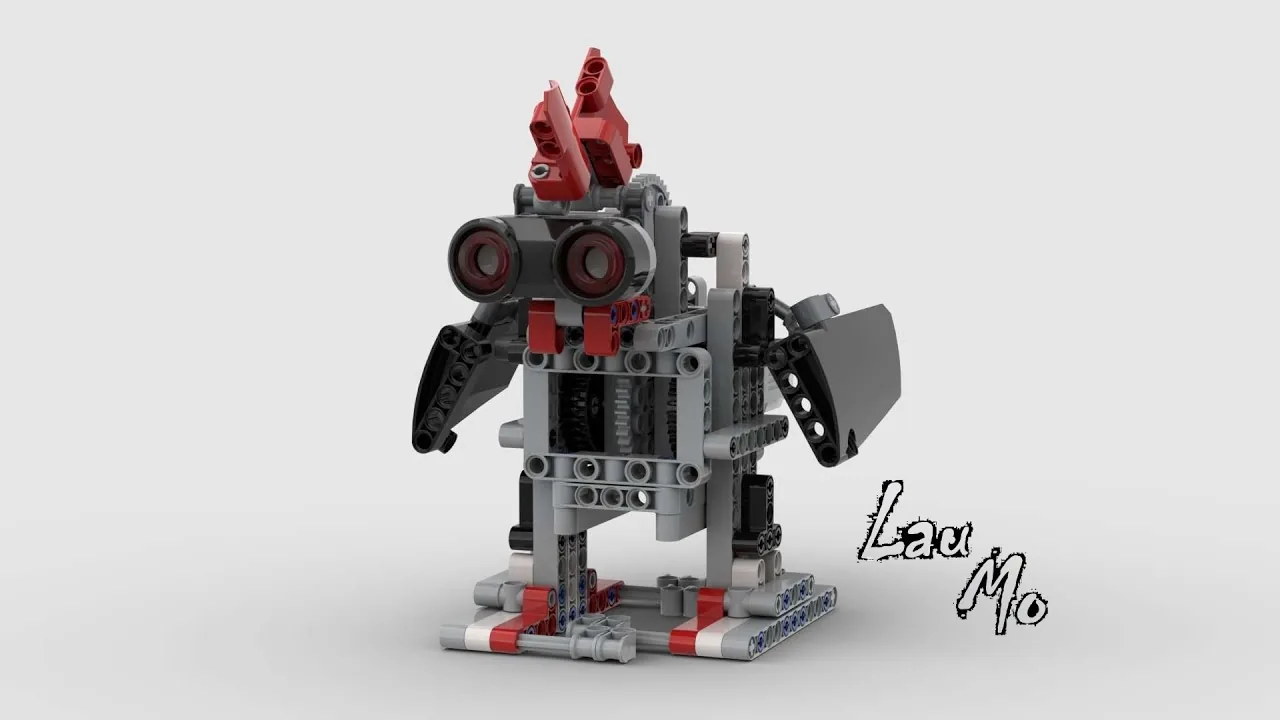
The Robot Chicken: a bird that walks, stops, pecks and looks up, with an Ultrasonic Sensor in its head watching the ground ahead of it.
A real chicken does not do all of those at once, and neither will yours. It does one of them, and which one depends on what it was doing a moment ago as much as on what it can see now.
By the end of the lesson your chicken will move between four named behaviours on its own — and the program will say, in one word on the screen, which one it is in.
In the real world 5 min
Where you have seen it
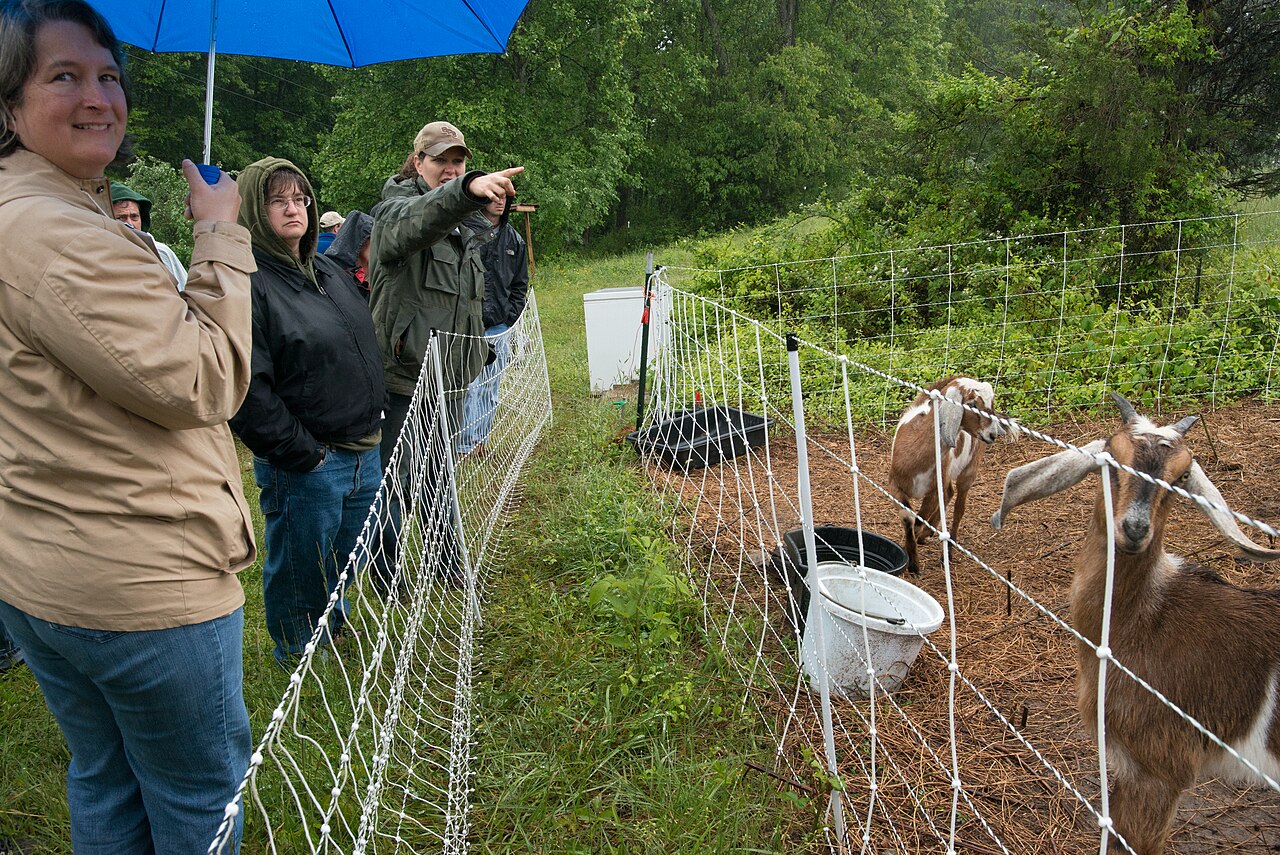
Watch a chicken foraging and you will see it cycle through a small set of distinct behaviours: walk a few steps, stop, scratch, peck, then lift its head and look around. Ethologists call these behavioural states, and the striking thing is how sharp the boundaries are. A chicken is not half-pecking and half-scanning. It is doing one, then the other.
20160521-RD-LSC-0458 (27615896212). Photo: U.S. Department of Agriculture Lance Cheung/Multimedia PhotoJournalist / Wikimedia Commons (Public domain).
The head-up scan is not optional. A bird with its beak in the ground cannot watch for predators, so it must stop feeding to look. That trade-off — you cannot be in two states at once — is what shapes the whole rhythm.
Why it is built that way
Because attention is a limited resource, and so is a machine’s. A washing machine is filling, or washing, or spinning, or draining — never two. A traffic light is red, or amber, or green. A lift is idle, or moving, or holding doors.
In every case there is a small list of states, and a small list of events that move you from one to another. Engineers draw this as circles with arrows between them and call it a state machine. It is one of the most useful pictures in the subject.
What would go wrong without it
A washing machine that tried to spin while filling would flood. A lift that moved while its doors were open would be lethal. The states are not a tidy way of describing the machine — they are what stops it doing two incompatible things at once.
A machine in exactly one state at a time cannot contradict itself.
The main concept — a variable that remembers the mode 6 min
Last lesson ended stuck: conditions describe now, so nothing could latch. The fix is a variable whose whole job is to hold which mode the robot is in — and rules that both read it and change it.
Draw it before you build it
A state machine is four states and the arrows between them. Write this out before touching a block:
State
What the chicken does
Leaves when…
Goes to
walk
Legs run; head up.
Something is close ahead
stop
stop
Everything still.
Half a second has passed
peck
peck
Head down and up, three times.
The pecks are done
scan
scan
Head up, turning, looking.
Nothing is close any more
walk
Every state must have a way out. Read the table again and check each row’s “leaves when” can actually happen. A state with no exit is a robot that has frozen, and it is the commonest bug in this lesson by a wide margin.
The shape in blocks
when program starts :: events hat
set [state v] to [walk] :: variables
forever
  write (state) at line (1) :: display

  if <(state) = [walk]> then
    [B v] start motor at (40) % speed :: motors
    if <([4 v] distance in cm) < (15)> then
      set [state v] to [stop] :: variables
    end
  end

  if <(state) = [stop]> then
    [B v] stop motor :: motors
    wait (0.5) seconds :: control
    set [state v] to [peck] :: variables
  end
end
Two states of the four. Each one does its job and decides whether to hand over. That pairing is the whole pattern.
Why this is not just a Switch
Conditions alone (Lesson 6)
A state machine (today)
Decides using
Only what is true now.
What is true now and what mode it is in.
Can it latch?
No. Let go and it reverts.
Yes. It stays until something moves it on.
Same input, twice
Always the same result.
Can do different things — because the state differs.
ComponentData6 min
Variables
Why anybody needs one
Long before there were computers, people had exactly this problem. A shepherd counting sheep through a gate, a trader counting sacks of grain, a builder counting days — none of them can hold the number in their head while they get on with the work. So they scratched a mark on a wall, cut a notch in a stick, or wrote a number on a piece of paper. The number lived outside the person, in a place they had agreed on, and they could go back to it, read it, and change it.
Better still, once the number is written down somebody else can use it. Watch these two: one of them counts and writes, the other never sees a single animal and simply reads the wall.
Abby never remembers the numberBen never sees a henThe wall holds it for both
Abby has a gate and a wall. Before a single hen comes through she chalks 0 on the wall — that is where the number is going to live.A hen goes through. Abby rubs out the 0 and chalks 1. Another goes through, and she does it again.Three hens have been through, and the wall says 3. Abby is not remembering the number — she is reading her own wall each time and writing the next one.Ben has been at the market all morning. He has not seen one hen. He walks up, reads the wall, and knows the answer — without asking Abby anything.That is a variable. Not a number in somebody's head, but a place both of them agreed on: one writes to it, the other reads from it, and it keeps the number in between.Finished. Abby wrote, Ben read, and the wall is what joined them up.
the wall holds it
Notice what never happens: Ben never asks Abby. He does not need to — the number is not in her head, it is on the wall, and the wall is there for anyone who needs it.
Neither Abby nor Ben is holding the number — the wall is. And notice what never happens: Ben does not ask Abby. He does not need to, because the count is not in her head. It is in a place they both agreed on, which is what makes it useful to more than one of them.
That is all a variable is. The robot cannot hold a number in its head either, so you give it a wall of its own, write a name at the top so everyone knows which wall is which — score, count, degree_turn — and the program can read what is on it and write something new. One part of the program writes; another part reads. Exactly Abby and Ben.
The paper, and the two things you can do to it
Say we are counting rotations of a motor. Before we start we write 0 on the paper. Every time the motor completes a turn we cross out what is there and write one more: 0 becomes 1, then 2, then 3. That is change — it has to read the old number to work out the new one.
set is the other thing you can do, and it is completely different: rub the whole paper out and write the number you want. It does not care what was there. Press the buttons and watch what happens to the crossings-out.
score
0
The paper starts blank, so we write 0 on it. That is what a variable is: a place to keep a number while the robot works.
change leaves a trail — every value follows from the one before it. This is what counting is.
set wipes the sheet. Use it to start a count, never to continue one.
Press set score to 0 after counting up a few times and watch the whole history vanish. That is what happens to a count when a set block ends up in the wrong place — and it is the commonest variable bug there is.
Blocks reference
Block
What it does
set [count v] to (0)
Puts a value in, replacing whatever was there.
change [count v] by (1)
Adds to what is already there.
(count)
Reports the current value, for use in a comparison or on the display.
Set, or change?
set replaces; change adds. Counting things needs change. Starting a count needs set. Both programs below have both blocks — the only difference is whether the set block is inside the loop or above it.
set before the loop
when program starts
set count to 0
repeat 4
A run clockwise for 1rotations
change count by 1
set inside it
repeat 4
set count to 0
A run clockwise for 1rotations
change count by 1
Before the loop: counted 0Inside the loop: stuck at 0
Both programs count the turns of a motor. The left sets the count to zero before the loop; the right sets it inside.Turn 1. Both counters read 1, and so far the two programs agree.Turn 2. The left count is 2. The right was set back to zero at the top of the loop, so it is 1 again.Turn 3. The left reads 3. The right still reads 1.Turn 4. The motor turned four times on both robots — only one of them counted them.Finished. Four turns, and one of the two counts is fiction.
stopped
Both programs contain both blocks. Only the position of set [count] to 0 is different.
The count on the right is not broken; it is being told to start again on every pass. Each time round the loop it is wiped back to zero and then changed by one, so the honest answer is always 1 — while the motor cheerfully turns four times. A counter stuck at 1 almost always means a set block that has slipped inside the loop.
Anything oval is a number you can pick up
EV3 Classroom tells you what a block does by its shape, and once you have noticed that, a whole set of questions answers itself:
Oval — reports a number. The blue degrees counted, the timer, a distance, your own variable.
Pointed — reports true or false. These go in an if or a wait until, not in a variable.
Block-shaped — does something. These stack up; they do not fit inside anything.
So when a slot is oval, any oval fits it — and it does not matter in the least where that number came from. You can take the motor’s own A degrees counted and keep it in a variable you named degree_turn, then compare that with a number later. Pick an oval below and watch the same one drop into all three kinds of slot.
pick an oval
the same oval fits all three
set degree_turn to A degrees countedkeep it in a variable of your own
A degrees counted+10do arithmetic with it
A degrees counted>50compare it with a number
Every one of those slots is oval-shaped, and A degrees counted is an oval — so it drops in. Nothing about where the number came from matters.
This is what makes a variable more than a counter. A sensor reading is true only at the instant you read it; copying it into a variable freezes it, so the robot can compare where it is now against where it was when something happened:
when program starts :: events hat
[A v] reset degrees counted :: motors
set [degree_turn v] to ([A v] degrees counted :: sensors)
start moving [right: 30] :: movement
wait until <(([A v] degrees counted :: sensors) - (degree_turn)) > (400)>
stop moving :: movement
Read the condition aloud: how far the motor has gone now, minus where it was when we started, is more than 400. Both are ovals, so both can go into a subtraction, and the subtraction is an oval too — which is why it can go into a comparison. Ovals nest inside ovals as deep as you need.
Reset at the start, every time
A variable keeps its value after the program ends. Run the program again without setting it back and the second run begins where the first left off — the count starts at 14, the robot thinks it has already done the job. Every variable a program changes must be set to its starting value at the top.
Why it matters
A variable is the difference between a machine that repeats a fixed routine and one that responds to how things have gone — counting parts, tracking a score, remembering where it started.
ComponentControl6 min
Making a decision
Up to now a robot has been able to wait for a sensor. Deciding is different: the robot checks the sensor and does one thing or another depending on the answer — and then carries on either way.
Blocks reference
Block
What it does
if <> then
end
Runs the blocks inside only when the condition is true. Otherwise skips them.
if <> then
else
end
Runs one set of blocks when true and a different set when false.
Deciding again and again
A decision made once, at the start, is almost never what you want. Here are two robots with the identical if-else, testing the identical sensor against the identical number — one inside a loop and one not.
decision inside a loop
forever
if distance < 15 then
stop moving
else · start moving
the same decision, once
if distance < 15 then
stop moving
else · start moving
247checks · in a loop1check · once only
Nothing is close, so both robots ask «is the wall within 15 cm?», both hear no, and both take the else branch and drive.The left robot is asking again, and again, and again. The right one asked once and has finished asking.Under 15 cm. The left robot's next check says stop, so it stops. The right robot has no next check.Same condition. Same sensor. Same number. Only the loop is different.Finished. One robot is parked; the other is against the wall.
wall far
A decision is only worth as much as the last time it was made. Inside a loop, that is a few milliseconds ago.
Nothing is wrong with the right-hand program’s decision. It asked the question, got a truthful answer, and acted on it correctly. It simply never asked again, and the world moved on. Decisions belong inside a loop, so the robot keeps re-deciding as things change.
when program starts :: events hat
forever
  if <([4 v] distance in [cm v] :: sensors) < (15)> then
    stop moving :: movement
  else
    start moving [straight: 0] :: movement
  end
end
Four shapes, and how to choose
Once there is more than one question, decisions can be arranged in four ways. They look nearly identical stacked up in the editor, which is exactly why they get muddled — the thing that differs is not what the blocks say, it is which routes through them exist.
One question sorts them almost completely:
Are the questions…
Use
How many bodies can run
independent — any combination can be true
separate ifs
none, some, or all
one question, two answers
if / else
exactly one
the second only matters when the first is true
nested if
one, and only via the outer
mutually exclusive cases — exactly one should win
chained if / else
exactly one, the first that matches
Separate ifs — independent questions
Each if is asked no matter what the others answered, so any number of them can fire on the same pass. That is the right shape when the conditions genuinely have nothing to do with each other.
Both questions are always asked, so one pass can turn on the lamp, the fan, both, or neither. Dark and hot are unrelated — there is no reason answering one should stop the other being asked.
forever
  if <[3 v] is ambient light intensity [< v] (20) %? :: sensors> then
    [A v] start motor [clockwise v] :: motors
  end
  if <[4 v] is distance [< v] (15) [cm v]? :: sensors> then
    [D v] start motor [clockwise v] :: motors
  end
end
if / else — one question, two answers
Exactly one branch runs, every time. Reach for this whenever the robot must do something either way — and in preference to two ifs testing opposite conditions, which is the same idea written twice and can drift apart.
There is no route through this that runs both boxes, and none that runs neither. That guarantee is the reason to prefer it over two opposite ifs.
Nested if — a follow-up question
Putting one if inside another means the inner question is only ever asked when the outer one is true. Use it when the second question is meaningless otherwise: there is no point asking which side an obstacle is on when there is no obstacle.
The inner question sits on the outer one's yes route, so it is only reached when something is close. If nothing is close, the robot never asks which side it is on — because there is nothing to have a side.
if <[4 v] is distance [< v] (15) [cm v]? :: sensors> then
  if <([2 v] angle :: sensors) < (0)> then
    start moving [right: 50] :: movement
  end
end
When not to nest. If you only want “both true” and nothing happens at the outer level, an and says it in one block and reads better:
if <<[4 v] is distance [< v] (15) [cm v]? :: sensors> and <([2 v] angle :: sensors) < (0)>> then
  start moving [right: 50] :: movement
end
Nesting earns its place when something happens at the outer level too, or when there is an else at each level and the two mean different things.
Chained if / else — one winner out of several
This is the shape for a list of cases where exactly one should win: colour bands, distance bands, speed ranges. EV3 Classroom has no else-if block, so you build a chain by putting the next if inside the else of the last one.
Each question is only reached down the previous one's no route. The first that matches acts, and everything below it is never even asked — which is what makes overlapping bands safe.
And here is why it matters, because this is the single commonest bug in this whole module. Three bands written as three separate ifs are each perfectly correct, and together they are wrong: a reading of 20 is under 30 and under 60 and under 90, so all three run and the last one to run is the one that sticks.
three separate ifs
if light < 30 then
stop
if light < 60 then
go slowly
if light < 90 then
go fast
chained — if / else / if
if light < 30 then
stop
else
if light < 60 then
go slowly
else
go fast
↑ the rest is inside the else — never asked
3bands matchedgo fastseparate ifs dostopchained does
Separate ifs: 3 matched, last one winsChained: first match wins, rest never asked
The sensor reads 20 — a dark surface. Both programs should stop.The three separate ifs each ask their own question. 20 is under 30, so it stops… then 20 is also under 60, so it goes slowly… then 20 is under 90 too, so it goes fast. All three ran, and the last one wins.The chained version asked the same first question, got `yes`, and stopped. The other two live inside its else, so they were never even asked.Slide the reading up to 75 and both agree again — because only one band matches. The bug only shows itself where the bands overlap, which is most of the range.Finished. Same three bands, same reading — two different answers, because one shape stops asking and the other does not.
reading 20
Separate ifs are not wrong here so much as unguarded: nothing stops a second one matching. Chaining is what makes “the first one wins” true.
The rule to carry away: if the cases are meant to be exclusive, they must be made exclusive. Chaining does it by construction. Separate ifs only work if you are careful to write non-overlapping bands yourself — light < 30, 30 to 60, 60 and over — which is more to get right and easy to break later.
Why it matters
This is the point at which a machine stops following a script and starts responding. A thermostat, an automatic door, a robot vacuum — all of them are a decision inside a loop.
Each state does one thing and knows one way out. Write the table first; the blocks are then just typing.
▶VariablesFrom Level 2, Lesson 26 — a box with a name. Today it holds a word rather than a count.Show meHide
ComponentData6 min
Variables
Why anybody needs one
Long before there were computers, people had exactly this problem. A shepherd counting sheep through a gate, a trader counting sacks of grain, a builder counting days — none of them can hold the number in their head while they get on with the work. So they scratched a mark on a wall, cut a notch in a stick, or wrote a number on a piece of paper. The number lived outside the person, in a place they had agreed on, and they could go back to it, read it, and change it.
Better still, once the number is written down somebody else can use it. Watch these two: one of them counts and writes, the other never sees a single animal and simply reads the wall.
Abby never remembers the numberBen never sees a henThe wall holds it for both
Abby has a gate and a wall. Before a single hen comes through she chalks 0 on the wall — that is where the number is going to live.A hen goes through. Abby rubs out the 0 and chalks 1. Another goes through, and she does it again.Three hens have been through, and the wall says 3. Abby is not remembering the number — she is reading her own wall each time and writing the next one.Ben has been at the market all morning. He has not seen one hen. He walks up, reads the wall, and knows the answer — without asking Abby anything.That is a variable. Not a number in somebody's head, but a place both of them agreed on: one writes to it, the other reads from it, and it keeps the number in between.Finished. Abby wrote, Ben read, and the wall is what joined them up.
the wall holds it
Notice what never happens: Ben never asks Abby. He does not need to — the number is not in her head, it is on the wall, and the wall is there for anyone who needs it.
Neither Abby nor Ben is holding the number — the wall is. And notice what never happens: Ben does not ask Abby. He does not need to, because the count is not in her head. It is in a place they both agreed on, which is what makes it useful to more than one of them.
That is all a variable is. The robot cannot hold a number in its head either, so you give it a wall of its own, write a name at the top so everyone knows which wall is which — score, count, degree_turn — and the program can read what is on it and write something new. One part of the program writes; another part reads. Exactly Abby and Ben.
The paper, and the two things you can do to it
Say we are counting rotations of a motor. Before we start we write 0 on the paper. Every time the motor completes a turn we cross out what is there and write one more: 0 becomes 1, then 2, then 3. That is change — it has to read the old number to work out the new one.
set is the other thing you can do, and it is completely different: rub the whole paper out and write the number you want. It does not care what was there. Press the buttons and watch what happens to the crossings-out.
score
0
The paper starts blank, so we write 0 on it. That is what a variable is: a place to keep a number while the robot works.
change leaves a trail — every value follows from the one before it. This is what counting is.
set wipes the sheet. Use it to start a count, never to continue one.
Press set score to 0 after counting up a few times and watch the whole history vanish. That is what happens to a count when a set block ends up in the wrong place — and it is the commonest variable bug there is.
Blocks reference
Block
What it does
set [count v] to (0)
Puts a value in, replacing whatever was there.
change [count v] by (1)
Adds to what is already there.
(count)
Reports the current value, for use in a comparison or on the display.
Set, or change?
set replaces; change adds. Counting things needs change. Starting a count needs set. Both programs below have both blocks — the only difference is whether the set block is inside the loop or above it.
set before the loop
when program starts
set count to 0
repeat 4
A run clockwise for 1rotations
change count by 1
set inside it
repeat 4
set count to 0
A run clockwise for 1rotations
change count by 1
Before the loop: counted 0Inside the loop: stuck at 0
Both programs count the turns of a motor. The left sets the count to zero before the loop; the right sets it inside.Turn 1. Both counters read 1, and so far the two programs agree.Turn 2. The left count is 2. The right was set back to zero at the top of the loop, so it is 1 again.Turn 3. The left reads 3. The right still reads 1.Turn 4. The motor turned four times on both robots — only one of them counted them.Finished. Four turns, and one of the two counts is fiction.
stopped
Both programs contain both blocks. Only the position of set [count] to 0 is different.
The count on the right is not broken; it is being told to start again on every pass. Each time round the loop it is wiped back to zero and then changed by one, so the honest answer is always 1 — while the motor cheerfully turns four times. A counter stuck at 1 almost always means a set block that has slipped inside the loop.
Anything oval is a number you can pick up
EV3 Classroom tells you what a block does by its shape, and once you have noticed that, a whole set of questions answers itself:
Oval — reports a number. The blue degrees counted, the timer, a distance, your own variable.
Pointed — reports true or false. These go in an if or a wait until, not in a variable.
Block-shaped — does something. These stack up; they do not fit inside anything.
So when a slot is oval, any oval fits it — and it does not matter in the least where that number came from. You can take the motor’s own A degrees counted and keep it in a variable you named degree_turn, then compare that with a number later. Pick an oval below and watch the same one drop into all three kinds of slot.
pick an oval
the same oval fits all three
set degree_turn to A degrees countedkeep it in a variable of your own
A degrees counted+10do arithmetic with it
A degrees counted>50compare it with a number
Every one of those slots is oval-shaped, and A degrees counted is an oval — so it drops in. Nothing about where the number came from matters.
This is what makes a variable more than a counter. A sensor reading is true only at the instant you read it; copying it into a variable freezes it, so the robot can compare where it is now against where it was when something happened:
when program starts :: events hat
[A v] reset degrees counted :: motors
set [degree_turn v] to ([A v] degrees counted :: sensors)
start moving [right: 30] :: movement
wait until <(([A v] degrees counted :: sensors) - (degree_turn)) > (400)>
stop moving :: movement
Read the condition aloud: how far the motor has gone now, minus where it was when we started, is more than 400. Both are ovals, so both can go into a subtraction, and the subtraction is an oval too — which is why it can go into a comparison. Ovals nest inside ovals as deep as you need.
Reset at the start, every time
A variable keeps its value after the program ends. Run the program again without setting it back and the second run begins where the first left off — the count starts at 14, the robot thinks it has already done the job. Every variable a program changes must be set to its starting value at the top.
Why it matters
A variable is the difference between a machine that repeats a fixed routine and one that responds to how things have gone — counting parts, tracking a score, remembering where it started.
Say this back before moving on: “What am I doing, and what would make me stop?”
What’s in this build 4 min
Find the three electronic parts, then work the legs by hand and watch what the head does. On many chicken builds the two are linked, and that matters for your states.
Part
What it is doing here
EV3 Intelligent Brick
The body. Today its screen shows the state name, which turns an invisible variable into something a class can watch.
Medium Motor — the head
Pecks and lifts. Medium because the head is light and a peck should be quick.
Large Motor — the legs
Drives the walking linkage. Large because walking legs push the whole bird along and stall easily on carpet.
Ultrasonic Sensor — in the head
Looks ahead for food or an obstacle. It is what triggers the change out of walk.
The leg linkage (not electronic)
Turn it by hand through a full stride. If the bird lifts and drops rather than sliding, the walk will look right; if it scrapes, drop the speed later rather than forcing it.
Check what the sensor sees when the head is down. If the head pecks towards the floor, the Ultrasonic reading collapses to a couple of centimetres mid-peck — which will look like an obstacle to a badly written state. It is one reason peck is its own state and does not check for obstacles at all.
Ports — and the rule 4 min
Sensors go in ports 1, 2, 3, 4. Motors go in ports A, B, C, D. They are not interchangeable, and nothing will tell you politely if you swap them.
Part
Port
Why this one
Head (Medium)
A
The detail motor, first port.
Legs (Large)
B
The locomotion motor.
Eyes (Ultrasonic)
4
Ultrasonic stays on 4 across the course.
Check your own build now:
Head in A, legs in B, Ultrasonic in 4.
Give the head cable enough slack to peck. The head moves through a big arc and its cable is the one most likely to be pulled tight.
Stand the chicken on a hard, flat surface. Carpet stalls the legs and turns a walking state into a stationary one.
Put your hand 15 cm in front of the head and confirm the reading on the Brick screen. That distance is your first transition.
Connect the Brick 4 min
Two routes, and either is fine. USB is the reliable one and the one to fall back on when a room’s Bluetooth is busy; Bluetooth leaves the robot free to move, which some models need.
▶How to connect the BrickUSB and Bluetooth, step by step, with a photograph of every screen. Open it if you have not done this before — or if pairing is not working.Show meHide
USB — the reliable one
Switch the Brick on with the dark grey centre button.
Cable into the Brick’s PC port — the small square socket beside the numbered ports, not one of the numbered ones.
Other end into the computer.
Bluetooth — name it first
Do these in order. Naming the Brick after you go looking for it in the list is how groups end up driving each other’s robots.
Name your Brick. On the Brick: Settings (the spanner) → Brick Name. Type something nobody else will pick, then press the tick. Every Brick is called EV3 until somebody changes it.
Turn Bluetooth on. Settings → Bluetooth. Tick Bluetooth and Visibility. Leave iPhone/iPad/iPod unticked.
Connect from EV3 Classroom. Click the Brick icon at the top of the programming area, find your Brick by name, and click Connect.
Say yes on the Brick. It asks “Connect?” with the computer’s name — choose the tick, then accept the passkey, which is already 1234.
Where to read it. The name sits in the bar across the very top of the screen, on every screen — so you can check which Brick you are holding at any moment without going into a menu. This one is EV3VE. A Brick nobody has renamed says EV3.Step 3, and the reason step 1 exists. Three Bricks in range — read the name before you click Connect. Pairing with the wrong one is not an error: it works perfectly, on somebody else’s robot.
Step 2.Bluetooth switches the radio on; Visibility is what lets the computer find you. With Visibility off your Brick works perfectly and simply never appears in the list.Step 4. Look at the Brick. It asks whether to accept and names the computer. Choose the tick.Then the passkey, already 1234. Press the tick again and you are connected.
The two failures, every class, every time. The Brick has gone to sleep while you were building — press the centre button to wake it. Or you have paired with the group at the next table, which is why the name matters.
The long version, including Port View and how to read the port tiles, is in the Brick & Bluetooth guide.
Bluetooth, because this one walks. A tethered chicken drags its cable, and the drag changes the walking — which then changes when the sensor sees something, which changes the states. Cut that variable out.
Confirm the connection 2 min
Check the Brick icon: connected, or not.
Two motor tiles — A and B.
One sensor tile — 4, in centimetres.
Walk your hand slowly towards the head and watch tile 4 count down. Note the number at which you would want the bird to stop — that is the 15 in the program, and yours may want to be different.
Stuck? The long version, with a photograph of every screen, is in the Brick & Bluetooth guide.
Change it and test 8 min
One change at a time. Predict, then run, then look.
Change the number of pecks to six. One number, one state, no effect on anything else. That containment is what states buy you.
Delete the set state to scan from the peck state. Predict first. The chicken pecks for ever — a state with no exit, seen deliberately, so you recognise it when you cause it by accident.
Make scan exit at 15 instead of 25. Stand something right at the boundary and watch the bird dither between two states. Now you have felt why the two numbers differed.
Add a fifth state, alarm, entered from any state when something comes within 5 cm: flap, squawk, and go back to walk. Update your paper table first.
Start in the wrong state. Set the initial state to peck and watch it peck at nothing before joining the ring. Where a machine starts is part of its design.
Draw the states and arrows on paper first. Every bug in this lesson is a missing arrow.
Where this goes 3 min
Your chicken remembers one thing: which mode it is in. It cannot remember a series of things.
Suppose you wanted it to record how far it walked between each peck, and then report the five longest walks at the end. One variable cannot hold five numbers — each new value would overwrite the last.
A list is a variable that holds many values in order, and can be added to while the program runs. That is the next lesson, and it is the last big data idea in Level 3.
A variable remembers one thing. A state machine remembers where it is. A list remembers everything that happened.
This is what you are building: the EV3 Robot Chicken.
Make it move 10 min
All four states. Notice the shape repeats exactly — do the job, then decide whether to hand over.
when program starts :: events hat
set [state v] to [walk] :: variables
clear display :: display
forever
  write (state) at line (1) :: display

  if <(state) = [walk]> then
    [B v] start motor at (40) % speed :: motors
    if <([4 v] distance in cm) < (15)> then
      set [state v] to [stop] :: variables
    end
  end

  if <(state) = [stop]> then
    [B v] stop motor :: motors
    play sound [Animals / Cluck v] :: sound
    wait (0.5) seconds :: control
    set [state v] to [peck] :: variables
  end

  if <(state) = [peck]> then
    repeat (3)
      [A v] run [clockwise v] for (60) [degrees v] at (70) % speed :: motors
      [A v] run [counterclockwise v] for (60) [degrees v] at (50) % speed :: motors
    end
    set [state v] to [scan] :: variables
  end

  if <(state) = [scan]> then
    [A v] run [clockwise v] for (30) [degrees v] at (30) % speed :: motors
    [A v] run [counterclockwise v] for (30) [degrees v] at (30) % speed :: motors
    if <([4 v] distance in cm) > (25)> then
      set [state v] to [walk] :: variables
    end
  end
end
Four states, four exits. The screen names the current one, so a class can watch the machine think.
Every state sets the next one. Trace the four arrows with a finger: walk → stop → peck → scan → walk. It is a ring.
** peck does not look at the sensor at all. ** It is busy, its head is down, and its reading would be meaningless. A state is allowed to ignore inputs that do not apply to it.
** scan exits on 25 cm, not 15. ** If both used 15 the bird would flicker between walking and stopping at the boundary. The gap between the two numbers is deliberate — and it is the idea Lesson 10 is about.
Line 1 is the instrument. If the chicken misbehaves, read the screen before reading the program: it tells you which rule is running.
What success looks like: the chicken walks until something is close, clucks and stops, pecks three times, looks around, and walks off again once the way is clear — with the state name changing on screen at each step.
If it freezes in one state, that state has no way out. Look at the screen for its name, find that block, and ask: what would make this set state to something else? If the answer is “nothing”, you have found the bug.
Build it 15 min
Build the model before you read any further. Everything after this is about making it do something, and none of it will make much sense with nothing on the table in front of you.
Use the viewer's own controls to zoom and turn pages. Fullscreen makes it big enough to build from.
Check the finished build against the picture before you switch anything on. A motor mounted the wrong way round is far easier to spot now than it is to debug later, when it looks like a program fault.
Challenges 27 min
Work through them in order — each is harder than the last. The extra challenge comes after all three, and it is meant to make you plan before you build.
Challenge 1
Change one state without touching the others.
Make the chicken peck six times instead of three, and add a cluck on every peck.
You should only have opened one of the four state blocks. That containment is what states are for — say out loud which state you edited and why nothing else was affected.
Challenge 2
Add a fifth state.
Add "alarm": if anything comes within 5 cm from ANY state, the chicken flaps, squawks, and then goes back to walking.
Update your paper table first — add the row, and draw the arrows in from every other state. A state you can enter from anywhere needs a check in every state, which is worth noticing.
Challenge 3
Make it get tired.
The chicken should walk more slowly and peck less each time round the cycle, until after four full cycles it stops in a new "rest" state for five seconds and then starts fresh.
You need a variable that counts cycles alongside the state variable. Decide carefully where it goes up and where it resets — getting that wrong gives a chicken that either never tires or never recovers.
Extra challenge
Give the chicken a convincing feeding routine, designed on paper before it is built.
Draw the full state diagram first: every state as a circle, every transition as an arrow with the condition written on it. Your machine must have at least five states, and at least one state must be reachable from more than one other.
Three rules:
1. Every state has at least one way out. Check every circle on your drawing has an arrow leaving it.
2. The current state is always shown on the screen.
3. No state may run for longer than ten seconds without either finishing or being interrupted.
Then test it by trying to break it: put an obstacle right at a boundary distance, take it away mid-peck, block the chicken while it walks. A well-drawn state machine survives all three. Where yours does not, the missing arrow is on your drawing, not in your blocks.