
Challenge 1
Count the good ones. Add a fourth running answer to the same loop: how many of the reaction times were under 0.5 seconds. It starts at 0, not at item 1. Be ready to say why that differs from best and worst.
Quick Learn — the model, the instructions, the program and the challenges. The theory is in Full Lesson.
EV3 Robotics›Level 3 · Advanced›Lesson 9
Level 3 · Lesson 9 · EV3-L03-0960 minutes · Ages 9–16 · Model: EV3 Reaction Game
The Reaction Game: a target arm that swings up at unpredictable moments, a pointer that shows the score, and two ways to answer — a button for one player and a coloured paddle for the other.
Last lesson recorded reaction times and could only say how many there were. This machine reports the fastest, the slowest and the average — which means it has to go back through what it stored and work them out.
By the end of the lesson your program will read its own memory item by item — the pattern behind every scoreboard, every league table and every average you have ever seen a computer produce.
A sprinter’s reaction time is measured from the gun to the first pressure change in the blocks. Under World Athletics rules anything under 0.100 seconds is a false start — not because the athlete cheated, but because human nerves cannot carry the signal that fast. The rule exists because someone measured a great many reactions and looked at the distribution.
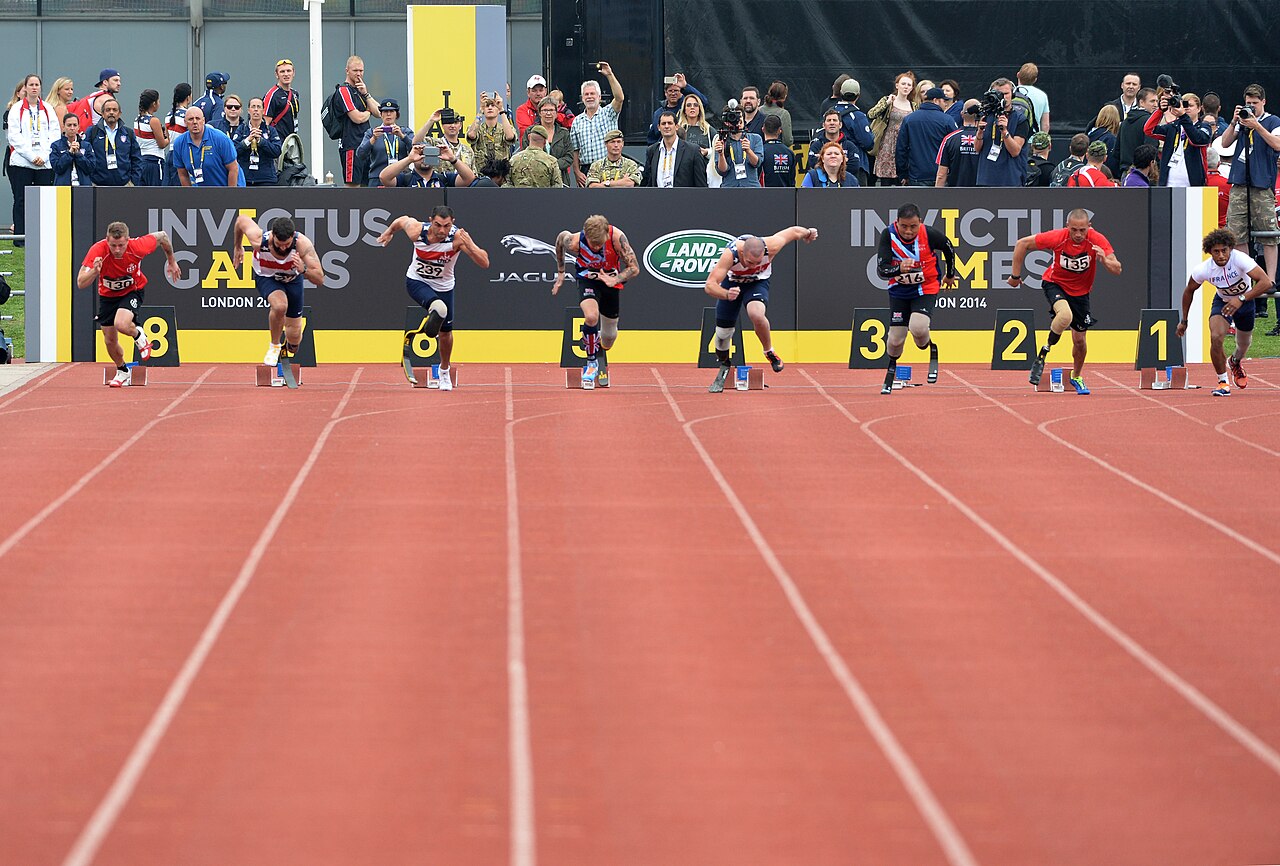
That is the point. One reaction time is nearly meaningless — you might have been lucky, or distracted. Ten of them tell you your typical speed, your best on a good day, and how consistent you are, which is often the most useful number of the three.
Every measuring system that reports a summary is doing the same job underneath: walk through everything recorded, one at a time, keeping a running answer. A scoreboard finds the maximum. A billing system adds up. A quality inspector counts how many failed.
The values differ; the shape never does. Start with an answer-so-far, look at each item in turn, update the answer, move on.
A machine that could store data but never read it back would be a filing cabinet nobody can open. The storing is only half of it — the value comes out when something goes through the record and finds the thing you actually wanted to know.
Recording is memory. Walking the record is understanding.
To read a list back you need two things: a counter that says which item you are looking at, and a loop that runs once per item. Everything else is what you do with each one.
set [i v] to (1) :: variables
repeat (length of [times v])
  write (item (i) of [times v]) at line (i) :: display
  change [i v] by (1) :: variables
end
i starts at 1, the loop runs once per item, and i goes up at the end of every pass.Lists count from 1, not 0. Start i at 0 and the first read returns nothing; start at 1 and stop at length of and you get exactly the items that exist. This is the single commonest mistake with lists, in every programming language, and it has its own name: an off-by-one.
set [best v] to (item (1) of [times v]) :: list
set [i v] to (1) :: variables
repeat (length of [times v])
  if <(item (i) of [times v]) < (best)> then
    set [best v] to (item (i) of [times v]) :: list
  end
  change [i v] by (1) :: variables
endNotice what best starts as. Not zero — no reaction time is faster than zero, so nothing would ever beat it and the answer would stay 0. Starting from the first real item is the safe habit, and it works whatever the values are.
set [total v] to (0) :: variables
set [i v] to (1) :: variables
repeat (length of [times v])
  set [total v] to ((total) + (item (i) of [times v])) :: variables
  change [i v] by (1) :: variables
end
set [mean v] to ((total) / (length of [times v])) :: variables
| Job | Start the answer at | Each item |
|---|---|---|
| Smallest | item 1 | Replace if this one is smaller. |
| Largest | item 1 | Replace if this one is larger. |
| Total | 0 | Add it on. |
| How many under 0.5 s | 0 | Add 1 if it qualifies. |
A variable holds one number. A list holds many, in order, under one name — so a robot can remember every reading it took rather than only the most recent.
If a variable is a piece of paper with one number on it, a list is a row of lockers. Each locker has a number on the door, and each one holds something of its own. They all share a name — snacks, colours — and you tell them apart by the number, not the name.
The doors matter. You cannot see what is in the whole row at a glance: to find out what is in locker 3, you have to open locker 3. And if you want to change what is in there, you open it, take out what is inside, and put something else in. Try it — click a door.
Three lockers are in use. You cannot see inside any of them until you open one — click a door.
Every list block is one of those physical actions, and the block for whatever you just did appears underneath the lockers:
| Block | The locker version |
|---|---|
add [banana] to [snacks v] | Put a banana in the next free locker. Always the end of the row. |
(item (3) of [snacks v]) | Open locker 3 and tell me what is inside. One locker, one look. |
replace item (3) of [snacks v] with [candy] | Open 3, take out what is there, put candy in. Nothing else moves. |
delete (3) of [snacks v] | Empty locker 3 and close up the gap — everything after it shuffles down one. What was in 4 is now in 3. |
(length of [snacks v]) | How many lockers are in use. |
delete all of [snacks v] | Empty the whole row. This belongs at the top of a program. |
Deleting is the one that catches people. A locker does not stay empty — the row closes up. Delete item 2 of a five-item list and you have a four-item list, with everything after position 2 now one number lower than it was. Any position you wrote down before the delete is wrong afterwards.
Lists are not only for numbers. Anything a block can report can go in one:
| Block | What it does |
|---|---|
add [thing] to [List v] | Puts a new value on the end. |
(item (1) of [List v]) | Reads the value at a position. Positions start at 1. |
(length of [List v]) | Reports how many values are stored. |
delete all of [List v] | Empties it. This belongs at the top of the program, for the same reason a variable is set to zero there. |
The natural shape is a loop that takes a reading and adds it. Watch the same four readings go into a variable and into a list.
into a variable
into a list
Watch the variable box, not the list. Every reading it shows is correct; it is the ones it has already forgotten that matter.
Notice that the variable is never wrong. Every number it shows is a real reading, correctly taken, moments ago. It simply has room for one, so each new reading pushes the last one out — and by the fourth stop three readings have quietly ceased to exist.
Afterwards the list can be walked to find the largest, the smallest, or the average — none of which is possible if you only ever kept the latest value.
Positions count from 1, not 0. A loop that starts its counter at 0 reads a position that does not exist and misses the first entry.
Storing readings is only half of it. To use a list you walk it, and that needs one more idea: a variable that holds a position rather than a value. Call it i. Set it to 1, read item i, then change i by 1 — and the next pass round the loop looks at the next locker.
Two things make this work without anybody counting. The loop repeats length of colours, so it runs once per item however many there are; and i doubles as the screen line, so each item lands on its own row.
when program starts :: events hat
delete all of [colours v]
add [red] to [colours v]
add [blue] to [colours v]
add [green] to [colours v]
add [yellow] to [colours v]
clear display :: display
set [i v] to (1)
repeat (length of [colours v])
  write (item (i) of [colours v]) at line (i) :: display
  change [i v] by (1)
end
Watch i rather than the blocks. It is the only thing that changes between one pass and the next, and it is what makes each pass look at a different locker.
Nowhere does that program mention the number four. Add a fifth colour and it writes five lines, unchanged — which is the whole reason to ask a list its length rather than typing a number you will have to remember to update.
Once a robot can walk a list it can do real work on one. Both of these are the same trick — go along comparing two items at a time — and they differ only in what they do about it. Sorting swaps the pair; finding the biggest just remembers the winner.
when program starts :: events hat
set [i v] to (1)
repeat ((length of [nums v]) - (1))
  set [j v] to (1)
  repeat ((length of [nums v]) - (i))
    if <(item (j) of [nums v]) > (item ((j) + (1)) of [nums v])> then
      set [temp v] to (item (j) of [nums v])
      replace item (j) of [nums v] with (item ((j) + (1)) of [nums v])
      replace item ((j) + (1)) of [nums v] with (temp)
    end
    change [j v] by (1)
  end
  change [i v] by (1)
endOnly ever two numbers are being compared at a time. A sort looks complicated because it repeats, not because any one step is hard.
A bubble sort looks hard because it is a loop inside a loop, but no single step is: compare two neighbours, swap them if they are the wrong way round, move along one. Each full pass floats the biggest remaining number to the end — which is where the name comes from — so after as many passes as there are items, the list is in order.
Finding the biggest needs no swapping at all. Assume the first item is the winner, walk the rest, and whenever you meet something bigger, remember that instead. One pass, one variable. Swap the > for a < and the same program finds the smallest — which is how a line-following robot works out its black and its white before choosing a threshold between them.
This is data collection — a robot driving a course while recording distances, then reporting what it found. It is the difference between a machine that reacts and one that measures.
Machines repeat. A wiper sweeps, a conveyor runs, a ride goes round — and none of that should mean copying the same blocks over and over. A loop says “do this again” once.
| Block | What it does |
|---|---|
repeat (10) end | Runs the blocks inside a set number of times, then carries on below. |
forever end | Runs the blocks inside over and over, and never carries on below. |
repeat until <> end | Repeats until a condition becomes true — a loop with a sensor as its exit. |
Anything placed after a forever loop will never run. Not “runs late” — never. Both programs below end with the same block: set the status light green.
repeat (3)
forever
↑ this block never runs
Both programs contain the same green-light block. Let it run as long as you like — the right-hand ring will never turn green.
The repeat loop counts its three passes, stops, and moves on to the block underneath, so its light turns green. The forever loop reaches the bottom of its own blocks and jumps straight back to the top, so the block underneath is never reached — however long you leave it. If a program seems to stop half way through, look for a forever loop above the blocks that are not happening.
A program is a list, and the Brick works down it once. Every block runs, in order, and when the last one is done the program is over. That is fine for a list of instructions — drive, turn, beep, stop — because each is a thing you do once.
A sensor is not a thing you do once. Asking is 1 pressed? gives you an answer about this instant, and an instant later it may be wrong. Checking a sensor once tells you what the world was like at the moment the program started — which is almost never what you wanted to know.
So a program that has to react must ask again, and again, for as long as it is running. That is the whole job of the loop: not to repeat an action, but to keep the question being asked.
Wrap a sensor check and the motor it controls in a forever loop and you have built a closed-loop control system — the pattern behind every line follower, thermostat and cruise control:
It is called closed because the output feeds back round to the input: the motors move the robot, moving the robot changes what the sensor sees, and what the sensor sees changes the motors. Break the circle at any point and the robot stops responding.
when program starts :: events hat
forever
  if <[1 v] is pressed? :: sensors> then
    [A v] start motor [clockwise v] :: motors
  else
    [A v] stop motor :: motors
  end
end
Read it as a sentence and it is almost too simple to need explaining: for ever, if the button is pressed run the motor, otherwise stop it. The motor now follows the button for as long as the program is running.
This is the mistake nearly everybody makes first, and it is a hard one to spot because nothing about it looks wrong:
when program starts :: events hat
if <[1 v] is pressed? :: sensors> then
  [A v] start motor [clockwise v] :: motors
else
  [A v] stop motor :: motors
end
The logic is perfect. The ports are right. Nothing is misspelled. And the robot will ignore the button completely — because the Brick reaches that if/else a few milliseconds after you press Run, finds the button not pressed, takes the else branch, stops the motor, runs out of blocks and ends. By the time a finger arrives, there is no program left to notice it.
with forever — a closed loop
without it — the common mistake
↑ running — for the only time
Both programs contain exactly the same if/else. The only difference is the forever block around one of them.
Both programs contain exactly the same if/else. The counter is what gives it away: one keeps checking for as long as it runs, the other is stuck on the single check it made before anybody touched anything. A student who has seen this once stops writing it.
The tell on a real robot is a program that ends the instant you start it — the Brick returns to its menu almost immediately. If a sensor program finishes rather than waits, the loop is what is missing.
A sensor that reports a number cannot be used to make a decision on its own — 23 is neither true nor false. An operator turns that number into an answer by comparing it with something.
| Block | What it does |
|---|---|
<(x) > (50)> | True when the left value is bigger than the right. |
<(x) < (50)> | True when it is smaller. |
<<> and <>> | True only when both conditions are true. |
<<> or <>> | True when at least one of them is. |
Forget the symbols for a moment. A comparison is a question about position on a number line: is x to the left of the other number, or to the right? Left is smaller, right is bigger — and that is the whole of it.
Drag the orange x and the black marker, and change the comparison. The green stretch is every position of x that would make the answer true — so you can see where the answer flips before you get there. Turn not on and watch the green jump to the other side.
Drag either marker, or use the arrow keys.
is x to the LEFT of it?
The lab above asks one question at a time: is this x true? A robot never has just one x, though — a sensor reading slides up and down all the time, so what really matters is which stretch of the line makes the condition true. This one draws the whole answer at once.
Drag the circle to move the number you are comparing against, and change the comparison. Everything shaded green is a value of x that would make it true.
Drag the circle, or use the arrow keys. It moves in steps of 0.2.
Every number to the left of 0.2 — but not 0.2 itself, so the circle is hollow.
Watch the circle, because it carries the part everyone gets wrong:
Now turn not on with x > 2 selected and watch two things happen together. The shading jumps to the other side, and the circle fills in — because “not greater than 2” means 2 or less, and 2 has to be part of it. That pairing is the whole reason a hollow circle is worth drawing.
Why a robot cares. Two conditions that look almost identical — light < 30 and not (light > 30) — differ by exactly one value, the reading of precisely 30. A robot sitting right on its threshold behaves differently under the two, and that is the sort of bug that only shows up occasionally and looks like a broken sensor.
These three join answers together rather than numbers. The trap is that English is looser than a program: “stop if it is close and the bumper is pressed” sounds like it covers both situations, when it covers neither on its own.
Flip the two conditions and watch the table. There are only four possible situations in total, and and and or differ on exactly two of them.
| close | bumper | and | or |
|---|---|---|---|
| true | true | true | true |
| true | false | false | true |
| false | true | false | true |
| false | false | false | false |
and is fussy: it wants both. Three of the four rows are false.
Two sensors are running below: an Ultrasonic reporting a number, and a Touch Sensor reporting true or false. Watch the comparison turn the number into an answer, and watch and and or disagree.
and was true in one row out of four. or was true in three. That is the whole difference, and it is why one of them makes a robot look broken.
The comparison is doing one job: it takes a reading that is neither true nor false and, by holding it against a number you chose, produces something a decision can use. The moment the blue fill crosses the black marker is the moment the answer changes.
The number you compare against is a design decision, not a fact. “Close” for a parking sensor might be 15 cm; for a robot arm it might be 3. Pick it by measuring what the sensor actually reads in the situation you care about, then leave a margin.
and narrows: both must hold, so the robot acts less often but more certainly — stop only if something is close and the bumper is pressed. or widens: either will do, so the robot acts more readily — stop if something is close or the bumper is pressed.
In the four situations above, and was true in one of them and or in three. That is the practical difference: swapping one for the other does not adjust a robot slightly, it changes how often it reacts at all.
Start an answer. Visit every item. Update the answer. That one shape does best, worst, total, average and count.
A variable holds one number. A list holds many, in order, under one name — so a robot can remember every reading it took rather than only the most recent.
If a variable is a piece of paper with one number on it, a list is a row of lockers. Each locker has a number on the door, and each one holds something of its own. They all share a name — snacks, colours — and you tell them apart by the number, not the name.
The doors matter. You cannot see what is in the whole row at a glance: to find out what is in locker 3, you have to open locker 3. And if you want to change what is in there, you open it, take out what is inside, and put something else in. Try it — click a door.
Three lockers are in use. You cannot see inside any of them until you open one — click a door.
Every list block is one of those physical actions, and the block for whatever you just did appears underneath the lockers:
| Block | The locker version |
|---|---|
add [banana] to [snacks v] | Put a banana in the next free locker. Always the end of the row. |
(item (3) of [snacks v]) | Open locker 3 and tell me what is inside. One locker, one look. |
replace item (3) of [snacks v] with [candy] | Open 3, take out what is there, put candy in. Nothing else moves. |
delete (3) of [snacks v] | Empty locker 3 and close up the gap — everything after it shuffles down one. What was in 4 is now in 3. |
(length of [snacks v]) | How many lockers are in use. |
delete all of [snacks v] | Empty the whole row. This belongs at the top of a program. |
Deleting is the one that catches people. A locker does not stay empty — the row closes up. Delete item 2 of a five-item list and you have a four-item list, with everything after position 2 now one number lower than it was. Any position you wrote down before the delete is wrong afterwards.
Lists are not only for numbers. Anything a block can report can go in one:
| Block | What it does |
|---|---|
add [thing] to [List v] | Puts a new value on the end. |
(item (1) of [List v]) | Reads the value at a position. Positions start at 1. |
(length of [List v]) | Reports how many values are stored. |
delete all of [List v] | Empties it. This belongs at the top of the program, for the same reason a variable is set to zero there. |
The natural shape is a loop that takes a reading and adds it. Watch the same four readings go into a variable and into a list.
into a variable
into a list
Watch the variable box, not the list. Every reading it shows is correct; it is the ones it has already forgotten that matter.
Notice that the variable is never wrong. Every number it shows is a real reading, correctly taken, moments ago. It simply has room for one, so each new reading pushes the last one out — and by the fourth stop three readings have quietly ceased to exist.
Afterwards the list can be walked to find the largest, the smallest, or the average — none of which is possible if you only ever kept the latest value.
Positions count from 1, not 0. A loop that starts its counter at 0 reads a position that does not exist and misses the first entry.
Storing readings is only half of it. To use a list you walk it, and that needs one more idea: a variable that holds a position rather than a value. Call it i. Set it to 1, read item i, then change i by 1 — and the next pass round the loop looks at the next locker.
Two things make this work without anybody counting. The loop repeats length of colours, so it runs once per item however many there are; and i doubles as the screen line, so each item lands on its own row.
when program starts :: events hat
delete all of [colours v]
add [red] to [colours v]
add [blue] to [colours v]
add [green] to [colours v]
add [yellow] to [colours v]
clear display :: display
set [i v] to (1)
repeat (length of [colours v])
  write (item (i) of [colours v]) at line (i) :: display
  change [i v] by (1)
end
Watch i rather than the blocks. It is the only thing that changes between one pass and the next, and it is what makes each pass look at a different locker.
Nowhere does that program mention the number four. Add a fifth colour and it writes five lines, unchanged — which is the whole reason to ask a list its length rather than typing a number you will have to remember to update.
Once a robot can walk a list it can do real work on one. Both of these are the same trick — go along comparing two items at a time — and they differ only in what they do about it. Sorting swaps the pair; finding the biggest just remembers the winner.
when program starts :: events hat
set [i v] to (1)
repeat ((length of [nums v]) - (1))
  set [j v] to (1)
  repeat ((length of [nums v]) - (i))
    if <(item (j) of [nums v]) > (item ((j) + (1)) of [nums v])> then
      set [temp v] to (item (j) of [nums v])
      replace item (j) of [nums v] with (item ((j) + (1)) of [nums v])
      replace item ((j) + (1)) of [nums v] with (temp)
    end
    change [j v] by (1)
  end
  change [i v] by (1)
endOnly ever two numbers are being compared at a time. A sort looks complicated because it repeats, not because any one step is hard.
A bubble sort looks hard because it is a loop inside a loop, but no single step is: compare two neighbours, swap them if they are the wrong way round, move along one. Each full pass floats the biggest remaining number to the end — which is where the name comes from — so after as many passes as there are items, the list is in order.
Finding the biggest needs no swapping at all. Assume the first item is the winner, walk the rest, and whenever you meet something bigger, remember that instead. One pass, one variable. Swap the > for a < and the same program finds the smallest — which is how a line-following robot works out its black and its white before choosing a threshold between them.
This is data collection — a robot driving a course while recording distances, then reporting what it found. It is the difference between a machine that reacts and one that measures.
Say this back before moving on: “One at a time, keeping the answer so far.”
Four electronic parts, and two of them are the two players. Work out which.
| Part | What it is doing here |
|---|---|
| EV3 Intelligent Brick | Referee and scoreboard. At the end of a round its screen carries the summary the whole lesson has been building towards. |
| Large Motor — the target arm | Flicks the target up. Must be fast and unmistakable — a slow rise gives players a warning, and then you are measuring anticipation rather than reaction. |
| Medium Motor — the score pointer | Swings to show the result. A physical needle is worth having: it makes a number from a list visible from across the room. |
| Touch Sensor — player one | A button. Fast, unambiguous, and easy to lean on by accident. |
| Colour Sensor — player two | Sees a coloured paddle waved in front of it. Slower to trigger than a button, which is worth knowing before you compare two players. |
The two inputs are not equally fast, and that is a real result. A Colour Sensor has to see the paddle arrive; a switch closes the instant it is touched. If you compare the two players directly, you are partly comparing the sensors — challenge 3 asks you to deal with that honestly.
Sensors go in ports 1, 2, 3, 4. Motors go in ports A, B, C, D. They are not interchangeable, and nothing will tell you politely if you swap them.
| Part | Port | Why this one |
|---|---|---|
| Target arm (Large) | A | The main actuator. |
| Score pointer (Medium) | B | The display motor. |
| Player one (Touch) | 1 | Touch stays on 1. |
| Player two (Colour) | 3 | Colour stays on 3. |
Check your own build now:
Two routes, and either is fine. USB is the reliable one and the one to fall back on when a room’s Bluetooth is busy; Bluetooth leaves the robot free to move, which some models need.
Do these in order. Naming the Brick after you go looking for it in the list is how groups end up driving each other’s robots.
EV3 until somebody changes it.EV3.The two failures, every class, every time. The Brick has gone to sleep while you were building — press the centre button to wake it. Or you have paired with the group at the next table, which is why the name matters.
The long version, including Port View and how to read the port tiles, is in the Brick & Bluetooth guide.
USB, and keep the lead behind the machine. Two players lunging at a table is exactly the situation in which a cable gets caught, and the Brick coming off the table mid-round loses the list.
Stuck? The long version, with a photograph of every screen, is in the Brick & Bluetooth guide.
One change at a time. Predict, then run, then look.
i at 0. Predict what breaks. Then run it — an off-by-one you have caused deliberately is much easier to recognise later.best at 0. Nothing beats it, so the reported best stays 0 all round. This is why the starting value matters.under, starting at 0, adding 1 whenever an item is below 0.5 seconds. Same loop, same shape, new question.B run for (best × 100) degrees. A number out of a list is just a number — it can drive a motor like any other.Index from 1 to length. Advance it every pass. Choose the starting answer on purpose.
That is the data half of Level 3 finished. My Blocks and broadcasts organise a program; variables, states and lists give it a memory it can reason about.
The last three lessons go back to control — to the closed loop from Lesson 5, and the two things about it that were left unfinished. It never quite settles, and its numbers are guesses that only work in this room.
Next lesson fixes the twitching. A helicopter holding a hover cannot chase every millimetre — at some point “close enough” has to mean stop, and saying where that point is turns out to be a design decision with a name.
You can organise a program and give it a memory. Now make it good at being right.
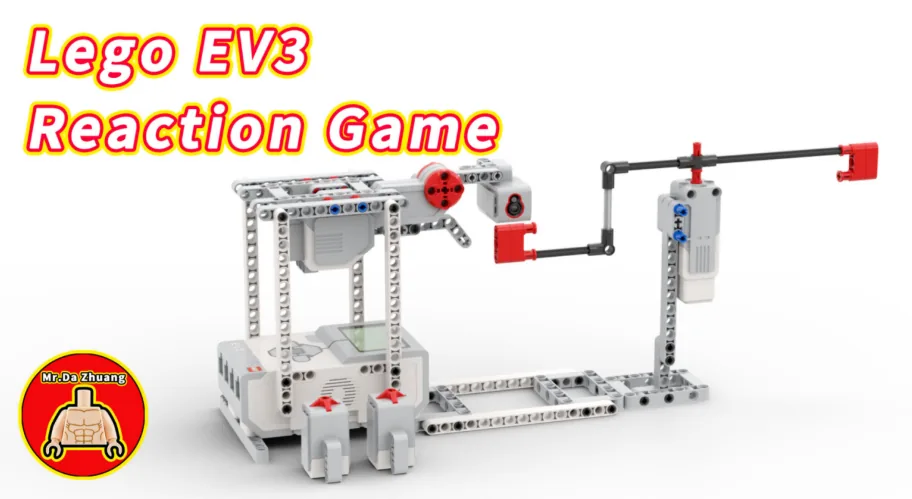
Build the model before you read any further. Everything after this is about making it do something, and none of it will make much sense with nothing on the table in front of you.
Use the viewer's own controls to zoom and turn pages. Fullscreen makes it big enough to build from.
The same build on Google Drive — sometimes a video, sometimes a scan:
Use the viewer's own controls to zoom and turn pages. Fullscreen makes it big enough to build from.
Check the finished build against the picture before you switch anything on. A motor mounted the wrong way round is far easier to spot now than it is to debug later, when it looks like a program fault.
Play five rounds and record them, then — the new part — read the list back three different ways.
when program starts :: events hat
delete all of [times v] :: list
clear display :: display

repeat (5)
  write [WAIT] at line (1) :: display
  wait (pick random (2) to (6)) seconds :: control
  [A v] run [clockwise v] for (90) [degrees v] at (100) % speed :: motors
  write [GO!] at line (1) :: display
  reset timer :: control
  wait until <[1 v] is pressed? :: sensors>
  add (timer) to [times v] :: list
  [A v] run [counterclockwise v] for (90) [degrees v] at (60) % speed :: motors
  wait until <not <[1 v] is pressed? :: sensors>> :: control
end

set [best v] to (item (1) of [times v]) :: list
set [worst v] to (item (1) of [times v]) :: list
set [total v] to (0) :: variables
set [i v] to (1) :: variables

repeat (length of [times v])
  if <(item (i) of [times v]) < (best)> then
    set [best v] to (item (i) of [times v]) :: list
  end
  if <(item (i) of [times v]) > (worst)> then
    set [worst v] to (item (i) of [times v]) :: list
  end
  set [total v] to ((total) + (item (i) of [times v])) :: variables
  change [i v] by (1) :: variables
end

clear display :: display
write (best) at line (2) :: display
write (worst) at line (4) :: display
write ((total) / (length of [times v])) at line (6) :: displaybest and worst both start at item 1. ** Whatever the real times are, the first one is a legitimate starting guess.total starts at 0 ** — the only one of the three that does, and the reason is worth saying aloud.change i by 1 is the last line inside the loop. ** Forget it and the loop reads item 1 five times, giving a best, worst and average that are all the same number. That is the tell.What success looks like: five goes, then three numbers on screen — a fastest, a slowest, and an average that sits between them.
If all three numbers are identical, your index is not advancing. If the best is 0, you started
bestat 0 instead of at item 1.
Work through them in order — each is harder than the last. The extra challenge comes after all three, and it is meant to make you plan before you build.
Count the good ones. Add a fourth running answer to the same loop: how many of the reaction times were under 0.5 seconds. It starts at 0, not at item 1. Be ready to say why that differs from best and worst.
Print the whole list. Walk the list a second time and write every item down the screen, one per line. Then check your summary against what you can see. If the best on screen is not the smallest in the list, your comparison is the wrong way round.
Two players, judged fairly. Record player one and player two into separate lists, five rounds each, and report each player's best and average. Then answer honestly on paper: the button and the colour paddle do not trigger equally fast. Does your result show who reacted quicker, or who had the better sensor? Suggest one change to the machine that would make the comparison fair.
Build a scoreboard that tells the players something they did not know. Ten rounds. At the end, the machine must report: the best, the worst, the average, and — the interesting one — whether the player got FASTER over the ten rounds. That last one needs thought. One approach: average the first five and the last five and compare. There are others. Choosing an approach and being able to defend it is the mission. Three rules: 1. One walk through the list per question. If you find yourself looping four times, ask which of your answers could share a pass. 2. Every starting value chosen on purpose. Be ready to say why each one is what it is. 3. The verdict appears in words on the screen — IMPROVING, STEADY or TIRING — not as a raw number. Finally: run it on someone, show them the verdict, and ask if it matches how they felt. A measurement that disagrees with the person measured is worth investigating, not dismissing.