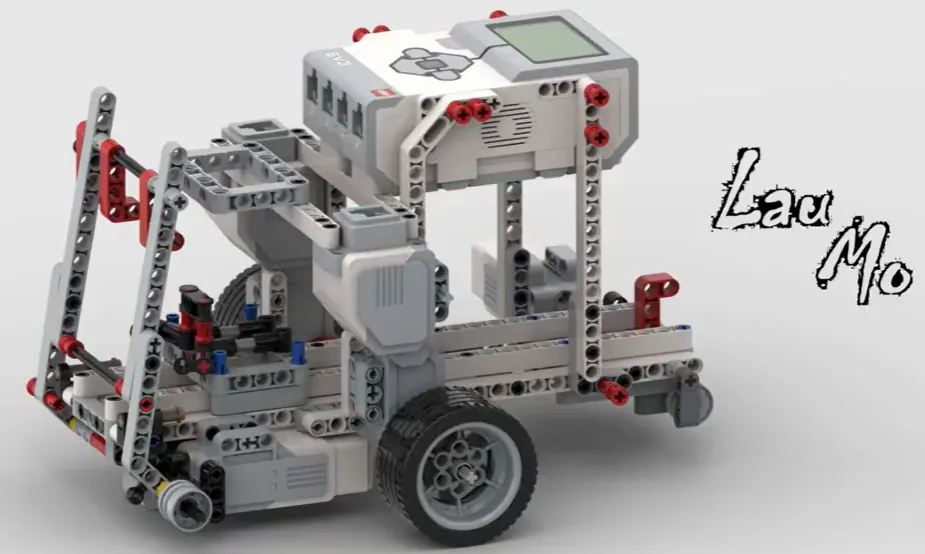
The Bowling Car: a driving base with a swinging arm on a Medium Motor that bowls a ball down a lane at a set of pins.
A bowling run is a routine — line up, adjust, approach, swing, follow through. Written as blocks, changing the run means rewriting the program. Written as a list, changing the run means changing four numbers.
By the end of the lesson your car will perform a run stored as data, and a short loop will be the only part that moves anything — which means you can change the whole routine without touching the code that performs it.
In the real world 5 min
Where you have seen it
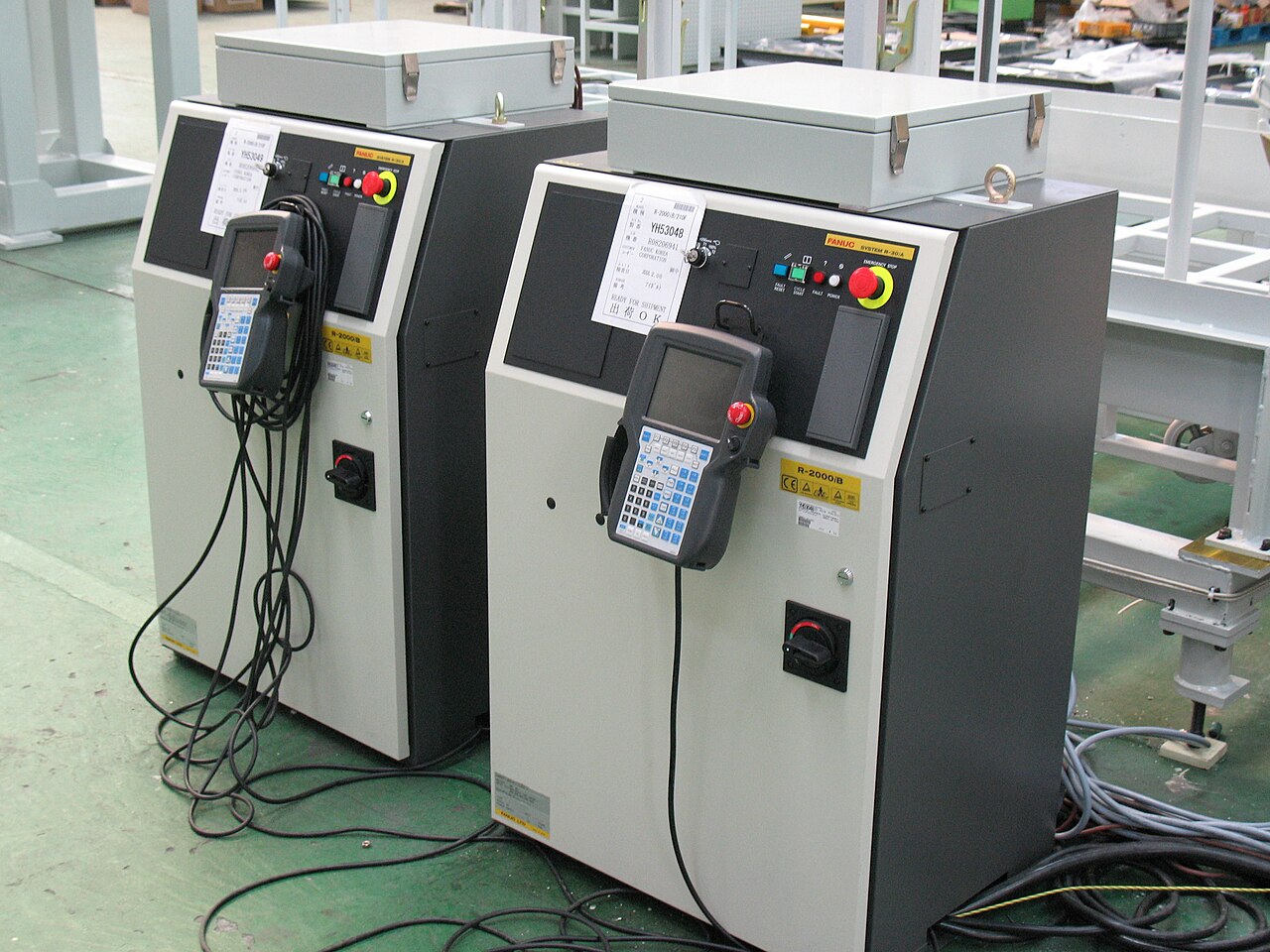
An industrial robot arm is almost never programmed by typing coordinates. An engineer takes a hand-held pendant, drives the arm to each position in turn, and presses a button to record it. The arm plays the points back afterwards at full speed.
The arm’s software does not change between jobs. What changes is the list of points. The same welding robot does a car door on Monday and a wing bracket on Tuesday, running identical code over different data.
Why it is built that way
Because the person who knows the job is not the person who writes the software. A production engineer can teach an arm a new path in twenty minutes; changing the program would mean a software release, testing, and a week of waiting.
Separating what to do from how to do it is one of the biggest ideas in computing. A CNC machine reads a file of moves. A washing machine’s programmes are tables of times and temperatures, not separate programs.
What would go wrong without it
Every change would be a code change. Every code change risks breaking the parts that already worked — and the person best placed to make the change would not be allowed near it.
When the routine lives in data, changing the routine cannot break the machine.
The main concept — the routine as data 6 min
You have used lists to remember what happened. Today a list holds what to do, and a short loop walks it — the same walking pattern from Lesson 9, doing something quite different.
The routine written out
when program starts :: events hat
move [forward v] for (2) [rotations v] at (40) % speed :: movement
turn [right v] for (0.3) [rotations v] at (30) % speed :: movement
move [forward v] for (1.5) [rotations v] at (60) % speed :: movement
[A v] run [clockwise v] for (180) [degrees v] at (100) % speed :: motors
Clear, and completely rigid. A five-step run needs five more blocks; changing the order means dragging blocks around.
The same routine as data
when program starts :: events hat
delete all of [moves v] :: list
delete all of [amounts v] :: list

add [drive] to [moves v] :: list
add (2) to [amounts v] :: list
add [turn] to [moves v] :: list
add (0.3) to [amounts v] :: list
add [drive] to [moves v] :: list
add (1.5) to [amounts v] :: list
add [bowl] to [moves v] :: list
add (180) to [amounts v] :: list

broadcast [run routine v] :: events
Two lists, read at the same position: step 3 is moves item 3 with amounts item 3. This is the table shape from Lesson 8.
when I receive [run routine v] :: events hat
set [i v] to (1) :: variables
repeat (length of [moves v])
  set [what v] to (item (i) of [moves v]) :: list
  set [how much v] to (item (i) of [amounts v]) :: list
  write (what) at line (1) :: display

  if <(what) = [drive]> then
    move [forward v] for (how much) [rotations v] at (40) % speed :: movement
  end
  if <(what) = [turn]> then
    turn [right v] for (how much) [rotations v] at (30) % speed :: movement
  end
  if <(what) = [bowl]> then
    [A v] run [clockwise v] for (how much) [degrees v] at (100) % speed :: motors
  end

  change [i v] by (1) :: variables
end
The interpreter. It knows how to do three things and does not know or care what the routine is. Written once, never edited again.
To change…
Blocks version
List version
How far the first drive goes
Find the block, change the number.
Change one number in the data.
The order of the steps
Drag blocks around and hope.
Reorder the add lines.
Run a different routine entirely
A second program.
A second set of add lines. Same interpreter.
Add a new KIND of action
Add blocks.
Add one rule to the interpreter — the only time you touch it.
Two lists read at the same index is a table. Item 3 of moves and item 3 of amounts belong to the same step. They must always be added in pairs, or every step after the mistake refers to the wrong number.
ComponentData6 min
Lists
A variable holds one number. A list holds many, in order, under one name — so a robot can remember every reading it took rather than only the most recent.
A corridor of lockers
If a variable is a piece of paper with one number on it, a list is a row of lockers. Each locker has a number on the door, and each one holds something of its own. They all share a name — snacks, colours — and you tell them apart by the number, not the name.
The doors matter. You cannot see what is in the whole row at a glance: to find out what is in locker 3, you have to open locker 3. And if you want to change what is in there, you open it, take out what is inside, and put something else in. Try it — click a door.
length of snacks = 3
add candy to snacks
Three lockers are in use. You cannot see inside any of them until you open one — click a door.
Every list block is one of those physical actions, and the block for whatever you just did appears underneath the lockers:
Block
The locker version
add [banana] to [snacks v]
Put a banana in the next free locker. Always the end of the row.
(item (3) of [snacks v])
Open locker 3 and tell me what is inside. One locker, one look.
replace item (3) of [snacks v] with [candy]
Open 3, take out what is there, put candy in. Nothing else moves.
delete (3) of [snacks v]
Empty locker 3 and close up the gap — everything after it shuffles down one. What was in 4 is now in 3.
(length of [snacks v])
How many lockers are in use.
delete all of [snacks v]
Empty the whole row. This belongs at the top of a program.
Deleting is the one that catches people. A locker does not stay empty — the row closes up. Delete item 2 of a five-item list and you have a four-item list, with everything after position 2 now one number lower than it was. Any position you wrote down before the delete is wrong afterwards.
What a robot puts in them
Lists are not only for numbers. Anything a block can report can go in one:
Colours from the Colour Sensor. Drive along a line of coloured cards adding each reading, and at the end the robot has the whole sequence — not just the last card it went over.
Positions in degrees. A list of angles is a list of places an arm should go: 0, 90, 180, 270. Walking the list drives the arm through the positions in order, and changing where it stops means editing a number rather than rewriting the program.
Words.apple, banana, candy — a vending machine holds its stock in one list and the matching prices or positions in another, so item 2 of one lines up with item 2 of the other.
Blocks reference
Block
What it does
add [thing] to [List v]
Puts a new value on the end.
(item (1) of [List v])
Reads the value at a position. Positions start at 1.
(length of [List v])
Reports how many values are stored.
delete all of [List v]
Empties it. This belongs at the top of the program, for the same reason a variable is set to zero there.
Collecting readings
The natural shape is a loop that takes a reading and adds it. Watch the same four readings go into a variable and into a list.
into a variable
repeat 4
set reading to 4 distance in cm
into a list
delete all of Readings
repeat 4
add 4 distance in cm to Readings
write item (3) of Readings at line 1
0values in the variable0values in the list
The robot will stop four times and read the distance. One program keeps the reading in a variable; the other adds it to a list.Reading 1: 38 cm. Both programs hold 38.Reading 2: 12 cm. The variable has just thrown 38 away. The list has both.Reading 3: 47 cm — the biggest of the run.Reading 4: 25 cm. The variable holds one number; the list holds four, in the order they were taken.Now go back and ask for any of them — item 3 of the list is still 47, the largest of the run. The variable cannot answer: 47 stopped existing two stops ago.Finished. The variable was never wrong — it was only ever holding one thing.
0 of 4 readings taken
Watch the variable box, not the list. Every reading it shows is correct; it is the ones it has already forgotten that matter.
Notice that the variable is never wrong. Every number it shows is a real reading, correctly taken, moments ago. It simply has room for one, so each new reading pushes the last one out — and by the fourth stop three readings have quietly ceased to exist.
Afterwards the list can be walked to find the largest, the smallest, or the average — none of which is possible if you only ever kept the latest value.
Positions count from 1, not 0. A loop that starts its counter at 0 reads a position that does not exist and misses the first entry.
Reading the whole list out
Storing readings is only half of it. To use a list you walk it, and that needs one more idea: a variable that holds a position rather than a value. Call it i. Set it to 1, read item i, then change i by 1 — and the next pass round the loop looks at the next locker.
Two things make this work without anybody counting. The loop repeats length of colours, so it runs once per item however many there are; and i doubles as the screen line, so each item lands on its own row.
when program starts :: events hat
delete all of [colours v]
add [red] to [colours v]
add [blue] to [colours v]
add [green] to [colours v]
add [yellow] to [colours v]
clear display :: display
set [i v] to (1)
repeat (length of [colours v])
  write (item (i) of [colours v]) at line (i) :: display
  change [i v] by (1)
end
1i · the positionreditem i of colours4length of colours
The list holds four colours. i is set to 1 — it is not a colour, it is a position.Pass 1. item 1 of colours is red, so red goes on line 1. Then i changes to 2.Pass 2. item 2 is blue, onto line 2, and i becomes 3.Pass 3. item 3 is green, onto line 3, and i becomes 4.Pass 4 writes yellow. The loop was told to repeat length of colours — four — so it stops there without anybody counting.Four items, four passes, four lines. Add a fifth colour to the list and the same program writes five, unchanged.Finished. The program never mentions the number four — it asks the list how long it is.
i = 1
Watch i rather than the blocks. It is the only thing that changes between one pass and the next, and it is what makes each pass look at a different locker.
Nowhere does that program mention the number four. Add a fifth colour and it writes five lines, unchanged — which is the whole reason to ask a list its length rather than typing a number you will have to remember to update.
Going further: sorting, and finding the biggest
Once a robot can walk a list it can do real work on one. Both of these are the same trick — go along comparing two items at a time — and they differ only in what they do about it. Sorting swaps the pair; finding the biggest just remembers the winner.
when program starts :: events hat
set [i v] to (1)
repeat ((length of [nums v]) - (1))
  set [j v] to (1)
  repeat ((length of [nums v]) - (i))
    if <(item (j) of [nums v]) > (item ((j) + (1)) of [nums v])> then
      set [temp v] to (item (j) of [nums v])
      replace item (j) of [nums v] with (item ((j) + (1)) of [nums v])
      replace item ((j) + (1)) of [nums v] with (temp)
    end
    change [j v] by (1)
  end
  change [i v] by (1)
end
5 was bigger than 2, so they swap. The bigger number moves one place to the right.5 is already smaller than 9 — nothing to do. Move along one.9 was bigger than 1, so they swap. The bigger number moves one place to the right.9 was bigger than 7, so they swap. The bigger number moves one place to the right.2 is already smaller than 5 — nothing to do. Move along one.5 was bigger than 1, so they swap. The bigger number moves one place to the right.5 is already smaller than 7 — nothing to do. Move along one.2 was bigger than 1, so they swap. The bigger number moves one place to the right.2 is already smaller than 5 — nothing to do. Move along one.1 is already smaller than 2 — nothing to do. Move along one.Sorted. Every pass floated the biggest remaining number to the end, which is why it is called a bubble sort.Finished. Same blocks, any list — it does not care how long it is or what order it started in.
swap
Only ever two numbers are being compared at a time. A sort looks complicated because it repeats, not because any one step is hard.
A bubble sort looks hard because it is a loop inside a loop, but no single step is: compare two neighbours, swap them if they are the wrong way round, move along one. Each full pass floats the biggest remaining number to the end — which is where the name comes from — so after as many passes as there are items, the list is in order.
Finding the biggest needs no swapping at all. Assume the first item is the winner, walk the rest, and whenever you meet something bigger, remember that instead. One pass, one variable. Swap the > for a < and the same program finds the smallest — which is how a line-following robot works out its black and its white before choosing a threshold between them.
Why it matters
This is data collection — a robot driving a course while recording distances, then reporting what it found. It is the difference between a machine that reacts and one that measures.
ComponentControl5 min
Repeating
Machines repeat. A wiper sweeps, a conveyor runs, a ride goes round — and none of that should mean copying the same blocks over and over. A loop says “do this again” once.
Blocks reference
Block
What it does
repeat (10)
end
Runs the blocks inside a set number of times, then carries on below.
forever
end
Runs the blocks inside over and over, and never carries on below.
repeat until <>
end
Repeats until a condition becomes true — a loop with a sensor as its exit.
Forever really does mean forever
Anything placed after a forever loop will never run. Not “runs late” — never. Both programs below end with the same block: set the status light green.
repeat (3)
repeat 3
A run clockwise for 0.25rotations
set status light to green
forever
forever
A run clockwise for 0.25rotations
set status light to green
↑ this block never runs
0passes · repeat (3)0passes · forever
repeat (3): still goingforever: light never set
Both loops begin. Each pass turns the motor a quarter turn.Pass 1.Pass 2.Pass 3 — and repeat (3) has now done its three.The left program carries on to the block underneath and sets its light green. The right one has jumped back to the top of the loop, and it always will.The left program has finished. The right program has not, and will not.
starting
Both programs contain the same green-light block. Let it run as long as you like — the right-hand ring will never turn green.
The repeat loop counts its three passes, stops, and moves on to the block underneath, so its light turns green. The forever loop reaches the bottom of its own blocks and jumps straight back to the top, so the block underneath is never reached — however long you leave it. If a program seems to stop half way through, look for a forever loop above the blocks that are not happening.
Why a sensor program needs a loop at all
A program is a list, and the Brick works down it once. Every block runs, in order, and when the last one is done the program is over. That is fine for a list of instructions — drive, turn, beep, stop — because each is a thing you do once.
A sensor is not a thing you do once. Asking is 1 pressed? gives you an answer about this instant, and an instant later it may be wrong. Checking a sensor once tells you what the world was like at the moment the program started — which is almost never what you wanted to know.
So a program that has to react must ask again, and again, for as long as it is running. That is the whole job of the loop: not to repeat an action, but to keep the question being asked.
Read, decide, act — and then do it again
Wrap a sensor check and the motor it controls in a forever loop and you have built a closed-loop control system — the pattern behind every line follower, thermostat and cruise control:
Read the sensor.
Decide what that reading means.
Act on the motors.
Go back to 1 — immediately, thousands of times a minute.
It is called closed because the output feeds back round to the input: the motors move the robot, moving the robot changes what the sensor sees, and what the sensor sees changes the motors. Break the circle at any point and the robot stops responding.
when program starts :: events hat
forever
  if <[1 v] is pressed? :: sensors> then
    [A v] start motor [clockwise v] :: motors
  else
    [A v] stop motor :: motors
  end
end
Read it as a sentence and it is almost too simple to need explaining: for ever, if the button is pressed run the motor, otherwise stop it. The motor now follows the button for as long as the program is running.
The same program without the loop
This is the mistake nearly everybody makes first, and it is a hard one to spot because nothing about it looks wrong:
when program starts :: events hat
if <[1 v] is pressed? :: sensors> then
  [A v] start motor [clockwise v] :: motors
else
  [A v] stop motor :: motors
end
The logic is perfect. The ports are right. Nothing is misspelled. And the robot will ignore the button completely — because the Brick reaches that if/else a few milliseconds after you press Run, finds the button not pressed, takes the else branch, stops the motor, runs out of blocks and ends. By the time a finger arrives, there is no program left to notice it.
with forever — a closed loop
when program starts
forever
if 1 is pressed? then
A start motor clockwise
else
A stop motor
without it — the common mistake
when program starts
if 1 is pressed? then
A start motor clockwise
else
A stop motor
↑ running — for the only time
40checks · with forever1checks · no loop
Looped: motor off, matching the buttonNo loop: motor off for ever, whatever you press
Both programs start. The button is not pressed, so both take the else branch and leave the motor off. So far they agree exactly.The right-hand program has already finished. One if/else, checked once, and there were no more blocks after it — the program ended in a few milliseconds.Press the button. The looped program comes round, checks again, sees `pressed`, and starts the motor. The finished program cannot: it is not running.Release. The looped program comes round again and stops the motor. The other one has not looked at the sensor since the instant it started.Press again, and again. Every pass round the loop is another check — that constant read, decide, act is what a closed loop IS.Finished. The looped program answered the button every time. The other answered it once, before anybody had touched it.
button released
Both programs contain exactly the same if/else. The only difference is the forever block around one of them.
Both programs contain exactly the same if/else. The counter is what gives it away: one keeps checking for as long as it runs, the other is stuck on the single check it made before anybody touched anything. A student who has seen this once stops writing it.
The tell on a real robot is a program that ends the instant you start it — the Brick returns to its menu almost immediately. If a sensor program finishes rather than waits, the loop is what is missing.
Choosing the right loop
Known number of times — repeat (n). A wiper that sweeps five times.
Until something happens — repeat until. Drive until the wall is close.
For as long as the machine is on — forever. A fan, a ride, a monitor.
ComponentData6 min
Variables
Why anybody needs one
Long before there were computers, people had exactly this problem. A shepherd counting sheep through a gate, a trader counting sacks of grain, a builder counting days — none of them can hold the number in their head while they get on with the work. So they scratched a mark on a wall, cut a notch in a stick, or wrote a number on a piece of paper. The number lived outside the person, in a place they had agreed on, and they could go back to it, read it, and change it.
Better still, once the number is written down somebody else can use it. Watch these two: one of them counts and writes, the other never sees a single animal and simply reads the wall.
Abby never remembers the numberBen never sees a henThe wall holds it for both
Abby has a gate and a wall. Before a single hen comes through she chalks 0 on the wall — that is where the number is going to live.A hen goes through. Abby rubs out the 0 and chalks 1. Another goes through, and she does it again.Three hens have been through, and the wall says 3. Abby is not remembering the number — she is reading her own wall each time and writing the next one.Ben has been at the market all morning. He has not seen one hen. He walks up, reads the wall, and knows the answer — without asking Abby anything.That is a variable. Not a number in somebody's head, but a place both of them agreed on: one writes to it, the other reads from it, and it keeps the number in between.Finished. Abby wrote, Ben read, and the wall is what joined them up.
the wall holds it
Notice what never happens: Ben never asks Abby. He does not need to — the number is not in her head, it is on the wall, and the wall is there for anyone who needs it.
Neither Abby nor Ben is holding the number — the wall is. And notice what never happens: Ben does not ask Abby. He does not need to, because the count is not in her head. It is in a place they both agreed on, which is what makes it useful to more than one of them.
That is all a variable is. The robot cannot hold a number in its head either, so you give it a wall of its own, write a name at the top so everyone knows which wall is which — score, count, degree_turn — and the program can read what is on it and write something new. One part of the program writes; another part reads. Exactly Abby and Ben.
The paper, and the two things you can do to it
Say we are counting rotations of a motor. Before we start we write 0 on the paper. Every time the motor completes a turn we cross out what is there and write one more: 0 becomes 1, then 2, then 3. That is change — it has to read the old number to work out the new one.
set is the other thing you can do, and it is completely different: rub the whole paper out and write the number you want. It does not care what was there. Press the buttons and watch what happens to the crossings-out.
score
0
The paper starts blank, so we write 0 on it. That is what a variable is: a place to keep a number while the robot works.
change leaves a trail — every value follows from the one before it. This is what counting is.
set wipes the sheet. Use it to start a count, never to continue one.
Press set score to 0 after counting up a few times and watch the whole history vanish. That is what happens to a count when a set block ends up in the wrong place — and it is the commonest variable bug there is.
Blocks reference
Block
What it does
set [count v] to (0)
Puts a value in, replacing whatever was there.
change [count v] by (1)
Adds to what is already there.
(count)
Reports the current value, for use in a comparison or on the display.
Set, or change?
set replaces; change adds. Counting things needs change. Starting a count needs set. Both programs below have both blocks — the only difference is whether the set block is inside the loop or above it.
set before the loop
when program starts
set count to 0
repeat 4
A run clockwise for 1rotations
change count by 1
set inside it
repeat 4
set count to 0
A run clockwise for 1rotations
change count by 1
Before the loop: counted 0Inside the loop: stuck at 0
Both programs count the turns of a motor. The left sets the count to zero before the loop; the right sets it inside.Turn 1. Both counters read 1, and so far the two programs agree.Turn 2. The left count is 2. The right was set back to zero at the top of the loop, so it is 1 again.Turn 3. The left reads 3. The right still reads 1.Turn 4. The motor turned four times on both robots — only one of them counted them.Finished. Four turns, and one of the two counts is fiction.
stopped
Both programs contain both blocks. Only the position of set [count] to 0 is different.
The count on the right is not broken; it is being told to start again on every pass. Each time round the loop it is wiped back to zero and then changed by one, so the honest answer is always 1 — while the motor cheerfully turns four times. A counter stuck at 1 almost always means a set block that has slipped inside the loop.
Anything oval is a number you can pick up
EV3 Classroom tells you what a block does by its shape, and once you have noticed that, a whole set of questions answers itself:
Oval — reports a number. The blue degrees counted, the timer, a distance, your own variable.
Pointed — reports true or false. These go in an if or a wait until, not in a variable.
Block-shaped — does something. These stack up; they do not fit inside anything.
So when a slot is oval, any oval fits it — and it does not matter in the least where that number came from. You can take the motor’s own A degrees counted and keep it in a variable you named degree_turn, then compare that with a number later. Pick an oval below and watch the same one drop into all three kinds of slot.
pick an oval
the same oval fits all three
set degree_turn to A degrees countedkeep it in a variable of your own
A degrees counted+10do arithmetic with it
A degrees counted>50compare it with a number
Every one of those slots is oval-shaped, and A degrees counted is an oval — so it drops in. Nothing about where the number came from matters.
This is what makes a variable more than a counter. A sensor reading is true only at the instant you read it; copying it into a variable freezes it, so the robot can compare where it is now against where it was when something happened:
when program starts :: events hat
[A v] reset degrees counted :: motors
set [degree_turn v] to ([A v] degrees counted :: sensors)
start moving [right: 30] :: movement
wait until <(([A v] degrees counted :: sensors) - (degree_turn)) > (400)>
stop moving :: movement
Read the condition aloud: how far the motor has gone now, minus where it was when we started, is more than 400. Both are ovals, so both can go into a subtraction, and the subtraction is an oval too — which is why it can go into a comparison. Ovals nest inside ovals as deep as you need.
Reset at the start, every time
A variable keeps its value after the program ends. Run the program again without setting it back and the second run begins where the first left off — the count starts at 14, the robot thinks it has already done the job. Every variable a program changes must be set to its starting value at the top.
Why it matters
A variable is the difference between a machine that repeats a fixed routine and one that responds to how things have gone — counting parts, tracking a score, remembering where it started.
One part of the program says what to do. Another part knows how. Neither needs to change when the other does.
▶Walking a listFrom Lesson 9 — index from 1 to length, advancing every pass. Today each item is an instruction.Show meHide
ComponentData6 min
Lists
A variable holds one number. A list holds many, in order, under one name — so a robot can remember every reading it took rather than only the most recent.
A corridor of lockers
If a variable is a piece of paper with one number on it, a list is a row of lockers. Each locker has a number on the door, and each one holds something of its own. They all share a name — snacks, colours — and you tell them apart by the number, not the name.
The doors matter. You cannot see what is in the whole row at a glance: to find out what is in locker 3, you have to open locker 3. And if you want to change what is in there, you open it, take out what is inside, and put something else in. Try it — click a door.
length of snacks = 3
add candy to snacks
Three lockers are in use. You cannot see inside any of them until you open one — click a door.
Every list block is one of those physical actions, and the block for whatever you just did appears underneath the lockers:
Block
The locker version
add [banana] to [snacks v]
Put a banana in the next free locker. Always the end of the row.
(item (3) of [snacks v])
Open locker 3 and tell me what is inside. One locker, one look.
replace item (3) of [snacks v] with [candy]
Open 3, take out what is there, put candy in. Nothing else moves.
delete (3) of [snacks v]
Empty locker 3 and close up the gap — everything after it shuffles down one. What was in 4 is now in 3.
(length of [snacks v])
How many lockers are in use.
delete all of [snacks v]
Empty the whole row. This belongs at the top of a program.
Deleting is the one that catches people. A locker does not stay empty — the row closes up. Delete item 2 of a five-item list and you have a four-item list, with everything after position 2 now one number lower than it was. Any position you wrote down before the delete is wrong afterwards.
What a robot puts in them
Lists are not only for numbers. Anything a block can report can go in one:
Colours from the Colour Sensor. Drive along a line of coloured cards adding each reading, and at the end the robot has the whole sequence — not just the last card it went over.
Positions in degrees. A list of angles is a list of places an arm should go: 0, 90, 180, 270. Walking the list drives the arm through the positions in order, and changing where it stops means editing a number rather than rewriting the program.
Words.apple, banana, candy — a vending machine holds its stock in one list and the matching prices or positions in another, so item 2 of one lines up with item 2 of the other.
Blocks reference
Block
What it does
add [thing] to [List v]
Puts a new value on the end.
(item (1) of [List v])
Reads the value at a position. Positions start at 1.
(length of [List v])
Reports how many values are stored.
delete all of [List v]
Empties it. This belongs at the top of the program, for the same reason a variable is set to zero there.
Collecting readings
The natural shape is a loop that takes a reading and adds it. Watch the same four readings go into a variable and into a list.
into a variable
repeat 4
set reading to 4 distance in cm
into a list
delete all of Readings
repeat 4
add 4 distance in cm to Readings
write item (3) of Readings at line 1
0values in the variable0values in the list
The robot will stop four times and read the distance. One program keeps the reading in a variable; the other adds it to a list.Reading 1: 38 cm. Both programs hold 38.Reading 2: 12 cm. The variable has just thrown 38 away. The list has both.Reading 3: 47 cm — the biggest of the run.Reading 4: 25 cm. The variable holds one number; the list holds four, in the order they were taken.Now go back and ask for any of them — item 3 of the list is still 47, the largest of the run. The variable cannot answer: 47 stopped existing two stops ago.Finished. The variable was never wrong — it was only ever holding one thing.
0 of 4 readings taken
Watch the variable box, not the list. Every reading it shows is correct; it is the ones it has already forgotten that matter.
Notice that the variable is never wrong. Every number it shows is a real reading, correctly taken, moments ago. It simply has room for one, so each new reading pushes the last one out — and by the fourth stop three readings have quietly ceased to exist.
Afterwards the list can be walked to find the largest, the smallest, or the average — none of which is possible if you only ever kept the latest value.
Positions count from 1, not 0. A loop that starts its counter at 0 reads a position that does not exist and misses the first entry.
Reading the whole list out
Storing readings is only half of it. To use a list you walk it, and that needs one more idea: a variable that holds a position rather than a value. Call it i. Set it to 1, read item i, then change i by 1 — and the next pass round the loop looks at the next locker.
Two things make this work without anybody counting. The loop repeats length of colours, so it runs once per item however many there are; and i doubles as the screen line, so each item lands on its own row.
when program starts :: events hat
delete all of [colours v]
add [red] to [colours v]
add [blue] to [colours v]
add [green] to [colours v]
add [yellow] to [colours v]
clear display :: display
set [i v] to (1)
repeat (length of [colours v])
  write (item (i) of [colours v]) at line (i) :: display
  change [i v] by (1)
end
1i · the positionreditem i of colours4length of colours
The list holds four colours. i is set to 1 — it is not a colour, it is a position.Pass 1. item 1 of colours is red, so red goes on line 1. Then i changes to 2.Pass 2. item 2 is blue, onto line 2, and i becomes 3.Pass 3. item 3 is green, onto line 3, and i becomes 4.Pass 4 writes yellow. The loop was told to repeat length of colours — four — so it stops there without anybody counting.Four items, four passes, four lines. Add a fifth colour to the list and the same program writes five, unchanged.Finished. The program never mentions the number four — it asks the list how long it is.
i = 1
Watch i rather than the blocks. It is the only thing that changes between one pass and the next, and it is what makes each pass look at a different locker.
Nowhere does that program mention the number four. Add a fifth colour and it writes five lines, unchanged — which is the whole reason to ask a list its length rather than typing a number you will have to remember to update.
Going further: sorting, and finding the biggest
Once a robot can walk a list it can do real work on one. Both of these are the same trick — go along comparing two items at a time — and they differ only in what they do about it. Sorting swaps the pair; finding the biggest just remembers the winner.
when program starts :: events hat
set [i v] to (1)
repeat ((length of [nums v]) - (1))
  set [j v] to (1)
  repeat ((length of [nums v]) - (i))
    if <(item (j) of [nums v]) > (item ((j) + (1)) of [nums v])> then
      set [temp v] to (item (j) of [nums v])
      replace item (j) of [nums v] with (item ((j) + (1)) of [nums v])
      replace item ((j) + (1)) of [nums v] with (temp)
    end
    change [j v] by (1)
  end
  change [i v] by (1)
end
5 was bigger than 2, so they swap. The bigger number moves one place to the right.5 is already smaller than 9 — nothing to do. Move along one.9 was bigger than 1, so they swap. The bigger number moves one place to the right.9 was bigger than 7, so they swap. The bigger number moves one place to the right.2 is already smaller than 5 — nothing to do. Move along one.5 was bigger than 1, so they swap. The bigger number moves one place to the right.5 is already smaller than 7 — nothing to do. Move along one.2 was bigger than 1, so they swap. The bigger number moves one place to the right.2 is already smaller than 5 — nothing to do. Move along one.1 is already smaller than 2 — nothing to do. Move along one.Sorted. Every pass floated the biggest remaining number to the end, which is why it is called a bubble sort.Finished. Same blocks, any list — it does not care how long it is or what order it started in.
swap
Only ever two numbers are being compared at a time. A sort looks complicated because it repeats, not because any one step is hard.
A bubble sort looks hard because it is a loop inside a loop, but no single step is: compare two neighbours, swap them if they are the wrong way round, move along one. Each full pass floats the biggest remaining number to the end — which is where the name comes from — so after as many passes as there are items, the list is in order.
Finding the biggest needs no swapping at all. Assume the first item is the winner, walk the rest, and whenever you meet something bigger, remember that instead. One pass, one variable. Swap the > for a < and the same program finds the smallest — which is how a line-following robot works out its black and its white before choosing a threshold between them.
Why it matters
This is data collection — a robot driving a course while recording distances, then reporting what it found. It is the difference between a machine that reacts and one that measures.
Say this back before moving on: “The list is the routine. The loop is the machine.”
What’s in this build 4 min
Swing the bowling arm by hand and watch where the ball would leave it. That release point decides everything about where the ball goes.
Part
What it is doing here
EV3 Intelligent Brick
The chassis. Today its screen names each step as it runs, so a routine stored as data is still something you can watch happen.
Large Motor ×2 — the drive
A movement pair. The approach must be repeatable or the release point moves and the data is meaningless.
Medium Motor — the bowling arm
Swings the arm. Medium because a bowl is a fast flick rather than a heavy push, and speed is what sends the ball.
Touch Sensor — the trigger
Starts a run. Keeps the machine from bowling while somebody is setting up the pins.
The arm and ball cradle (not electronic)
The ball must sit the same way every time. A cradle that lets the ball roll to one side turns a repeatable machine into a random one, and no amount of good data fixes it.
Ports — and the rule 4 min
Sensors go in ports 1, 2, 3, 4. Motors go in ports A, B, C, D. They are not interchangeable, and nothing will tell you politely if you swap them.
Part
Port
Why this one
Left drive (Large)
B
The movement pair.
Right drive (Large)
C
The other half of the pair.
Bowling arm (Medium)
A
Its own job, driven by its own step type.
Trigger (Touch)
1
Touch stays on 1 across the course.
Check your own build now:
Drive in B and C, arm in A, trigger in 1.
Set the movement pair at the top of your program. Without it, move forward drives nothing.
Mark the start position on the floor with tape and mark the direction. A stored routine is only meaningful from a known start.
Return the arm to its back position before every run.
Connect the Brick 4 min
Two routes, and either is fine. USB is the reliable one and the one to fall back on when a room’s Bluetooth is busy; Bluetooth leaves the robot free to move, which some models need.
▶How to connect the BrickUSB and Bluetooth, step by step, with a photograph of every screen. Open it if you have not done this before — or if pairing is not working.Show meHide
USB — the reliable one
Switch the Brick on with the dark grey centre button.
Cable into the Brick’s PC port — the small square socket beside the numbered ports, not one of the numbered ones.
Other end into the computer.
Bluetooth — name it first
Do these in order. Naming the Brick after you go looking for it in the list is how groups end up driving each other’s robots.
Name your Brick. On the Brick: Settings (the spanner) → Brick Name. Type something nobody else will pick, then press the tick. Every Brick is called EV3 until somebody changes it.
Turn Bluetooth on. Settings → Bluetooth. Tick Bluetooth and Visibility. Leave iPhone/iPad/iPod unticked.
Connect from EV3 Classroom. Click the Brick icon at the top of the programming area, find your Brick by name, and click Connect.
Say yes on the Brick. It asks “Connect?” with the computer’s name — choose the tick, then accept the passkey, which is already 1234.
Where to read it. The name sits in the bar across the very top of the screen, on every screen — so you can check which Brick you are holding at any moment without going into a menu. This one is EV3VE. A Brick nobody has renamed says EV3.Step 3, and the reason step 1 exists. Three Bricks in range — read the name before you click Connect. Pairing with the wrong one is not an error: it works perfectly, on somebody else’s robot.
Step 2.Bluetooth switches the radio on; Visibility is what lets the computer find you. With Visibility off your Brick works perfectly and simply never appears in the list.Step 4. Look at the Brick. It asks whether to accept and names the computer. Choose the tick.Then the passkey, already 1234. Press the tick again and you are connected.
The two failures, every class, every time. The Brick has gone to sleep while you were building — press the centre button to wake it. Or you have paired with the group at the next table, which is why the name matters.
The long version, including Port View and how to read the port tiles, is in the Brick & Bluetooth guide.
Bluetooth — this one drives away from you. A trailing cable also adds a different drag on every run, which is a source of variation you invented yourself, and today’s whole point is that the same data should produce the same run.
Confirm the connection 2 min
Check the Brick icon: connected, or not.
Three motor tiles — A, B and C.
One sensor tile — 1.
Turn each drive wheel by hand and confirm which is left and which is right. A routine that turns the wrong way is usually a swapped pair, not bad data.
Stuck? The long version, with a photograph of every screen, is in the Brick & Bluetooth guide.
Change it and test 8 min
One change at a time. Predict, then run, then look. For the first four, do not touch the interpreter at all.
Change the first drive from 2 to 3 rotations. One number. Watch the run change.
Swap two steps by reordering the add lines. Remember to move both the move and its amount, or every step after it will use the wrong number.
Add two more steps to the routine. The interpreter loop already runs the right number of times, because it asks the list how long it is.
Write a completely different routine — a short one, three steps. Same interpreter, untouched. This is the moment the idea lands.
Now add a new KIND of action:wait, which pauses for that many seconds. This is the only change that belongs in the interpreter, and it is one new rule.
Editing the routine should never mean editing the machine. If it does, the step type you need does not exist yet.
Where this goes 3 min
Look at your interpreter again. It is one loop with four rules in it, and every rule is a couple of blocks.
Now imagine a machine with twenty step types. That loop becomes twenty rules in one place, and it stops being readable — the very problem Lesson 1 solved for straight-line programs.
The answer is My Blocks again, but built out of each other: a pick up that calls lower, grip and raise. Naming things that are made of other named things is how a program stays readable at any size, and the next model is a robotic arm whose catalogue entry says exactly that.
Lesson 1 named a routine. Lesson 15 stored one. Next: routines built out of routines.
This is what you are building: the EV3 Bowling Car.
Make it move 10 min
One stack loads the routine, one performs it. After this, you will only ever edit the first.
when program starts :: events hat
set movement motors to [B v] and [C v] :: movement
delete all of [moves v] :: list
delete all of [amounts v] :: list

add [drive] to [moves v] :: list
add (2) to [amounts v] :: list
add [turn] to [moves v] :: list
add (0.25) to [amounts v] :: list
add [drive] to [moves v] :: list
add (1) to [amounts v] :: list
add [aim] to [moves v] :: list
add (-0.25) to [amounts v] :: list
add [bowl] to [moves v] :: list
add (200) to [amounts v] :: list

write [PRESS TO BOWL] at line (1) :: display
forever
  wait until <[1 v] is pressed? :: sensors>
  wait until <not <[1 v] is pressed? :: sensors>> :: control
  broadcast [run routine v] and wait :: events
  write [PRESS TO BOWL] at line (1) :: display
end

when I receive [run routine v] :: events hat
set [i v] to (1) :: variables
repeat (length of [moves v])
  set [what v] to (item (i) of [moves v]) :: list
  set [how much v] to (item (i) of [amounts v]) :: list
  write (what) at line (1) :: display
  write (i) at line (3) :: display

  if <(what) = [drive]> then
    move [forward v] for (how much) [rotations v] at (40) % speed :: movement
  end
  if <(what) = [turn]> then
    turn [right v] for (how much) [rotations v] at (30) % speed :: movement
  end
  if <(what) = [aim]> then
    turn [right v] for (how much) [rotations v] at (15) % speed :: movement
  end
  if <(what) = [bowl]> then
    [A v] run [clockwise v] for (how much) [degrees v] at (100) % speed :: motors
    [A v] run [counterclockwise v] for (how much) [degrees v] at (30) % speed :: motors
  end

  change [i v] by (1) :: variables
end
Five steps of data, four kinds of action, one interpreter. Lines 1 and 3 show what is happening and which step it is.
The interpreter knows nothing about bowling. It knows how to drive, turn, aim and bowl. What order those come in is not its business.
** aim is a turn at a lower speed ** — a separate step type because a fine adjustment and a big turn want different speeds. Notice a negative amount turns the other way.
** broadcast and wait runs the routine ** so the trigger stack cannot start a second run over the top of the first. Lesson 4, doing exactly its job.
Line 3 tells you which step failed. When a run goes wrong, you know whether it is step 2 or step 4 before you look at anything.
What success looks like: press the trigger and the car drives, turns, drives, adjusts and bowls — with each step named on screen as it happens.
If a step is skipped, its name in the data does not match the name in the interpreter. bowl and Bowl are different words. This is the one fragile part of the technique and it fails silently.
Build it 15 min
Build the model before you read any further. Everything after this is about making it do something, and none of it will make much sense with nothing on the table in front of you.
Use the viewer's own controls to zoom and turn pages. Fullscreen makes it big enough to build from.
Check the finished build against the picture before you switch anything on. A motor mounted the wrong way round is far easier to spot now than it is to debug later, when it looks like a program fault.
Challenges 27 min
Work through them in order — each is harder than the last. The extra challenge comes after all three, and it is meant to make you plan before you build.
Challenge 1
Change the routine without touching the interpreter.
Make the car drive further on its first move and turn the other way on its second — by editing only the data.
If you opened the interpreter, look again at which part you actually needed to change.
Challenge 2
Add a new kind of step.
Add "wait", which pauses for that many seconds, and use it in your routine to let the pins settle before bowling.
This is the one change that belongs inside the interpreter. Say out loud why this one is different from challenge 1.
Challenge 3
Two routines, one machine.
Store two complete routines and let the Brick buttons choose between them before the run starts.
The interpreter must not change at all. If you find yourself writing a second interpreter, stop — you want a second set of data.
Extra challenge
Teach the car a routine instead of typing one.
Build a recording mode: the user drives the car by hand using the Brick buttons, and every move they make is added to the lists as they go. Pressing the centre button ends recording. The car then plays the whole routine back by itself.
This is how industrial robot arms are actually programmed, and it is a genuine piece of engineering.
Plan first, on paper: what does one button press add to the lists? How do you record how FAR it drove, not just that it drove? What happens if they record thirty moves — does anything break?
Two rules:
1. The playback code is the interpreter you already have, unchanged. If recording forces you to change how playback works, the design is wrong.
2. Recording must be able to happen twice without restarting the program — which means you know exactly where the lists get emptied.