Challenge 1
Show that a wait blinds the stack. Take your working gait and put a wait of one second in the loop. Now put your hand in front of the head and time how long it takes to stop. Take it out and time it again. Report both numbers.
Quick Learn — the model, the instructions, the program and the challenges. The theory is in Full Lesson.
EV3 Robotics›Level 3 · Advanced›Lesson 23
Level 3 · Lesson 23 · EV3-L03-2360 minutes · Ages 9–16 · Model: EV3 Gorilla
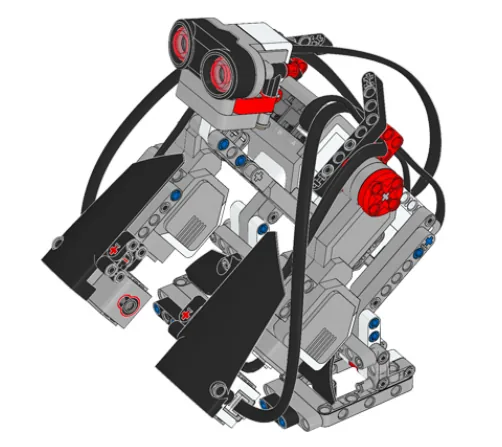
The Gorilla: a knuckle-walker that moves on two legs and two arms together, with an Ultrasonic Sensor in its head watching where it is going.
A walk is a sequence of phases with durations — swing, plant, push, shift. You could write those with wait blocks, and then the gorilla walks beautifully into a wall, because a stack that is waiting is not looking.
By the end of the lesson your gorilla will time every phase of its gait without a single wait block — and it will be able to stop mid-stride, because it never stopped watching.
A gorilla knuckle-walks: weight on the front of the hands, on the middle bones of the fingers, with the arms taking roughly a third of the load. It is a proper four-limbed gait with a repeating rhythm, and it lets a large animal move efficiently while keeping its head up.
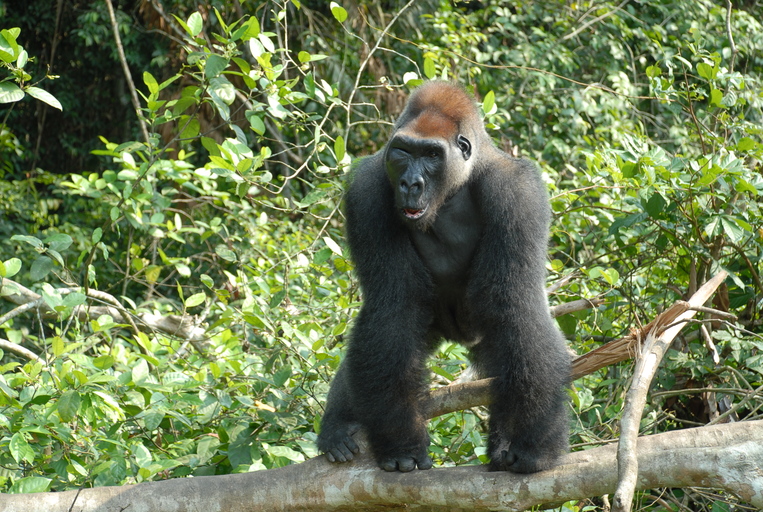
Head up is the detail worth noticing. The gait is rhythmic and timed, and the animal is watching the whole way through it — the timing never costs it its attention.
An animal that stopped sensing while it completed a stride would be an easy meal. Nervous systems run the rhythm and the watching in parallel, and a danger signal can interrupt a stride half-way through.
That is exactly what a wait block cannot do. A wait is a promise to do nothing at all for a fixed period, and things you would want to notice do not agree to happen outside it.
Consider your basketball robot in the last lesson. Its one-second settle was correct — and if somebody had walked in front of the hoop during it, the robot would have shot anyway, because for that second it was not capable of noticing anything.
Time your actions by watching the clock, not by closing your eyes and counting.
A wait block does not pause time. It pauses the stack it is in, and everything that stack was responsible for. The alternative is to note when something started and keep checking whether long enough has passed.
when program starts :: events hat
forever
  [A v] run [clockwise v] for (90) [degrees v] at (50) % speed :: motors
  wait (1) seconds :: control
  [A v] run [counterclockwise v] for (90) [degrees v] at (50) % speed :: motors
  wait (1) seconds :: control
end
when program starts :: events hat
reset timer :: control
set [phase started v] to (timer) :: variables
set [phase v] to (1) :: variables

forever
  // this runs hundreds of times a second, whatever the gait is doing
  set [gap v] to ([4 v] distance in cm) :: variables

  if <((timer) - (phase started)) > (1)> then
    change [phase v] by (1) :: variables
    if <(phase) > (2)> then
      set [phase v] to (1) :: variables
    end
    set [phase started v] to (timer) :: variables
  end
endset phase started to timer.timer − phase started.Forgetting step 3’s reset is the classic bug. If phase started is never updated, the elapsed time keeps growing and every phase after the first ends instantly — the gorilla flickers through its whole gait in one pass and looks like it is vibrating.
| Use | When | Example from this course |
|---|---|---|
wait | Nothing needs watching, and nothing else is running that matters. | The debounce in Lesson 21 — a tenth of a second, blind, harmless. |
| Elapsed time | Something must keep being sensed, or another job shares the stack. | A gait that must stop for an obstacle. The settle in Lesson 22, if you wanted it interruptible. |
A parallel stack is not always the answer either. You could put the watching in its own stack and keep the waits — and sometimes that is right. But the two stacks then have to agree about when to abandon a stride, which is a shared-state problem (Lesson 11) you did not have before. One loop that never blinks is usually simpler.
A wait pauses for a length of time. The timer is different: it runs in the background and can be read at any moment, so the robot can know how long something has taken while it is still happening.
| Block | What it does |
|---|---|
(timer) | Reports the seconds since the timer was last reset. |
reset timer | Sets it back to zero, so the next reading counts from here. |
The most valuable use of a timer is escaping a wait that might never end. A robot told to drive until it sees a wall will drive for ever if the wall is not there. Combined with a timer, it can give up:
Repeat until the wall is close or five seconds have passed. That one change turns a program that can hang into one that always finishes. Both robots below are looking for a wall that is not there.
no way out
with a timeout
The sensor is not faulty and the program is not wrong. There is simply no wall, and only one of these two programs has a way of noticing that.
The left-hand robot is not broken, and neither is its sensor. Its condition is simply one that will never come true, so the program sits on that block for ever — with nothing on the Brick to say so. The right-hand program asks the same question with an escape route bolted on, and finishes every time.
Real systems time themselves out constantly — a lift that cannot close its doors eventually gives up and beeps rather than trying for ever. A robot with no timeout simply stops responding, and there is nothing on screen to say why.
Long before there were computers, people had exactly this problem. A shepherd counting sheep through a gate, a trader counting sacks of grain, a builder counting days — none of them can hold the number in their head while they get on with the work. So they scratched a mark on a wall, cut a notch in a stick, or wrote a number on a piece of paper. The number lived outside the person, in a place they had agreed on, and they could go back to it, read it, and change it.
Better still, once the number is written down somebody else can use it. Watch these two: one of them counts and writes, the other never sees a single animal and simply reads the wall.
Notice what never happens: Ben never asks Abby. He does not need to — the number is not in her head, it is on the wall, and the wall is there for anyone who needs it.
Neither Abby nor Ben is holding the number — the wall is. And notice what never happens: Ben does not ask Abby. He does not need to, because the count is not in her head. It is in a place they both agreed on, which is what makes it useful to more than one of them.
That is all a variable is. The robot cannot hold a number in its head either, so you give it a wall of its own, write a name at the top so everyone knows which wall is which — score, count, degree_turn — and the program can read what is on it and write something new. One part of the program writes; another part reads. Exactly Abby and Ben.
Say we are counting rotations of a motor. Before we start we write 0 on the paper. Every time the motor completes a turn we cross out what is there and write one more: 0 becomes 1, then 2, then 3. That is change — it has to read the old number to work out the new one.
set is the other thing you can do, and it is completely different: rub the whole paper out and write the number you want. It does not care what was there. Press the buttons and watch what happens to the crossings-out.
The paper starts blank, so we write 0 on it. That is what a variable is: a place to keep a number while the robot works.
| Block | What it does |
|---|---|
set [count v] to (0) | Puts a value in, replacing whatever was there. |
change [count v] by (1) | Adds to what is already there. |
(count) | Reports the current value, for use in a comparison or on the display. |
set replaces; change adds. Counting things needs change. Starting a count needs set. Both programs below have both blocks — the only difference is whether the set block is inside the loop or above it.
set before the loop
set inside it
Both programs contain both blocks. Only the position of set [count] to 0 is different.
The count on the right is not broken; it is being told to start again on every pass. Each time round the loop it is wiped back to zero and then changed by one, so the honest answer is always 1 — while the motor cheerfully turns four times. A counter stuck at 1 almost always means a set block that has slipped inside the loop.
EV3 Classroom tells you what a block does by its shape, and once you have noticed that, a whole set of questions answers itself:
So when a slot is oval, any oval fits it — and it does not matter in the least where that number came from. You can take the motor’s own A degrees counted and keep it in a variable you named degree_turn, then compare that with a number later. Pick an oval below and watch the same one drop into all three kinds of slot.
pick an oval
the same oval fits all three
Every one of those slots is oval-shaped, and A degrees counted is an oval — so it drops in. Nothing about where the number came from matters.
This is what makes a variable more than a counter. A sensor reading is true only at the instant you read it; copying it into a variable freezes it, so the robot can compare where it is now against where it was when something happened:
when program starts :: events hat
[A v] reset degrees counted :: motors
set [degree_turn v] to ([A v] degrees counted :: sensors)
start moving [right: 30] :: movement
wait until <(([A v] degrees counted :: sensors) - (degree_turn)) > (400)>
stop moving :: movement
Read the condition aloud: how far the motor has gone now, minus where it was when we started, is more than 400. Both are ovals, so both can go into a subtraction, and the subtraction is an oval too — which is why it can go into a comparison. Ovals nest inside ovals as deep as you need.
A variable keeps its value after the program ends. Run the program again without setting it back and the second run begins where the first left off — the count starts at 14, the robot thinks it has already done the job. Every variable a program changes must be set to its starting value at the top.
A variable is the difference between a machine that repeats a fixed routine and one that responds to how things have gone — counting parts, tracking a score, remembering where it started.
Machines repeat. A wiper sweeps, a conveyor runs, a ride goes round — and none of that should mean copying the same blocks over and over. A loop says “do this again” once.
| Block | What it does |
|---|---|
repeat (10) end | Runs the blocks inside a set number of times, then carries on below. |
forever end | Runs the blocks inside over and over, and never carries on below. |
repeat until <> end | Repeats until a condition becomes true — a loop with a sensor as its exit. |
Anything placed after a forever loop will never run. Not “runs late” — never. Both programs below end with the same block: set the status light green.
repeat (3)
forever
↑ this block never runs
Both programs contain the same green-light block. Let it run as long as you like — the right-hand ring will never turn green.
The repeat loop counts its three passes, stops, and moves on to the block underneath, so its light turns green. The forever loop reaches the bottom of its own blocks and jumps straight back to the top, so the block underneath is never reached — however long you leave it. If a program seems to stop half way through, look for a forever loop above the blocks that are not happening.
A program is a list, and the Brick works down it once. Every block runs, in order, and when the last one is done the program is over. That is fine for a list of instructions — drive, turn, beep, stop — because each is a thing you do once.
A sensor is not a thing you do once. Asking is 1 pressed? gives you an answer about this instant, and an instant later it may be wrong. Checking a sensor once tells you what the world was like at the moment the program started — which is almost never what you wanted to know.
So a program that has to react must ask again, and again, for as long as it is running. That is the whole job of the loop: not to repeat an action, but to keep the question being asked.
Wrap a sensor check and the motor it controls in a forever loop and you have built a closed-loop control system — the pattern behind every line follower, thermostat and cruise control:
It is called closed because the output feeds back round to the input: the motors move the robot, moving the robot changes what the sensor sees, and what the sensor sees changes the motors. Break the circle at any point and the robot stops responding.
when program starts :: events hat
forever
  if <[1 v] is pressed? :: sensors> then
    [A v] start motor [clockwise v] :: motors
  else
    [A v] stop motor :: motors
  end
end
Read it as a sentence and it is almost too simple to need explaining: for ever, if the button is pressed run the motor, otherwise stop it. The motor now follows the button for as long as the program is running.
This is the mistake nearly everybody makes first, and it is a hard one to spot because nothing about it looks wrong:
when program starts :: events hat
if <[1 v] is pressed? :: sensors> then
  [A v] start motor [clockwise v] :: motors
else
  [A v] stop motor :: motors
end
The logic is perfect. The ports are right. Nothing is misspelled. And the robot will ignore the button completely — because the Brick reaches that if/else a few milliseconds after you press Run, finds the button not pressed, takes the else branch, stops the motor, runs out of blocks and ends. By the time a finger arrives, there is no program left to notice it.
with forever — a closed loop
without it — the common mistake
↑ running — for the only time
Both programs contain exactly the same if/else. The only difference is the forever block around one of them.
Both programs contain exactly the same if/else. The counter is what gives it away: one keeps checking for as long as it runs, the other is stuck on the single check it made before anybody touched anything. A student who has seen this once stops writing it.
The tell on a real robot is a program that ends the instant you start it — the Brick returns to its menu almost immediately. If a sensor program finishes rather than waits, the loop is what is missing.
Note the start, check the difference, reset when you move on. Never close your eyes to count.
A wait pauses for a length of time. The timer is different: it runs in the background and can be read at any moment, so the robot can know how long something has taken while it is still happening.
| Block | What it does |
|---|---|
(timer) | Reports the seconds since the timer was last reset. |
reset timer | Sets it back to zero, so the next reading counts from here. |
The most valuable use of a timer is escaping a wait that might never end. A robot told to drive until it sees a wall will drive for ever if the wall is not there. Combined with a timer, it can give up:
Repeat until the wall is close or five seconds have passed. That one change turns a program that can hang into one that always finishes. Both robots below are looking for a wall that is not there.
no way out
with a timeout
The sensor is not faulty and the program is not wrong. There is simply no wall, and only one of these two programs has a way of noticing that.
The left-hand robot is not broken, and neither is its sensor. Its condition is simply one that will never come true, so the program sits on that block for ever — with nothing on the Brick to say so. The right-hand program asks the same question with an escape route bolted on, and finishes every time.
Real systems time themselves out constantly — a lift that cannot close its doors eventually gives up and beeps rather than trying for ever. A robot with no timeout simply stops responding, and there is nothing on screen to say why.
Say this back before moving on: “How long has this phase been going?”
Work the gorilla through one full stride by hand and count the distinct phases. However many you find is how many your program will have.
| Part | What it is doing here |
|---|---|
| EV3 Intelligent Brick | The torso, and the weight that has to be shifted from side to side. Its screen shows the current phase and its elapsed time — the instrument for everything today. |
| Large Motor ×2 — the legs | Drive the walking linkage. They must be in step; a gorilla whose legs drift out of phase turns instead of walking. |
| Medium Motor — the arms | Swings the arms, which carry real load in a knuckle-walk. Their timing relative to the legs is what makes the gait look right. |
| Ultrasonic Sensor — the head | Watches ahead throughout the gait. It is the reason the timing cannot block. |
| The limb linkages (not electronic) | Work every joint by hand. Anything stiff makes one phase take longer than its allotted time, and a phase that overruns its clock is a gait that falls apart. |
Time one stride with a stopwatch before you program. Push the gorilla through a full cycle by hand at a natural pace and note how long each phase wants to take. Those numbers are your phase durations, and guessing them costs far more time than measuring them.
Sensors go in ports 1, 2, 3, 4. Motors go in ports A, B, C, D. They are not interchangeable, and nothing will tell you politely if you swap them.
| Part | Port | Why this one |
|---|---|---|
| Arms (Medium) | A | The detail motor, first port. |
| Left leg (Large) | B | The movement pair. |
| Right leg (Large) | C | The other half. |
| Eyes (Ultrasonic) | 4 | Ultrasonic stays on 4 across the course. |
Check your own build now:
Two routes, and either is fine. USB is the reliable one and the one to fall back on when a room’s Bluetooth is busy; Bluetooth leaves the robot free to move, which some models need.
Do these in order. Naming the Brick after you go looking for it in the list is how groups end up driving each other’s robots.
EV3 until somebody changes it.EV3.The two failures, every class, every time. The Brick has gone to sleep while you were building — press the centre button to wake it. Or you have paired with the group at the next table, which is why the name matters.
The long version, including Port View and how to read the port tiles, is in the Brick & Bluetooth guide.
Bluetooth — this one walks and it walks slowly. A cable dragging behind a knuckle-walker adds a load that varies through the stride, which will make some phases overrun their timing and not others.
Stuck? The long version, with a photograph of every screen, is in the Brick & Bluetooth guide.
One change at a time. Predict, then run, then look.
set phase started to timer. Predict what the phase number does, then watch it. This is the bug, caused deliberately so you recognise it later.wait-based logic would not.If a machine must notice something while it is timing something, it cannot use a wait block at all.
Your gorilla runs two motors on a shared clock, and the relationship between them is what makes the gait look like walking rather than twitching.
The last model of this set takes that idea to its conclusion. An egg-drawing machine has two motors turning at once, and the ratio between their speeds decides what shape appears. Change the ratio and you get a different pattern from the same program.
Two motors moving together are not two movements. They are one movement in two dimensions — which is how a plotter, a lathe and every CNC machine in the world works.
Today two motors shared a clock. Next they share a shape.
Write the blocking version first and try to make it stop for an obstacle. You will not be able to, and that is the point.
```ev3blocks It walks. Now put your hand in front of the head — nothing happens, because for most of every cycle the stack is inside a wait.
when program starts :: events hat
set movement motors to [B v] and [C v] :: movement
forever
start moving [forward v] at (30) % speed :: movement
[A v] run [clockwise v] for (90) [degrees v] at (40) % speed :: motors
wait (1) seconds :: control
[A v] run [counterclockwise v] for (90) [degrees v] at (40) % speed :: motors
wait (1) seconds :: control
end
### Step 2 — the same gait, timed without blocking

```ev3blocks One loop, never blocked. The gorilla walks in timed phases and stops the instant something appears — mid-stride if necessary.
when program starts :: events hat
set movement motors to [B v] and [C v] :: movement
reset timer :: control
set [phase v] to (1) :: variables
set [phase started v] to (timer) :: variables
set [walking v] to (1) :: variables
clear display :: display

forever
  // ---- ALWAYS, every pass, whatever the gait is doing ----
  set [gap v] to ([4 v] distance in cm) :: variables
  set [elapsed v] to ((timer) - (phase started)) :: variables
  write (phase) at line (1) :: display
  write (elapsed) at line (3) :: display
  write (gap) at line (5) :: display

  if <(gap) < (20)> then
    set [walking v] to (0) :: variables
    stop moving :: movement
    [A v] stop motor :: motors
    set status light to [red v] :: display
  end
  if <(gap) > (30)> then
    set [walking v] to (1) :: variables
    set status light to [green v] :: display
  end

  // ---- the gait, only while walking ----
  if <(walking) = (1)> then
    start moving [forward v] at (30) % speed :: movement

    if <(phase) = (1)> then
      [A v] start motor at (40) % speed :: motors
      if <(elapsed) > (1)> then
        change [phase v] by (1) :: variables
        set [phase started v] to (timer) :: variables
      end
    end

    if <(phase) = (2)> then
      [A v] start motor at (-40) % speed :: motors
      if <(elapsed) > (1)> then
        set [phase v] to (1) :: variables
        set [phase started v] to (timer) :: variables
      end
    end
  end
end
elapsed is computed once at the top ** and used everywhere below, so every test in one pass agrees about what time it is. Lesson 11’s habit, applied to the clock.phase started. ** Miss one and that phase and all the ones after it end instantly.What success looks like: a steady walking rhythm with the phase number alternating on screen, and a gorilla that freezes the moment your hand appears — including part-way through a stride — and carries on when you take it away.
If the phase number races, you are not resetting
phase startedwhen the phase changes. If it never changes, you reset it every pass rather than only on the change — look at where that line sits.
Build the model before you read any further. Everything after this is about making it do something, and none of it will make much sense with nothing on the table in front of you.
Use the viewer's own controls to zoom and turn pages. Fullscreen makes it big enough to build from.
The same build on Google Drive — sometimes a video, sometimes a scan:
Use the viewer's own controls to zoom and turn pages. Fullscreen makes it big enough to build from.
Check the finished build against the picture before you switch anything on. A motor mounted the wrong way round is far easier to spot now than it is to debug later, when it looks like a program fault.
Work through them in order — each is harder than the last. The extra challenge comes after all three, and it is meant to make you plan before you build.
Show that a wait blinds the stack. Take your working gait and put a wait of one second in the loop. Now put your hand in front of the head and time how long it takes to stop. Take it out and time it again. Report both numbers.
Make the phases different lengths. Time each phase of the gait by hand with a stopwatch, then use your measured numbers rather than one second for everything. A real gait is not symmetrical. Say which phase wanted to be longest and why.
Cause the classic bug, then name it. Delete one of the "set phase started to timer" lines. Predict what the phase number does before you run it. Then write down, in one sentence, what you would look for on the screen to recognise this bug in somebody else's program.
Walk a route and interrupt it cleanly. The gorilla must walk a set path, and at any moment a partner can put a hand in front of it. It must freeze — mid-stride if that is where it is — and then resume the gait FROM WHERE IT LEFT OFF, not from the beginning. That last part is the mission. Freezing is easy; resuming without restarting the stride needs you to keep the phase and the elapsed time separately, and to think about what should happen to the clock while it is stopped. Three rules: 1. Not one wait block anywhere in the gait. 2. The sensor is read every pass, whatever phase is current. 3. The screen always shows the phase and how long it has been running, so a stuck gait can be diagnosed by looking rather than guessing. Before you build, decide on paper: when it freezes, does the phase clock pause or keep running? Both are defensible. Choose one, say why, and make the machine behave the way you chose.