
Challenge 1
Delete the delete. Remove the "delete item 1" line and press a floor button. Watch the lift arrive, and arrive, and arrive. Watch line 5 while it happens. Write one sentence on how you would recognise this bug from the screen alone.
Quick Learn — the model, the instructions, the program and the challenges. The theory is in Full Lesson.
EV3 Robotics›Level 3 · Advanced›Lesson 25
Level 3 · Lesson 25 · EV3-L03-2560 minutes · Ages 9–16 · Model: Lift Simulation
The Lift: a car on a Large Motor running up and down a shaft, with a call button at each of three floors.
Here is the problem no earlier model had. While the lift is travelling to floor 3, somebody presses the button on floor 1. The lift is busy. It cannot go there now — and it must not forget.
By the end of the lesson your lift will collect requests while it works and serve them one at a time — losing none of them, and never serving the same one twice.
Press a lift button and it lights up. That light is the machine telling you it has remembered — not that it is coming now, but that your request is on a list and will not be lost. The light goes out when the lift arrives, and that is the request leaving the list.
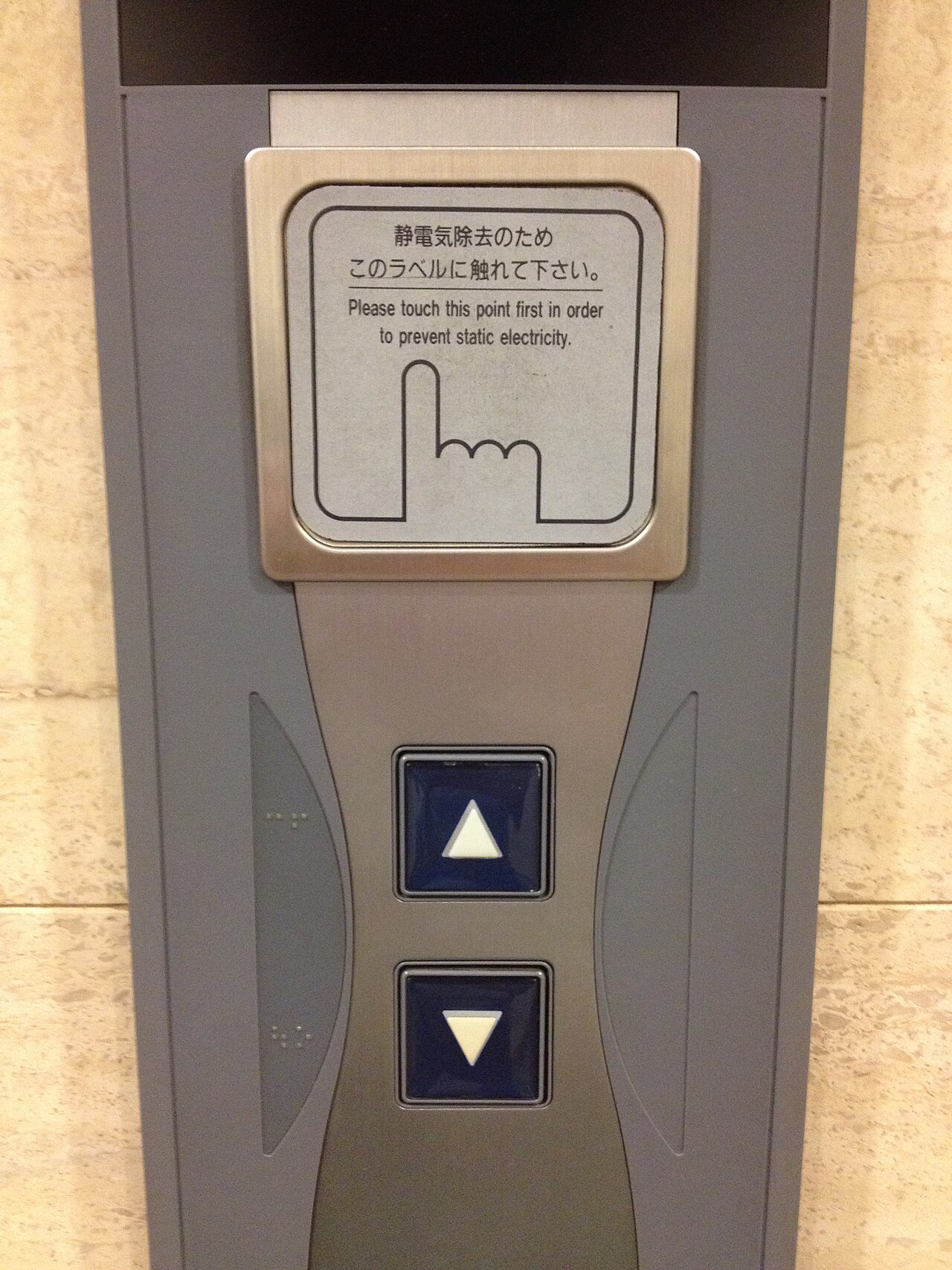
Watch a lift in a busy building and you will notice it does not serve requests in the order they arrived. It sweeps up, stopping at every floor that wants it on the way, then sweeps down. That is a deliberate choice.
First-come-first-served would be perfectly fair and unbearably slow — the lift would pass floor 5 on its way to floor 8, having already been asked for floor 5 afterwards, and would have to come back.
So real lifts sweep. The cost is that somebody can be skipped repeatedly if requests keep arriving in the direction the lift is already going, so controllers add a rule: a request that has waited too long jumps the queue.
A lift that only remembered one request would drop every press that arrived while it was moving. Everybody would press repeatedly, which is exactly what people do when a machine gives no sign of having heard them.
A request that arrives while you are busy must go somewhere. That somewhere is a queue.
You have used a list as a record — it only ever grew. A queue is a list that also shrinks: things are added at the end and taken from the front, and the taking is what makes it a queue.
| Action | Block | On the lift |
|---|---|---|
| Join the queue | add (floor) to [requests] | Somebody presses a button. |
| Who is next? | item (1) of [requests] | The front of the queue — served, not removed yet. |
| Leave the queue | delete (1) of [requests] | The lift has arrived. The new block, and the new habit. |
| Anyone waiting? | length of [requests] > 0 | Whether the lift has anything to do. |
forever
  if <(length of [requests v]) > (0)> then
    set [going to v] to (item (1) of [requests v]) :: list
    // ... travel to that floor ...
    delete (1) of [requests v] :: list
  end
endThe delete is the whole difference between a queue and a list. Forget it and the machine is not slow or wrong — it is stuck, serving request one repeatedly while requests two and three wait behind it for ever. That is the bug this lesson exists to make you recognise.
Somebody presses floor 2 three times because they are impatient. Without a check, the lift goes to floor 2, then to floor 2, then to floor 2. Before adding, ask whether that floor is already waiting:
if <not <[requests v] contains (2)?>> then
  add (2) to [requests v] :: list
end
| Rule | Good | Bad |
|---|---|---|
| First come, first served — always item 1 | Perfectly fair. Nobody is ever skipped. | Wasteful. The lift may pass a waiting floor and have to return. |
| Nearest first | Much less travel. | A far-away floor can wait for ever if near ones keep asking. Starvation. |
| Sweep — all requests in one direction, then reverse | What real lifts do. Efficient and mostly fair. | More complicated to write, and still needs an anti-starving rule. |
Start with first-come-first-served. It is four blocks and it is correct. The mission asks you to do better and to say what you gave up.
A variable holds one number. A list holds many, in order, under one name — so a robot can remember every reading it took rather than only the most recent.
If a variable is a piece of paper with one number on it, a list is a row of lockers. Each locker has a number on the door, and each one holds something of its own. They all share a name — snacks, colours — and you tell them apart by the number, not the name.
The doors matter. You cannot see what is in the whole row at a glance: to find out what is in locker 3, you have to open locker 3. And if you want to change what is in there, you open it, take out what is inside, and put something else in. Try it — click a door.
Three lockers are in use. You cannot see inside any of them until you open one — click a door.
Every list block is one of those physical actions, and the block for whatever you just did appears underneath the lockers:
| Block | The locker version |
|---|---|
add [banana] to [snacks v] | Put a banana in the next free locker. Always the end of the row. |
(item (3) of [snacks v]) | Open locker 3 and tell me what is inside. One locker, one look. |
replace item (3) of [snacks v] with [candy] | Open 3, take out what is there, put candy in. Nothing else moves. |
delete (3) of [snacks v] | Empty locker 3 and close up the gap — everything after it shuffles down one. What was in 4 is now in 3. |
(length of [snacks v]) | How many lockers are in use. |
delete all of [snacks v] | Empty the whole row. This belongs at the top of a program. |
Deleting is the one that catches people. A locker does not stay empty — the row closes up. Delete item 2 of a five-item list and you have a four-item list, with everything after position 2 now one number lower than it was. Any position you wrote down before the delete is wrong afterwards.
Lists are not only for numbers. Anything a block can report can go in one:
| Block | What it does |
|---|---|
add [thing] to [List v] | Puts a new value on the end. |
(item (1) of [List v]) | Reads the value at a position. Positions start at 1. |
(length of [List v]) | Reports how many values are stored. |
delete all of [List v] | Empties it. This belongs at the top of the program, for the same reason a variable is set to zero there. |
The natural shape is a loop that takes a reading and adds it. Watch the same four readings go into a variable and into a list.
into a variable
into a list
Watch the variable box, not the list. Every reading it shows is correct; it is the ones it has already forgotten that matter.
Notice that the variable is never wrong. Every number it shows is a real reading, correctly taken, moments ago. It simply has room for one, so each new reading pushes the last one out — and by the fourth stop three readings have quietly ceased to exist.
Afterwards the list can be walked to find the largest, the smallest, or the average — none of which is possible if you only ever kept the latest value.
Positions count from 1, not 0. A loop that starts its counter at 0 reads a position that does not exist and misses the first entry.
Storing readings is only half of it. To use a list you walk it, and that needs one more idea: a variable that holds a position rather than a value. Call it i. Set it to 1, read item i, then change i by 1 — and the next pass round the loop looks at the next locker.
Two things make this work without anybody counting. The loop repeats length of colours, so it runs once per item however many there are; and i doubles as the screen line, so each item lands on its own row.
when program starts :: events hat
delete all of [colours v]
add [red] to [colours v]
add [blue] to [colours v]
add [green] to [colours v]
add [yellow] to [colours v]
clear display :: display
set [i v] to (1)
repeat (length of [colours v])
  write (item (i) of [colours v]) at line (i) :: display
  change [i v] by (1)
end
Watch i rather than the blocks. It is the only thing that changes between one pass and the next, and it is what makes each pass look at a different locker.
Nowhere does that program mention the number four. Add a fifth colour and it writes five lines, unchanged — which is the whole reason to ask a list its length rather than typing a number you will have to remember to update.
Once a robot can walk a list it can do real work on one. Both of these are the same trick — go along comparing two items at a time — and they differ only in what they do about it. Sorting swaps the pair; finding the biggest just remembers the winner.
when program starts :: events hat
set [i v] to (1)
repeat ((length of [nums v]) - (1))
  set [j v] to (1)
  repeat ((length of [nums v]) - (i))
    if <(item (j) of [nums v]) > (item ((j) + (1)) of [nums v])> then
      set [temp v] to (item (j) of [nums v])
      replace item (j) of [nums v] with (item ((j) + (1)) of [nums v])
      replace item ((j) + (1)) of [nums v] with (temp)
    end
    change [j v] by (1)
  end
  change [i v] by (1)
endOnly ever two numbers are being compared at a time. A sort looks complicated because it repeats, not because any one step is hard.
A bubble sort looks hard because it is a loop inside a loop, but no single step is: compare two neighbours, swap them if they are the wrong way round, move along one. Each full pass floats the biggest remaining number to the end — which is where the name comes from — so after as many passes as there are items, the list is in order.
Finding the biggest needs no swapping at all. Assume the first item is the winner, walk the rest, and whenever you meet something bigger, remember that instead. One pass, one variable. Swap the > for a < and the same program finds the smallest — which is how a line-following robot works out its black and its white before choosing a threshold between them.
This is data collection — a robot driving a course while recording distances, then reporting what it found. It is the difference between a machine that reacts and one that measures.
Long before there were computers, people had exactly this problem. A shepherd counting sheep through a gate, a trader counting sacks of grain, a builder counting days — none of them can hold the number in their head while they get on with the work. So they scratched a mark on a wall, cut a notch in a stick, or wrote a number on a piece of paper. The number lived outside the person, in a place they had agreed on, and they could go back to it, read it, and change it.
Better still, once the number is written down somebody else can use it. Watch these two: one of them counts and writes, the other never sees a single animal and simply reads the wall.
Notice what never happens: Ben never asks Abby. He does not need to — the number is not in her head, it is on the wall, and the wall is there for anyone who needs it.
Neither Abby nor Ben is holding the number — the wall is. And notice what never happens: Ben does not ask Abby. He does not need to, because the count is not in her head. It is in a place they both agreed on, which is what makes it useful to more than one of them.
That is all a variable is. The robot cannot hold a number in its head either, so you give it a wall of its own, write a name at the top so everyone knows which wall is which — score, count, degree_turn — and the program can read what is on it and write something new. One part of the program writes; another part reads. Exactly Abby and Ben.
Say we are counting rotations of a motor. Before we start we write 0 on the paper. Every time the motor completes a turn we cross out what is there and write one more: 0 becomes 1, then 2, then 3. That is change — it has to read the old number to work out the new one.
set is the other thing you can do, and it is completely different: rub the whole paper out and write the number you want. It does not care what was there. Press the buttons and watch what happens to the crossings-out.
The paper starts blank, so we write 0 on it. That is what a variable is: a place to keep a number while the robot works.
| Block | What it does |
|---|---|
set [count v] to (0) | Puts a value in, replacing whatever was there. |
change [count v] by (1) | Adds to what is already there. |
(count) | Reports the current value, for use in a comparison or on the display. |
set replaces; change adds. Counting things needs change. Starting a count needs set. Both programs below have both blocks — the only difference is whether the set block is inside the loop or above it.
set before the loop
set inside it
Both programs contain both blocks. Only the position of set [count] to 0 is different.
The count on the right is not broken; it is being told to start again on every pass. Each time round the loop it is wiped back to zero and then changed by one, so the honest answer is always 1 — while the motor cheerfully turns four times. A counter stuck at 1 almost always means a set block that has slipped inside the loop.
EV3 Classroom tells you what a block does by its shape, and once you have noticed that, a whole set of questions answers itself:
So when a slot is oval, any oval fits it — and it does not matter in the least where that number came from. You can take the motor’s own A degrees counted and keep it in a variable you named degree_turn, then compare that with a number later. Pick an oval below and watch the same one drop into all three kinds of slot.
pick an oval
the same oval fits all three
Every one of those slots is oval-shaped, and A degrees counted is an oval — so it drops in. Nothing about where the number came from matters.
This is what makes a variable more than a counter. A sensor reading is true only at the instant you read it; copying it into a variable freezes it, so the robot can compare where it is now against where it was when something happened:
when program starts :: events hat
[A v] reset degrees counted :: motors
set [degree_turn v] to ([A v] degrees counted :: sensors)
start moving [right: 30] :: movement
wait until <(([A v] degrees counted :: sensors) - (degree_turn)) > (400)>
stop moving :: movement
Read the condition aloud: how far the motor has gone now, minus where it was when we started, is more than 400. Both are ovals, so both can go into a subtraction, and the subtraction is an oval too — which is why it can go into a comparison. Ovals nest inside ovals as deep as you need.
A variable keeps its value after the program ends. Run the program again without setting it back and the second run begins where the first left off — the count starts at 14, the robot thinks it has already done the job. Every variable a program changes must be set to its starting value at the top.
A variable is the difference between a machine that repeats a fixed routine and one that responds to how things have gone — counting parts, tracking a score, remembering where it started.
The Touch Sensor is the simplest input the EV3 has: a button that is either pressed or not. That sounds trivial, but it is how a robot knows it has hit a wall, reached the end of a track, or been told to start by a person.
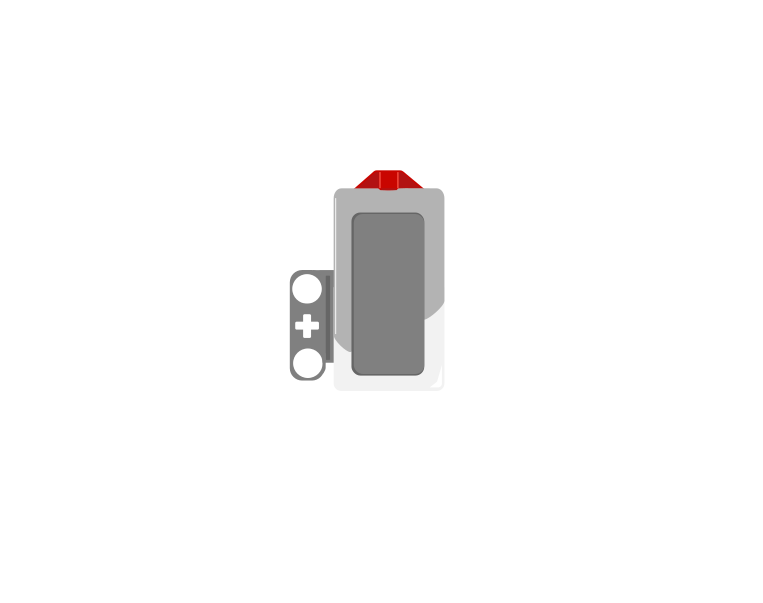 released
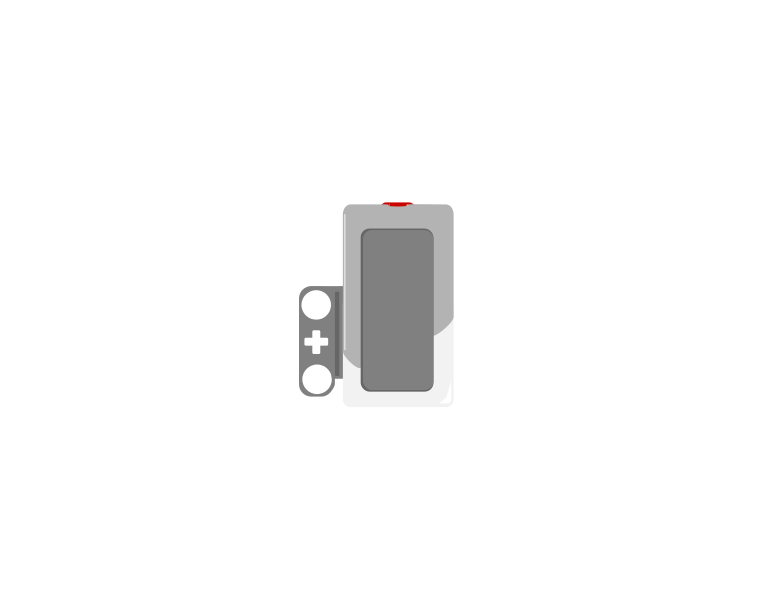 pressed
| Block | What it does |
|---|---|
wait until <[1 v] is pressed? :: sensors> | Holds the program here until somebody presses the sensor. |
<[1 v] is pressed? :: sensors> | Reports true or false. Drop it into a condition to make a decision rather than a wait. |
[1 v] when [bumped v] :: events hat | Starts a whole stack of its own. The dropdown chooses the moment: pressed, released or bumped. |
A button is not only “pressed”. One press is three things: the moment it goes down, the time it stays down, and the moment it comes back up. Watch what a single press does to three programs at once.
versus two hat blocks
The middle counter is the one that surprises people. Nothing is wrong with it — a loop really does check that fast, and every check really is a separate answer.
Nothing there is broken. A loop really does get round hundreds of times a second, and each time it asks is pressed? the honest answer is still yes — so if that loop plays a sound or counts something, it does it hundreds of times from one finger. The two hat blocks each fire once, and they fire at different moments: pressed the instant the button goes down, bumped only when it comes back up.
The three options, and what each is for:
when program starts :: events hat
set movement motors to [B v] and [C v] :: movement
start moving [straight: 0] :: movement
wait until <[1 v] is pressed? :: sensors>
stop moving :: movement
The robot drives until something presses the sensor. Note that the movement is started unmeasured on purpose — the sensor decides when to stop, not a distance.
Touch sensors are everywhere in machines you cannot see into: a lift knows the doors are shut, a printer knows the lid is closed, a washing machine will not spin until it is latched. They are safety devices as much as inputs.
Add at the back, serve from the front, and delete when it is done. The delete is the one everybody forgets.
A variable holds one number. A list holds many, in order, under one name — so a robot can remember every reading it took rather than only the most recent.
If a variable is a piece of paper with one number on it, a list is a row of lockers. Each locker has a number on the door, and each one holds something of its own. They all share a name — snacks, colours — and you tell them apart by the number, not the name.
The doors matter. You cannot see what is in the whole row at a glance: to find out what is in locker 3, you have to open locker 3. And if you want to change what is in there, you open it, take out what is inside, and put something else in. Try it — click a door.
Three lockers are in use. You cannot see inside any of them until you open one — click a door.
Every list block is one of those physical actions, and the block for whatever you just did appears underneath the lockers:
| Block | The locker version |
|---|---|
add [banana] to [snacks v] | Put a banana in the next free locker. Always the end of the row. |
(item (3) of [snacks v]) | Open locker 3 and tell me what is inside. One locker, one look. |
replace item (3) of [snacks v] with [candy] | Open 3, take out what is there, put candy in. Nothing else moves. |
delete (3) of [snacks v] | Empty locker 3 and close up the gap — everything after it shuffles down one. What was in 4 is now in 3. |
(length of [snacks v]) | How many lockers are in use. |
delete all of [snacks v] | Empty the whole row. This belongs at the top of a program. |
Deleting is the one that catches people. A locker does not stay empty — the row closes up. Delete item 2 of a five-item list and you have a four-item list, with everything after position 2 now one number lower than it was. Any position you wrote down before the delete is wrong afterwards.
Lists are not only for numbers. Anything a block can report can go in one:
| Block | What it does |
|---|---|
add [thing] to [List v] | Puts a new value on the end. |
(item (1) of [List v]) | Reads the value at a position. Positions start at 1. |
(length of [List v]) | Reports how many values are stored. |
delete all of [List v] | Empties it. This belongs at the top of the program, for the same reason a variable is set to zero there. |
The natural shape is a loop that takes a reading and adds it. Watch the same four readings go into a variable and into a list.
into a variable
into a list
Watch the variable box, not the list. Every reading it shows is correct; it is the ones it has already forgotten that matter.
Notice that the variable is never wrong. Every number it shows is a real reading, correctly taken, moments ago. It simply has room for one, so each new reading pushes the last one out — and by the fourth stop three readings have quietly ceased to exist.
Afterwards the list can be walked to find the largest, the smallest, or the average — none of which is possible if you only ever kept the latest value.
Positions count from 1, not 0. A loop that starts its counter at 0 reads a position that does not exist and misses the first entry.
Storing readings is only half of it. To use a list you walk it, and that needs one more idea: a variable that holds a position rather than a value. Call it i. Set it to 1, read item i, then change i by 1 — and the next pass round the loop looks at the next locker.
Two things make this work without anybody counting. The loop repeats length of colours, so it runs once per item however many there are; and i doubles as the screen line, so each item lands on its own row.
when program starts :: events hat
delete all of [colours v]
add [red] to [colours v]
add [blue] to [colours v]
add [green] to [colours v]
add [yellow] to [colours v]
clear display :: display
set [i v] to (1)
repeat (length of [colours v])
  write (item (i) of [colours v]) at line (i) :: display
  change [i v] by (1)
end
Watch i rather than the blocks. It is the only thing that changes between one pass and the next, and it is what makes each pass look at a different locker.
Nowhere does that program mention the number four. Add a fifth colour and it writes five lines, unchanged — which is the whole reason to ask a list its length rather than typing a number you will have to remember to update.
Once a robot can walk a list it can do real work on one. Both of these are the same trick — go along comparing two items at a time — and they differ only in what they do about it. Sorting swaps the pair; finding the biggest just remembers the winner.
when program starts :: events hat
set [i v] to (1)
repeat ((length of [nums v]) - (1))
  set [j v] to (1)
  repeat ((length of [nums v]) - (i))
    if <(item (j) of [nums v]) > (item ((j) + (1)) of [nums v])> then
      set [temp v] to (item (j) of [nums v])
      replace item (j) of [nums v] with (item ((j) + (1)) of [nums v])
      replace item ((j) + (1)) of [nums v] with (temp)
    end
    change [j v] by (1)
  end
  change [i v] by (1)
endOnly ever two numbers are being compared at a time. A sort looks complicated because it repeats, not because any one step is hard.
A bubble sort looks hard because it is a loop inside a loop, but no single step is: compare two neighbours, swap them if they are the wrong way round, move along one. Each full pass floats the biggest remaining number to the end — which is where the name comes from — so after as many passes as there are items, the list is in order.
Finding the biggest needs no swapping at all. Assume the first item is the winner, walk the rest, and whenever you meet something bigger, remember that instead. One pass, one variable. Swap the > for a < and the same program finds the smallest — which is how a line-following robot works out its black and its white before choosing a threshold between them.
This is data collection — a robot driving a course while recording distances, then reporting what it found. It is the difference between a machine that reacts and one that measures.
Say this back before moving on: “Who is waiting, and have I finished with them?”
Run the car up and down the shaft by hand and note where each floor is. You need three motor positions before you can write anything.
| Part | What it is doing here |
|---|---|
| EV3 Intelligent Brick | The machine room. Its screen is the indicator panel — the current floor and how many requests are waiting, which is how you watch a queue behave. |
| Large Motor — the car | Raises and lowers. It must hold position at stop, or a parked lift sinks between requests and every floor position drifts. |
| Touch Sensor ×3 — the call buttons | One per floor. Three sensors is the most this course has used for one purpose, and it is what makes requests arrive while the machine is busy. |
| The shaft and car (not electronic) | Must run freely the whole height. A car that binds part-way makes one floor position unreachable, and the queue will stall on it. |
Home the car at the bottom before every run. Floor positions are counted in motor degrees from a zero, and if the zero moves, every floor moves with it.
Sensors go in ports 1, 2, 3, 4. Motors go in ports A, B, C, D. They are not interchangeable, and nothing will tell you politely if you swap them.
| Part | Port | Why this one |
|---|---|---|
| The car (Large) | A | The only motor. |
| Floor 1 button (Touch) | 1 | Port number matches floor number, which makes the program much easier to read and to debug. |
| Floor 2 button (Touch) | 2 | Same. |
| Floor 3 button (Touch) | 3 | Same. |
Check your own build now:
Two routes, and either is fine. USB is the reliable one and the one to fall back on when a room’s Bluetooth is busy; Bluetooth leaves the robot free to move, which some models need.
Do these in order. Naming the Brick after you go looking for it in the list is how groups end up driving each other’s robots.
EV3 until somebody changes it.EV3.The two failures, every class, every time. The Brick has gone to sleep while you were building — press the centre button to wake it. Or you have paired with the group at the next table, which is why the name matters.
The long version, including Port View and how to read the port tiles, is in the Brick & Bluetooth guide.
USB is fine — the lift does not travel. With four cables on the Brick already, keep them out of the shaft so the car cannot catch one on its way past.
Stuck? The long version, with a photograph of every screen, is in the Brick & Bluetooth guide.
One change at a time. Predict, then run, then look.
contains check and press one floor five times. The lift dutifully goes there five times. This is why a lit lift button ignores you.Fair and slow, or fast and unfair. Every scheduler in the world is somewhere between the two, on purpose.
Your lift knows where its floors are because you measured them and typed three numbers in.
Rebuild the shaft slightly taller and all three are wrong. Change the gearing and they are wrong. Hand the model to another group and they must find their own three numbers before anything works.
A machine can be TOLD a position instead: put it where you want it, press a button, and it remembers. Teaching a position rather than typing one is the next lesson, and it is how almost every adjustable machine you own is set up.
Today the machine remembered who was waiting. Next it remembers where things are.
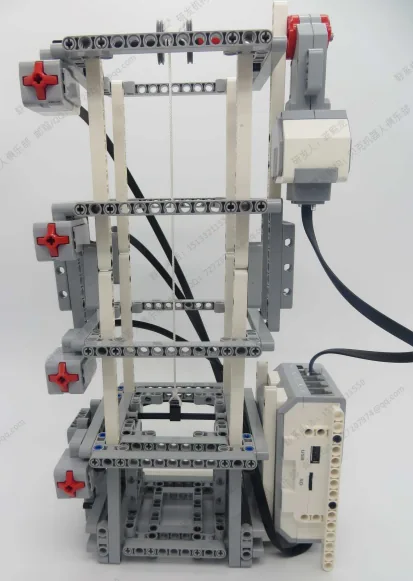
Build the model before you read any further. Everything after this is about making it do something, and none of it will make much sense with nothing on the table in front of you.
Use the viewer's own controls to zoom and turn pages. Fullscreen makes it big enough to build from.
Check the finished build against the picture before you switch anything on. A motor mounted the wrong way round is far easier to spot now than it is to debug later, when it looks like a program fault.
Work through them in order — each is harder than the last. The extra challenge comes after all three, and it is meant to make you plan before you build.
Delete the delete. Remove the "delete item 1" line and press a floor button. Watch the lift arrive, and arrive, and arrive. Watch line 5 while it happens. Write one sentence on how you would recognise this bug from the screen alone.
Stop the impatient presser. Press one floor five times quickly. The lift should go there once, not five times. Use "contains" before adding. Then explain why a real lift button lights up and then ignores you.
Switch to nearest-first, then break it. Instead of always serving item 1, walk the queue and pick the request closest to the current floor. Queue floors 3, 1, 2 and compare the travel with first-come-first-served. Then keep pressing the floor nearest the lift and watch the far floor wait for ever. That fault has a name — find it in the lesson and use it in your answer.
Build a lift somebody would actually be willing to ride. It must handle all of these, and you must demonstrate each: - three requests arriving while it is already moving, none lost - the same floor pressed repeatedly, served once - a request for the floor it is already at, handled sensibly - nobody waiting more than a stated maximum, however busy it gets That last one is the mission. Nearest-first is efficient and can starve somebody; first-come is fair and slow. Choose a rule, then add whatever it takes to guarantee your maximum wait — most real lifts promote a request that has waited too long. Two rules: 1. One stack owns the queue. Everything else reads it. 2. The screen always shows the current floor and how many requests are waiting, so a stuck lift can be diagnosed by looking. Then write down, in two sentences, what your rule gives up and who it gives it up for. Every scheduler in the world makes that trade, and being able to state yours is the point.
Two stacks. One watches all three buttons and adds to the queue; the other serves the queue and never touches a sensor.
when program starts :: events hat
delete all of [requests v] :: list
delete all of [floors v] :: list
add (0) to [floors v] :: list
add (300) to [floors v] :: list
add (600) to [floors v] :: list
[A v] set motor to [hold position v] at stop :: motors
[A v] run [counterclockwise v] for (700) [degrees v] at (20) % speed :: motors
[A v] reset degrees counted :: motors
set [at floor v] to (1) :: variables
clear display :: display

// ---- the button watcher: the only stack that reads a sensor ----
when program starts :: events hat
forever
  if <<[1 v] is pressed? :: sensors> and <not <[requests v] contains (1)?>>> then
    add (1) to [requests v] :: list
  end
  if <<[2 v] is pressed? :: sensors> and <not <[requests v] contains (2)?>>> then
    add (2) to [requests v] :: list
  end
  if <<[3 v] is pressed? :: sensors> and <not <[requests v] contains (3)?>>> then
    add (3) to [requests v] :: list
  end
  write (length of [requests v]) at line (5) :: display
end

// ---- the lift: serves the queue, knows nothing about buttons ----
when program starts :: events hat
forever
  write (at floor) at line (1) :: display
  if <(length of [requests v]) > (0)> then
    set [going to v] to (item (1) of [requests v]) :: list
    write (going to) at line (3) :: display
    set [target v] to (item (going to) of [floors v]) :: list

    set [error v] to ((target) - ([A v] degrees counted)) :: variables
    if <([abs v] of (error)) > (15)> then
      [A v] start motor at ((error) * (0.4)) % speed :: motors
    else
      [A v] stop motor :: motors
      set [at floor v] to (going to) :: variables
      play sound [Mechanical / Blip 4 v] :: sound
      wait (1) seconds :: control
      delete (1) of [requests v] :: list
      write [] at line (3) :: display
    end
  end
enditem 2 of floors — so changing where a floor is means changing one number, not hunting through the program.contains stops duplicates. ** Press floor 2 five times and it joins the queue once, exactly like a real lit button.What success looks like: press floor 3, then press floor 1 while it is still climbing. It finishes at 3, pauses, then goes to 1 — and line 5 goes 2, then 1, then 0.
If the lift keeps returning to the same floor, the delete is missing or unreachable. Watch line 5: if it never falls, nothing is leaving the queue.