
Challenge 1
Measure your steps per millimetre. Drive X exactly 360 degrees and measure the pen travel with a ruler. Do the same for Y. Then draw a dot at (30, 30) and measure whether it landed where you predicted. Do not go further until it does.
Quick Learn — the model, the instructions, the program and the challenges. The theory is in Full Lesson.
EV3 Robotics›Level 3 · Advanced›Lesson 30
Level 3 · Lesson 30 · EV3-L03-3060 minutes · Ages 9–16 · Model: Writing Robot
The Writing Robot: a pen that can move left and right, forward and back, and up and down — three motors, and a sheet of paper underneath.
The sorter in the last lesson knew four places, because somebody measured four angles. A letter has dozens of points, and every letter has different ones. You cannot measure your way out of this.
By the end of the lesson your robot will draw a letter from a list of coordinates — and drawing a different letter will mean changing the list, not the program.
Handwriting is a sequence of strokes, and every calligrapher learns them as movements rather than as pictures: start here, travel there, lift, start again. A Chinese character has a defined stroke order that every child learns, because the character is not a shape — it is a route.

A machine needs the same thing written down. Every font on your computer is stored as a list of points and curves, not as a picture — which is why text stays sharp however far you zoom in.
Because a list of positions can describe anything, and a list of named places can only describe what somebody thought of in advance. A CNC machine, a 3D printer and a plotter all read files of coordinates, and none of them knows or cares what shape it is making.
All of them agree about one thing first: where zero is. Every coordinate is measured from an origin, and if the machine and the drawing disagree about where that is, every single point is wrong by the same amount.
A machine with named positions can only ever do what it was taught. Ask it for something between two of them and it has no way to express the question — there is no name for that place.
Name a place and you can go there. Number a place and you can go anywhere.
A coordinate is a pair: how far across, how far along. Fix an origin — the place both numbers are zero — and every point on the paper has exactly one pair, and every pair means exactly one point.
| Agreement | On this machine | If you get it wrong |
|---|---|---|
| Where zero is | The bottom-left corner, found by homing. | Everything is shifted by the same amount — the drawing is right but in the wrong place. |
| Which way is positive | X to the right, Y away from you. | The letter comes out mirrored or upside down. |
| What one unit means | Motor degrees per millimetre, measured once. | The letter is the right shape and the wrong size — or stretched, if X and Y disagree. |
Homing is what makes coordinates mean anything. The encoders count from wherever they happened to be when the program started, so without driving to a known corner and zeroing there, (30, 20) means a different place on every run.
define go to (x) (y)
[B v] run to position ((x) * (steps per mm)) [degrees v] at (40) % speed :: motors
[A v] run to position ((y) * (steps per mm)) [degrees v] at (40) % speed :: motors
// the letter L
add (10) to [xs v] :: list
add (60) to [ys v] :: list
add (10) to [xs v] :: list
add (10) to [ys v] :: list
add (40) to [xs v] :: list
add (10) to [ys v] :: list
A letter is not one unbroken line. Draw T and you must get from the end of the crossbar to the top of the stem without leaving a mark. So every point needs a third piece of information: is the pen down on the way here?
add (1) to [draws v] :: list   // 1 = pen down travelling to this point
add (0) to [draws v] :: list   // 0 = lift, move, then come back down
This is exactly how every plotter and 3D printer works — a list of destinations, each marked as a drawing move or a travelling move. The file format has a name, G-code, and it is barely more complicated than what you are about to write.
A variable holds one number. A list holds many, in order, under one name — so a robot can remember every reading it took rather than only the most recent.
If a variable is a piece of paper with one number on it, a list is a row of lockers. Each locker has a number on the door, and each one holds something of its own. They all share a name — snacks, colours — and you tell them apart by the number, not the name.
The doors matter. You cannot see what is in the whole row at a glance: to find out what is in locker 3, you have to open locker 3. And if you want to change what is in there, you open it, take out what is inside, and put something else in. Try it — click a door.
Three lockers are in use. You cannot see inside any of them until you open one — click a door.
Every list block is one of those physical actions, and the block for whatever you just did appears underneath the lockers:
| Block | The locker version |
|---|---|
add [banana] to [snacks v] | Put a banana in the next free locker. Always the end of the row. |
(item (3) of [snacks v]) | Open locker 3 and tell me what is inside. One locker, one look. |
replace item (3) of [snacks v] with [candy] | Open 3, take out what is there, put candy in. Nothing else moves. |
delete (3) of [snacks v] | Empty locker 3 and close up the gap — everything after it shuffles down one. What was in 4 is now in 3. |
(length of [snacks v]) | How many lockers are in use. |
delete all of [snacks v] | Empty the whole row. This belongs at the top of a program. |
Deleting is the one that catches people. A locker does not stay empty — the row closes up. Delete item 2 of a five-item list and you have a four-item list, with everything after position 2 now one number lower than it was. Any position you wrote down before the delete is wrong afterwards.
Lists are not only for numbers. Anything a block can report can go in one:
| Block | What it does |
|---|---|
add [thing] to [List v] | Puts a new value on the end. |
(item (1) of [List v]) | Reads the value at a position. Positions start at 1. |
(length of [List v]) | Reports how many values are stored. |
delete all of [List v] | Empties it. This belongs at the top of the program, for the same reason a variable is set to zero there. |
The natural shape is a loop that takes a reading and adds it. Watch the same four readings go into a variable and into a list.
into a variable
into a list
Watch the variable box, not the list. Every reading it shows is correct; it is the ones it has already forgotten that matter.
Notice that the variable is never wrong. Every number it shows is a real reading, correctly taken, moments ago. It simply has room for one, so each new reading pushes the last one out — and by the fourth stop three readings have quietly ceased to exist.
Afterwards the list can be walked to find the largest, the smallest, or the average — none of which is possible if you only ever kept the latest value.
Positions count from 1, not 0. A loop that starts its counter at 0 reads a position that does not exist and misses the first entry.
Storing readings is only half of it. To use a list you walk it, and that needs one more idea: a variable that holds a position rather than a value. Call it i. Set it to 1, read item i, then change i by 1 — and the next pass round the loop looks at the next locker.
Two things make this work without anybody counting. The loop repeats length of colours, so it runs once per item however many there are; and i doubles as the screen line, so each item lands on its own row.
when program starts :: events hat
delete all of [colours v]
add [red] to [colours v]
add [blue] to [colours v]
add [green] to [colours v]
add [yellow] to [colours v]
clear display :: display
set [i v] to (1)
repeat (length of [colours v])
  write (item (i) of [colours v]) at line (i) :: display
  change [i v] by (1)
end
Watch i rather than the blocks. It is the only thing that changes between one pass and the next, and it is what makes each pass look at a different locker.
Nowhere does that program mention the number four. Add a fifth colour and it writes five lines, unchanged — which is the whole reason to ask a list its length rather than typing a number you will have to remember to update.
Once a robot can walk a list it can do real work on one. Both of these are the same trick — go along comparing two items at a time — and they differ only in what they do about it. Sorting swaps the pair; finding the biggest just remembers the winner.
when program starts :: events hat
set [i v] to (1)
repeat ((length of [nums v]) - (1))
  set [j v] to (1)
  repeat ((length of [nums v]) - (i))
    if <(item (j) of [nums v]) > (item ((j) + (1)) of [nums v])> then
      set [temp v] to (item (j) of [nums v])
      replace item (j) of [nums v] with (item ((j) + (1)) of [nums v])
      replace item ((j) + (1)) of [nums v] with (temp)
    end
    change [j v] by (1)
  end
  change [i v] by (1)
endOnly ever two numbers are being compared at a time. A sort looks complicated because it repeats, not because any one step is hard.
A bubble sort looks hard because it is a loop inside a loop, but no single step is: compare two neighbours, swap them if they are the wrong way round, move along one. Each full pass floats the biggest remaining number to the end — which is where the name comes from — so after as many passes as there are items, the list is in order.
Finding the biggest needs no swapping at all. Assume the first item is the winner, walk the rest, and whenever you meet something bigger, remember that instead. One pass, one variable. Swap the > for a < and the same program finds the smallest — which is how a line-following robot works out its black and its white before choosing a threshold between them.
This is data collection — a robot driving a course while recording distances, then reporting what it found. It is the difference between a machine that reacts and one that measures.
A My Block is a block you make yourself. You take a group of blocks that do one job, give the group a name, and from then on that name is the block.
| Block | What it does |
|---|---|
define grab | The head of a definition. Whatever is attached under it is what the block does. There is exactly one of these per My Block. |
grab :: myblocks | Runs the definition. Use it as many times as you like. |
define turn (degrees) | A definition with an input. degrees is a name for whatever number the caller types. |
turn (90) :: myblocks | Runs it with 90 in place of that name. |
Copying blocks works perfectly — right up until the copied thing has to change. Here are two robots driving a square, one with a My Block and one with the blocks copied four times, and then somebody asks for a bigger square.
a My Block, used four times
the same thing copied
↑ the fourth copy still says 2
The bug is not in any block. It is in the fact that the same idea was written down four times, and only three of them were updated.
The right-hand robot is not running a broken program. It is running four programs that were supposed to be identical, and three of them were updated. Nothing is misspelled, nothing reports an error, and the only evidence is a square that does not close.
The left-hand program is these two listings, and nothing else:
define side
move [forward v] for (3) [rotations v] :: movement
move [right: 100 v] for (0.5) [rotations v] :: movement
when program starts :: events hat
repeat (4)
  side :: myblocks
end
A My Block can take a value. Turn-right is useful; turn (degrees) is far more useful, because one definition then serves every turn in the program. The value is given a name when the block is made, and that name is used inside the definition wherever the number belongs.
The name is the part that trips people up. Inside the definition, (cm) is not a variable you have to set anywhere — it is a hole, and it is filled in with whatever the caller typed, every time the block is called.
EV3 movement blocks count wheel turns, and nobody measures a table in wheel turns. One turn of a standard driving wheel carries the robot about 17.5 cm, so driving 50 cm means asking for 50 ÷ 17.5 rotations. Doing that sum in your head, at every movement block, all program long, is how mistakes get in.
Put the sum inside a My Block once and the whole program can be written in centimetres. Change the two numbers below and watch where they end up.
These two numbers are the whole interface. Everything below is what the definition does with them.
what you write in the program
drive (50) cm at (75) % :: myblocks
the definition — (cm) and (speed) are names, not values
define drive (cm) cm at (speed) %
set movement speed to (speed) % :: movement
move [forward v] for ((cm) / (17.5)) [rotations v] :: movement
the same blocks, with your two numbers put in
set movement speed to (75) % :: movement
move [forward v] for ((50) / (17.5)) [rotations v] :: movement
The green division block is doing the only real work: the movement block underneath counts wheel turns, and you asked in centimetres. One turn of these wheels carries the robot 17.5 cm, so 50 cm is 50 ÷ 17.5 = 2.86 turns.
Set the distance to 17.5, 35 or 70 and the part turn disappears — those are whole numbers of wheel turns. Every other distance leaves a fraction, which is exactly why the division belongs inside the My Block and not in your head.
Two inputs, and the definition is three blocks. Note what has actually been gained: not fewer blocks — the same blocks run either way — but a program you can check against a ruler. drive (50) cm at (75) % is either right or wrong about the table, and you can tell which without running it.
Typing a fixed number inside the definition instead of using the input is the classic slip — the block then ignores whatever it is given and always drives the same distance:
define drive (cm) cm at (speed) %
set movement speed to (speed) % :: movement
move [forward v] for ((50) / (17.5)) [rotations v] :: movement
That block takes a distance and throws it away. It will pass every test you run at 50 cm.
Here are those two My Blocks and a 100 × 100 cm mat. Drag blocks into the script, set the numbers, and press Run — the base always starts in the left-hand corner facing up the mat. Say where you think it will finish before you press it; the ruler is there to settle the argument.
Two My Blocks, a 100 × 100 cm mat and a ruler. Drag blocks into the script — or press one to add it — set the numbers, then Run and see whether the base ends up where you said it would.
my blocks — drag or press
the script — 0 / 8 blocks
Empty. Drag a block in from above, or press one.
Nothing to run yet. A square is four drives and four turns — try predicting the distance before you press Run.
Eight blocks is enough for a square with 40 cm sides, and not enough for anything you cannot picture. If a shape needs more than that, it wants a repeat (4) around it — which is the next thing a My Block usually grows into.
The Gyro Sensor gives an accurate turn, and it costs five blocks every time: reset the angle, start turning, wait until the reading is a few degrees short of the target, stop. Those five blocks are about the sensor. What the program wants to say is turn 90.
define turn (degrees)
[2 v] reset angle :: sensors
start moving [right: 30 v] :: movement
wait until <([2 v] angle :: sensors) > ((degrees) - (4))>
stop moving :: movement
The − 4 is the overshoot allowance from the Gyro Sensor module: the robot carries on turning for a moment after the motors are told to stop, so the block asks for less than it wants and lets it coast in. Written here, it is decided once. Written out at every corner, it is eleven chances to forget it.
Now the input earns its keep — because the shape a robot draws is decided entirely by that one number. A closed shape turns through 360° in total, so a shape with n corners turns 360 ÷ n at each one.
the whole program
when program starts :: events hat
repeat (4)
  move [forward v] for (2) [rotations v] :: movement
  turn (90) :: myblocks
end
what turn is, once
define turn (degrees)
[2 v] reset angle :: sensors
start moving [right: 30] :: movement
wait until <([2 v] angle :: sensors) > ((degrees) - (4))>
stop moving :: movement
Nothing in the program mentions the gyro. It is all inside turn, which is the point: the sensor is an implementation detail of turning, and the program should be about the shape.
Same definition, same drive block, same length of side. The only edit between a triangle and a pentagon is turn (120) :: myblocks becoming turn (72) :: myblocks. That is what a well-chosen input does: it turns a program that draws one shape into a program that draws shapes.
The same block also turns left, if you let it. Give the definition an if … then … else and a negative input means anticlockwise:
define turn (degrees)
[2 v] reset angle :: sensors
if <(degrees) > (0)> then
  start moving [right: 30 v] :: movement
  wait until <([2 v] angle :: sensors) > ((degrees) - (4))>
else
  start moving [left: 30 v] :: movement
  wait until <([2 v] angle :: sensors) < ((degrees) + (4))>
end
stop moving :: movement
One block, two directions, and every program that uses it gets the left turn for free the moment this definition is edited.
The signal is repetition: the same sequence appearing in more than one place. That is the moment to name it. Making a My Block for something used once adds a layer without adding clarity.
The second signal is a unit. If the blocks convert between what you think in (centimetres, degrees, seconds) and what the hardware counts (rotations, sensor readings), that conversion is worth a name — it is the thing you will otherwise get wrong.
Every EV3 motor contains a sensor that counts how far it has actually turned. That means a motor is not only an output — you can ask it where it is, and the answer describes what really happened rather than what you asked for.
| Block | What it does |
|---|---|
([A v] degrees counted :: sensors) | Reports how far this motor has actually turned since the count was last reset, in degrees. |
[A v] reset degrees counted :: motors | Sets the count back to zero, making right here the new reference point. |
([A v] speed :: sensors) | Reports how fast the motor is turning right now, as a percentage. A motor that is being driven but reads zero is a motor that is stuck. |
Those two are not always the same. Here are two identical motors, running the same program, with only their mechanisms different.
the same program, on two identical motors
Nothing on the Brick announces a stall. The only evidence is that the counter stopped changing while the motor was still being told to turn.
Nothing on the Brick announces the jam. The motor is still being driven, the program is still sitting on the same block, and the only trace of the problem anywhere is a counter that has stopped climbing. Comparing what you asked for with what was counted is how a robot notices — which is the whole of stall detection.
When the Brick powers on, the count is simply whatever it happens to be. It is not a position on the machine — it becomes one only when you tie it to something physical.
That is what reset degrees counted is for, and it is not just a tidy-up block for the top of a program. Where you put it decides what zero means, so putting it part-way through — after the mechanism has been driven somewhere known — is the normal way to use it, not an abuse of it.
A conveyor has no idea where it is. Give it a touch sensor at one end and it can find out: drive it until the sensor is pressed, and it is now at a place you can name. Only then reset the count, and that end becomes 0.
when program starts :: events hat
[A v] start motor [counterclockwise v] :: motors
[1 v] wait until [pressed v] :: sensors
[A v] stop motor :: motors
[A v] reset degrees counted :: motors
The order is the whole point. Reset before the sensor is pressed and you have zeroed a random spot; reset after it, and every later reading means “how far from home”. This is called homing, and it is why a printer rattles its head to one side when you switch it on.
Drive towards home gently. The mechanism is deliberately being run into its own end stop, so a slow speed saves the gears — and the touch sensor is what stops it, which means it stops in the same place every time regardless of where it started.
Home is often a corner, and a corner is an awkward place to measure from. Say the conveyor carries a chute that dispenses bricks, and you would rather describe its position as left and right of the middle. Then home once, drive the known distance to the middle, and reset again there:
when program starts :: events hat
[A v] start motor [counterclockwise v] :: motors
[1 v] wait until [pressed v] :: sensors
[A v] stop motor :: motors
[A v] reset degrees counted :: motors
[A v] run [clockwise v] for (900) [degrees v] :: motors
[A v] reset degrees counted :: motors
Now the middle is 0. Moving right counts up, moving left counts down past zero into negative numbers — the count is perfectly happy to go negative — and “go back to the middle” becomes the simplest instruction in the program: drive until the count reaches 0.
Both resets earn their place. The first one turns a meaningless number into a distance from a real, repeatable place. The second one moves zero to where the maths is easiest. A reset in the middle of a program is only a mistake when the mechanism is somewhere you cannot name.
Because the count is in degrees, and a wheel of known size travels a known distance per turn, the reading can be converted into how far the robot has actually driven. That is how a robot reports a distance in centimetres rather than in rotations — and it is why changing the wheels changes the answer.
This is how a printer knows the paper jammed, how a car window stops when it meets your hand, and how a robot arm knows it has reached its limit. A machine that can only give orders is fragile; one that can check what happened can recover.
Home to find zero. Two numbers to reach a point. A third to say whether you are drawing on the way.
A variable holds one number. A list holds many, in order, under one name — so a robot can remember every reading it took rather than only the most recent.
If a variable is a piece of paper with one number on it, a list is a row of lockers. Each locker has a number on the door, and each one holds something of its own. They all share a name — snacks, colours — and you tell them apart by the number, not the name.
The doors matter. You cannot see what is in the whole row at a glance: to find out what is in locker 3, you have to open locker 3. And if you want to change what is in there, you open it, take out what is inside, and put something else in. Try it — click a door.
Three lockers are in use. You cannot see inside any of them until you open one — click a door.
Every list block is one of those physical actions, and the block for whatever you just did appears underneath the lockers:
| Block | The locker version |
|---|---|
add [banana] to [snacks v] | Put a banana in the next free locker. Always the end of the row. |
(item (3) of [snacks v]) | Open locker 3 and tell me what is inside. One locker, one look. |
replace item (3) of [snacks v] with [candy] | Open 3, take out what is there, put candy in. Nothing else moves. |
delete (3) of [snacks v] | Empty locker 3 and close up the gap — everything after it shuffles down one. What was in 4 is now in 3. |
(length of [snacks v]) | How many lockers are in use. |
delete all of [snacks v] | Empty the whole row. This belongs at the top of a program. |
Deleting is the one that catches people. A locker does not stay empty — the row closes up. Delete item 2 of a five-item list and you have a four-item list, with everything after position 2 now one number lower than it was. Any position you wrote down before the delete is wrong afterwards.
Lists are not only for numbers. Anything a block can report can go in one:
| Block | What it does |
|---|---|
add [thing] to [List v] | Puts a new value on the end. |
(item (1) of [List v]) | Reads the value at a position. Positions start at 1. |
(length of [List v]) | Reports how many values are stored. |
delete all of [List v] | Empties it. This belongs at the top of the program, for the same reason a variable is set to zero there. |
The natural shape is a loop that takes a reading and adds it. Watch the same four readings go into a variable and into a list.
into a variable
into a list
Watch the variable box, not the list. Every reading it shows is correct; it is the ones it has already forgotten that matter.
Notice that the variable is never wrong. Every number it shows is a real reading, correctly taken, moments ago. It simply has room for one, so each new reading pushes the last one out — and by the fourth stop three readings have quietly ceased to exist.
Afterwards the list can be walked to find the largest, the smallest, or the average — none of which is possible if you only ever kept the latest value.
Positions count from 1, not 0. A loop that starts its counter at 0 reads a position that does not exist and misses the first entry.
Storing readings is only half of it. To use a list you walk it, and that needs one more idea: a variable that holds a position rather than a value. Call it i. Set it to 1, read item i, then change i by 1 — and the next pass round the loop looks at the next locker.
Two things make this work without anybody counting. The loop repeats length of colours, so it runs once per item however many there are; and i doubles as the screen line, so each item lands on its own row.
when program starts :: events hat
delete all of [colours v]
add [red] to [colours v]
add [blue] to [colours v]
add [green] to [colours v]
add [yellow] to [colours v]
clear display :: display
set [i v] to (1)
repeat (length of [colours v])
  write (item (i) of [colours v]) at line (i) :: display
  change [i v] by (1)
end
Watch i rather than the blocks. It is the only thing that changes between one pass and the next, and it is what makes each pass look at a different locker.
Nowhere does that program mention the number four. Add a fifth colour and it writes five lines, unchanged — which is the whole reason to ask a list its length rather than typing a number you will have to remember to update.
Once a robot can walk a list it can do real work on one. Both of these are the same trick — go along comparing two items at a time — and they differ only in what they do about it. Sorting swaps the pair; finding the biggest just remembers the winner.
when program starts :: events hat
set [i v] to (1)
repeat ((length of [nums v]) - (1))
  set [j v] to (1)
  repeat ((length of [nums v]) - (i))
    if <(item (j) of [nums v]) > (item ((j) + (1)) of [nums v])> then
      set [temp v] to (item (j) of [nums v])
      replace item (j) of [nums v] with (item ((j) + (1)) of [nums v])
      replace item ((j) + (1)) of [nums v] with (temp)
    end
    change [j v] by (1)
  end
  change [i v] by (1)
endOnly ever two numbers are being compared at a time. A sort looks complicated because it repeats, not because any one step is hard.
A bubble sort looks hard because it is a loop inside a loop, but no single step is: compare two neighbours, swap them if they are the wrong way round, move along one. Each full pass floats the biggest remaining number to the end — which is where the name comes from — so after as many passes as there are items, the list is in order.
Finding the biggest needs no swapping at all. Assume the first item is the winner, walk the rest, and whenever you meet something bigger, remember that instead. One pass, one variable. Swap the > for a < and the same program finds the smallest — which is how a line-following robot works out its black and its white before choosing a threshold between them.
This is data collection — a robot driving a course while recording distances, then reporting what it found. It is the difference between a machine that reacts and one that measures.
Say this back before moving on: “Across, along, and pen down or not.”
Move the pen to each corner of the paper by hand and watch both encoders. Those four readings are the edges of the world your coordinates live in.
| Part | What it is doing here |
|---|---|
| EV3 Intelligent Brick | The frame. Its screen shows the current point being drawn, which is how you find the one bad coordinate in a list of twenty. |
| Large Motor — the X axis | Moves the pen across. Large because it usually carries the whole Y assembly with it. |
| Medium Motor — the Y axis | Moves the pen along. Lighter load, finer control. |
| Medium Motor — the pen | Lifts and lowers. Only two positions matter, and both must be repeatable — a pen that lands at a different height each time draws differently each time. |
| Touch Sensor — home | Found at one corner. It is what turns encoder counts into coordinates, and without it the machine has no idea where it is. |
| The carriages and rails (not electronic) | Backlash lives here. Push a carriage one way, then the other, and feel the slack before it engages — that slack is why a letter drawn left-to-right differs from the same letter drawn right-to-left. |
Measure your steps-per-millimetre, do not guess it. Drive X by exactly 360 degrees and measure how far the pen actually moved with a ruler. Divide. That single number turns motor degrees into millimetres and makes every coordinate mean something physical.
Sensors go in ports 1, 2, 3, 4. Motors go in ports A, B, C, D. They are not interchangeable, and nothing will tell you politely if you swap them.
| Part | Port | Why this one |
|---|---|---|
| Y axis (Medium) | A | The second axis of the pair. |
| X axis (Large) | B | The first axis, and the one carrying the most. |
| Pen (Medium) | D | Kept away from A and B so the two axes read as a pair. |
| Home switch (Touch) | 1 | Touch stays on 1 across the course. |
Check your own build now:
Two routes, and either is fine. USB is the reliable one and the one to fall back on when a room’s Bluetooth is busy; Bluetooth leaves the robot free to move, which some models need.
Do these in order. Naming the Brick after you go looking for it in the list is how groups end up driving each other’s robots.
EV3 until somebody changes it.EV3.The two failures, every class, every time. The Brick has gone to sleep while you were building — press the centre button to wake it. Or you have paired with the group at the next table, which is why the name matters.
The long version, including Port View and how to read the port tiles, is in the Brick & Bluetooth guide.
USB, and keep the lead off the paper. The machine stays put and you will download many small coordinate changes — but a cable resting on the sheet will be dragged by the carriage and smear the drawing.
Stuck? The long version, with a photograph of every screen, is in the Brick & Bluetooth guide.
One change at a time. Predict, then run, then look. Use a fresh area of paper each time so you can compare.
draws to 1. The pen never lifts, and the letter is joined to wherever it started. Now you know what the third list is for.draws values right is the whole exercise.Shift the origin and everything moves together. Scale the numbers and everything grows together. That is what a coordinate system buys you.
Your robot draws what it is told, where it is told. Everything it knows came from a sensor reading or a number in a list.
The next model works out things nobody measured. A scoreboard has no sensor for “points per minute”, no sensor for “the gap between the teams”, and no sensor for “who is winning” — and yet those are the numbers people actually want.
A derived value is one the machine computes from things it did measure — and it is often more useful than any of them. Working out what to derive, and being careful about when it is meaningless, is the next lesson.
Today the machine went where it was told. Next it works out something nobody told it.
Build the model before you read any further. Everything after this is about making it do something, and none of it will make much sense with nothing on the table in front of you.
Use the viewer's own controls to zoom and turn pages. Fullscreen makes it big enough to build from.
Check the finished build against the picture before you switch anything on. A motor mounted the wrong way round is far easier to spot now than it is to debug later, when it looks like a program fault.
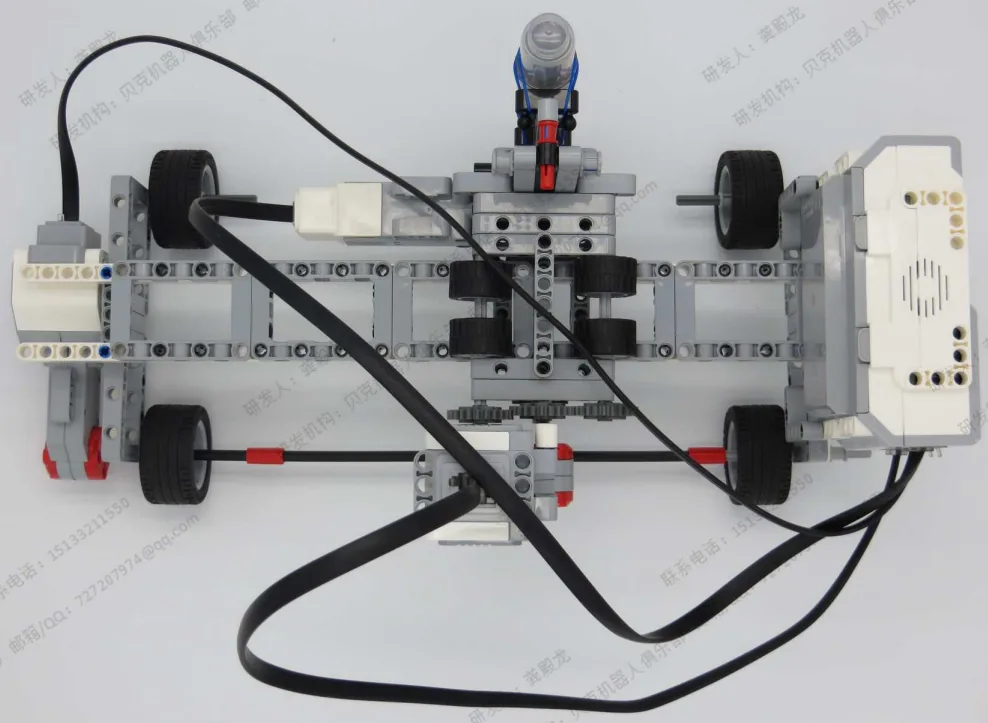
Home first, then one point, then a shape. Do not put a letter in until go to reliably reaches a point you can measure with a ruler.
```ev3blocks Put your own measured numbers in per mm. Then measure the dot: it should be 30 mm across and 30 mm along from your marked origin.
define pen up
[D v] run to position (0) [degrees v] at (40) % speed :: motors
define pen down [D v] run to position (90) [degrees v] at (30) % speed :: motors
define home pen up :: custom [B v] start motor at (-25) % speed :: motors wait until <[1 v] is pressed? :: sensors> [B v] stop motor :: motors [B v] reset degrees counted :: motors [A v] run [counterclockwise v] for (500) [degrees v] at (25) % speed :: motors [A v] reset degrees counted :: motors
define go to (x) (y) [B v] run to position ((x) * (per mm x)) [degrees v] at (40) % speed :: motors [A v] run to position ((y) * (per mm y)) [degrees v] at (40) % speed :: motors
when program starts :: events hat set [per mm x v] to (7) :: variables set [per mm y v] to (7) :: variables home :: custom go to (30) (30) :: custom pen down :: custom pen up :: custom
> **Do not go on until that dot lands where you predicted.** Every coordinate afterwards depends on this being right, and a wrong steps-per-millimetre makes every letter wrong in a way that looks like a different problem.

### Step 2 — draw a shape from a list

```ev3blocks Three points and a letter. The first has `draws = 0` because the pen travels there without marking; the other two are drawn.
define draw shape
set [i v] to (1) :: variables
pen up :: custom
repeat (length of [xs v])
  write (i) at line (1) :: display
  if <(item (i) of [draws v]) = (0)> then
    pen up :: custom
  end
  go to (item (i) of [xs v]) (item (i) of [ys v]) :: custom
  if <(item (i) of [draws v]) = (1)> then
    pen down :: custom
  end
  change [i v] by (1) :: variables
end
pen up :: custom

when program starts :: events hat
set [per mm x v] to (7) :: variables
set [per mm y v] to (7) :: variables
delete all of [xs v] :: list
delete all of [ys v] :: list
delete all of [draws v] :: list

// the letter L: start top of the upright, down, then across
add (20) to [xs v] :: list
add (60) to [ys v] :: list
add (0) to [draws v] :: list

add (20) to [xs v] :: list
add (20) to [ys v] :: list
add (1) to [draws v] :: list

add (50) to [xs v] :: list
add (20) to [ys v] :: list
add (1) to [draws v] :: list

home :: custom
draw shape :: custom
play sound [Communication / Goodbye v] until done :: sound
draw shape knows nothing about letters. ** It walks three lists. Change the lists and it draws something else — Lesson 15’s separation, applied to geometry.What success looks like: a recognisable letter L, in the right place on the paper, with no stray line leading into it — and drawn again in the same place if you run it twice.
If the letter is mirrored, one axis is positive the wrong way. If it is the right shape but too big or small, your steps-per-millimetre is out. If it is stretched, the two axes have different values and you used one for both.
Work through them in order — each is harder than the last. The extra challenge comes after all three, and it is meant to make you plan before you build.
Measure your steps per millimetre. Drive X exactly 360 degrees and measure the pen travel with a ruler. Do the same for Y. Then draw a dot at (30, 30) and measure whether it landed where you predicted. Do not go further until it does.
Shift and scale the whole letter. Add 20 to every X and watch the letter move without changing shape. Then multiply every coordinate by 1.5 and watch it grow without changing shape. Two edits, and you have discovered what a coordinate system is for.
Draw a letter that needs a lift. Draw a T. It has a genuine gap in the middle — the pen must travel from the end of the crossbar to the top of the stem without marking. Then set every draws value to 1 and look at what you get. Explain what the third list is for in one sentence.
Write a word. The machine must write at least three letters, side by side, correctly spaced, from lists of coordinates — and drawing a different word must mean changing data, not blocks. Plan on paper first. Draw your letters on squared paper, read off the coordinates, and mark which moves are drawn and which are travelled. Four rules: 1. One drawing routine. Every letter is that routine walking different data. 2. Letters are positioned by an offset, so the same L data draws the second and the fourth letter without being retyped. 3. The machine homes before it starts, so running it twice writes in the same place twice. 4. Nothing in the drawing routine mentions a motor port. Then hand your coordinate lists to another group and ask them to run them on THEIR machine. If the word comes out right, your steps-per-millimetre and origin are both honest — and you have just discovered why every machine tool in the world agrees about coordinates.