Challenge 1
Pause three times in one job. Start a fifty-turn job and pause it three times at different points. The machine must still stop at exactly fifty. If it overshoots or stops short, something is being counted twice or lost.
Quick Learn — the model, the instructions, the program and the challenges. The theory is in Full Lesson.
EV3 Robotics›Level 3 · Advanced›Lesson 34
Level 3 · Lesson 34 · EV3-L03-3460 minutes · Ages 9–16 · Model: Winding machine
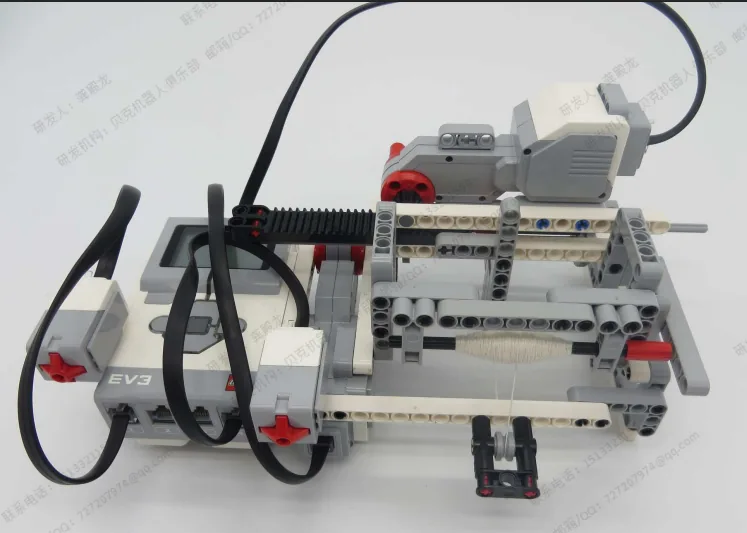
The Winding machine: a spindle that winds thread or wire onto a bobbin, with a screen to set how many turns and buttons to run and pause it.
Two hundred turns takes a while, and things happen — the thread snags, somebody needs the table, the wire needs guiding. The machine has to stop.
By the end of the lesson stopping will cost nothing — press again and it continues from turn 137, not from zero.
A spinning wheel winds yarn onto a bobbin, and a spinner stops constantly — to join a new length of fibre, to shift position, to answer the door. Nothing is lost. The yarn already on the bobbin is the progress, and it is still there when they sit back down.
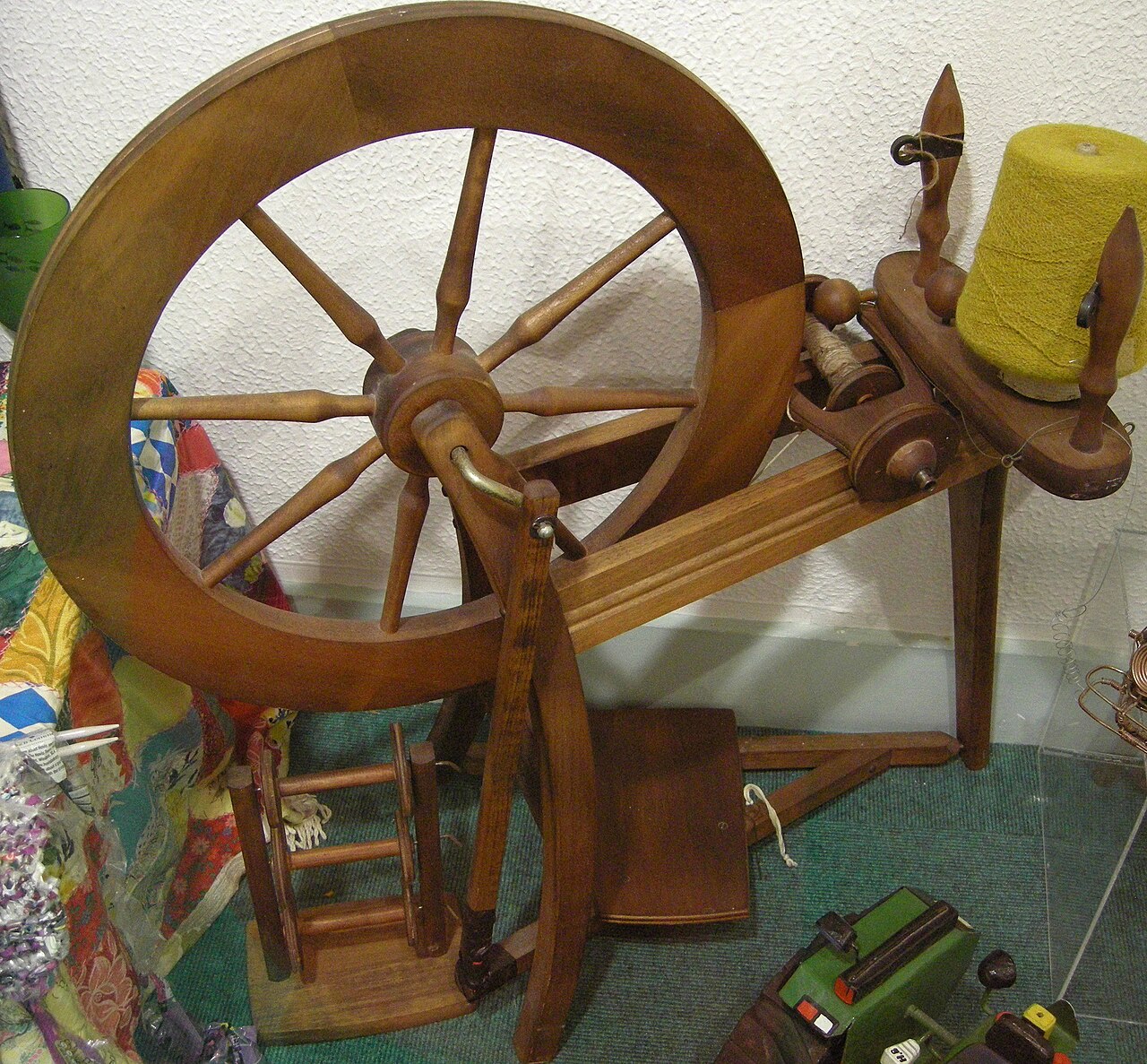
Industrial coil winders are the same. A machine putting several thousand turns on a transformer coil can be halted for a broken wire, and it does not start again from turn one — the counter holds, the operator fixes the break, and it carries on.
Because long jobs get interrupted, and restarting is expensive. If a stop costs you the whole run, operators stop avoiding stops — they push on through problems that should have been fixed, and the work suffers.
Where the count is kept matters more than that it is kept. A winder counts what is actually on the bobbin, not how many times it told the motor to turn — because if somebody unwinds a few turns by hand while it is stopped, only one of those two numbers is still true.
A machine that forgets makes every interruption a disaster, and a machine that remembers the wrong thing is worse — it will confidently report 200 turns on a bobbin holding 180, and nobody will find out until the coil fails.
Count what is really there, not what you meant to do.
A resumable job needs three separate things, and confusing any two of them is how resuming goes wrong.
| Thing | Means | Survives a pause? |
|---|---|---|
target | How many turns the job needs. | Yes. Set once, cleared only on reset. |
done | How many turns are actually on the bobbin. | Yes. This is the progress. |
running | Whether the motor should be turning right now. | No — this is the only one a pause changes. |
A pause must touch running and nothing else. The moment pausing also clears the count or the target, it has stopped being a pause and become a stop — and the difference is the whole lesson.
// GOOD — the count is read from the physical world
set [done v] to (([A v] degrees counted) / (360)) :: variables
// RISKY — the count is a tally the program keeps
[A v] run [clockwise v] for (360) [degrees v] at (40) % speed :: motors
change [done v] by (1) :: variables
Prefer a count you can check against the real thing. The encoder version can be verified by looking at the bobbin; the tally version can only be believed.
forever
  set [done v] to (([A v] degrees counted) / (360)) :: variables
  if <<(running) = (1)> and <(done) < (target)>> then
    [A v] start motor at (40) % speed :: motors
  else
    [A v] stop motor :: motors
  end
endNotice there is no “resume” code at all. A job written as “keep going while there is work left” resumes for free. A job written as “repeat 200 times” cannot, because the loop counter is thrown away the moment the loop is left.
If pause and reset are the same button, an operator stopping to fix a snag will eventually lose an hour’s work. They are different intentions and they get different buttons — and the destructive one should say what it is about to throw away.
Every EV3 motor contains a sensor that counts how far it has actually turned. That means a motor is not only an output — you can ask it where it is, and the answer describes what really happened rather than what you asked for.
| Block | What it does |
|---|---|
([A v] degrees counted :: sensors) | Reports how far this motor has actually turned since the count was last reset, in degrees. |
[A v] reset degrees counted :: motors | Sets the count back to zero, making right here the new reference point. |
([A v] speed :: sensors) | Reports how fast the motor is turning right now, as a percentage. A motor that is being driven but reads zero is a motor that is stuck. |
Those two are not always the same. Here are two identical motors, running the same program, with only their mechanisms different.
the same program, on two identical motors
Nothing on the Brick announces a stall. The only evidence is that the counter stopped changing while the motor was still being told to turn.
Nothing on the Brick announces the jam. The motor is still being driven, the program is still sitting on the same block, and the only trace of the problem anywhere is a counter that has stopped climbing. Comparing what you asked for with what was counted is how a robot notices — which is the whole of stall detection.
When the Brick powers on, the count is simply whatever it happens to be. It is not a position on the machine — it becomes one only when you tie it to something physical.
That is what reset degrees counted is for, and it is not just a tidy-up block for the top of a program. Where you put it decides what zero means, so putting it part-way through — after the mechanism has been driven somewhere known — is the normal way to use it, not an abuse of it.
A conveyor has no idea where it is. Give it a touch sensor at one end and it can find out: drive it until the sensor is pressed, and it is now at a place you can name. Only then reset the count, and that end becomes 0.
when program starts :: events hat
[A v] start motor [counterclockwise v] :: motors
[1 v] wait until [pressed v] :: sensors
[A v] stop motor :: motors
[A v] reset degrees counted :: motors
The order is the whole point. Reset before the sensor is pressed and you have zeroed a random spot; reset after it, and every later reading means “how far from home”. This is called homing, and it is why a printer rattles its head to one side when you switch it on.
Drive towards home gently. The mechanism is deliberately being run into its own end stop, so a slow speed saves the gears — and the touch sensor is what stops it, which means it stops in the same place every time regardless of where it started.
Home is often a corner, and a corner is an awkward place to measure from. Say the conveyor carries a chute that dispenses bricks, and you would rather describe its position as left and right of the middle. Then home once, drive the known distance to the middle, and reset again there:
when program starts :: events hat
[A v] start motor [counterclockwise v] :: motors
[1 v] wait until [pressed v] :: sensors
[A v] stop motor :: motors
[A v] reset degrees counted :: motors
[A v] run [clockwise v] for (900) [degrees v] :: motors
[A v] reset degrees counted :: motors
Now the middle is 0. Moving right counts up, moving left counts down past zero into negative numbers — the count is perfectly happy to go negative — and “go back to the middle” becomes the simplest instruction in the program: drive until the count reaches 0.
Both resets earn their place. The first one turns a meaningless number into a distance from a real, repeatable place. The second one moves zero to where the maths is easiest. A reset in the middle of a program is only a mistake when the mechanism is somewhere you cannot name.
Because the count is in degrees, and a wheel of known size travels a known distance per turn, the reading can be converted into how far the robot has actually driven. That is how a robot reports a distance in centimetres rather than in rotations — and it is why changing the wheels changes the answer.
This is how a printer knows the paper jammed, how a car window stops when it meets your hand, and how a robot arm knows it has reached its limit. A machine that can only give orders is fragile; one that can check what happened can recover.
Long before there were computers, people had exactly this problem. A shepherd counting sheep through a gate, a trader counting sacks of grain, a builder counting days — none of them can hold the number in their head while they get on with the work. So they scratched a mark on a wall, cut a notch in a stick, or wrote a number on a piece of paper. The number lived outside the person, in a place they had agreed on, and they could go back to it, read it, and change it.
Better still, once the number is written down somebody else can use it. Watch these two: one of them counts and writes, the other never sees a single animal and simply reads the wall.
Notice what never happens: Ben never asks Abby. He does not need to — the number is not in her head, it is on the wall, and the wall is there for anyone who needs it.
Neither Abby nor Ben is holding the number — the wall is. And notice what never happens: Ben does not ask Abby. He does not need to, because the count is not in her head. It is in a place they both agreed on, which is what makes it useful to more than one of them.
That is all a variable is. The robot cannot hold a number in its head either, so you give it a wall of its own, write a name at the top so everyone knows which wall is which — score, count, degree_turn — and the program can read what is on it and write something new. One part of the program writes; another part reads. Exactly Abby and Ben.
Say we are counting rotations of a motor. Before we start we write 0 on the paper. Every time the motor completes a turn we cross out what is there and write one more: 0 becomes 1, then 2, then 3. That is change — it has to read the old number to work out the new one.
set is the other thing you can do, and it is completely different: rub the whole paper out and write the number you want. It does not care what was there. Press the buttons and watch what happens to the crossings-out.
The paper starts blank, so we write 0 on it. That is what a variable is: a place to keep a number while the robot works.
| Block | What it does |
|---|---|
set [count v] to (0) | Puts a value in, replacing whatever was there. |
change [count v] by (1) | Adds to what is already there. |
(count) | Reports the current value, for use in a comparison or on the display. |
set replaces; change adds. Counting things needs change. Starting a count needs set. Both programs below have both blocks — the only difference is whether the set block is inside the loop or above it.
set before the loop
set inside it
Both programs contain both blocks. Only the position of set [count] to 0 is different.
The count on the right is not broken; it is being told to start again on every pass. Each time round the loop it is wiped back to zero and then changed by one, so the honest answer is always 1 — while the motor cheerfully turns four times. A counter stuck at 1 almost always means a set block that has slipped inside the loop.
EV3 Classroom tells you what a block does by its shape, and once you have noticed that, a whole set of questions answers itself:
So when a slot is oval, any oval fits it — and it does not matter in the least where that number came from. You can take the motor’s own A degrees counted and keep it in a variable you named degree_turn, then compare that with a number later. Pick an oval below and watch the same one drop into all three kinds of slot.
pick an oval
the same oval fits all three
Every one of those slots is oval-shaped, and A degrees counted is an oval — so it drops in. Nothing about where the number came from matters.
This is what makes a variable more than a counter. A sensor reading is true only at the instant you read it; copying it into a variable freezes it, so the robot can compare where it is now against where it was when something happened:
when program starts :: events hat
[A v] reset degrees counted :: motors
set [degree_turn v] to ([A v] degrees counted :: sensors)
start moving [right: 30] :: movement
wait until <(([A v] degrees counted :: sensors) - (degree_turn)) > (400)>
stop moving :: movement
Read the condition aloud: how far the motor has gone now, minus where it was when we started, is more than 400. Both are ovals, so both can go into a subtraction, and the subtraction is an oval too — which is why it can go into a comparison. Ovals nest inside ovals as deep as you need.
A variable keeps its value after the program ends. Run the program again without setting it back and the second run begins where the first left off — the count starts at 14, the robot thinks it has already done the job. Every variable a program changes must be set to its starting value at the top.
A variable is the difference between a machine that repeats a fixed routine and one that responds to how things have gone — counting parts, tracking a score, remembering where it started.
The Brick’s screen is a small black-and-white whiteboard. You can wipe it, draw one of the built-in pictures on it, or write your own words at a spot you choose. It is how the robot tells a person what it is doing.

| Block | What it does |
|---|---|
clear display :: display | Wipes the screen blank, ready for something new. |
display [Eyes / Neutral v] :: display | Draws a built-in picture chosen from a list — eyes, faces, arrows, symbols. |
display [Eyes / Neutral v] for (2) seconds :: display | Draws the picture, holds the program for that long, and then carries on. Handy when a face should be seen before anything else happens. |
write [Hello] at line (1) :: display | Writes your own text on one of the screen’s eight lines. |
write [Hello] at x: (10) y: (40) with font [normal black v] :: display | Writes text at an exact spot instead of a line, and lets you choose the size. Use it when a message has to line up with something else on the screen. |
The screen has no memory of whose writing is whose. It keeps every mark until something wipes it — including the marks left by the last run. Watch the same program with and without its clear display block.
with clear display
without it
Let it loop two or three times. The left screen still reads cleanly; the right one is the same program with one block missing.
Both Bricks are told exactly the same thing. The left one wipes the screen first, so line 7 holds one message and reads correctly. The right one never wipes, so each new message is drawn over the last and the words turn into a smudge. This is why a program that seems to display nonsense is usually displaying the truth — several times over.
There are two blocks for writing text, and they describe where in two completely different ways. Watch one message move around the screen under both of them.
the screen is 178 pixels across and 128 down
The arrows are the two numbers. The one along the top is x; the one down the side is y, and it counts downwards from the top edge.
write [EV3] at line (1) is the simple one. You give it a line number and it puts the text there, starting hard against the left edge — you do not choose how far across, only how far down.
For most robots this is all you need: a status word on line 1, a reading on line 3, a warning on line 5. Pick your lines at the start and keep each one for one job, the way you would keep one colour of status light for one meaning.
write [EV3] at x: () y: () with font [] treats the screen as a grid of pixels — 178 across and 128 down — and lets you put the text anywhere on it.
The block ends with a font dropdown, and normal black is the usual choice. A larger font makes the writing easier to read from across the room but takes more room across the screen, so fewer characters fit before the text runs off the edge.
The text slot of either block will take a reporter, so a sensor value can be shown directly: drop (4 distance in cm) into the slot and the screen shows the reading. That is the EV3’s version of a print statement, and it is the fastest way to find out what a robot actually thinks it is seeing.
A bare number on its own is hard to read, though. To show DIST: 23 rather than 23, use the operator block join [DIST: ] () to glue the label to the value, and put the join into the write block’s text slot.
when program starts :: events hat
clear display :: display
forever
  write (join [DIST: ] ([4 v] distance in [cm v] :: sensors)) at line (1) :: display
end
Note the forever: a value written once is a value from the start of the program. To watch a reading change, the write block has to be inside a loop.
Once one value is on the screen the rest follows, and the useful trick throughout is join: it glues two pieces of text together and hands the result to the write block. Anything that reports a value can go in either slot — a variable, a sensor, or another join.
Counting is the classic case. A variable counts how many times the Touch Sensor has been pressed, and a bare 5 on the screen tells nobody anything — PRESSED: 5 tells them everything:
when program starts :: events hat
clear display :: display
set [count v] to (0) :: variables
forever
  wait until <[1 v] is pressed? :: sensors>
  change [count v] by (1) :: variables
  write (join [PRESSED: ] (count)) at line (1) :: display
  wait until <not <[1 v] is pressed? :: sensors>>
end
The two wait until blocks are what make it count presses rather than counting as fast as the loop runs while your finger is down. That is the Touch Sensor’s own lesson, but it shows up here because a counter on the screen is where you first notice it going wrong.
Give every reading its own line and keep it. A line that changes meaning halfway through a program is unreadable at a glance, which is the only speed a screen on a moving robot gets read at.
when program starts :: events hat
clear display :: display
forever
  write (join [DIST: ] ([4 v] distance in [cm v] :: sensors)) at line (2) :: display
  write (join [DEG: ] ([A v] degrees counted :: sensors)) at line (5) :: display
end
degrees counted is worth putting on the screen the first time you use it — it is the fastest way to find out whether a motor is turning as far as you think it is, and it is the block behind every “why did it stop early” question.
Sensors report numbers, and people read words. The Colour Sensor reports 5; the person watching wants RED. A chain of if … then … else blocks does the translation, and it is worth doing once into a variable rather than in every write block:
if <([3 v] color :: sensors) = (5)> then
  set [name v] to [RED] :: variables
else
  if <([3 v] color :: sensors) = (4)> then
    set [name v] to [YELLOW] :: variables
  else
    set [name v] to [OTHER] :: variables
  end
end
write (join [COLOR: ] (name)) at line (4) :: display
The same shape turns a distance into a warning. Here the screen carries the number and what the number means, which is what lets somebody across the room tell whether the robot is about to hit something:
if <([4 v] distance in [cm v] :: sensors) < (10)> then
  set [status v] to [TOO CLOSE!] :: variables
else
  if <([4 v] distance in [cm v] :: sensors) < (30)> then
    set [status v] to [OBSTACLE FOUND] :: variables
  else
    set [status v] to [NOTHING FOUND] :: variables
  end
end
write (status) at line (3) :: display
Drive all four of those at once below. The screen is the real thing — five write blocks, five lines, and every one of them a join.
Drive the sensors and read the screen. Every line is one write block with a join in its text slot.
| Line | What goes in the write block | On the screen now |
|---|---|---|
| 1 | join "PRESSED: " (count) | PRESSED: 3 |
| 2 | join "DIST: " (4 distance in cm) | DIST: 24 |
| 3 | (status) — set by the if chain | OBSTACLE FOUND |
| 4 | join "COLOR: " (name) | COLOR: RED |
| 5 | join "DEG: " (A degrees counted) | DEG: 180 |
Line 4 says COLOR: RED, but the sensor only ever said 5. The if chain in between is what turns a number into a word.
The moment a reading goes inside a loop, one of two things goes wrong, and which one depends on where the clear display block went.
Almost everybody tries clear inside the loop first. It gives the right text — and a screen that blinks several times a second, because between the clear and the write there is genuinely nothing on the screen and the loop goes round faster than your eye.
So the clear gets moved to the start of the program, the blinking stops, and the words go wrong. Writing text paints only the characters it has and leaves everything past them exactly where it was. Write RED over YELLOW and the LOW is still there: the screen says REDLOW. Go the other way — yellow first, then red — and it looks fine, which is why this bug takes so long to pin down.
when program starts :: events hat
clear display :: display
forever
  write (name) at line (3) :: display
end
Watch the bottom three rows rather than the Brick. They are what the screen is actually doing: old characters, new characters, and whatever survives.
The fix is to make the new text at least as long as the old one, and join already does that: pad it with spaces. RED plus three spaces is six characters — exactly enough to paint over YELLOW. Nothing is left behind, and nothing is ever blank.
write (join (name) [ ]) at line (3) :: display
Pad to the length of the longest thing that line can ever show. Six characters covers RED, BLUE and GREEN but not NOTHING FOUND — count the longest message, and add spaces to match. The same applies to numbers: DIST: 5 after DIST: 40 leaves a stray 0 on the end, so a line that shows a two-digit reading needs a trailing space.
Use clear-inside-the-loop when the whole screen changes at once and a flicker does not matter; use the padding trick whenever a value is being watched.
Once several values need showing, the line number becomes a counter and the values come out of a list: write item 1 at line 1, item 2 at line 2, and so on inside a repeat. That needs the list blocks rather than the display blocks, so it lives with them — Lists covers building one and reading it back item by item, and the loop that walks it is the same loop that fills the screen.
Machines in the real world tell you what they are doing: a microwave counts down, a lift shows its floor, a car dashboard warns you. A robot that shows WAITING and then OPEN is far easier to understand — and far easier to debug — than one that moves silently.
Write the job as “while there is work left” and it resumes by itself. Count what is really there, and let only reset clear it.
Every EV3 motor contains a sensor that counts how far it has actually turned. That means a motor is not only an output — you can ask it where it is, and the answer describes what really happened rather than what you asked for.
| Block | What it does |
|---|---|
([A v] degrees counted :: sensors) | Reports how far this motor has actually turned since the count was last reset, in degrees. |
[A v] reset degrees counted :: motors | Sets the count back to zero, making right here the new reference point. |
([A v] speed :: sensors) | Reports how fast the motor is turning right now, as a percentage. A motor that is being driven but reads zero is a motor that is stuck. |
Those two are not always the same. Here are two identical motors, running the same program, with only their mechanisms different.
the same program, on two identical motors
Nothing on the Brick announces a stall. The only evidence is that the counter stopped changing while the motor was still being told to turn.
Nothing on the Brick announces the jam. The motor is still being driven, the program is still sitting on the same block, and the only trace of the problem anywhere is a counter that has stopped climbing. Comparing what you asked for with what was counted is how a robot notices — which is the whole of stall detection.
When the Brick powers on, the count is simply whatever it happens to be. It is not a position on the machine — it becomes one only when you tie it to something physical.
That is what reset degrees counted is for, and it is not just a tidy-up block for the top of a program. Where you put it decides what zero means, so putting it part-way through — after the mechanism has been driven somewhere known — is the normal way to use it, not an abuse of it.
A conveyor has no idea where it is. Give it a touch sensor at one end and it can find out: drive it until the sensor is pressed, and it is now at a place you can name. Only then reset the count, and that end becomes 0.
when program starts :: events hat
[A v] start motor [counterclockwise v] :: motors
[1 v] wait until [pressed v] :: sensors
[A v] stop motor :: motors
[A v] reset degrees counted :: motors
The order is the whole point. Reset before the sensor is pressed and you have zeroed a random spot; reset after it, and every later reading means “how far from home”. This is called homing, and it is why a printer rattles its head to one side when you switch it on.
Drive towards home gently. The mechanism is deliberately being run into its own end stop, so a slow speed saves the gears — and the touch sensor is what stops it, which means it stops in the same place every time regardless of where it started.
Home is often a corner, and a corner is an awkward place to measure from. Say the conveyor carries a chute that dispenses bricks, and you would rather describe its position as left and right of the middle. Then home once, drive the known distance to the middle, and reset again there:
when program starts :: events hat
[A v] start motor [counterclockwise v] :: motors
[1 v] wait until [pressed v] :: sensors
[A v] stop motor :: motors
[A v] reset degrees counted :: motors
[A v] run [clockwise v] for (900) [degrees v] :: motors
[A v] reset degrees counted :: motors
Now the middle is 0. Moving right counts up, moving left counts down past zero into negative numbers — the count is perfectly happy to go negative — and “go back to the middle” becomes the simplest instruction in the program: drive until the count reaches 0.
Both resets earn their place. The first one turns a meaningless number into a distance from a real, repeatable place. The second one moves zero to where the maths is easiest. A reset in the middle of a program is only a mistake when the mechanism is somewhere you cannot name.
Because the count is in degrees, and a wheel of known size travels a known distance per turn, the reading can be converted into how far the robot has actually driven. That is how a robot reports a distance in centimetres rather than in rotations — and it is why changing the wheels changes the answer.
This is how a printer knows the paper jammed, how a car window stops when it meets your hand, and how a robot arm knows it has reached its limit. A machine that can only give orders is fragile; one that can check what happened can recover.
Say this back before moving on: “How much is done, and how much is left?”
Turn the spindle by hand one full revolution and watch the encoder. How many motor degrees is one turn of the bobbin? Gearing means it is probably not 360.
| Part | What it is doing here |
|---|---|
| EV3 Intelligent Brick | The machine’s controls. Its screen shows done, target and remaining — and the remaining count is what an operator actually watches. |
| Large Motor — the spindle | Winds the bobbin, and is also the counter. Its encoder is the machine’s memory of how much is done. |
| Touch Sensor — start / pause | One button, toggling. It must be reachable instantly, because it is what an operator reaches for when the thread snags. |
| Touch Sensor — reset | The destructive one. Deliberately separate, deliberately further away. |
| The bobbin and guide (not electronic) | The thread must lay evenly. A bobbin that piles thread in one place changes its own diameter as it fills — which is Level 2 Lesson 48’s pulley problem, and it means turns are a better measure than length. |
Do not reset the encoder except on a genuine reset. It is the progress. A stray reset degrees counted in the wrong place silently throws away everything the machine has done, and the display will cheerfully show zero.
Sensors go in ports 1, 2, 3, 4. Motors go in ports A, B, C, D. They are not interchangeable, and nothing will tell you politely if you swap them.
| Part | Port | Why this one |
|---|---|---|
| Spindle (Large) | A | The only motor, and the counter. |
| Start / pause (Touch) | 1 | Touch stays on 1 across the course. |
| Reset (Touch) | 2 | The destructive action, on its own port and well away from the other. |
Check your own build now:
Two routes, and either is fine. USB is the reliable one and the one to fall back on when a room’s Bluetooth is busy; Bluetooth leaves the robot free to move, which some models need.
Do these in order. Naming the Brick after you go looking for it in the list is how groups end up driving each other’s robots.
EV3 until somebody changes it.EV3.The two failures, every class, every time. The Brick has gone to sleep while you were building — press the centre button to wake it. Or you have paired with the group at the next table, which is why the name matters.
The long version, including Port View and how to read the port tiles, is in the Brick & Bluetooth guide.
USB is fine — the machine stays put. Keep the lead away from the spindle, which will happily wind a cable onto the bobbin along with the thread.
Stuck? The long version, with a photograph of every screen, is in the Brick & Bluetooth guide.
One change at a time. Predict, then run, then look.
reset degrees counted in the pause stack. Predict the result, then watch an hour’s work vanish on a pause. Undo it.Pause changes one variable. Reset is the only thing allowed to forget, and it should have to ask.
Your winder counts turns, and a turn is a real thing — you can point at the bobbin and see them.
Most measurements are not like that. A sensor gives a number between 0 and 100, or a count of degrees, and those are not grams, millimetres or newtons. They are just numbers, and turning one into a real unit takes more than a sensor.
Two known weights and a straight line between them turns a raw reading into grams — two-point calibration, which is Lesson 12 grown up, and the last measurement idea in this set.
Today the machine counted something real. Next it learns to say what a number means.
Write the version that cannot resume first. It is the obvious way to write it, and seeing it fail is what makes the alternative look sensible.
```ev3blocks Try to pause this. You cannot — and if you stop the program, the count is gone because it only ever lived inside the repeat.
when program starts :: events hat
wait until <[1 v] is pressed? :: sensors>
repeat (50)
[A v] run [clockwise v] for (360) [degrees v] at (40) % speed :: motors
end
play sound [Communication / Goodbye v] until done :: sound
### Step 2 — the resumable machine

```ev3blocks Three stacks with three jobs. Pause changes one variable; reset is the only thing that touches the count, and it asks first.
when program starts :: events hat
set [per turn v] to (360) :: variables
set [target v] to (50) :: variables
set [running v] to (0) :: variables
[A v] reset degrees counted :: motors
clear display :: display

// ---- start / pause: touches 'running' and NOTHING else ----
when program starts :: events hat
forever
  wait until <[1 v] is pressed? :: sensors>
  wait until <not <[1 v] is pressed? :: sensors>> :: control
  if <(running) = (1)> then
    set [running v] to (0) :: variables
  else
    set [running v] to (1) :: variables
  end
  play sound [Mechanical / Blip 2 v] :: sound
end

// ---- reset: the only thing allowed to clear progress ----
when program starts :: events hat
forever
  wait until <[2 v] is pressed? :: sensors>
  set [running v] to (0) :: variables
  [A v] stop motor :: motors
  write [RESET? HOLD 2s] at line (1) :: display
  wait (2) seconds :: control
  if <[2 v] is pressed? :: sensors> then
    [A v] reset degrees counted :: motors
    play sound [Mechanical / Error v] :: sound
  end
  wait until <not <[2 v] is pressed? :: sensors>> :: control
end

// ---- the job: "while there is work left" ----
when program starts :: events hat
forever
  set [done v] to ([floor v] of (([A v] degrees counted) / (per turn))) :: variables
  set [left v] to ((target) - (done)) :: variables

  write (done) at line (2) :: display
  write (target) at line (3) :: display
  write (left) at line (5) :: display

  if <<(running) = (1)> and <(left) > (0)>> then
    [A v] start motor at (40) % speed :: motors
    write [WINDING] at line (1) :: display
    set status light to [orange v] :: display
  else
    [A v] stop motor :: motors
    set status light to [green v] :: display
    if <(left) > (0)> then
      write [PAUSED] at line (1) :: display
    else
      write [DONE] at line (1) :: display
    end
  end
end
done is derived from the encoder every pass. ** Turn the bobbin by hand while paused and the display follows — because it is measuring the bobbin, not the program.left is what the operator watches. ** Derived, from Lesson 31 — never stored, so it cannot disagree with the count.What success looks like: start it, let it reach about twenty turns, press pause. The count holds. Press start and it continues from twenty — and stops itself at the target.
If the count resets when you pause, a
reset degrees countedis in the wrong stack. Only the reset button may touch it.
Work through them in order — each is harder than the last. The extra challenge comes after all three, and it is meant to make you plan before you build.
Pause three times in one job. Start a fifty-turn job and pause it three times at different points. The machine must still stop at exactly fifty. If it overshoots or stops short, something is being counted twice or lost.
Unwind it by hand. While paused, turn the bobbin backwards by hand and watch the count fall. Press start and watch it wind those turns back. Write one sentence on why counting the encoder is better than counting how many times you told the motor to turn.
Switch to a tally, then break it. Count turns in a variable instead of reading the encoder. Pause, unwind ten turns by hand, and resume. The display now lies and no line of your program is wrong. Say how you would notice this fault in somebody else's machine.
Wind a real job, interrupted for real reasons. Set a target of at least a hundred turns and complete it — but you must pause at least four times for genuine reasons: to guide the thread, to fix a snag, to swap places with a partner. Requirements: 1. Pause changes exactly one variable. Prove it by showing which line runs when you press pause. 2. Reset is a separate button, asks before it acts, and is the only thing that clears progress. 3. The screen shows done, target and remaining at all times, and remaining is derived. 4. The finished bobbin actually has the target number of turns on it — count them, or measure the thread. That last requirement is the mission. A machine that reports a hundred turns on a bobbin holding ninety-two has kept the wrong number, and the only way to find out is to check it against the real thing. Then write down one machine you have used that loses your work when interrupted, and one that does not.
Build the model before you read any further. Everything after this is about making it do something, and none of it will make much sense with nothing on the table in front of you.
Use the viewer's own controls to zoom and turn pages. Fullscreen makes it big enough to build from.
Check the finished build against the picture before you switch anything on. A motor mounted the wrong way round is far easier to spot now than it is to debug later, when it looks like a program fault.