
Challenge 1
Count what random really does. Draw thirty times between one and three and record the three counts. Then do it again. Then do three hundred and compare. Report all of it. Nobody believes clustering until they have counted it.
Quick Learn — the model, the instructions, the program and the challenges. The theory is in Full Lesson.
EV3 Robotics›Level 3 · Advanced›Lesson 36
Level 3 · Lesson 36 · EV3-L03-3660 minutes · Ages 9–16 · Model: EV3 Ball Conveyor
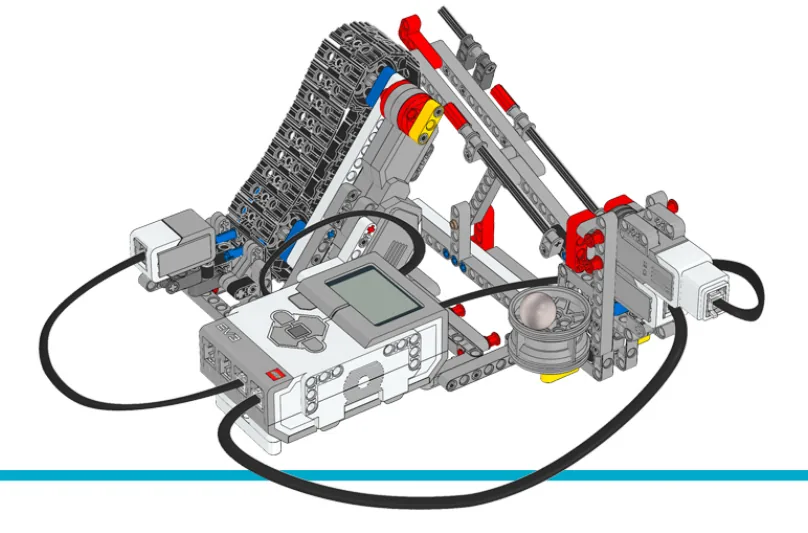
The Ball Conveyor: coloured balls travel up a belt, a Colour Sensor sees each one, and a gate sends it somewhere — a draw machine, in effect.
For thirty-five lessons unpredictable has meant broken. Every bug you have chased was a machine doing something different from one run to the next.
By the end of the lesson exactly one part of your machine will be unpredictable, on purpose — and you will be able to say precisely which parts must never be.
A bingo or lottery machine is built so that nobody — including its makers — can predict the next ball. The balls are weighed to identical mass, the drum is transparent, and the draw is filmed. All that effort exists to make one thing genuinely unpredictable.
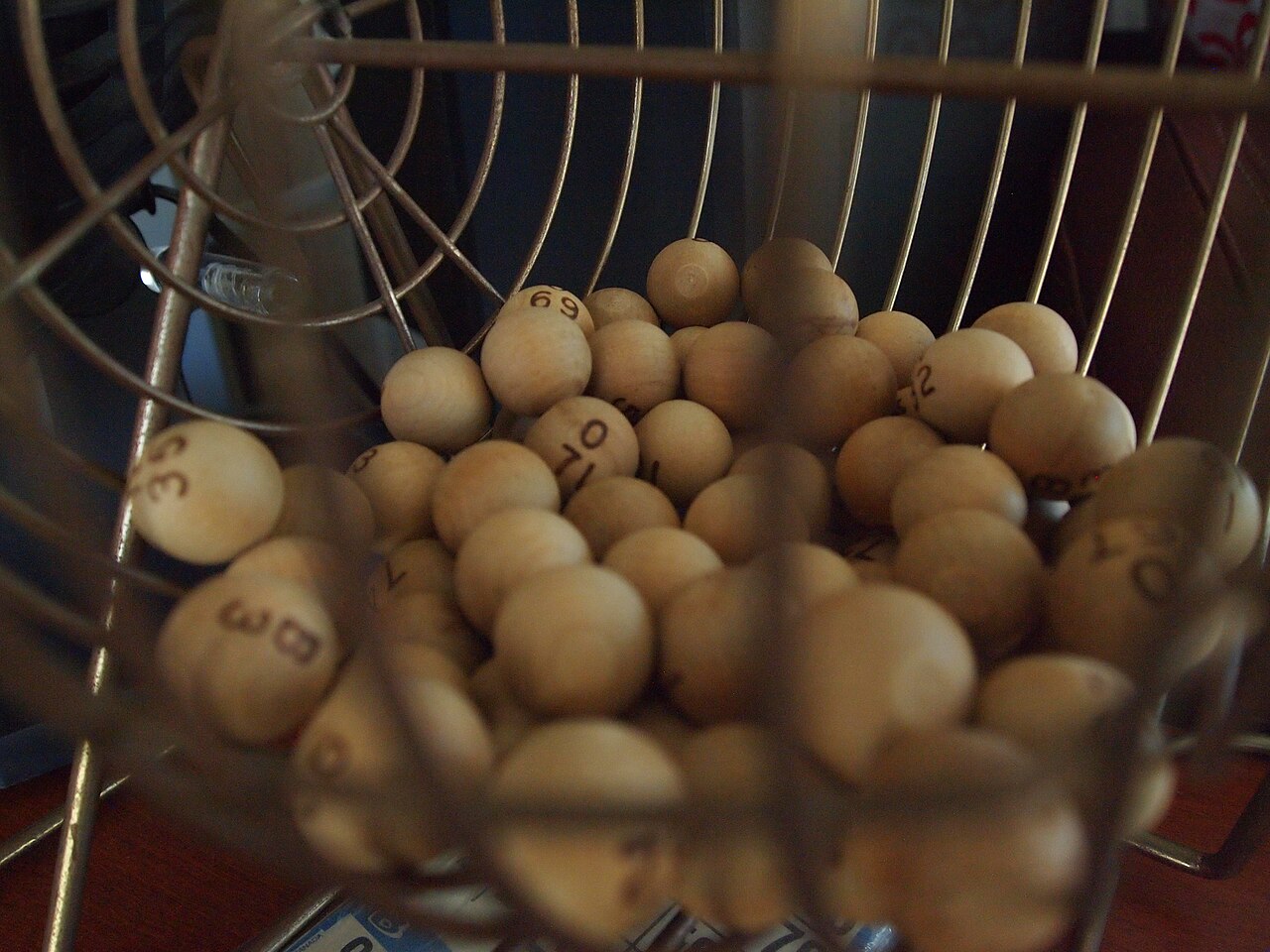
But look at what is not random. The number of balls is fixed. Each number appears exactly once. The machine counts what it drew, and a drawn ball is removed so it cannot come again. Only which one comes next is uncertain.
Because randomness is valuable in exactly one place and disastrous everywhere else. A game needs it or it is not a game. A shuffle needs it or the playlist is the same every morning.
A safety interlock, a counter, a calibration and a scale must never be random — and a machine that is unpredictable in one of those is not exciting, it is broken.
A draw machine that produced the same order every time would be pointless. And one that could repeat a number, or lose count of how many it had drawn, would be worse than pointless — the game would be unplayable and nobody would trust it.
Be random where it is the point, and rigidly predictable everywhere else.
pick random is one block and the easiest thing in this lesson. The hard parts are knowing what random actually behaves like, and knowing where it must not go.
Ask for a random number between 1 and 3 twelve times and you will not get four of each. You will often get five, five and two — and sometimes the same value three times running.
A run of the same result is not a broken machine, and students will insist it is. Randomness has no memory: the fact that red came up three times changes nothing about the fourth draw. Evening out only happens over hundreds of draws, not over twelve.
If you want each option exactly once — a proper draw — you cannot get it by picking randomly and hoping. You draw from a shrinking list:
// fill the bag
delete all of [bag v] :: list
add (1) to [bag v] :: list
add (2) to [bag v] :: list
add (3) to [bag v] :: list
add (4) to [bag v] :: list

// draw one, and remove it so it cannot come again
set [pick v] to (pick random (1) to (length of [bag v])) :: variables
set [drawn v] to (item (pick) of [bag v]) :: list
delete (pick) of [bag v] :: list
delete from Lesson 25, doing a completely different job.| You want | Use | Behaves like |
|---|---|---|
| Any option, repeats allowed | pick random 1 to 4 | A die. Can roll three sixes. |
| Each option exactly once | Draw from a shrinking list. | A lottery. Cannot repeat, and runs out. |
| Mostly one, sometimes another | Random 1–100, act on ranges. | Weighted chance — 1 to 80 does this, 81 to 100 that. |
| Part of a machine | Random? | Why |
|---|---|---|
| Which ball to send next | Yes | It is the entire point of the machine. |
| How many have been drawn | Never | A count that varies is not a count. |
| Where the gate positions are | Never | Calibrated, from Lesson 12 and 35. |
| Whether to stop when something jams | Never | Safety. A guard that sometimes acts is not a guard. |
A well-built machine usually has exactly one random decision in it. If you find a second, ask hard whether it is doing anything except making the machine difficult to test.
Every bug you have fixed was found by making the machine repeat itself. A random machine cannot be repeated, so build a switch that fixes the choice — Brick Left forces red, say — and use it whenever you are debugging anything else.
Sometimes a robot should not be predictable. A game that always asks the same question, or a creature that always turns the same way, stops being interesting after one run. A random number fixes that.
| Block | What it does |
|---|---|
(pick random (1) to (10)) | Reports a number between the two values, including both ends. A fresh number every time it runs. |
(pick random (1.0) to (10.0)) | The same range, but written with decimal points — so it reports decimals instead of whole numbers. |
This catches everybody once, because the two blocks look almost identical and behave completely differently. The block decides from what you typed, not from the size of the range:
(pick random (1) to (10)) — and you get whole numbers only. 1, 2, 3 … 10. Never 4.5.(pick random (1.0) to (10)) — and you get decimals: 4.5281749263, 9.9903, anything in between. A whole number is possible but vanishingly unlikely.And both ends are included. That matters more than it sounds: (pick random (1) to (2)) has exactly two possible answers, not one, which is what makes it a coin toss. A range of whole numbers from a to b has b − a + 1 answers in it.
Type your own range below and press it. Then press it five hundred times.
(pick random (1) to (10))
Only 10 answers exist here, and 1 and 10 are two of them — both ends are included, so the count is 10 − 1 + 1. Nothing lands between the marks.
Press pick a few more times. A handful of picks tells you nothing about whether it is fair.
Change 10 to 10.0 and nothing about the range changes — but the row of separate marks becomes an unbroken band, because the answers stop being a short list of possibilities and become anywhere in between. That is the whole rule, and it is the difference between one keystroke.
Keep the range sensible. A random turn between 1 and 360 degrees mostly looks like chaos; one between 30 and 90 looks like a creature deciding.
Dropped into a motor block it varies the movement; into a wait it varies the timing; into a display block it varies what is shown. Anywhere a number can go, a random number can go.
[A v] run [clockwise v] for (pick random (30) to (90)) [degrees v] :: motors
wait (pick random (1) to (4)) seconds :: control
write (pick random (1) to (6)) at line (1) :: display
The step that makes this block genuinely useful is feeding it into an if … then … else. On its own a random number varies how much something happens. Inside a decision it varies what happens at all.
The smallest version is the coin toss: 1 or 2, two branches, and a fifty-fifty chance of each. Here it is deciding how a driving base gets round an obstacle — one way it drives for three seconds and turns right, the other it drives for two and turns left.
when program starts :: events hat
set [coin v] to (pick random (1) to (2)) :: variables
if <(coin) = (1)> then
  move [forward v] for (3) [seconds v] :: movement
  move [right: 100 v] for (0.5) [rotations v] :: movement
else
  move [forward v] for (2) [seconds v] :: movement
  move [left: 100 v] for (0.5) [rotations v] :: movement
end
The same shape gives a motor a fifty-fifty chance of turning one way or the other — 90° or −90°. On the EV3 the sign lives in the direction dropdown rather than in the number, so −90° is written as counterclockwise 90:
when program starts :: events hat
set [coin v] to (pick random (1) to (2)) :: variables
if <(coin) = (1)> then
  [A v] run [clockwise v] for (90) [degrees v] :: motors
else
  [A v] run [counterclockwise v] for (90) [degrees v] :: motors
end
when program starts :: events hat
set [coin v] to (pick random (1) to (2)) :: variables
if <(coin) = (1)> then
  move [forward v] for (3) [seconds v] :: movement
  move [right: 100 v] for (0.5) [rotations v] :: movement
else
  move [forward v] for (2) [seconds v] :: movement
  move [left: 100 v] for (0.5) [rotations v] :: movement
end
Let it loop eight times. Both branches come up four times — and they do not take turns doing it, which is the part that looks like a bug and is not.
Two things are worth watching there. Only one branch runs — the other does not happen at all, so the robot ends up somewhere the other branch would never have put it. And the tally along the bottom is uneven: two 2s in a row, then two 1s. Over the eight runs it comes out four and four, but it does not get there by taking turns, and a program that looks broken for three runs in a row is usually just being random at you.
Storing the draw in a variable is not decoration here — it is required. The next section is why.
This is the part that bites. The block does not hold a number — it produces one, freshly, each time it is reached. Use it twice and you have asked two questions and got two answers. Both creatures below turn a head one way and then back again.
store it, then reuse it
set [angle v] to (pick random (30) to (90)) :: variables
[A v] run [clockwise v] for (angle) [degrees v] :: motors
[A v] run [counterclockwise v] for (angle) [degrees v] :: motors
ask twice
[A v] run [clockwise v] for (pick random (30) to (90)) [degrees v] :: motors
[A v] run [counterclockwise v] for (pick random (30) to (90)) [degrees v] :: motors
Let it loop. The angle changes every run on both creatures, as it should. Only the right-hand one also ends up facing somewhere new.
Both are unpredictable, which is what was wanted. But the one on the right asked the random block a second time for the return journey, so it turns back by a different amount and never comes home — by a different margin every run, which is exactly why the bug survives being tested a few times.
The fix is the one on the left. Ask once, store the answer, then use the store:
set [angle v] to (pick random (30) to (90)) :: variables
[A v] run [clockwise v] for (angle) [degrees v] :: motors
[A v] run [counterclockwise v] for (angle) [degrees v] :: motors
The same rule is why the coin toss above says set [coin v] to (pick random (1) to (2)) :: variables on its own line. Putting the random block straight into the if would work for one test and then fail strangely the moment anything below the if needed to know which way it went — because asking again is a fresh toss.
A random number is rarely what you actually want. What you want is a random something: a move, a colour, a name. Put the two together and the number stops being the answer and becomes the position of the answer.
(item (pick random (1) to (length of [Names v])) of [Names v])
Read it from the inside out. (length of [Names v]) asks the list how many things are in it. The random block picks a position between 1 and that. (item () of [Names v]) fetches whatever is standing in that position.
Asking the list for its own length is the part to copy. Type the number in instead and the program works perfectly until the day somebody adds one more item — and then that item is never picked, silently, for ever. Try it below.
when program starts :: events hat
clear display :: display
set [pick v] to (pick random (1) to (length of [Names v])) :: variables
write (item (pick) of [Names v]) at line (3) :: display
The range is asked from the list itself, so adding a name is enough — press «add a name» and the new one is in the draw immediately.
Switch the range to the typed 5, add a name, and press pick 40 more. The counts under the new faces stay on zero. Nothing is misspelled, nothing reports an error, and one name simply never comes up — which is the same class of bug as the creature that never comes home, and just as hard to notice by running the program once.
This is the honest cost. A program with randomness in it behaves differently every run, so a bug that appears once may not appear again — and you cannot tell whether a fix worked from a single test. When hunting a bug in a random program, temporarily replace the random block with a fixed number, fix the bug, then put it back.
A variable holds one number. A list holds many, in order, under one name — so a robot can remember every reading it took rather than only the most recent.
If a variable is a piece of paper with one number on it, a list is a row of lockers. Each locker has a number on the door, and each one holds something of its own. They all share a name — snacks, colours — and you tell them apart by the number, not the name.
The doors matter. You cannot see what is in the whole row at a glance: to find out what is in locker 3, you have to open locker 3. And if you want to change what is in there, you open it, take out what is inside, and put something else in. Try it — click a door.
Three lockers are in use. You cannot see inside any of them until you open one — click a door.
Every list block is one of those physical actions, and the block for whatever you just did appears underneath the lockers:
| Block | The locker version |
|---|---|
add [banana] to [snacks v] | Put a banana in the next free locker. Always the end of the row. |
(item (3) of [snacks v]) | Open locker 3 and tell me what is inside. One locker, one look. |
replace item (3) of [snacks v] with [candy] | Open 3, take out what is there, put candy in. Nothing else moves. |
delete (3) of [snacks v] | Empty locker 3 and close up the gap — everything after it shuffles down one. What was in 4 is now in 3. |
(length of [snacks v]) | How many lockers are in use. |
delete all of [snacks v] | Empty the whole row. This belongs at the top of a program. |
Deleting is the one that catches people. A locker does not stay empty — the row closes up. Delete item 2 of a five-item list and you have a four-item list, with everything after position 2 now one number lower than it was. Any position you wrote down before the delete is wrong afterwards.
Lists are not only for numbers. Anything a block can report can go in one:
| Block | What it does |
|---|---|
add [thing] to [List v] | Puts a new value on the end. |
(item (1) of [List v]) | Reads the value at a position. Positions start at 1. |
(length of [List v]) | Reports how many values are stored. |
delete all of [List v] | Empties it. This belongs at the top of the program, for the same reason a variable is set to zero there. |
The natural shape is a loop that takes a reading and adds it. Watch the same four readings go into a variable and into a list.
into a variable
into a list
Watch the variable box, not the list. Every reading it shows is correct; it is the ones it has already forgotten that matter.
Notice that the variable is never wrong. Every number it shows is a real reading, correctly taken, moments ago. It simply has room for one, so each new reading pushes the last one out — and by the fourth stop three readings have quietly ceased to exist.
Afterwards the list can be walked to find the largest, the smallest, or the average — none of which is possible if you only ever kept the latest value.
Positions count from 1, not 0. A loop that starts its counter at 0 reads a position that does not exist and misses the first entry.
Storing readings is only half of it. To use a list you walk it, and that needs one more idea: a variable that holds a position rather than a value. Call it i. Set it to 1, read item i, then change i by 1 — and the next pass round the loop looks at the next locker.
Two things make this work without anybody counting. The loop repeats length of colours, so it runs once per item however many there are; and i doubles as the screen line, so each item lands on its own row.
when program starts :: events hat
delete all of [colours v]
add [red] to [colours v]
add [blue] to [colours v]
add [green] to [colours v]
add [yellow] to [colours v]
clear display :: display
set [i v] to (1)
repeat (length of [colours v])
  write (item (i) of [colours v]) at line (i) :: display
  change [i v] by (1)
end
Watch i rather than the blocks. It is the only thing that changes between one pass and the next, and it is what makes each pass look at a different locker.
Nowhere does that program mention the number four. Add a fifth colour and it writes five lines, unchanged — which is the whole reason to ask a list its length rather than typing a number you will have to remember to update.
Once a robot can walk a list it can do real work on one. Both of these are the same trick — go along comparing two items at a time — and they differ only in what they do about it. Sorting swaps the pair; finding the biggest just remembers the winner.
when program starts :: events hat
set [i v] to (1)
repeat ((length of [nums v]) - (1))
  set [j v] to (1)
  repeat ((length of [nums v]) - (i))
    if <(item (j) of [nums v]) > (item ((j) + (1)) of [nums v])> then
      set [temp v] to (item (j) of [nums v])
      replace item (j) of [nums v] with (item ((j) + (1)) of [nums v])
      replace item ((j) + (1)) of [nums v] with (temp)
    end
    change [j v] by (1)
  end
  change [i v] by (1)
endOnly ever two numbers are being compared at a time. A sort looks complicated because it repeats, not because any one step is hard.
A bubble sort looks hard because it is a loop inside a loop, but no single step is: compare two neighbours, swap them if they are the wrong way round, move along one. Each full pass floats the biggest remaining number to the end — which is where the name comes from — so after as many passes as there are items, the list is in order.
Finding the biggest needs no swapping at all. Assume the first item is the winner, walk the rest, and whenever you meet something bigger, remember that instead. One pass, one variable. Swap the > for a < and the same program finds the smallest — which is how a line-following robot works out its black and its white before choosing a threshold between them.
This is data collection — a robot driving a course while recording distances, then reporting what it found. It is the difference between a machine that reacts and one that measures.
The Colour Sensor looks down at a surface and can answer three quite different questions: what colour is this?, how bright is this? and how light is the room? Choosing the wrong one is the usual reason a line-following robot refuses to work.
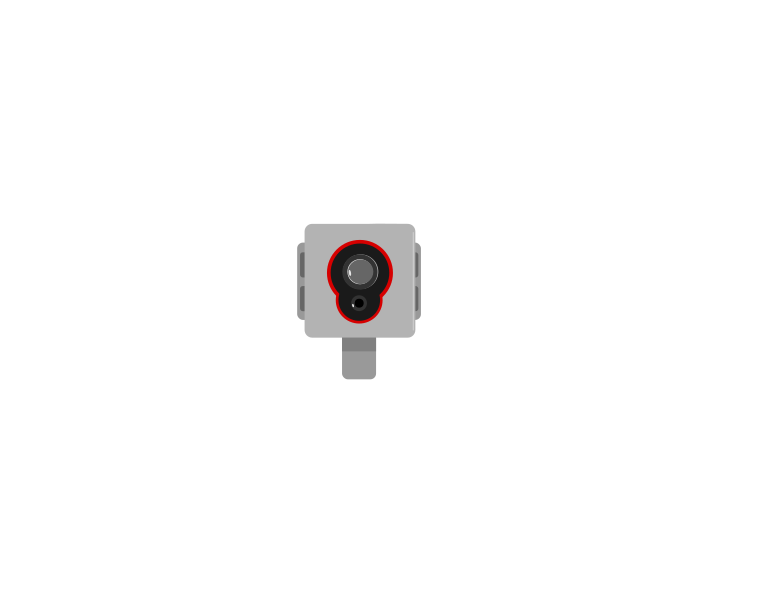 front
front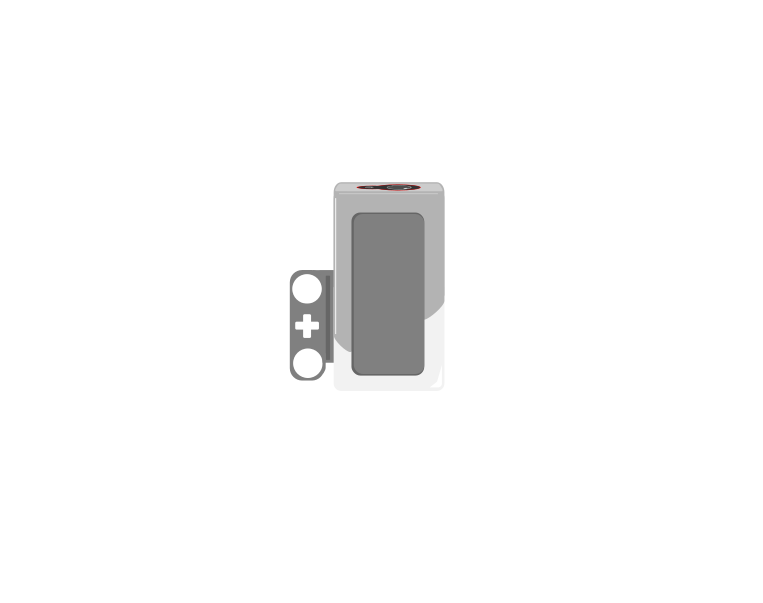 side
side| Block | What it does |
|---|---|
([3 v] color :: sensors) | Reports which colour it sees, from a short list — red, blue, green, black, white and a few more. |
([3 v] reflected light intensity :: sensors) | Reports how bright the surface is, as a number from 0 (black) to 100 (white). |
<[3 v] is color [red v]? :: sensors> | Reports true or false for one particular colour. |
([3 v] ambient light intensity :: sensors) | Reports how much light is falling on the sensor, 0 to 100, with its own lamp switched off. |
The sensor does not describe a colour — it picks one from a list of eight, and that list is the whole of what it can ever say:
| Reports | Means |
|---|---|
| 0 | no colour — too far away, or too dark to call |
| 1 · 2 · 3 | black, blue, green |
| 4 · 5 · 6 | yellow, red, white |
| 7 | brown |
Anything you put under it is forced into one of those eight. There is no orange and no purple: an orange brick comes back as red or as yellow, and often as red one moment and yellow the next as the robot creeps along. Light blue and grey are the other classic pair to avoid — grey is neither black nor white, so it flips between them.
This is why colour mode is a good fit for a task you control and a bad fit for one you do not. Sorting the LEGO bricks that come in the set works, because they are made in exactly these colours. Reading a printed sheet, a coloured tile from another set, or anything pastel is asking the sensor to answer a question it does not have a word for.
Two practical points follow from how it decides. It shines its own lamp and looks at how much red, green and blue comes back, so it must be close — about half a centimetre, and no more than a centimetre. Lift it and the answer decays to 0. And because it takes those three readings before it can answer, colour mode is the slowest thing this sensor does; a robot driving quickly can pass right over a small patch without ever reporting it.
When a colour must be recognised reliably, test it. Drive the robot slowly over the real surface with color shown on the screen and watch what it actually says — including what it says at the edges between two colours, which is where the wrong answers live.
Both questions are asked of the same surface at the same moment. Watch the two answers travel across a strip of colours and then over the edge of a black line.
Watch the two read-outs over the last third of the strip. One of them changes once. The other changes the whole way across.
Over the patches, both read-outs are useful. Over the edge of the line they part company: the colour name has only two answers to give and jumps between them, while the number slides smoothly from 88 down to 8. Every value in that slide tells you how far onto the line the sensor is — which is information the name simply does not carry.
A line follower built on colour names only knows “black” or “not black”, so it can only lurch. Built on reflected light it can tell how far onto the line it has drifted, which is what makes smooth following possible.
The first two modes both switch the sensor’s own lamp on and measure what bounces back off the surface. Ambient light intensity does the opposite: the lamp goes off, and the sensor simply reports how much light is arriving from wherever — 0 in the dark, up to 100 in bright light.
| Mode | Own lamp | Measures | Points |
|---|---|---|---|
| colour | on | which of eight colours the surface is | at the surface, very close |
| reflected light | on | how much of its own light comes back | at the surface, very close |
| ambient light | off | how bright the surroundings are | wherever you want to measure |
That makes it the only one of the three that is not really about the floor. A number between 0 and 100 means very little on its own, so watch the same sensor sit through five different rooms — nothing underneath it changes at any point.
the sensor’s own lamp is off — it is measuring the room
Nothing under the sensor changed at any point in this run. Ambient light is the one mode that is not asking about the surface at all.
Those are the shape of the scale rather than exact figures, but the shape is the useful part: a lit room is nowhere near 100, and the top of the range is reserved for a light pointed straight at the sensor. Cover it with your hand and the number drops to near zero — which is the easiest way to check the sensor is doing what you think.
Point it at the ceiling and it tells you whether the room lights are on; point it forwards and a torch will spike the reading, which is a way of signalling to a robot without touching it.
Do not reach for it as a substitute for reflected light. Room light falling on a black line and on white paper is almost the same, so ambient mode can barely tell them apart — the reason reflected light works is precisely that the sensor brings its own light and measures how much of it survives.
It is also the mode most at the mercy of the room. A reading taken by a window in the morning will not match the same spot in the afternoon, so anything built on ambient light needs measuring on the day, in the place, with the lights as they will be.
Even the two lamp-on modes are affected by room lighting — a reading taken by a sunny window differs from one taken in a corner. The sensor must also sit close to the surface and at a constant height, because lifting it changes the reading even though the surface has not changed.
One random decision, in the place that needs it. Counting, safety and calibration stay predictable.
Sometimes a robot should not be predictable. A game that always asks the same question, or a creature that always turns the same way, stops being interesting after one run. A random number fixes that.
| Block | What it does |
|---|---|
(pick random (1) to (10)) | Reports a number between the two values, including both ends. A fresh number every time it runs. |
(pick random (1.0) to (10.0)) | The same range, but written with decimal points — so it reports decimals instead of whole numbers. |
This catches everybody once, because the two blocks look almost identical and behave completely differently. The block decides from what you typed, not from the size of the range:
(pick random (1) to (10)) — and you get whole numbers only. 1, 2, 3 … 10. Never 4.5.(pick random (1.0) to (10)) — and you get decimals: 4.5281749263, 9.9903, anything in between. A whole number is possible but vanishingly unlikely.And both ends are included. That matters more than it sounds: (pick random (1) to (2)) has exactly two possible answers, not one, which is what makes it a coin toss. A range of whole numbers from a to b has b − a + 1 answers in it.
Type your own range below and press it. Then press it five hundred times.
(pick random (1) to (10))
Only 10 answers exist here, and 1 and 10 are two of them — both ends are included, so the count is 10 − 1 + 1. Nothing lands between the marks.
Press pick a few more times. A handful of picks tells you nothing about whether it is fair.
Change 10 to 10.0 and nothing about the range changes — but the row of separate marks becomes an unbroken band, because the answers stop being a short list of possibilities and become anywhere in between. That is the whole rule, and it is the difference between one keystroke.
Keep the range sensible. A random turn between 1 and 360 degrees mostly looks like chaos; one between 30 and 90 looks like a creature deciding.
Dropped into a motor block it varies the movement; into a wait it varies the timing; into a display block it varies what is shown. Anywhere a number can go, a random number can go.
[A v] run [clockwise v] for (pick random (30) to (90)) [degrees v] :: motors
wait (pick random (1) to (4)) seconds :: control
write (pick random (1) to (6)) at line (1) :: display
The step that makes this block genuinely useful is feeding it into an if … then … else. On its own a random number varies how much something happens. Inside a decision it varies what happens at all.
The smallest version is the coin toss: 1 or 2, two branches, and a fifty-fifty chance of each. Here it is deciding how a driving base gets round an obstacle — one way it drives for three seconds and turns right, the other it drives for two and turns left.
when program starts :: events hat
set [coin v] to (pick random (1) to (2)) :: variables
if <(coin) = (1)> then
  move [forward v] for (3) [seconds v] :: movement
  move [right: 100 v] for (0.5) [rotations v] :: movement
else
  move [forward v] for (2) [seconds v] :: movement
  move [left: 100 v] for (0.5) [rotations v] :: movement
end
The same shape gives a motor a fifty-fifty chance of turning one way or the other — 90° or −90°. On the EV3 the sign lives in the direction dropdown rather than in the number, so −90° is written as counterclockwise 90:
when program starts :: events hat
set [coin v] to (pick random (1) to (2)) :: variables
if <(coin) = (1)> then
  [A v] run [clockwise v] for (90) [degrees v] :: motors
else
  [A v] run [counterclockwise v] for (90) [degrees v] :: motors
end
when program starts :: events hat
set [coin v] to (pick random (1) to (2)) :: variables
if <(coin) = (1)> then
  move [forward v] for (3) [seconds v] :: movement
  move [right: 100 v] for (0.5) [rotations v] :: movement
else
  move [forward v] for (2) [seconds v] :: movement
  move [left: 100 v] for (0.5) [rotations v] :: movement
end
Let it loop eight times. Both branches come up four times — and they do not take turns doing it, which is the part that looks like a bug and is not.
Two things are worth watching there. Only one branch runs — the other does not happen at all, so the robot ends up somewhere the other branch would never have put it. And the tally along the bottom is uneven: two 2s in a row, then two 1s. Over the eight runs it comes out four and four, but it does not get there by taking turns, and a program that looks broken for three runs in a row is usually just being random at you.
Storing the draw in a variable is not decoration here — it is required. The next section is why.
This is the part that bites. The block does not hold a number — it produces one, freshly, each time it is reached. Use it twice and you have asked two questions and got two answers. Both creatures below turn a head one way and then back again.
store it, then reuse it
set [angle v] to (pick random (30) to (90)) :: variables
[A v] run [clockwise v] for (angle) [degrees v] :: motors
[A v] run [counterclockwise v] for (angle) [degrees v] :: motors
ask twice
[A v] run [clockwise v] for (pick random (30) to (90)) [degrees v] :: motors
[A v] run [counterclockwise v] for (pick random (30) to (90)) [degrees v] :: motors
Let it loop. The angle changes every run on both creatures, as it should. Only the right-hand one also ends up facing somewhere new.
Both are unpredictable, which is what was wanted. But the one on the right asked the random block a second time for the return journey, so it turns back by a different amount and never comes home — by a different margin every run, which is exactly why the bug survives being tested a few times.
The fix is the one on the left. Ask once, store the answer, then use the store:
set [angle v] to (pick random (30) to (90)) :: variables
[A v] run [clockwise v] for (angle) [degrees v] :: motors
[A v] run [counterclockwise v] for (angle) [degrees v] :: motors
The same rule is why the coin toss above says set [coin v] to (pick random (1) to (2)) :: variables on its own line. Putting the random block straight into the if would work for one test and then fail strangely the moment anything below the if needed to know which way it went — because asking again is a fresh toss.
A random number is rarely what you actually want. What you want is a random something: a move, a colour, a name. Put the two together and the number stops being the answer and becomes the position of the answer.
(item (pick random (1) to (length of [Names v])) of [Names v])
Read it from the inside out. (length of [Names v]) asks the list how many things are in it. The random block picks a position between 1 and that. (item () of [Names v]) fetches whatever is standing in that position.
Asking the list for its own length is the part to copy. Type the number in instead and the program works perfectly until the day somebody adds one more item — and then that item is never picked, silently, for ever. Try it below.
when program starts :: events hat
clear display :: display
set [pick v] to (pick random (1) to (length of [Names v])) :: variables
write (item (pick) of [Names v]) at line (3) :: display
The range is asked from the list itself, so adding a name is enough — press «add a name» and the new one is in the draw immediately.
Switch the range to the typed 5, add a name, and press pick 40 more. The counts under the new faces stay on zero. Nothing is misspelled, nothing reports an error, and one name simply never comes up — which is the same class of bug as the creature that never comes home, and just as hard to notice by running the program once.
This is the honest cost. A program with randomness in it behaves differently every run, so a bug that appears once may not appear again — and you cannot tell whether a fix worked from a single test. When hunting a bug in a random program, temporarily replace the random block with a fixed number, fix the bug, then put it back.
Say this back before moving on: “Which one thing here should be a surprise?”
Run a ball up the belt by hand and watch where the Colour Sensor sees it. Everything depends on each ball being read in the same place, held still.
| Part | What it is doing here |
|---|---|
| EV3 Intelligent Brick | The draw machine’s display. It announces each result and — the honest part — reports how many of each colour have come out. |
| Large Motor — the conveyor | Lifts balls to the sensor. Its speed must be steady and not random, or balls arrive at unpredictable moments and the sensor reads between them. |
| Medium Motor — the gate | Sends each ball to a chute. Its positions are calibrated and fixed — the gate is never random, only the decision about where to send is. |
| Colour Sensor — which ball | Classifies each arrival, from Lesson 29 — including the reject case for anything it does not recognise. |
| Touch Sensor — dispense | The user asks for a draw. One press, one ball, and the wait-for-release from Lesson 21 so an eager finger does not empty the machine. |
The belt must deliver one ball at a time. Two arriving together makes the sensor read whichever is in front, and the machine will confidently draw a ball it did not actually dispense — a bug that looks like bad randomness and is not.
Sensors go in ports 1, 2, 3, 4. Motors go in ports A, B, C, D. They are not interchangeable, and nothing will tell you politely if you swap them.
| Part | Port | Why this one |
|---|---|---|
| Gate (Medium) | A | The positioning motor. |
| Conveyor (Large) | B | The one moving balls against gravity. |
| Dispense (Touch) | 1 | Touch stays on 1 across the course. |
| Which ball (Colour) | 3 | Colour stays on 3 across the course. |
Check your own build now:
Two routes, and either is fine. USB is the reliable one and the one to fall back on when a room’s Bluetooth is busy; Bluetooth leaves the robot free to move, which some models need.
Do these in order. Naming the Brick after you go looking for it in the list is how groups end up driving each other’s robots.
EV3 until somebody changes it.EV3.The two failures, every class, every time. The Brick has gone to sleep while you were building — press the centre button to wake it. Or you have paired with the group at the next table, which is why the name matters.
The long version, including Port View and how to read the port tiles, is in the Brick & Bluetooth guide.
Download and unplug for the real test. A draw machine is used by people gathered round it — and the final challenge asks you to run a game for somebody else.
Stuck? The long version, with a photograph of every screen, is in the Brick & Bluetooth guide.
One change at a time. Predict, then run, then look.
Count before you conclude. A run of the same result is what randomness looks like, not what broken looks like.
Look at the program you have just written. A queue-style list. A classifier with a reject bin. Calibrated positions. Exact counts. One deliberate surprise.
Twelve lessons ago a machine could correct itself and remember things. Now it can organise a waiting line, be taught, go and look, classify, describe a place, work out what nobody measured, decide what matters most, take an instruction, keep its place, say what a number means — and know when to be unpredictable.
| You can… | From |
|---|---|
| Hold a waiting line, and let a user teach a position | Lessons 25, 26 |
| Search rather than wait, and move by a travelling wave | Lessons 27, 28 |
| Turn a measurement into a category, and a place into numbers | Lessons 29, 30 |
| Compute what nothing measures, and decide what wins | Lessons 31, 32 |
| Take a value from a person, and survive being interrupted | Lessons 33, 34 |
| Report in real units, and be unpredictable on purpose | Lessons 35, 36 |
The remaining Level 3 lessons put these together on harder models. Level 4 takes the lot onto a competition mat, where calibration is the first thing you do at every table, the closed loop becomes a line follower, and a program that cannot be read cannot be fixed in the ten minutes before a run.
A machine worth trusting is predictable everywhere except the one place it was built to surprise you.
Build the model before you read any further. Everything after this is about making it do something, and none of it will make much sense with nothing on the table in front of you.
Use the viewer's own controls to zoom and turn pages. Fullscreen makes it big enough to build from.
The same build on Google Drive — sometimes a video, sometimes a scan:
Use the viewer's own controls to zoom and turn pages. Fullscreen makes it big enough to build from.
Check the finished build against the picture before you switch anything on. A motor mounted the wrong way round is far easier to spot now than it is to debug later, when it looks like a program fault.
Prove that random behaves the way the lesson says before you build the machine round it. Nobody believes clustering until they have counted it.
when program starts :: events hat
set [a v] to (0) :: variables
set [b v] to (0) :: variables
set [c v] to (0) :: variables
repeat (30)
  set [r v] to (pick random (1) to (3)) :: variables
  if <(r) = (1)> then
    change [a v] by (1) :: variables
  end
  if <(r) = (2)> then
    change [b v] by (1) :: variables
  end
  if <(r) = (3)> then
    change [c v] by (1) :: variables
  end
end
write (a) at line (2) :: display
write (b) at line (4) :: display
write (c) at line (6) :: display```ev3blocks Search the program for pick random. There is exactly one, and every other line does the same thing every time.
when program starts :: events hat
delete all of [gate angle v] :: list
add (0) to [gate angle v] :: list
add (60) to [gate angle v] :: list
add (120) to [gate angle v] :: list
add (180) to [gate angle v] :: list
set [drawn v] to (0) :: variables
set [rejected v] to (0) :: variables
[A v] reset degrees counted :: motors
clear display :: display
forever write [PRESS TO DRAW] at line (1) :: display wait until <[1 v] is pressed? :: sensors> wait until <not <[1 v] is pressed? :: sensors>> :: control
// ---- THE ONE RANDOM DECISION: which chute this draw sends to ---- set [chute v] to (pick random (1) to (3)) :: variables
// ---- everything below is rigidly predictable ---- write [DRAWING] at line (1) :: display [B v] start motor at (35) % speed :: motors wait until <([3 v] color) != [none v]> :: control [B v] stop motor :: motors wait (0.3) seconds :: control
set [seen v] to ([3 v] color) :: variables set [known v] to (0) :: variables if <<(seen) = [red v]> or <<(seen) = [blue v]> or <(seen) = [yellow v]>>> then set [known v] to (1) :: variables end
if <(known) = (1)> then [A v] run to position (item ((chute) + (1)) of [gate angle v]) [degrees v] at (40) % speed :: motors change [drawn v] by (1) :: variables write (seen) at line (3) :: display set status light to [green v] :: display else [A v] run to position (item (1) of [gate angle v]) [degrees v] at (40) % speed :: motors change [rejected v] by (1) :: variables write [UNKNOWN] at line (3) :: display play sound [Mechanical / Error v] :: sound set status light to [orange v] :: display end
write (drawn) at line (5) :: display write (rejected) at line (7) :: display
// release it [B v] start motor at (35) % speed :: motors wait until <([3 v] color) = [none v]> :: control [B v] stop motor :: motors end
1. **One random line, and you can point at it.** That is the test of whether randomness has been used carefully.
2. **The counts are not random.** Drawn and rejected are exact, because a count that varied would make the machine untrustworthy.
3. **The gate angles come from a list you measured.** Calibrated, from Lesson 12, and never a surprise.
4. **The reject path is Lesson 29’s**, unchanged — an unknown ball is announced, counted and sent to a known place.

**What success looks like:** press to draw and a ball goes to an unpredictable chute — but the counts are exact, unknown balls are rejected loudly, and the gate hits the same angles every time.

> **If the same chute comes up four times running**, that is randomness behaving normally, not a fault. Draw thirty and count before concluding anything — which is exactly what step 1 was for.
Work through them in order — each is harder than the last. The extra challenge comes after all three, and it is meant to make you plan before you build.
Count what random really does. Draw thirty times between one and three and record the three counts. Then do it again. Then do three hundred and compare. Report all of it. Nobody believes clustering until they have counted it.
Build a proper draw with no repeats. Fill a bag with the three chutes, draw from it by picking a position, and delete the drawn one so it cannot come again. Say in one sentence how this is a different algorithm from picking randomly, not a luckier version of it.
Put randomness where it does not belong. Make the conveyor speed random between 10 and 90 percent. Watch the sensor start missing balls. Then take it out and write one sentence on why this fault looks like a sensor problem and is not.
Run a game for somebody else. Build a draw machine and use it to run an actual game for people who have not seen it — bingo, a raffle, a prize draw, anything with a winner. Requirements: 1. Exactly ONE random decision in the whole program, and you can point at the line. 2. Every count is exact. Every gate position is calibrated. The reject path works. 3. A no-repeats draw, so the game is finite and finishes. 4. A debug override that forces the outcome, used while testing and disabled for the real game — because you cannot debug a machine that will not repeat itself. Then, afterwards, ask the players whether they thought it was fair. Somebody will have had an unlucky run and thought it was rigged. Write down what you would say to them, using what you measured in challenge 1. Being able to explain that a run of the same result is normal — with numbers rather than assertion — is the last thing this set of lessons teaches.