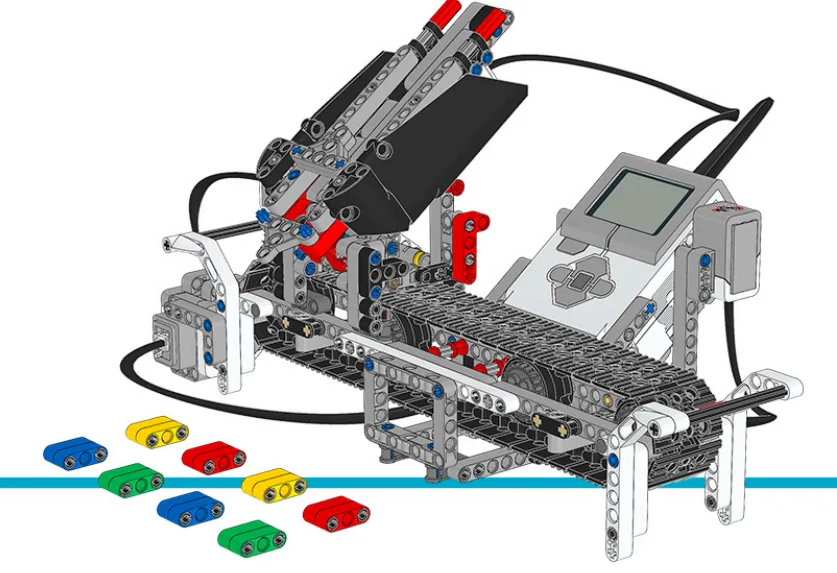
The Colour Sorter: a magazine of coloured bricks, a scanner, a swinging chute and a set of bins. Its job is to put every brick where it belongs.
Lesson 29 built the reactive version: see one brick, swing the chute, drop it, next. That works. It also swings the chute back and forth across the whole machine, over and over, for no reason.
By the end of the lesson your sorter will read the whole batch first, decide an order, and then sort it in far fewer movements — and you will have timed both to see whether it was worth it.
In the real world 5 min
Where you have seen it
Sorting coffee beans by hand, you do not carry each bean to its pile one at a time. You look across the tray, gather all of one kind, and move them together. Anyone who sorts anything for a living arrives at the same method.
Sorting coffee beans by size, Hawaii. Photo: Niels Van Iperen / Wikimedia Commons (CC BY-SA 4.0).
Machines do it too. A warehouse robot is given a whole pick list and reorders it so the route through the aisles is short. A lift that is called from four floors serves them in the order that suits the shaft, not the order the buttons were pressed.
Why it is built that way
Because moving is expensive and looking is cheap. When the cost of an action is much higher than the cost of an observation, it pays to observe everything first and then act as few times as possible.
The saving is not small. Twelve bricks in a random order swing the chute around eleven times; the same twelve grouped by colour swing it three. That is not a tidier program — it is a quarter of the work.
What would go wrong without it
Nothing dramatic. The reactive machine works — it is just slower, and it wears out its most expensive joint doing movements that never needed to happen.
But planning is not always right. Surveying takes time. If the batch is short, or things arrive one at a time, or the world changes while you are looking, the plan costs more than it saves — and a machine that insists on planning is now the slow one.
Survey when acting is expensive and the world holds still. Otherwise just start.
The main concept — a plan is data 6 min
Survey-then-act splits one job into three that can be looked at separately: read everything, decide an order, carry it out. Each is simple; mixed together they are not.
Phase
What it produces
What it must not do
Survey
A list of colours, in magazine order.
Move a single brick to a bin.
Plan
An order to work in, and the chute moves it implies.
Touch a motor at all — it is pure arithmetic.
Execute
Bricks in bins.
Re-decide anything. It follows the plan, or reports that it cannot.
Keeping the phases apart is most of the benefit. A plan you can print before anything moves is a plan you can check. Once the deciding is tangled into the moving, the only way to find out what the machine intends is to let it do it.
The plan lives in a list
// SURVEY — look at everything, move nothing
repeat (batch size)
  add (colour under the scanner) to [batch v] :: list
  advance the magazine one place
end

// PLAN — pure arithmetic, no motors
// work through colour 1, then colour 2, then colour 3
// so the chute moves twice instead of eleven times

// EXECUTE — follow it
repeat (3)
  set [target v] to (colour being done) :: variables
  swing the chute to the bin for (target) :: variables
  repeat (batch size)
    if <(item (i) of [batch v] :: list) = (target)> then
      release that brick
    end
  end
end
Three phases, in three separate places. The middle one moves nothing at all, which is exactly why it can be trusted.
Two ways to sort, and they cost different amounts
By colour: pick one colour, take every brick of it, then the next colour. The chute moves once per colour. The magazine goes round several times.
By position: take each brick in turn and swing the chute to wherever it belongs. The magazine goes round once. The chute moves constantly.
Which is faster depends on which is slower — the chute or the magazine. That is a measurement, not an opinion, and this lesson asks for both timed.
The plan can be wrong
Somebody takes a brick out while the machine is executing. The plan says green is next and there is nothing there. A plan must be checked as it is carried out, exactly as Lesson 44 checks each step — which is why surveying does not remove the need to verify.
ComponentData6 min
Lists
A variable holds one number. A list holds many, in order, under one name — so a robot can remember every reading it took rather than only the most recent.
A corridor of lockers
If a variable is a piece of paper with one number on it, a list is a row of lockers. Each locker has a number on the door, and each one holds something of its own. They all share a name — snacks, colours — and you tell them apart by the number, not the name.
The doors matter. You cannot see what is in the whole row at a glance: to find out what is in locker 3, you have to open locker 3. And if you want to change what is in there, you open it, take out what is inside, and put something else in. Try it — click a door.
length of snacks = 3
add candy to snacks
Three lockers are in use. You cannot see inside any of them until you open one — click a door.
Every list block is one of those physical actions, and the block for whatever you just did appears underneath the lockers:
Block
The locker version
add [banana] to [snacks v]
Put a banana in the next free locker. Always the end of the row.
(item (3) of [snacks v])
Open locker 3 and tell me what is inside. One locker, one look.
replace item (3) of [snacks v] with [candy]
Open 3, take out what is there, put candy in. Nothing else moves.
delete (3) of [snacks v]
Empty locker 3 and close up the gap — everything after it shuffles down one. What was in 4 is now in 3.
(length of [snacks v])
How many lockers are in use.
delete all of [snacks v]
Empty the whole row. This belongs at the top of a program.
Deleting is the one that catches people. A locker does not stay empty — the row closes up. Delete item 2 of a five-item list and you have a four-item list, with everything after position 2 now one number lower than it was. Any position you wrote down before the delete is wrong afterwards.
What a robot puts in them
Lists are not only for numbers. Anything a block can report can go in one:
Colours from the Colour Sensor. Drive along a line of coloured cards adding each reading, and at the end the robot has the whole sequence — not just the last card it went over.
Positions in degrees. A list of angles is a list of places an arm should go: 0, 90, 180, 270. Walking the list drives the arm through the positions in order, and changing where it stops means editing a number rather than rewriting the program.
Words.apple, banana, candy — a vending machine holds its stock in one list and the matching prices or positions in another, so item 2 of one lines up with item 2 of the other.
Blocks reference
Block
What it does
add [thing] to [List v]
Puts a new value on the end.
(item (1) of [List v])
Reads the value at a position. Positions start at 1.
(length of [List v])
Reports how many values are stored.
delete all of [List v]
Empties it. This belongs at the top of the program, for the same reason a variable is set to zero there.
Collecting readings
The natural shape is a loop that takes a reading and adds it. Watch the same four readings go into a variable and into a list.
into a variable
repeat 4
set reading to 4 distance in cm
into a list
delete all of Readings
repeat 4
add 4 distance in cm to Readings
write item (3) of Readings at line 1
0values in the variable0values in the list
The robot will stop four times and read the distance. One program keeps the reading in a variable; the other adds it to a list.Reading 1: 38 cm. Both programs hold 38.Reading 2: 12 cm. The variable has just thrown 38 away. The list has both.Reading 3: 47 cm — the biggest of the run.Reading 4: 25 cm. The variable holds one number; the list holds four, in the order they were taken.Now go back and ask for any of them — item 3 of the list is still 47, the largest of the run. The variable cannot answer: 47 stopped existing two stops ago.Finished. The variable was never wrong — it was only ever holding one thing.
0 of 4 readings taken
Watch the variable box, not the list. Every reading it shows is correct; it is the ones it has already forgotten that matter.
Notice that the variable is never wrong. Every number it shows is a real reading, correctly taken, moments ago. It simply has room for one, so each new reading pushes the last one out — and by the fourth stop three readings have quietly ceased to exist.
Afterwards the list can be walked to find the largest, the smallest, or the average — none of which is possible if you only ever kept the latest value.
Positions count from 1, not 0. A loop that starts its counter at 0 reads a position that does not exist and misses the first entry.
Reading the whole list out
Storing readings is only half of it. To use a list you walk it, and that needs one more idea: a variable that holds a position rather than a value. Call it i. Set it to 1, read item i, then change i by 1 — and the next pass round the loop looks at the next locker.
Two things make this work without anybody counting. The loop repeats length of colours, so it runs once per item however many there are; and i doubles as the screen line, so each item lands on its own row.
when program starts :: events hat
delete all of [colours v]
add [red] to [colours v]
add [blue] to [colours v]
add [green] to [colours v]
add [yellow] to [colours v]
clear display :: display
set [i v] to (1)
repeat (length of [colours v])
  write (item (i) of [colours v]) at line (i) :: display
  change [i v] by (1)
end
1i · the positionreditem i of colours4length of colours
The list holds four colours. i is set to 1 — it is not a colour, it is a position.Pass 1. item 1 of colours is red, so red goes on line 1. Then i changes to 2.Pass 2. item 2 is blue, onto line 2, and i becomes 3.Pass 3. item 3 is green, onto line 3, and i becomes 4.Pass 4 writes yellow. The loop was told to repeat length of colours — four — so it stops there without anybody counting.Four items, four passes, four lines. Add a fifth colour to the list and the same program writes five, unchanged.Finished. The program never mentions the number four — it asks the list how long it is.
i = 1
Watch i rather than the blocks. It is the only thing that changes between one pass and the next, and it is what makes each pass look at a different locker.
Nowhere does that program mention the number four. Add a fifth colour and it writes five lines, unchanged — which is the whole reason to ask a list its length rather than typing a number you will have to remember to update.
Going further: sorting, and finding the biggest
Once a robot can walk a list it can do real work on one. Both of these are the same trick — go along comparing two items at a time — and they differ only in what they do about it. Sorting swaps the pair; finding the biggest just remembers the winner.
when program starts :: events hat
set [i v] to (1)
repeat ((length of [nums v]) - (1))
  set [j v] to (1)
  repeat ((length of [nums v]) - (i))
    if <(item (j) of [nums v]) > (item ((j) + (1)) of [nums v])> then
      set [temp v] to (item (j) of [nums v])
      replace item (j) of [nums v] with (item ((j) + (1)) of [nums v])
      replace item ((j) + (1)) of [nums v] with (temp)
    end
    change [j v] by (1)
  end
  change [i v] by (1)
end
5 was bigger than 2, so they swap. The bigger number moves one place to the right.5 is already smaller than 9 — nothing to do. Move along one.9 was bigger than 1, so they swap. The bigger number moves one place to the right.9 was bigger than 7, so they swap. The bigger number moves one place to the right.2 is already smaller than 5 — nothing to do. Move along one.5 was bigger than 1, so they swap. The bigger number moves one place to the right.5 is already smaller than 7 — nothing to do. Move along one.2 was bigger than 1, so they swap. The bigger number moves one place to the right.2 is already smaller than 5 — nothing to do. Move along one.1 is already smaller than 2 — nothing to do. Move along one.Sorted. Every pass floated the biggest remaining number to the end, which is why it is called a bubble sort.Finished. Same blocks, any list — it does not care how long it is or what order it started in.
swap
Only ever two numbers are being compared at a time. A sort looks complicated because it repeats, not because any one step is hard.
A bubble sort looks hard because it is a loop inside a loop, but no single step is: compare two neighbours, swap them if they are the wrong way round, move along one. Each full pass floats the biggest remaining number to the end — which is where the name comes from — so after as many passes as there are items, the list is in order.
Finding the biggest needs no swapping at all. Assume the first item is the winner, walk the rest, and whenever you meet something bigger, remember that instead. One pass, one variable. Swap the > for a < and the same program finds the smallest — which is how a line-following robot works out its black and its white before choosing a threshold between them.
Why it matters
This is data collection — a robot driving a course while recording distances, then reporting what it found. It is the difference between a machine that reacts and one that measures.
ComponentSensing6 min
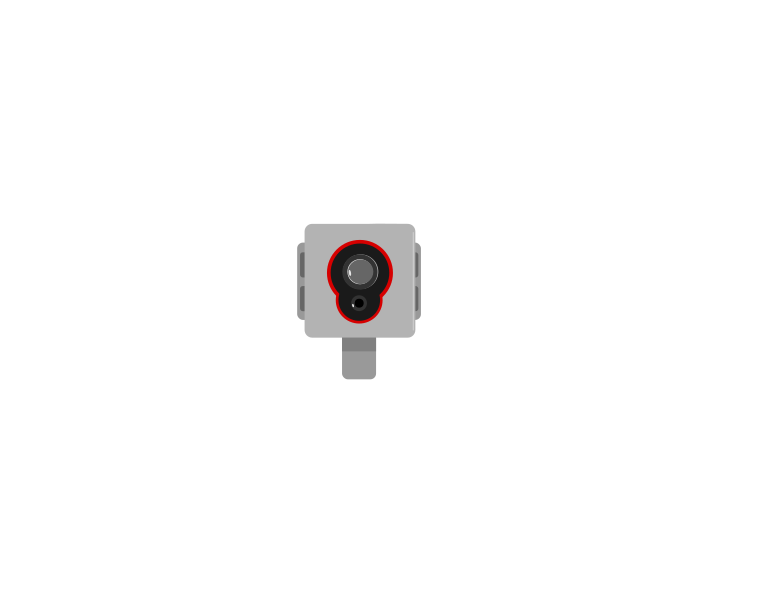
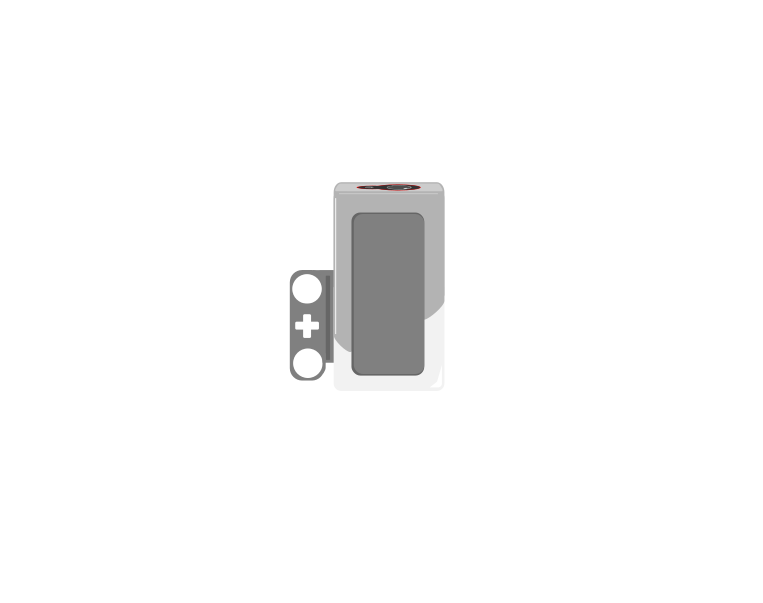
The Colour Sensor
The Colour Sensor looks down at a surface and can answer three quite different questions: what colour is this?, how bright is this? and how light is the room? Choosing the wrong one is the usual reason a line-following robot refuses to work.
front
side
The sensor has its own lamp beside its detector. That is why it must sit close to the surface and at a steady height — lifting it changes the reading even though the surface has not changed.
Blocks reference
Block
What it does
([3 v] color :: sensors)
Reports which colour it sees, from a short list — red, blue, green, black, white and a few more.
([3 v] reflected light intensity :: sensors)
Reports how bright the surface is, as a number from 0 (black) to 100 (white).
<[3 v] is color [red v]? :: sensors>
Reports true or false for one particular colour.
([3 v] ambient light intensity :: sensors)
Reports how much light is falling on the sensor, 0 to 100, with its own lamp switched off.
Which colour, exactly?
The sensor does not describe a colour — it picks one from a list of eight, and that list is the whole of what it can ever say:
Reports
Means
0
no colour — too far away, or too dark to call
1 · 2 · 3
black, blue, green
4 · 5 · 6
yellow, red, white
7
brown
Anything you put under it is forced into one of those eight. There is no orange and no purple: an orange brick comes back as red or as yellow, and often as red one moment and yellow the next as the robot creeps along. Light blue and grey are the other classic pair to avoid — grey is neither black nor white, so it flips between them.
This is why colour mode is a good fit for a task you control and a bad fit for one you do not. Sorting the LEGO bricks that come in the set works, because they are made in exactly these colours. Reading a printed sheet, a coloured tile from another set, or anything pastel is asking the sensor to answer a question it does not have a word for.
Two practical points follow from how it decides. It shines its own lamp and looks at how much red, green and blue comes back, so it must be close — about half a centimetre, and no more than a centimetre. Lift it and the answer decays to 0. And because it takes those three readings before it can answer, colour mode is the slowest thing this sensor does; a robot driving quickly can pass right over a small patch without ever reporting it.
When a colour must be recognised reliably, test it. Drive the robot slowly over the real surface with color shown on the screen and watch what it actually says — including what it says at the edges between two colours, which is where the wrong answers live.
Colour, or brightness?
Both questions are asked of the same surface at the same moment. Watch the two answers travel across a strip of colours and then over the edge of a black line.
when program starts
forever
write 3 color at line 1
write 3 reflected light intensity at line 3
colour: 2 possible answers herereflected light: every value from 88 down to 8
The sensor sits a few millimetres above the surface, with its own lamp shining down.It travels across the coloured patches. One read-out names what it sees; the other says how much light came back.Now the edge of a black line. The name only ever says white or black — but the number slides all the way down, and every value in between means something.Names for sorting. Numbers for following.Finished. Same sensor, same surface, two very different kinds of answer.
reflected light 88
Watch the two read-outs over the last third of the strip. One of them changes once. The other changes the whole way across.
Over the patches, both read-outs are useful. Over the edge of the line they part company: the colour name has only two answers to give and jumps between them, while the number slides smoothly from 88 down to 8. Every value in that slide tells you how far onto the line the sensor is — which is information the name simply does not carry.
Use colour when the answer really is a name — sorting red bricks from blue ones, stopping on a green square.
Use reflected light when the answer is a matter of degree — following the edge of a black line, where the useful readings are all the greys between black and white.
A line follower built on colour names only knows “black” or “not black”, so it can only lurch. Built on reflected light it can tell how far onto the line it has drifted, which is what makes smooth following possible.
The third mode: ambient light
The first two modes both switch the sensor’s own lamp on and measure what bounces back off the surface. Ambient light intensity does the opposite: the lamp goes off, and the sensor simply reports how much light is arriving from wherever — 0 in the dark, up to 100 in bright light.
Mode
Own lamp
Measures
Points
colour
on
which of eight colours the surface is
at the surface, very close
reflected light
on
how much of its own light comes back
at the surface, very close
ambient light
off
how bright the surroundings are
wherever you want to measure
That makes it the only one of the three that is not really about the floor. A number between 0 and 100 means very little on its own, so watch the same sensor sit through five different rooms — nothing underneath it changes at any point.
the sensor’s own lamp is off — it is measuring the room
Start in the dark — a hand over the lens, or the lights off. Almost no light reaches the sensor, and it reports 0.Curtains drawn with one small lamp on. Enough to see by, and the sensor climbs to about 12.An ordinary classroom with the lights on sits somewhere around 38 — the middle of the scale, not the top of it.Move it beside a bright window and the same sensor, in the same room, reads about 72.A torch pointed straight into it pushes the reading to nearly 100 — which is how a light can be used as a signal to a robot.Finished. Same sensor, same floor underneath it — the only thing that changed was the room.
ambient 0
Nothing under the sensor changed at any point in this run. Ambient light is the one mode that is not asking about the surface at all.
Those are the shape of the scale rather than exact figures, but the shape is the useful part: a lit room is nowhere near 100, and the top of the range is reserved for a light pointed straight at the sensor. Cover it with your hand and the number drops to near zero — which is the easiest way to check the sensor is doing what you think.
Point it at the ceiling and it tells you whether the room lights are on; point it forwards and a torch will spike the reading, which is a way of signalling to a robot without touching it.
Do not reach for it as a substitute for reflected light. Room light falling on a black line and on white paper is almost the same, so ambient mode can barely tell them apart — the reason reflected light works is precisely that the sensor brings its own light and measures how much of it survives.
It is also the mode most at the mercy of the room. A reading taken by a window in the morning will not match the same spot in the afternoon, so anything built on ambient light needs measuring on the day, in the place, with the lights as they will be.
Light and height matter
Even the two lamp-on modes are affected by room lighting — a reading taken by a sunny window differs from one taken in a corner. The sensor must also sit close to the surface and at a constant height, because lifting it changes the reading even though the surface has not changed.
ComponentData6 min
Variables
Why anybody needs one
Long before there were computers, people had exactly this problem. A shepherd counting sheep through a gate, a trader counting sacks of grain, a builder counting days — none of them can hold the number in their head while they get on with the work. So they scratched a mark on a wall, cut a notch in a stick, or wrote a number on a piece of paper. The number lived outside the person, in a place they had agreed on, and they could go back to it, read it, and change it.
Better still, once the number is written down somebody else can use it. Watch these two: one of them counts and writes, the other never sees a single animal and simply reads the wall.
Abby never remembers the numberBen never sees a henThe wall holds it for both
Abby has a gate and a wall. Before a single hen comes through she chalks 0 on the wall — that is where the number is going to live.A hen goes through. Abby rubs out the 0 and chalks 1. Another goes through, and she does it again.Three hens have been through, and the wall says 3. Abby is not remembering the number — she is reading her own wall each time and writing the next one.Ben has been at the market all morning. He has not seen one hen. He walks up, reads the wall, and knows the answer — without asking Abby anything.That is a variable. Not a number in somebody's head, but a place both of them agreed on: one writes to it, the other reads from it, and it keeps the number in between.Finished. Abby wrote, Ben read, and the wall is what joined them up.
the wall holds it
Notice what never happens: Ben never asks Abby. He does not need to — the number is not in her head, it is on the wall, and the wall is there for anyone who needs it.
Neither Abby nor Ben is holding the number — the wall is. And notice what never happens: Ben does not ask Abby. He does not need to, because the count is not in her head. It is in a place they both agreed on, which is what makes it useful to more than one of them.
That is all a variable is. The robot cannot hold a number in its head either, so you give it a wall of its own, write a name at the top so everyone knows which wall is which — score, count, degree_turn — and the program can read what is on it and write something new. One part of the program writes; another part reads. Exactly Abby and Ben.
The paper, and the two things you can do to it
Say we are counting rotations of a motor. Before we start we write 0 on the paper. Every time the motor completes a turn we cross out what is there and write one more: 0 becomes 1, then 2, then 3. That is change — it has to read the old number to work out the new one.
set is the other thing you can do, and it is completely different: rub the whole paper out and write the number you want. It does not care what was there. Press the buttons and watch what happens to the crossings-out.
score
0
The paper starts blank, so we write 0 on it. That is what a variable is: a place to keep a number while the robot works.
change leaves a trail — every value follows from the one before it. This is what counting is.
set wipes the sheet. Use it to start a count, never to continue one.
Press set score to 0 after counting up a few times and watch the whole history vanish. That is what happens to a count when a set block ends up in the wrong place — and it is the commonest variable bug there is.
Blocks reference
Block
What it does
set [count v] to (0)
Puts a value in, replacing whatever was there.
change [count v] by (1)
Adds to what is already there.
(count)
Reports the current value, for use in a comparison or on the display.
Set, or change?
set replaces; change adds. Counting things needs change. Starting a count needs set. Both programs below have both blocks — the only difference is whether the set block is inside the loop or above it.
set before the loop
when program starts
set count to 0
repeat 4
A run clockwise for 1rotations
change count by 1
set inside it
repeat 4
set count to 0
A run clockwise for 1rotations
change count by 1
Before the loop: counted 0Inside the loop: stuck at 0
Both programs count the turns of a motor. The left sets the count to zero before the loop; the right sets it inside.Turn 1. Both counters read 1, and so far the two programs agree.Turn 2. The left count is 2. The right was set back to zero at the top of the loop, so it is 1 again.Turn 3. The left reads 3. The right still reads 1.Turn 4. The motor turned four times on both robots — only one of them counted them.Finished. Four turns, and one of the two counts is fiction.
stopped
Both programs contain both blocks. Only the position of set [count] to 0 is different.
The count on the right is not broken; it is being told to start again on every pass. Each time round the loop it is wiped back to zero and then changed by one, so the honest answer is always 1 — while the motor cheerfully turns four times. A counter stuck at 1 almost always means a set block that has slipped inside the loop.
Anything oval is a number you can pick up
EV3 Classroom tells you what a block does by its shape, and once you have noticed that, a whole set of questions answers itself:
Oval — reports a number. The blue degrees counted, the timer, a distance, your own variable.
Pointed — reports true or false. These go in an if or a wait until, not in a variable.
Block-shaped — does something. These stack up; they do not fit inside anything.
So when a slot is oval, any oval fits it — and it does not matter in the least where that number came from. You can take the motor’s own A degrees counted and keep it in a variable you named degree_turn, then compare that with a number later. Pick an oval below and watch the same one drop into all three kinds of slot.
pick an oval
the same oval fits all three
set degree_turn to A degrees countedkeep it in a variable of your own
A degrees counted+10do arithmetic with it
A degrees counted>50compare it with a number
Every one of those slots is oval-shaped, and A degrees counted is an oval — so it drops in. Nothing about where the number came from matters.
This is what makes a variable more than a counter. A sensor reading is true only at the instant you read it; copying it into a variable freezes it, so the robot can compare where it is now against where it was when something happened:
when program starts :: events hat
[A v] reset degrees counted :: motors
set [degree_turn v] to ([A v] degrees counted :: sensors)
start moving [right: 30] :: movement
wait until <(([A v] degrees counted :: sensors) - (degree_turn)) > (400)>
stop moving :: movement
Read the condition aloud: how far the motor has gone now, minus where it was when we started, is more than 400. Both are ovals, so both can go into a subtraction, and the subtraction is an oval too — which is why it can go into a comparison. Ovals nest inside ovals as deep as you need.
Reset at the start, every time
A variable keeps its value after the program ends. Run the program again without setting it back and the second run begins where the first left off — the count starts at 14, the robot thinks it has already done the job. Every variable a program changes must be set to its starting value at the top.
Why it matters
A variable is the difference between a machine that repeats a fixed routine and one that responds to how things have gone — counting parts, tracking a score, remembering where it started.
Read everything. Decide with no motors running. Then carry it out and check as you go.
▶ListsFrom Lesson 8 — many values under one name, read by position. The survey's output is a list, and that is what makes the plan inspectable.Show meHide
ComponentData6 min
Lists
A variable holds one number. A list holds many, in order, under one name — so a robot can remember every reading it took rather than only the most recent.
A corridor of lockers
If a variable is a piece of paper with one number on it, a list is a row of lockers. Each locker has a number on the door, and each one holds something of its own. They all share a name — snacks, colours — and you tell them apart by the number, not the name.
The doors matter. You cannot see what is in the whole row at a glance: to find out what is in locker 3, you have to open locker 3. And if you want to change what is in there, you open it, take out what is inside, and put something else in. Try it — click a door.
length of snacks = 3
add candy to snacks
Three lockers are in use. You cannot see inside any of them until you open one — click a door.
Every list block is one of those physical actions, and the block for whatever you just did appears underneath the lockers:
Block
The locker version
add [banana] to [snacks v]
Put a banana in the next free locker. Always the end of the row.
(item (3) of [snacks v])
Open locker 3 and tell me what is inside. One locker, one look.
replace item (3) of [snacks v] with [candy]
Open 3, take out what is there, put candy in. Nothing else moves.
delete (3) of [snacks v]
Empty locker 3 and close up the gap — everything after it shuffles down one. What was in 4 is now in 3.
(length of [snacks v])
How many lockers are in use.
delete all of [snacks v]
Empty the whole row. This belongs at the top of a program.
Deleting is the one that catches people. A locker does not stay empty — the row closes up. Delete item 2 of a five-item list and you have a four-item list, with everything after position 2 now one number lower than it was. Any position you wrote down before the delete is wrong afterwards.
What a robot puts in them
Lists are not only for numbers. Anything a block can report can go in one:
Colours from the Colour Sensor. Drive along a line of coloured cards adding each reading, and at the end the robot has the whole sequence — not just the last card it went over.
Positions in degrees. A list of angles is a list of places an arm should go: 0, 90, 180, 270. Walking the list drives the arm through the positions in order, and changing where it stops means editing a number rather than rewriting the program.
Words.apple, banana, candy — a vending machine holds its stock in one list and the matching prices or positions in another, so item 2 of one lines up with item 2 of the other.
Blocks reference
Block
What it does
add [thing] to [List v]
Puts a new value on the end.
(item (1) of [List v])
Reads the value at a position. Positions start at 1.
(length of [List v])
Reports how many values are stored.
delete all of [List v]
Empties it. This belongs at the top of the program, for the same reason a variable is set to zero there.
Collecting readings
The natural shape is a loop that takes a reading and adds it. Watch the same four readings go into a variable and into a list.
into a variable
repeat 4
set reading to 4 distance in cm
into a list
delete all of Readings
repeat 4
add 4 distance in cm to Readings
write item (3) of Readings at line 1
0values in the variable0values in the list
The robot will stop four times and read the distance. One program keeps the reading in a variable; the other adds it to a list.Reading 1: 38 cm. Both programs hold 38.Reading 2: 12 cm. The variable has just thrown 38 away. The list has both.Reading 3: 47 cm — the biggest of the run.Reading 4: 25 cm. The variable holds one number; the list holds four, in the order they were taken.Now go back and ask for any of them — item 3 of the list is still 47, the largest of the run. The variable cannot answer: 47 stopped existing two stops ago.Finished. The variable was never wrong — it was only ever holding one thing.
0 of 4 readings taken
Watch the variable box, not the list. Every reading it shows is correct; it is the ones it has already forgotten that matter.
Notice that the variable is never wrong. Every number it shows is a real reading, correctly taken, moments ago. It simply has room for one, so each new reading pushes the last one out — and by the fourth stop three readings have quietly ceased to exist.
Afterwards the list can be walked to find the largest, the smallest, or the average — none of which is possible if you only ever kept the latest value.
Positions count from 1, not 0. A loop that starts its counter at 0 reads a position that does not exist and misses the first entry.
Reading the whole list out
Storing readings is only half of it. To use a list you walk it, and that needs one more idea: a variable that holds a position rather than a value. Call it i. Set it to 1, read item i, then change i by 1 — and the next pass round the loop looks at the next locker.
Two things make this work without anybody counting. The loop repeats length of colours, so it runs once per item however many there are; and i doubles as the screen line, so each item lands on its own row.
when program starts :: events hat
delete all of [colours v]
add [red] to [colours v]
add [blue] to [colours v]
add [green] to [colours v]
add [yellow] to [colours v]
clear display :: display
set [i v] to (1)
repeat (length of [colours v])
  write (item (i) of [colours v]) at line (i) :: display
  change [i v] by (1)
end
1i · the positionreditem i of colours4length of colours
The list holds four colours. i is set to 1 — it is not a colour, it is a position.Pass 1. item 1 of colours is red, so red goes on line 1. Then i changes to 2.Pass 2. item 2 is blue, onto line 2, and i becomes 3.Pass 3. item 3 is green, onto line 3, and i becomes 4.Pass 4 writes yellow. The loop was told to repeat length of colours — four — so it stops there without anybody counting.Four items, four passes, four lines. Add a fifth colour to the list and the same program writes five, unchanged.Finished. The program never mentions the number four — it asks the list how long it is.
i = 1
Watch i rather than the blocks. It is the only thing that changes between one pass and the next, and it is what makes each pass look at a different locker.
Nowhere does that program mention the number four. Add a fifth colour and it writes five lines, unchanged — which is the whole reason to ask a list its length rather than typing a number you will have to remember to update.
Going further: sorting, and finding the biggest
Once a robot can walk a list it can do real work on one. Both of these are the same trick — go along comparing two items at a time — and they differ only in what they do about it. Sorting swaps the pair; finding the biggest just remembers the winner.
when program starts :: events hat
set [i v] to (1)
repeat ((length of [nums v]) - (1))
  set [j v] to (1)
  repeat ((length of [nums v]) - (i))
    if <(item (j) of [nums v]) > (item ((j) + (1)) of [nums v])> then
      set [temp v] to (item (j) of [nums v])
      replace item (j) of [nums v] with (item ((j) + (1)) of [nums v])
      replace item ((j) + (1)) of [nums v] with (temp)
    end
    change [j v] by (1)
  end
  change [i v] by (1)
end
5 was bigger than 2, so they swap. The bigger number moves one place to the right.5 is already smaller than 9 — nothing to do. Move along one.9 was bigger than 1, so they swap. The bigger number moves one place to the right.9 was bigger than 7, so they swap. The bigger number moves one place to the right.2 is already smaller than 5 — nothing to do. Move along one.5 was bigger than 1, so they swap. The bigger number moves one place to the right.5 is already smaller than 7 — nothing to do. Move along one.2 was bigger than 1, so they swap. The bigger number moves one place to the right.2 is already smaller than 5 — nothing to do. Move along one.1 is already smaller than 2 — nothing to do. Move along one.Sorted. Every pass floated the biggest remaining number to the end, which is why it is called a bubble sort.Finished. Same blocks, any list — it does not care how long it is or what order it started in.
swap
Only ever two numbers are being compared at a time. A sort looks complicated because it repeats, not because any one step is hard.
A bubble sort looks hard because it is a loop inside a loop, but no single step is: compare two neighbours, swap them if they are the wrong way round, move along one. Each full pass floats the biggest remaining number to the end — which is where the name comes from — so after as many passes as there are items, the list is in order.
Finding the biggest needs no swapping at all. Assume the first item is the winner, walk the rest, and whenever you meet something bigger, remember that instead. One pass, one variable. Swap the > for a < and the same program finds the smallest — which is how a line-following robot works out its black and its white before choosing a threshold between them.
Why it matters
This is data collection — a robot driving a course while recording distances, then reporting what it found. It is the difference between a machine that reacts and one that measures.
Say this back before moving on: “What do I know before I start, and what does it save me?”
What’s in this build 4 min
Time one chute swing from end to end, and time one magazine advance. Those two numbers decide which sorting order is faster, and you can work out the answer on paper before you write any code.
Part
What it is doing here
EV3 Intelligent Brick
The planner. It should be able to show you the whole plan on screen before a single brick moves.
Large Motor — the chute
The expensive movement, and the one the plan exists to minimise. Time it — the saving is proportional to how slow it is.
Large Motor — the scanning carriage
Carries bricks past the sensor during the survey. Its speed is the cost of planning.
Medium Motor — the feeder
Releases one brick at a time. It must release exactly one, or the plan and the reality drift apart.
Colour Sensor — the scanner
Reads every brick during the survey. A misread here poisons the whole plan, so it is worth reading each brick twice and agreeing.
Touch Sensor — home
The chute’s reference. Bin positions are angles from home, and home has to be the same place every run.
Use bricks the sensor can tell apart, and check before you start. Red and orange under room lighting will produce a confident, wrong plan — and a wrong plan is harder to debug than a wrong reaction, because the mistake happened minutes before the symptom.
Ports — and the rule 4 min
Sensors go in ports 1, 2, 3, 4. Motors go in ports A, B, C, D. They are not interchangeable, and nothing will tell you politely if you swap them.
Part
Port
Why this one
Feeder (Medium)
A
The precise release.
Chute (Large)
B
The expensive movement.
Carriage (Large)
D
The survey movement.
Home (Touch)
1
Touch stays on 1 across the course.
Scanner (Colour)
3
Colour stays on 3 across the course.
Check your own build now:
Feeder in A, chute in B, carriage in D, home in 1, scanner in 3.
Swing the chute to each bin by hand and note the angle from home. Three numbers, written down, used everywhere.
Load a fixed batch and write the order down on paper. That paper is what you check the machine’s survey against.
Shade the scanner from direct light — a plan made in sunlight will not survive somebody opening a blind.
Connect the Brick 4 min
Two routes, and either is fine. USB is the reliable one and the one to fall back on when a room’s Bluetooth is busy; Bluetooth leaves the robot free to move, which some models need.
▶How to connect the BrickUSB and Bluetooth, step by step, with a photograph of every screen. Open it if you have not done this before — or if pairing is not working.Show meHide
USB — the reliable one
Switch the Brick on with the dark grey centre button.
Cable into the Brick’s PC port — the small square socket beside the numbered ports, not one of the numbered ones.
Other end into the computer.
Bluetooth — name it first
Do these in order. Naming the Brick after you go looking for it in the list is how groups end up driving each other’s robots.
Name your Brick. On the Brick: Settings (the spanner) → Brick Name. Type something nobody else will pick, then press the tick. Every Brick is called EV3 until somebody changes it.
Turn Bluetooth on. Settings → Bluetooth. Tick Bluetooth and Visibility. Leave iPhone/iPad/iPod unticked.
Connect from EV3 Classroom. Click the Brick icon at the top of the programming area, find your Brick by name, and click Connect.
Say yes on the Brick. It asks “Connect?” with the computer’s name — choose the tick, then accept the passkey, which is already 1234.
Where to read it. The name sits in the bar across the very top of the screen, on every screen — so you can check which Brick you are holding at any moment without going into a menu. This one is EV3VE. A Brick nobody has renamed says EV3.Step 3, and the reason step 1 exists. Three Bricks in range — read the name before you click Connect. Pairing with the wrong one is not an error: it works perfectly, on somebody else’s robot.
Step 2.Bluetooth switches the radio on; Visibility is what lets the computer find you. With Visibility off your Brick works perfectly and simply never appears in the list.Step 4. Look at the Brick. It asks whether to accept and names the computer. Choose the tick.Then the passkey, already 1234. Press the tick again and you are connected.
The two failures, every class, every time. The Brick has gone to sleep while you were building — press the centre button to wake it. Or you have paired with the group at the next table, which is why the name matters.
The long version, including Port View and how to read the port tiles, is in the Brick & Bluetooth guide.
Download and unplug before timing anything. You are about to compare two strategies with a stopwatch, and a machine running over a live connection is not running at the same speed as one that is not.
Confirm the connection 2 min
Check the Brick icon: connected, or not.
Three motor tiles — A, B and D.
Two sensor tiles — 1 and 3.
Hold each of your colours under the scanner and check tile 3 names it correctly, five times each. A colour that is right four times in five will produce a wrong plan roughly every other batch, and you will blame the sorting logic.
Stuck? The long version, with a photograph of every screen, is in the Brick & Bluetooth guide.
Change it and test 8 min
One change at a time. Predict, then run, then look. Every run in this section produces a time — write them all down.
Sort a batch of 3, then 6, then 12, then 24, both ways. Find the batch size where planning starts to win. It exists, and it is the honest answer to “is planning better”.
Slow the chute to 20%. Planning wins by more — because the plan exists to save chute movements, and they just got more expensive.
Slow the carriage to 20%. Now surveying costs more and the reactive version may win. Same program, opposite conclusion.
Take a brick out during execution. The machine should report which position the plan was wrong at rather than dropping a brick in the wrong bin.
Sort by rarest colour first. A different plan from the same survey — the plan is data, so changing strategy changes only the middle phase.
Planning pays when moving is expensive and the world holds still. Both conditions, or neither.
Where this goes 3 min
Everything the sorter does starts outside it — a brick arrives, a button is pressed. Left alone, it does nothing at all.
The next model does not wait. The Puppy gets hungry whether or not anybody feeds it, tired whether or not it played, and lonely whether or not you are there.
Values that change on their own, with nothing measuring them — and when two of those needs get urgent at once, the machine has to decide which one wins.
Today the machine planned what it was given. Next it wants things nobody asked it to want.
Build it 15 min
Build the model before you read any further. Everything after this is about making it do something, and none of it will make much sense with nothing on the table in front of you.
Use the viewer's own controls to zoom and turn pages. Fullscreen makes it big enough to build from.
Check the finished build against the picture before you switch anything on. A motor mounted the wrong way round is far easier to spot now than it is to debug later, when it looks like a program fault.
Make it move 10 min
Step 1 — react, one brick at a time
when program starts :: events hat
reset timer :: control
repeat (12)
  [D v] run for (1) [rotations v] at (40) % speed :: motors
  set [c v] to ([3 v] colour) :: variables
  if <(c) = (5)> then
    [B v] run to position (0) [degrees v] at (50) % speed :: motors
  end
  if <(c) = (3)> then
    [B v] run to position (90) [degrees v] at (50) % speed :: motors
  end
  if <(c) = (2)> then
    [B v] run to position (180) [degrees v] at (50) % speed :: motors
  end
  [A v] run for (1) [rotations v] at (60) % speed :: motors
end
write (timer) at line (1) :: display
The reactive sorter, with a clock. Write the time down — it is the number the plan has to beat.
Step 2 — survey, plan, execute
when program starts :: events hat
delete all of [batch v] :: list
set [batch size v] to (12) :: variables
[B v] start motor [counterclockwise v] at (20) % speed :: motors
wait until <[1 v] is pressed? :: sensors>
[B v] stop motor :: motors
[B v] reset degrees counted :: motors
reset timer :: control

// ---- 1. SURVEY: read everything, move nothing to a bin ----
repeat (batch size)
  [D v] run for (1) [rotations v] at (40) % speed :: motors
  set [a v] to ([3 v] colour) :: variables
  wait (0.1) seconds :: control
  set [b v] to ([3 v] colour) :: variables
  if <(a) = (b)> then
    add (a) to [batch v] :: list
  else
    add (0) to [batch v] :: list
  end
end
set [survey took v] to (timer) :: variables
write (survey took) at line (1) :: display

// ---- 2. PLAN: no motors at all, just counting ----
set [reds v] to (0) :: variables
set [greens v] to (0) :: variables
set [blues v] to (0) :: variables
set [unknowns v] to (0) :: variables
set [i v] to (1) :: variables
repeat (batch size)
  set [c v] to (item (i) of [batch v] :: list) :: variables
  if <(c) = (5)> then
    change [reds v] by (1) :: variables
  end
  if <(c) = (3)> then
    change [greens v] by (1) :: variables
  end
  if <(c) = (2)> then
    change [blues v] by (1) :: variables
  end
  if <(c) = (0)> then
    change [unknowns v] by (1) :: variables
  end
  change [i v] by (1) :: variables
end
write (reds) at line (3) :: display
write (greens) at line (4) :: display
write (blues) at line (5) :: display
write (unknowns) at line (6) :: display
wait (2) seconds :: control

// ---- 3. EXECUTE: one chute move per colour ----
set [colour n v] to (1) :: variables
repeat (3)
  if <(colour n) = (1)> then
    set [target v] to (5) :: variables
    [B v] run to position (0) [degrees v] at (50) % speed :: motors
  end
  if <(colour n) = (2)> then
    set [target v] to (3) :: variables
    [B v] run to position (90) [degrees v] at (50) % speed :: motors
  end
  if <(colour n) = (3)> then
    set [target v] to (2) :: variables
    [B v] run to position (180) [degrees v] at (50) % speed :: motors
  end

  set [i v] to (1) :: variables
  repeat (batch size)
    if <(item (i) of [batch v] :: list) = (target)> then
      [D v] run to position ((i) * (360)) [degrees v] at (40) % speed :: motors
      // check the plan against reality before releasing
      if <([3 v] colour) = (target)> then
        [A v] run for (1) [rotations v] at (60) % speed :: motors
      else
        play sound [Mechanical / Error v] :: sound
        write [PLAN WRONG AT] at line (7) :: display
        write (i) at line (8) :: display
      end
    end
    change [i v] by (1) :: variables
  end
  change [colour n v] by (1) :: variables
end

write (timer) at line (2) :: display
Survey, plan, execute — and the execute phase re-checks each brick before releasing it, because a plan made two minutes ago can be out of date.
The plan phase touches no motor. That is what makes it checkable — the counts are on screen before anything moves.
Each brick is read twice during the survey, and disagreement is recorded as unknown rather than guessed. A wrong plan is worse than an incomplete one.
The chute moves three times, not eleven. Count the swings in each version — that is where the time goes.
Execution verifies. Take a brick out mid-run and the machine says which position the plan was wrong at.
What success looks like: the survey time and the total time both on screen, the counts matching the batch you loaded on paper, and a total that beats step 1 for a batch of twelve.
If the planned version is slower, that is a real result, not a failure — your carriage is slow relative to the chute. Say so, with both times.
This is what you are building: the Color Sorter.
Challenges 27 min
Work through them in order — each is harder than the last. The extra challenge comes after all three, and it is meant to make you plan before you build.
Challenge 1
Time both strategies on the same batch.
Load twelve bricks in a fixed order. Sort them reactively and time it. Reload the same order, sort them with a plan, and time that.
Report both times AND the number of chute swings in each. The swings explain the times.
Challenge 2
Find where planning starts to win.
Run both strategies on batches of 3, 6, 12 and 24.
Report the batch size at which the planned version overtakes the reactive one. There is one, and finding it is a more honest answer than "planning is better".
Challenge 3
Change which movement is expensive.
Slow the chute to 20 percent and re-time both. Then restore it, slow the carriage to 20 percent, and re-time both again.
One of those makes planning win by more and the other can make it lose. Say which is which, and why, in one sentence each.
Extra challenge
Sort a batch nobody told you about.
Have another group load your magazine without telling you what is in it, then sort it.
Requirements:
1. Three separate phases — survey, plan, execute — in three separate places in the program.
2. The plan phase touches no motor at all, and the counts appear on screen before anything moves.
3. Each brick read twice during the survey, with disagreement recorded as unknown rather than guessed.
4. Execution re-checks each brick against the plan before releasing it, and reports the position if the plan was wrong.
5. Both the survey time and the total time shown at the end.
Then have them remove one brick while it is executing.
The machine must notice and say where, rather than dropping something in the wrong bin. A plan made two minutes ago is a claim about a world that has since moved on — surveying does not remove the need to verify, and a sorter that trusts its own plan blindly has simply moved the assumption somewhere harder to see.