Challenge 1
Read the Colour Sensor on the line, off the line and on the edge between them. Confirm the edge reads near 50 and write all three numbers down.
Quick Learn — the model, the instructions, the program and the challenges. The theory is in Full Lesson.
EV3 Robotics›Level 4 · WRO Prep›Lesson 12
Level 4 · Lesson 12 · EV3-L04-1260 minutes · Block 2 of 6 · Mat: WRO 2022 — My Robot My Friend, The Garden Robot
Take the idea from last lesson, point it at the line instead of the tree, and beat your own Block 1 time.
Find the three timed runs from lesson 5 in your journal before you do anything else. Those are the numbers today is measured against — the wobbling, shopping-trolley follower you were told not to fix. Today you fix it.
This is not a new technique. It is lesson 11’s technique with a different sensor. Error times gain, exactly as before. If it feels like something new to learn, you have not finished understanding lesson 11.
Use HOME to flower bed 1 at C. It runs from the base pad into the middle of the garden and it is the leg lesson 15 will need working, so time spent here is not spent twice.
Decide which edge you are following and write it down — the same edge as Block 1. Swapping edges halfway through a season means every program you own steers the wrong way, and it is a genuinely miserable bug to find.
In lesson 11 the error was a distance: where you are minus where you want to be. On a line it is the same sentence with a different measurement.
Your Colour Sensor was calibrated in lesson 4 so that white reads 100 and black reads 0. Sit the sensor on the edge — half on the line, half off — and it reads about 50. That is where you want to be. So:
error = reading − 50
Read it out. Over white, the reading is high, the error is positive, and the robot has drifted off the line. Over black, the reading is low, the error is negative, and the robot has drifted onto it. On the edge the error is zero and the robot should go straight.
Now the same move as last lesson: multiply the error by a gain, and use the result as steering rather than speed. A big error steers hard. A small error nudges. Zero error goes straight — and nobody had to write a rule saying so.
This is why bang-bang wobbled. Two states meant two corrections, both of them full-sized. The robot was steering as hard as it could even when it was almost perfectly placed, so it crossed the edge, corrected fully the other way, and crossed back. The wobble was never a bug — it was the only behaviour that rule could produce.
If your calibration has drifted since lesson 4, this whole lesson quietly breaks: the edge no longer reads 50, so “reading − 50” is measuring from the wrong place and the robot follows a line that is not there. Re-run the calibration if the numbers look wrong.
Nothing to build. Three readings to take, written in the journal before you program:
If the third number is a long way from 50, do not carry on and hope. Either the calibration needs redoing or the sensor is sitting too high off the mat — both are five-minute fixes now and an hour of confusion later.
Inside a loop, four steps, in this order. Read the sensor. Subtract 50 to get the error. Multiply by the gain to get the steering. Drive with that steering at a fixed speed.
Keep the driving speed constant today. It is tempting to slow down on corners as well, but changing two things at once means you cannot tell which one helped — and the gain is quite enough to be tuning in one lesson.
Leave the loop the way you left it in Block 1: when the robot has travelled far enough, or when a second condition says the station is reached. The exit condition is not what is new today.
Sign errors are the classic failure here. If the robot dives away from the line the instant it starts, your steering is the right size and the wrong direction. Negate it — do not re-tune it. A team that responds to a sign error by shrinking the gain ends up with a robot that leaves the line slowly.
One number again. Run the HOME to C leg and watch the shape of the path, not just the clock.
Change the gain, run, record. Keep the value that gets down the leg fastest without visible wobble on the straights, and write the rejected values down with a word each on what they did.
Same robot, same leg, two programs. Three runs of the Block 1 two-state follower, then three runs of today’s proportional one. Time every run and keep all six numbers.
Then stop square on the station, because a fast leg that ends crooked has not saved you anything — the next leg starts from wherever this one finished.
Compare the six numbers with the three from lesson 5 in your journal. If proportional control has not won, say so honestly and find out why: it is nearly always the gain, the calibration, or a sensor mounted too high.
Today’s entry:
Keep these times too. Block 4 builds PID on top of this and lesson 30 puts basic, proportional and PID side by side over the same leg. Today’s winning time is the middle column of that table.
This model drives, so its challenges are run on a mat. Mats differ between branches — check you are looking at the one in your room.
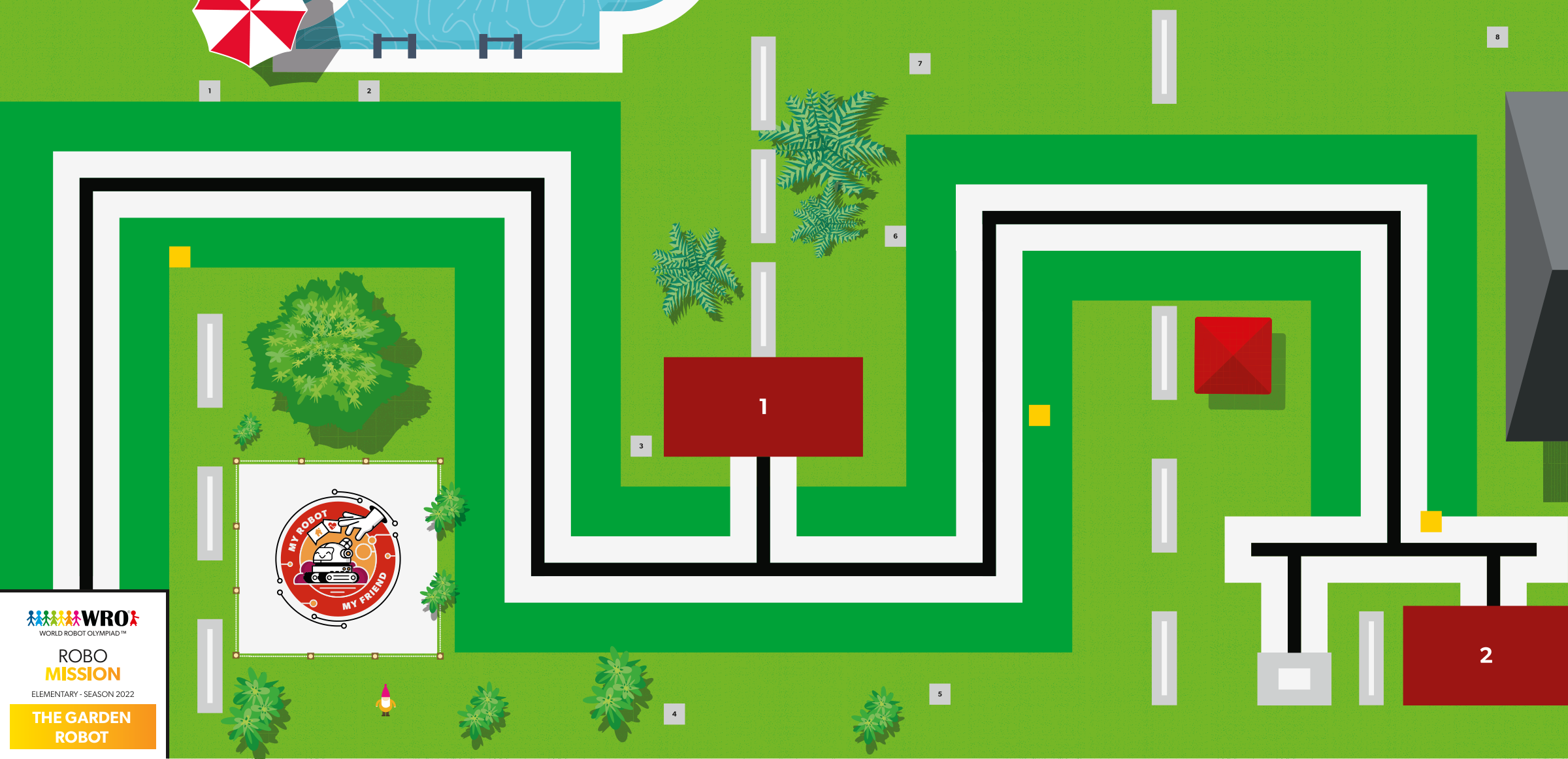
WRO 2022 RoboMission Elementary — My Robot My Friend — The Garden Robot · official WRO game mat, 2362 × 1143 mm
The challenges name these places rather than distances, so the same challenge works on any mat:
Switch mats above and every route below is redrawn on the mat you chose.
Work through them in order — each is harder than the last. The extra challenge comes after all three, and it is meant to make you plan before you build.
Read the Colour Sensor on the line, off the line and on the edge between them. Confirm the edge reads near 50 and write all three numbers down.
Build a follower whose steering is proportional to the error, where error is the reading minus 50, and drive the HOME to C leg with it.
Race it against Block 1's two-state follower over that same leg. Three runs each, and keep all six times.
Follow the line from HOME to the flower bed at C with the proportional follower and stop square on the station, beating your lesson 5 baseline for the same leg. Show the before and after times in the journal.