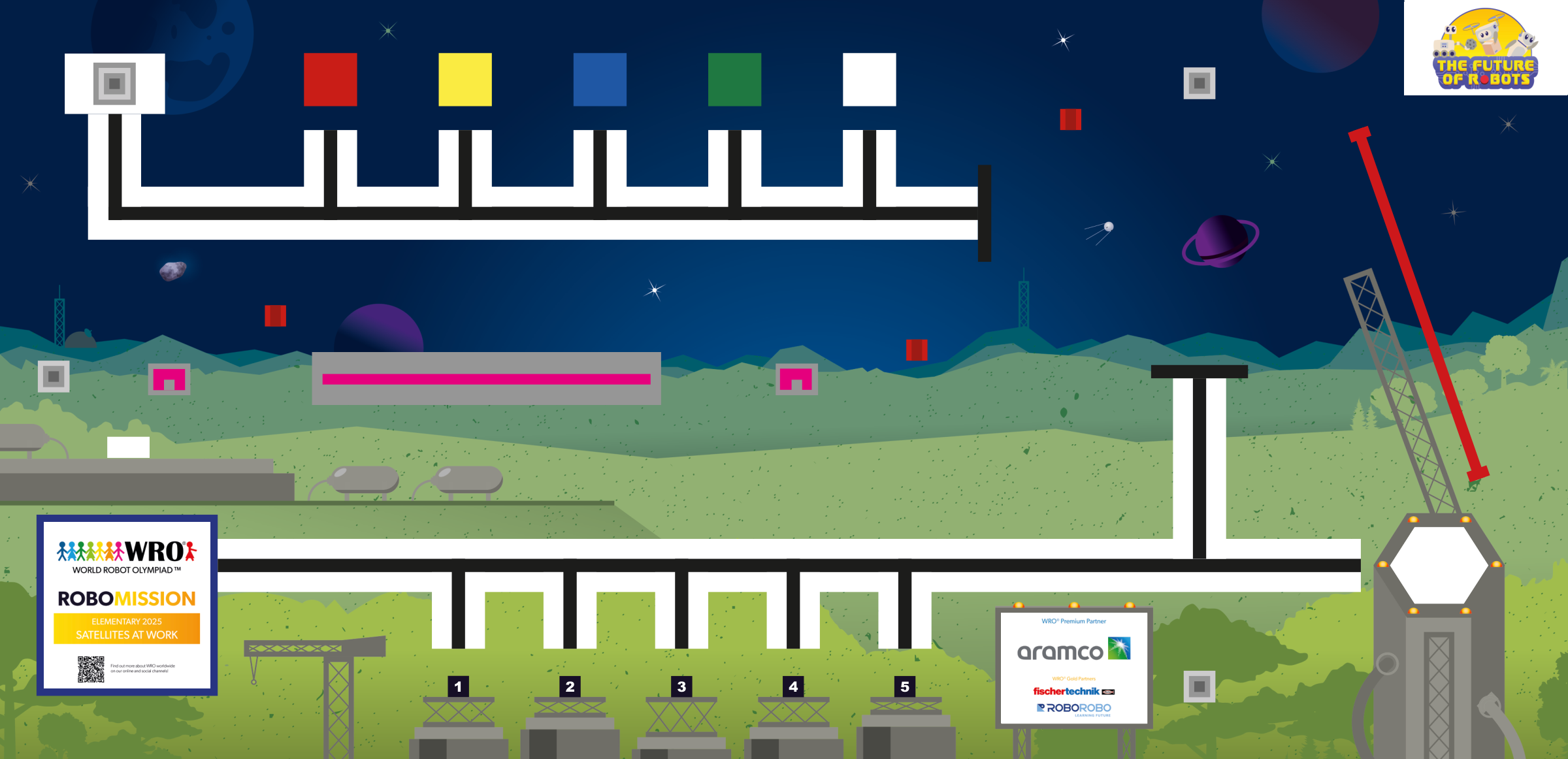
Quick Learn — the model, the instructions, the program and the challenges. The theory is in Full Lesson.
The mission 4 min
One program whose menu can run any mission in the set.
Everything exists. The menu chooses, the window lets the list grow, the log records what happened, the helper beam moves the module during the drive. Today they become one thing, and the claim is tested properly.
Nothing new is taught today. If something is missing, this is where you find out — and finding out here is much cheaper than finding out in tomorrow’s round.
Every mission in the set 5 min
All of it is live: the three launch pads at A, B and C, the launch gantry at D, and the satellite row at E, from HOME and back.
Your menu from lesson 36 should already offer these as entries. If an entry on that list has no working mission behind it, either build it today or take it off the menu — an entry that does nothing is worse than a shorter list, because somebody will choose it under pressure.
The satellite entry needs the satellite module fitted, which the program cannot check. That is a configuration-card question from lesson 34, and today is when the card gets used for real.
The technique — the shape of the program 12 min
Before assembling anything, draw the whole program on one page. Five parts, in this order, and every block you own belongs to exactly one of them:
- Initialise. Empty the log lists. Set the menu choice. Set the synch flag false. Calibrate the gyro.
- Choose. The menu loop with its window, ending on centre.
- Dispatch. One numeric Switch on the choice, one case per mission, plus a default that displays an error and stops.
- Run. The mission itself, built from My Blocks, with Log Stop after each scoring action and helper beams during travel.
- Report. The total, the summary screen, and a wait so somebody can read it.
Part one is where this block’s bugs live. The stale menu choice in lesson 35, the log holding last round’s stops in lesson 37, the synch flag left true in lesson 38 — three lessons, three bugs, one cause: state that outlived the run that made it. Put every initialisation in one visible group at the top where you can count them.
The canvas should now read as those five parts from left to right. If it does not — if the log emptying is buried inside a mission case, or the gyro calibration sits after the menu — move things until it does. A program you can read is a program you can fix in the two minutes between rounds.
Build it — assemble and count 10 min
Assemble the five parts, then count your initialisations against the list before running anything.
- Stations list — emptied.
- Points list — emptied.
- Menu choice — set to its starting value.
- Window start — set to 1.
- Synch flag — set to false.
- Gyro — calibrated.
Six things. Count them on the canvas. Every one of them worked fine in its own lesson and every one of them is a live bug once the program runs twice in a row.
Then check the dispatch Switch has a case for every menu entry, and that the numbers line up. An off-by-one between the menu list and the Switch cases makes every choice run the mission next to the one you picked — which is a confusing bug because everything works, just wrongly.
Program it — the back-to-back test 12 min
This is the test that defines the milestone, and it is the only one that catches what this block is actually about.
Three different missions, chosen from the menu, run one after another, without touching the computer. Not three separate runs with a reload in between — those all pass even when the program is broken.
After each run, check three things before starting the next:
- The robot did what the menu said, not what it did last time.
- The summary describes only this run — no stops carried over.
- The menu opened where it should, not on the previous choice.
When it fails, look at the top of the program. The routes were proved in Block 4 and the missions worked in isolation five minutes ago. A back-to-back sequence that misbehaves is almost never a route problem — it is something that was not reset.
Tune it — try to break it 9 min
Now attack your own program. Fifteen minutes here is worth more than any other fifteen in this block.
- Choose a mission you did not run last time. Deliberately pick the one furthest from the previous choice, at the other end of the menu list.
- Press centre without moving the selection at all. The default entry must run something sensible.
- Scroll to the last entry and choose it. The window and the dispatch have to agree at the far end of the list.
- Stop a run part-way and immediately start another. This is the nastiest one, and it is exactly what happens after a bad round.
- Run the satellite entry with the wrong module fitted. Not to break the robot — to find out what it does, and whether your configuration card would have caught it.
Run it — the milestone 6 min
The declared run: three missions from the menu, back to back, no reloading, each doing what was chosen and each reporting a correct summary.
Have another team watch and confirm nobody touched the computer between runs. That is the part it is easy to be generous with yourself about.
Then run the same three again in a different order. Passing once can be luck about which order happened to hide a stale value; passing in two different orders is a much stronger claim.
The journal 4 min
The milestone entry:
- the one-page program map — the five parts, and what is in each
- the initialisation list, all six, ticked off on the canvas
- the menu numbers against the dispatch cases, checked
- the back-to-back result — three missions, two orders, with the summaries
- what the break-it tests found, and what you changed
- one sentence naming the three bugs from lessons 35, 37 and 38 as the same bug
Tomorrow the mission is drawn at random. The Block 5 mock round tells you which mission to run shortly before each round starts, the way a real one does. That is the whole point of this block, and tomorrow is the first time the menu is used for the reason it was built.