🎯 Syllabus & Goals 3 min
Cambridge 3.4 · Network hardware Paper 1 · Computer Systems
By the end of this lesson you can:
- Describe the role of a NIC and the structure and types of a MAC address.
- Describe IP addresses — IPv4 and IPv6, public and private, static and dynamic — and compare them with MAC addresses.
- Describe how a router moves data packets between networks.
Textbook: Chapter 3, §3.4.1–3.4.4 (pp. 133–137)
Recap / Warm-Up 5 min
In Unit 2 you split data into packets. Every packet header carries a sender and a destination address. Today we meet the two kinds of address and the hardware that uses them.
Quick starter
Convert the hex byte B3 to 8-bit binary.
Reveal the answer
B = 11 = 1011 and 3 = 0011, so B3 = 1011 0011. You will need exactly this skill for MAC addresses.
🧠 Key Concept 14 min
1 · The network interface card (NIC)
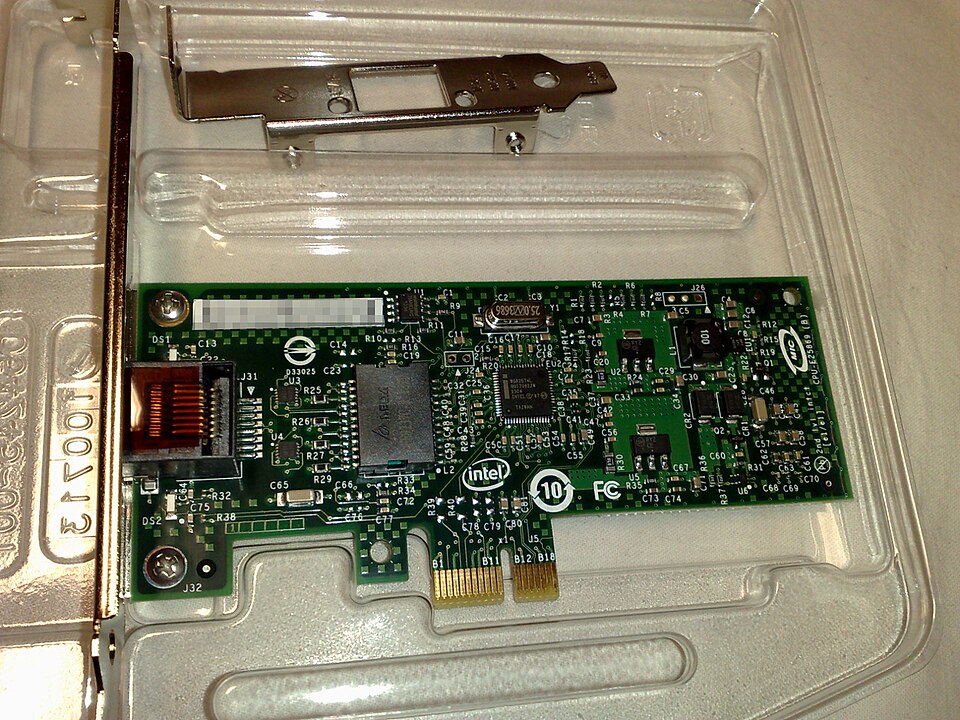
A device needs a network interface card (NIC) to connect to any network, including the internet. Today it is usually built into the motherboard. The NIC holds the device's MAC address, set when it is made.
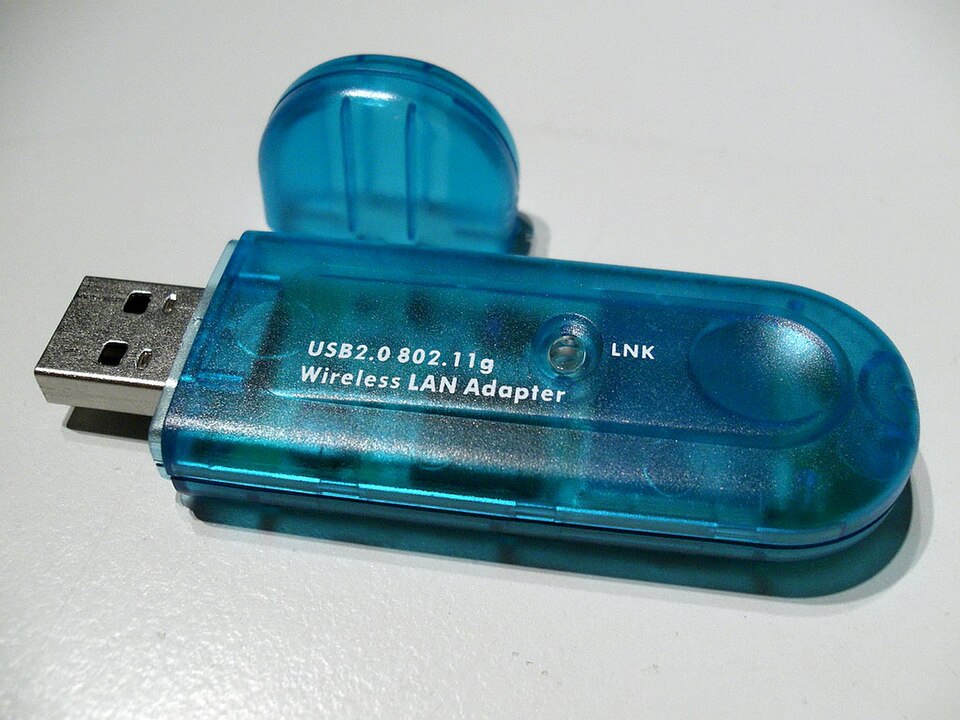
A wireless NIC (WNIC) does the same job without a cable. It uses an antenna to send and receive microwaves. It is either built in or plugged into a USB port.
2 · The MAC address
A MAC address (Media Access Control) identifies one device's NIC. It has 48 bits, written as six groups of two hex digits. The first half is the manufacturer's code; the second half is the device's serial number. If the NIC is replaced, the MAC address changes too.
Two types of MAC address
UAA — universally administered
- Set by the manufacturer at the factory.
- By far the most common type.
- Users rarely want to change it.
LAA — locally administered
- Set by a user or organisation, replacing the UAA.
- Easy to do — but it must still be unique on the network.
- Reasons: mainframe software that needs a strict address format; getting past a MAC-address filter on a router or firewall; getting round other network restrictions.
3 · The IP address
The internet runs on protocols — rules both sender and receiver must follow. The Internet Protocol needs every connected device to have an IP address. There are two versions:
IPv4
- 32 bits, written as four groups of 8 bits in denary, e.g.
192.168.1.20. - Each group is 0–255.
- Only 2³² ≈ 4.3 billion addresses — not enough for today's internet.
IPv6
- 128 bits, written as eight groups of four hex digits, separated by colons, e.g.
2001:0DB8:85A3:0000:0000:8A2E:0370:7334. - Lets the internet grow in hosts and traffic.
- Advantages: removes the risk of address collisions; built-in authentication checks; more efficient packet routes.
Static and dynamic IP addresses
A static IP address is given permanently by the ISP and never changes. It suits servers others must always find: a website host, an online database, an FTP server. A dynamic IP address is given each time the device connects, by a DHCP server (Dynamic Host Configuration Protocol) run by the ISP.
Dynamic IP addresses
- Greater privacy — the address changes each time.
- Can cause trouble for VoIP: a dropped connection can bring a new address and end the call.
Static IP addresses
- Never change, so the device is fully traceable.
- Faster upload and download — no address request each time.
- More expensive to maintain; the device must run constantly.
4 · MAC address versus IP address
| MAC address | IP address |
|---|---|
| Identifies the physical device on the network | Identifies the device's global address on the internet |
| Unique to the device | Not necessarily unique (private addresses repeat across networks) |
| Assigned by the manufacturer; part of the NIC | Assigned by the router / ISP (DHCP), or fixed as static |
| 48 bits, written in hex | 32 bits (IPv4, denary) or 128 bits (IPv6, hex) |
| Can be UAA or LAA | Can be static or dynamic |
| Used to identify the sending and receiving devices | Used in routing, showing where the device connects to the internet |
5 · Routers
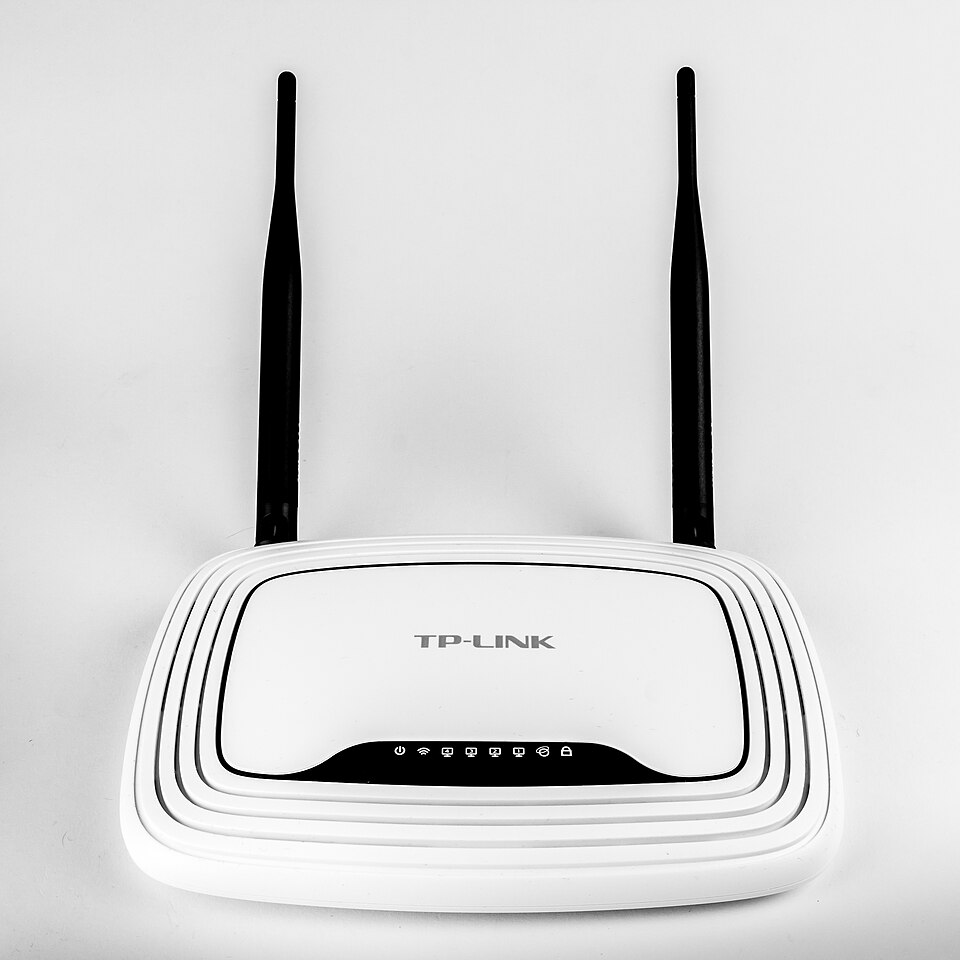
A router moves data packets between different networks, for example joining a home LAN to the internet (a WAN). If two networks use different protocols, the router converts the data so they can communicate. It usually has an internet cable plus cables or Wi-Fi to the local devices.
- The router inspects each packet's destination IP address.
- Devices on one network share the same first part of their IP address, so the router knows which network — and which switch — to send it to.
- The switch then delivers it to the right device using the destination MAC address.
- If no device on that switch has the MAC address, the packet is passed to another switch on the network.
- Broadband routers sit behind a firewall, which protects the network's computers. Routers can be wired or wireless.
Worked Example 12 min
(a) Reading a MAC address
A laptop's MAC address is 00-1C-B3-4F-25-FF. Split it and show how many bits it holds.
- Count the groups: 6 groups of 2 hex digits.every MAC address has six pairs.
- Manufacturer code: 00-1C-B3; serial number: 4F-25-FF.first three pairs NN, last three DD.
- Convert each digit to 4 bits, e.g. B = 1011, 3 = 0011, so B3 = 10110011.one hex digit is exactly one nibble.
- The whole address: 00000000 00011100 10110011 01001111 00100101 11111111.six bytes in order.
- Bits: 6 × 8 = 48 bits.matches the definition — a quick self-check.
(b) An IPv4 address in binary, and why IPv6 was needed
| Denary | 192 | 168 | 1 | 20 |
|---|---|---|---|---|
| Binary | 11000000 | 10101000 | 00000001 | 00010100 |
- 192 = 128 + 64 → 11000000.use the 128 64 32 16 8 4 2 1 place values.
- 168 = 128 + 32 + 8 → 10101000.subtract the largest place value that fits, repeatedly.
- 1 → 00000001; 20 = 16 + 4 → 00010100.always pad to 8 bits.
- Total: 4 × 8 = 32 bits, so 2³² = 4 294 967 296 addresses.each extra bit doubles the count.
- IPv6: 8 groups × 4 hex digits × 4 bits = 128 bits, giving 2¹²⁸ ≈ 3.4 × 10³⁸ addresses.that is 2⁹⁶ times as many as IPv4 — no shortage.
(c) Following a packet from Sam's laptop to a website
- The laptop connects; the home router gives it a private IP, 192.168.1.20.the router assigns private addresses on its own network.
- The router itself has a dynamic public IP from the ISP's DHCP server.home connections are usually dynamic.
- Sam types a web address; a DNS server returns the website's IP address.packets are routed by IP, not by name.
- The request leaves through the router, which forwards packets between the home LAN and the internet.joining networks is the router's defining job.
- The web server has a static IP, so it can always be found; it sends the page back to the router's public IP.servers use static addresses.
- The router passes the packets to the right switch/port; they reach the laptop by its MAC address.IP gets the packet to the network; MAC gets it to the device.
Try It Yourself 12 min
Goal: Label each as MAC, IPv4 or IPv6: 10.0.0.7 · 3C-22-FB-01-9A-10 · 2001:0DB8:0000:0000:0000:0000:0000:0001 · 172.16.254.1.
Goal: Convert 10.0.0.7 to four 8-bit binary groups. Then convert the MAC byte 9A to binary.
Goal: A school runs a web server and 300 student laptops. Recommend static or dynamic IP addressing for each, with two reasons each. Then give one reason the network manager might change a laptop's MAC address to an LAA.
Hint
Ask who needs to find each device. Everyone must always find the web server. Nobody outside needs to find a particular laptop — and privacy matters. For the LAA, think about a MAC-address filter on the router.
📝 Exam Practice 10 min
State the purpose of a network interface card (NIC) and what it contains that identifies the device.
Mark scheme
- Allows a device to connect to a network / the internet (1).
- Contains the (unique) MAC address, set at manufacture (1).
What is meant by a MAC address? Describe the two different types of MAC address.
Mark scheme
- A 48-bit / six hex-pair address that uniquely identifies a device (its NIC) on a network (1).
- First half = manufacturer code, second half = device serial number (1).
- UAA: universally administered, set by the manufacturer at the factory / most common (1).
- LAA: locally administered, set by the user or organisation to replace the UAA, e.g. to pass a MAC filter (1).
Describe the differences between a static and a dynamic IP address. Explain why both types are used.
Mark scheme
- Static does not change / dynamic changes each time the device connects (1).
- Dynamic is assigned by a DHCP server (of the ISP); static is assigned permanently by the ISP (1).
- Static is used for servers (websites, online databases, FTP) that must always be found at the same address (1).
- Dynamic is used for most users: greater privacy / addresses reused, so fewer needed / cheaper (1).
Describe three differences between MAC addresses and IP addresses.
Mark scheme
- MAC identifies the physical device; IP identifies its location/address on the internet (1).
- MAC is assigned by the manufacturer; IP by the router/ISP/DHCP (1).
- MAC is 48 bits; IP is 32 bits (IPv4) or 128 bits (IPv6) (1).
- Also accept: MAC is UAA/LAA, IP is static/dynamic; MAC is unique, a private IP may repeat on other networks.
🗝️ Recap & Key Terms 3 min
A NIC connects a device to a network and holds its 48-bit MAC address. An IP address (IPv4 32-bit, IPv6 128-bit) shows where the device connects, and may be static or dynamic. A router joins networks: it routes by IP, then the packet reaches the device by MAC.
- Network interface card (NIC)
- A hardware component needed to allow a device to connect to a network, such as the internet.
- MAC address
- A unique 48-bit identifier for a device on a network, in the form NN-NN-NN-DD-DD-DD (manufacturer code, then device code).
- IP address
- An address given to a device when it connects to a network, used to route data to it; IPv4 or IPv6.
- Static IP address
- An IP address that does not change.
- Dynamic IP address
- A temporary IP address assigned to a device each time it connects to a network.
- DHCP server
- A server that automatically provides and assigns IP addresses.
- Router
- A device that enables data packets to be moved between different networks, e.g. to join a LAN to a WAN.
Homework 1 min
Task (≤ 15 min): Explain the role of the router, the IP address and the MAC address when a laptop on a home network requests a web page and the page comes back. [4]
Model answer
- The router joins the home LAN to the internet and forwards packets between them (1).
- Packets are addressed with the destination IP address; the web server's static IP lets it be found (1).
- The reply comes back to the router's public IP; the router passes it to the laptop's private IP (1).
- The packet is finally delivered to the correct device by its MAC address (via the switch/NIC) (1).