🎯 Syllabus & Goals 3 min
Cambridge 4.1 · Hardware, firmware and an OS are needed to run applications Paper 1 · Computer Systems
By the end of this lesson you can:
- Define firmware and give the BIOS as an example.
- Describe what happens when a computer boots up.
- Explain why hardware, firmware and an operating system are all needed to run an application.
Textbook: Chapter 4, §4.1.3 (pp. 160–161)
Recap / Warm-Up 5 min
Lessons 3–4 showed the OS as a platform for applications. But the OS is itself a program stored on a disk. Something must load it first.
Quick starter
RAM is volatile. When a computer is switched off, where is the OS kept — and why can the CPU not run it straight from there at power-on without help?
Reveal the answer
The OS is kept on the HDD/SSD. At power-on RAM is empty, so a small program in non-volatile memory (the BIOS) must find the OS and load it into RAM.
🧠 Key Concept 14 min
1 · Four layers, each running on the one below
An application never runs on bare hardware. It runs on the OS. The OS is started by firmware. The firmware runs on the hardware.
2 · Firmware and the BIOS
The start-up of a computer's motherboard is handled by the BIOS (basic input/output system). The BIOS is firmware. It tells the computer where to find the storage device that holds the OS. It then loads the part of the OS that is needed and executes it.
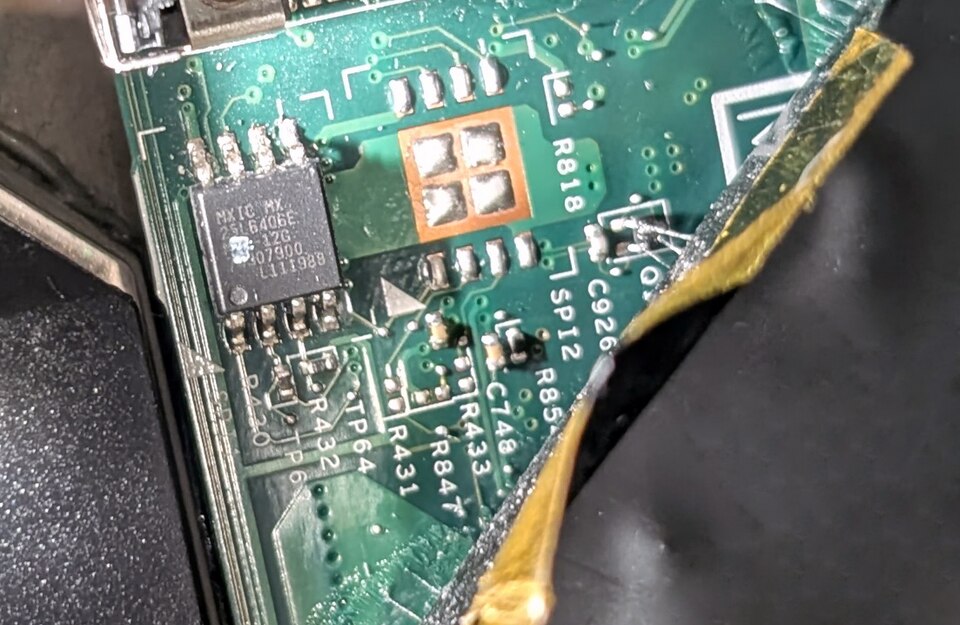
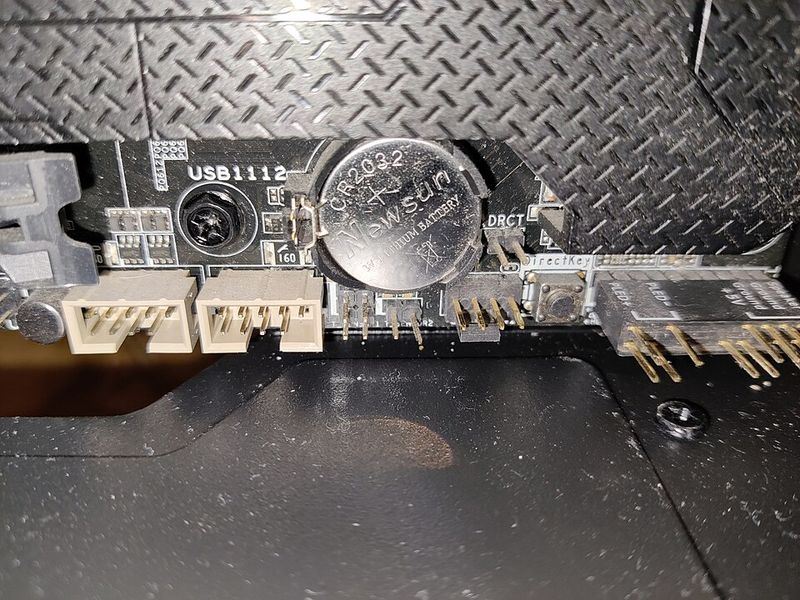
The BIOS program
Stored in flash memory, which keeps its contents with the power off. It can still be updated (re-written) when needed.
The BIOS settings
Stored on a CMOS chip, kept powered by a battery. If the battery is removed, the settings reset to the factory defaults.
3 · While an application is running
- The application is under the control of the OS.
- It uses system software, such as device drivers, to reach the hardware.
- Different parts of the OS are loaded in and out of RAM as the application runs.
Worked Example 12 min
(a) From power button to web browser
- Alex presses the power button. RAM is empty.RAM is volatile, so nothing is left in it from last time.
- The BIOS runs from its flash chip and starts the motherboard.Firmware is in non-volatile memory, so it is ready at power-on.
- The BIOS reads its settings from the CMOS and finds the SSD that holds the OS.The settings say which device to boot from.
- The bootstrap loader copies the needed part of the OS into RAM and runs it.The CPU can only execute instructions that are in RAM.
- The OS starts and shows its log-in screen.The OS now provides the HCI and the platform for applications.
- Alex opens a web browser. The OS loads it into RAM and gives it resources.The application runs on the OS, which runs on firmware and hardware.
(b) What if the CMOS battery is removed?
A technician changed the BIOS settings to boot from a USB stick first. Then the CMOS battery is removed and replaced.
- The BIOS program is still in flash memory.Flash keeps its contents with no power, so the program is safe.
- The BIOS settings on the CMOS chip are lost.CMOS needs the battery to hold its data.
- At the next power-on, the BIOS uses the factory default settings.It reads the same program but finds no user settings.
- The "boot from USB first" choice is gone and must be set again.Any user change (boot order, clock settings) reverts to the defaults.
Try It Yourself 12 min
Goal: Put these in order, top to bottom: operating system, hardware, application, firmware.
Goal: Write the boot sequence of a laptop as five numbered steps. Use the words BIOS, storage device, RAM, bootstrap loader and OS.
Goal: A smart TV runs a streaming app. Explain the part played by the hardware, the firmware and the OS when the viewer opens the app.
Hint
Work bottom-up: what physical parts are involved, what starts them at power-on, and what gives the app memory, a screen and a network connection?
📝 Exam Practice 10 min
Define the term firmware.
Mark scheme
- A program that provides low-level control for (hardware) devices (1).
Describe what happens when a computer is switched on, up to the point where the operating system is running.
Mark scheme
- The BIOS / firmware starts (the motherboard) (1).
- The BIOS locates the storage device that holds the OS (1).
- (Part of) the OS is loaded into RAM / bootstrap loader runs (1).
- The OS is executed / takes control (1).
Explain why hardware, firmware and an operating system are all needed to run application software.
Mark scheme
- Applications run on the OS, which provides the platform / resources / drivers (1).
- The OS is loaded and started by firmware (the BIOS / bootloader) (1).
- The firmware runs on / controls the hardware, which physically executes the instructions (1).
Identify where each item is stored. Choose from: CMOS, flash memory, HDD/SSD, RAM.
- (a) The BIOS settings
- (b) The BIOS program
- (c) The full operating system when the computer is off
- (d) The part of the OS currently in use
Mark scheme
- (a) CMOS (1).
- (b) Flash memory (accept EEPROM) (1).
- (c) HDD/SSD (1).
- (d) RAM (1).
🗝️ Recap & Key Terms 3 min
An application runs on the OS; the OS is loaded by firmware; the firmware runs on the hardware. At power-on the BIOS finds the OS and the bootstrap loader copies it into RAM. BIOS settings live on a battery-backed CMOS chip.
- Firmware
- A program that provides low-level control for devices.
- BIOS
- Basic input/output system: firmware that starts the motherboard and loads the OS.
- Boot up / bootstrap loader
- A small program that loads other programs (the OS) so a computer starts up correctly.
- CMOS
- A battery-powered chip that stores the BIOS settings.
- Platform
- The environment the OS provides in which application software runs.
Homework 1 min
Task (≤ 15 min): Describe the difference between the BIOS program and the BIOS settings, including where each is stored and why. [4]
Model answer
- The BIOS program is the firmware that starts the computer and loads the OS (1).
- It is stored in flash memory / EEPROM, which keeps it without power but lets it be updated (1).
- The BIOS settings are choices such as boot order or clock speed (1).
- They are stored on a CMOS chip powered by a battery; if the battery is removed they revert to factory defaults (1).