🎯 Syllabus & Goals 3 min
Cambridge 4.2 · The role and functions of an IDE Paper 1 · Computer Systems
By the end of this lesson you can:
- Explain what an integrated development environment (IDE) is.
- Describe the common IDE features: code editor, translator, run-time environment with debugger, error diagnostics, auto-completion, auto-correction and prettyprinting.
- Use a breakpoint, single-stepping and a report window to find a logic error.
Textbook: Chapter 4, §4.2.5 (pp. 170–173)
Recap / Warm-Up 5 min
Last lesson: an interpreter is handy while developing, and a compiler is used for the finished program. An IDE puts a translator — and many other helpers — in one place.
Quick starter
An interpreter stops at line 12 with an error. A compiler reports errors on lines 12 and 30. Which translator was used on which run — and which would you rather have while testing?
Reveal the answer
The interpreter stops at the first error (line 12). The compiler reports all errors. While testing, the interpreter gives quicker, line-by-line feedback.
🧠 Key Concept 14 min
1 · What is an IDE?
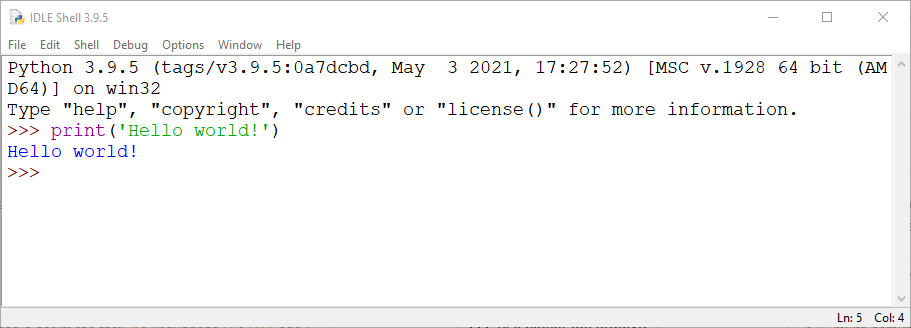
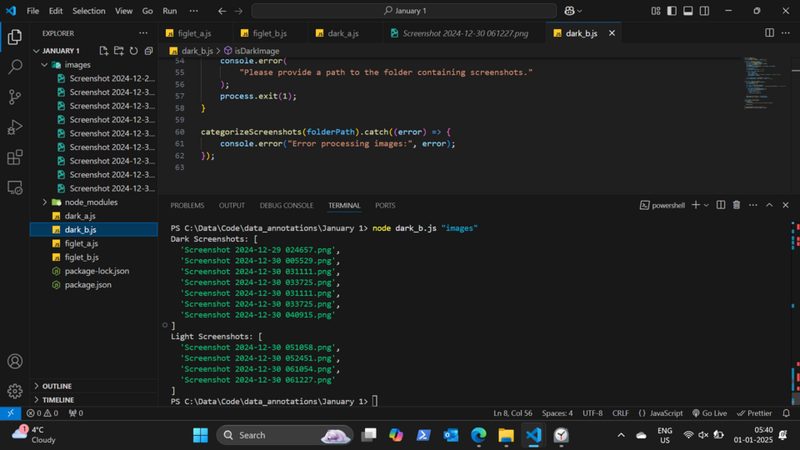
Some IDEs support one language; others support several. Examples include IDLE and PyCharm (for Python), Visual Studio (for Visual Basic and others) and BlueJ (for Java).
totl is underlined with a fix offered, and typing ave brings up an auto-completion list.2 · The features, one by one
Code editor
Write and edit the program without a separate text editor. No switching between programs speeds up development.
Translator
A built-in compiler and/or interpreter runs the program. The interpreter is used while developing; the compiler makes the final version.
Run-time environment with a debugger
Run the program one line at a time (single stepping) or stop it at a breakpoint. A report window shows the variables, so logic errors can be found.
Error diagnostics & auto-correction
Dynamic error checking finds possible errors as code is typed, alerts the programmer and suggests a correction. Many errors are fixed before the program ever runs.
Auto-completion
Context-sensitive prompts complete variable names and reserved words as you type. Fewer typing errors, faster coding.
Auto-documenter & prettyprinting
An auto-documenter explains what a piece of code does. Prettyprinting colour-codes keywords, strings and comments and lays the code out clearly.
Worked Example 12 min
(a) Finding a logic error with the debugger
This program should output the average of three marks. With inputs 60, 70 and 80 it should print 70, but it prints 26.66…
Cambridge pseudocode
DECLARE Total : INTEGER
DECLARE Count : INTEGER
DECLARE Mark : INTEGER
Total ← 0
FOR Count ← 1 TO 3
  INPUT Mark
  Total ← Mark
NEXT Count
OUTPUT "Average is ", Total / 3
The same in Python
total = 0
for count in range(1, 4):
    mark = int(input("Mark: "))
    total = mark
print("Average is", total / 3)
- Set a breakpoint on the line
Total ← Mark.This is where the running total is built, so it is the line to watch. - Run in the debugger and enter 60. The program pauses; the report window shows Total = 60.So far this looks right.
- Single-step through the next pass and enter 70. The report window shows Total = 70, not 130.The total has been replaced, not added to.
- Identify the error and correct the line to
Total ← Total + Mark.A running total must add the new value to the old total. - Re-run: the report window now shows 60, 130, 210 and the output is 70.Retesting confirms the fix.
| Count | Mark | Total (buggy) | Total (fixed) | OUTPUT |
|---|---|---|---|---|
| – | – | 0 | 0 | |
| 1 | 60 | 60 | 60 | |
| 2 | 70 | 70 | 130 | |
| 3 | 80 | 80 | 210 | |
| Buggy: 26.66… · Fixed: 70 |
(b) Which IDE feature helped?
Sam is typing a new program. Name the feature at work at each moment.
- Sam types
OUTPT "Hello". It is underlined in red andOUTPUTis offered.Error diagnostics spotted it; auto-correction offered the fix. - Sam types
Totand a list offersTotal.Auto-completion — context-sensitive prompts for variable names. - After a missing closing quote, all the following code turns green.Prettyprinting colours strings green, so the runaway string stands out.
- Sam clicks Run and the output appears in a panel.The built-in translator and run-time environment.
Try It Yourself 12 min
Goal: Open the IDE you use (IDLE works). Find three features from this lesson and describe what each one did.
Goal: This loop should output the largest of five numbers but always outputs the last one. Say where you would put a breakpoint and what you would watch in the report window.
Largest ← 0
FOR Count ← 1 TO 5
  INPUT Number
  IF Number > 0
    THEN
      Largest ← Number
  ENDIF
NEXT Count
OUTPUT LargestGoal: Explain why error diagnostics cannot find the bug in Worked Example (a), but a debugger can.
Hint
Is Total ← Mark a legal statement? What kind of error is it — does the program crash, or just give a wrong answer?
📝 Exam Practice 10 min
Explain what is meant by an integrated development environment (IDE).
Mark scheme
- A suite of programs / software (1)…
- …used to write, edit, test and debug programs (in a high-level language) (1).
An IDE contains these features: auto-completion, auto-correction and prettyprinting. Describe each feature. Include a suitable example with each description.
Mark scheme
- Auto-completion: offers/completes names of variables or reserved words as you type (1); e.g. typing
TotoffersTotal(1). - Auto-correction: finds possible errors as code is typed and suggests / makes a correction (1); e.g.
OUTPTcorrected toOUTPUT(1). - Prettyprinting: displays code in different colours and a clear layout / indentation (1); e.g. keywords orange, strings green (1).
Identify two other features that should be included in an IDE. Give a reason why each is needed.
Mark scheme
Two from, 1 mark feature + 1 mark reason:
- Code editor — to write and edit code without a separate program (1 + 1).
- Translator (compiler/interpreter) — to run / execute the program (1 + 1).
- Debugger / run-time environment — to step through the code, set breakpoints and find logic errors (1 + 1).
- Error diagnostics — to find and report errors as the code is typed (1 + 1).
- Auto-documenter — to explain the purpose of code (1 + 1).
Describe how a debugger could help a programmer find a logic error.
Mark scheme
- A breakpoint stops execution at a chosen point (1).
- Single stepping runs the program one line at a time (1).
- A report window shows the contents of variables, so the programmer can see where values go wrong (1).
🗝️ Recap & Key Terms 3 min
An IDE gathers the tools for writing and testing code: a code editor, a translator, a run-time environment with a debugger, error diagnostics, auto-correction, auto-completion, an auto-documenter and prettyprinting. The debugger finds logic errors; error diagnostics catch mistakes as you type.
- Integrated development environment (IDE)
- A suite of programs used to write and test a program written in a high-level language.
- Debugging
- Finding errors in a program by running or tracing it.
- Breakpoint
- A point set in the code where the debugger pauses execution.
- Single stepping
- Running a program one line at a time in the debugger.
- Report window
- A window in the run-time environment that shows the contents of variables during execution.
- Prettyprinting
- Displaying source code in different colours and formatting to make it easier to read.
Homework 1 min
Task (≤ 15 min): A student is writing her first program in a high-level language. Describe three features of an IDE that she would find helpful, and say how each helps. [6]
Model answer
- Error diagnostics / auto-correction — underlines mistakes as she types and suggests a fix (1), so errors are corrected before the program runs (1).
- Auto-completion — offers variable names and keywords as she types (1), reducing spelling mistakes and saving time (1).
- Debugger — lets her set breakpoints and single-step while watching variables (1), so she can find logic errors (1).
- Also accept: prettyprinting (colours make code easier to read), code editor, built-in translator.