Syllabus & Goals 3 min
Cambridge 5.1 · Web browsers; locating and retrieving web pages Paper 1 · Computer Systems
By the end of this lesson you can:
- State the purpose of a web browser and list its main functions.
- Describe the role of the DNS, IP addresses and the web server.
- Describe, in order, how a web page is located, retrieved and displayed.
Textbook: Chapter 5, §5.1.4–5.1.5 (pp. 182–183)
Recap / Warm-Up 5 min
Last lesson: a URL is a text address, and HTTP(S) is the set of rules for transferring pages. But computers find each other by IP address, not by name.
Quick starter
You know a friend's name but not their phone number. What do you use to find the number? How is that like typing a URL?
Reveal the answer
A contacts list (a phone book) turns a name into a number. The Domain Name Server (DNS) does the same job: it turns a domain name into an IP address.
Key Concept 14 min
1 · What a web browser does
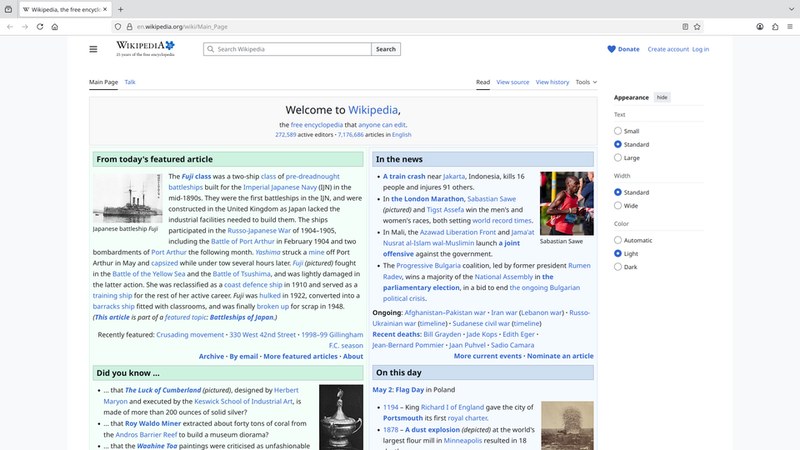
A web browser (usually just "browser") is software that lets a user access and display web pages. Its central job is to interpret (render) HTML sent from a web server. It turns that code into the text, images, video and audio you see and hear.
Most browsers offer these functions:
Finding and moving
- Address bar to type or show a URL
- Hyperlinks to jump between pages (click = same tab; Ctrl + click = new tab)
- Back and forward navigation through pages already opened
- A home page
Remembering and storing
- Bookmarks / favourites — saved pages
- User history — a record of sites visited
- Cookies — stored small files (Lesson 3)
- Cache — pages kept locally for faster reloading
Displaying
- Multiple tabs — many pages open at once
- Interpret HTML and run JavaScript
- Show security signs such as the padlock
2 · How a web page is located: IP addresses and the DNS
Websites are written in HTML and stored on a web server. Every web server has its own IP address. To fetch a page, your browser needs that IP address. People remember names far better than numbers, so we type a URL instead.
The Domain Name Server (DNS) — also called the domain name system — converts the domain name in a URL into its IP address. DNS servers hold a database of domain names and matching IP addresses. The lookup can involve more than one DNS server.
The five steps in the diagram:
- The user types the URL. The browser asks DNS server 1 for the website's IP address.
- DNS server 1 cannot find the name in its database or cache, so it asks DNS server 2.
- DNS server 2 finds the name and returns the matching IP address. DNS server 1 stores it in its cache for next time.
- DNS server 1 sends the IP address back to the user's computer.
- The browser contacts the web server at that IP address and requests the page. The server sends back the HTML files. The browser interprets the HTML and displays the page.
Worked Example 12 min
(a) Trace a page request, message by message
Scenario: Alex types https://www.exampleshop.com/sale.html. The web server's IP address is 203.0.113.25. DNS server 1 has never seen this name.
| Step | From → To | Message | Why this step |
|---|---|---|---|
| 1 | Browser → DNS 1 | "IP address for www.exampleshop.com?" | Computers route by IP address, not by name. |
| 2 | DNS 1 → DNS 2 | Same question, passed on | Not in DNS 1's database or cache. |
| 3 | DNS 2 → DNS 1 | 203.0.113.25 | DNS 2 holds the matching entry; DNS 1 caches it. |
| 4 | DNS 1 → Browser | 203.0.113.25 | The browser now knows where the server is. |
| 5 | Browser → Web server | HTTPS request for sale.html | Asks the correct machine for the file. |
| 6 | Web server → Browser | The HTML file (plus images) | The server holds the website's files. |
| 7 | Browser | Interprets the HTML and displays the page | Rendering is the browser's job. |
Follow-up: Sam then types the same URL on a different computer that uses DNS server 1. Which steps disappear? Steps 2 and 3, because DNS 1 now has the address in its cache.
(b) Complete the paragraph (a classic Paper 1 format)
Question: choose four terms from: browser, cookies, HTML, HTTPS, IP address, MAC address, web server.
"The user enters a URL. The (i) uses the DNS to find the (ii) of the website. It sends a request to the (iii) for the files. The files arrive as (iv) , which the browser interprets."
- (i) Who uses the DNS? The software on the user's device: browser. the sentence describes the user's side starting the lookup.
- (ii) What does the DNS return? IP address. a MAC address identifies a device on a local network; the DNS never deals with it.
- (iii) Who holds the files? web server. the DNS is not asked again — it only gave the address.
- (iv) What format is interpreted? HTML. HTTPS is the transfer protocol, not the file format; cookies are unrelated here.
Marks: one per correct gap. The distractors (MAC address, HTTPS, cookies) are there to catch vague revision.
Try It Yourself 12 min
Goal: give the browser function that solves each need: (a) reopen a recipe page you saw yesterday; (b) keep a school page one click away; (c) compare two shops side by side; (d) return to the previous page.
Goal: without looking, draw the DNS diagram with the user's computer, two DNS servers and the web server. Number the five arrows and write one line for each.
Goal: an attacker changes the entry for www.exampleshop.com in DNS server 1's cache to their own IP address. Describe what happens to the next user who types that URL, and why the user might not notice.
Hint
Follow the five steps. Which step now returns the wrong value? What does the browser do with whatever IP address it receives? (You will meet the name for this attack in Lesson 7.)
📝 Exam Practice 10 min
Describe how the DNS is used to locate and retrieve a web page after a user types a URL.
Mark scheme
Any five from:
- The browser sends the URL / domain name to a DNS server (1).
- The DNS server looks up the domain name in its database / cache (1).
- If it is not found, the request is passed to another DNS server (1).
- The matching IP address is found and returned to the browser / computer (1).
- The (first) DNS server stores the IP address in its cache (1).
- The browser uses the IP address to send a request to the web server (1).
- The web server sends the web page / HTML files back to the browser (1).
- The browser interprets / renders the HTML and displays the page (1).
Give three functions of a web browser.
Mark scheme
Any three from:
- Renders / interprets HTML to display web pages (1).
- Stores bookmarks / favourites (1).
- Records user history (1).
- Allows multiple tabs (1).
- Stores cookies (1).
- Provides navigation tools (back / forward / hyperlinks) (1).
- Provides an address bar (1).
- Stores a cache of web pages (1).
Explain why a DNS server stores the IP addresses it has recently looked up.
Mark scheme
- The IP address is kept in a cache so the next request for the same domain can be answered straight away (1)…
- …without contacting other DNS servers, so web pages are located faster / less network traffic (1).
State the language that a browser interprets to display a web page.
Mark scheme
- HTML / Hypertext Markup Language (1). Do not accept HTTP.
Recap & Key Terms 3 min
A browser finds pages and renders their HTML, and adds tabs, bookmarks, history, cookies and navigation. The DNS turns a domain name into an IP address, possibly asking several DNS servers. The browser then requests the files from the web server and displays them.
- (Web) browser
- Software that connects to a DNS to locate IP addresses and interprets the HTML of web pages for the user.
- Domain name server (DNS)
- A server that looks up domain names to find the IP addresses a computer needs to locate web servers.
- IP address
- The numeric address that identifies a device (such as a web server) on the internet.
- Web server
- A server that stores a website's files and sends them to browsers on request.
- Hyperlink
- Highlighted text or an image that, when clicked, links to another page or website.
- Cache
- Local storage of recently used data (pages, IP addresses) so it can be reloaded faster.
Homework 1 min
Task (≤ 15 min): Sam types a URL and a web page appears. Write the stages that happen in between, in the correct order, naming the browser, DNS, IP address, web server and HTML. [6]
Model answer
- Sam types the URL into the browser's address bar (1).
- The browser sends the domain name to a DNS server (1).
- The DNS looks it up (asking another DNS server if needed) and finds the IP address (1).
- The IP address is returned to the browser (1).
- The browser sends a request to the web server at that IP address (1).
- The web server returns the HTML files, which the browser interprets and displays (1).