Learning Goals 3 min
By the end of this lesson you will be able to:
- Build the EV3 Fan and plug the Medium Motor into port A.
- Make the fan blades spin and then stop, using the [A v] start motor [clockwise v] and [A v] stop motor blocks.
- Explain why [A v] start motor [clockwise v] keeps running until you tell it to stop.
Meet the Model — the EV3 Fan 6 min
What is an electric fan?
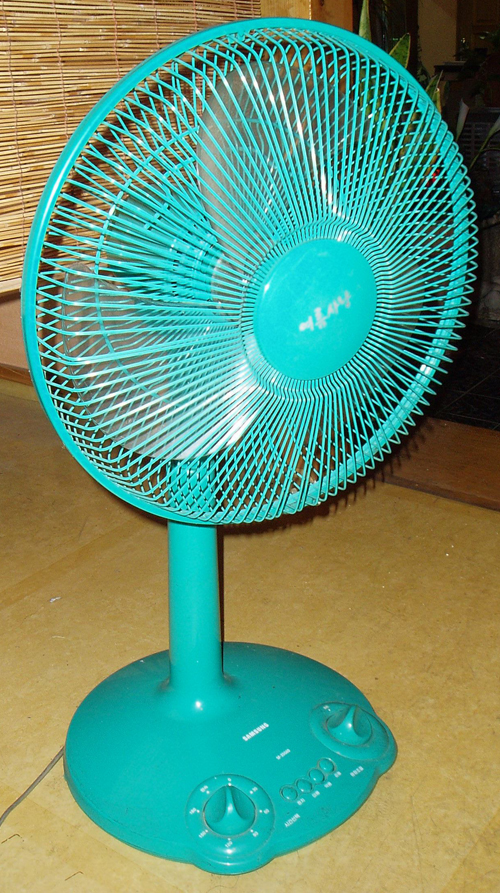
An electric fan is a machine that moves air to cool us down. A small motor spins a set of angled blades. The blades push air forward as a steady breeze.
The science behind it
Inside the hub sits an electric motor. It spins the blades, which are set at a slight angle. As they turn, they scoop air and throw it forward, making airflow we feel as wind. A faster spin moves more air, so the breeze feels stronger.
Where you meet it
Fans cool rooms, dry hair and pull heat from computers and ovens. In the tropical heat, a kipas hums in nearly every Malaysian home and classroom.
What we'll build
We'll build a small EV3 Fan. A Medium Motor on port A spins the blades through a gear. Then we program it to start and stop neatly.
Warm-Up 4 min
This is your first EV3 lesson. The Brick is the robot's brain. A motor is a muscle.
Quick-fire puzzle
Aisyah ran this tiny program on her EV3 Fan. What does the fan do?
when program starts :: events hat
[A v] start motor [clockwise v] :: motors
Reveal the answer
The blades spin up — and they keep spinning forever. There is no stop block, so the motor never switches off. Aisyah has to pull the battery or press the Brick's back button to stop it. Today we add a tidy way to stop.
New Concept — start and stop a motor 10 min
A Medium Motor is like a tiny electric fan motor. Give it power and it spins. Cut the power and it coasts to a stop.
Blocks reference
| Block | Category | What it does |
|---|---|---|
when program starts :: events hat | Events | The hat at the top of every stack. The program begins here when you press the centre button. |
[A v] start motor [clockwise v] :: motors | Motors | Turns the motor on. It keeps spinning — until you stop it. This is unregulated control. |
[A v] stop motor :: motors | Motors | Cuts power to the motor so it stops. |
wait (1) seconds | Control | Pauses the program for the number of seconds you type. |
Port reminder: motors plug into the letter ports A–D. Today the Medium Motor goes into port A. Sensors use number ports 1–4.
Unregulated means "runs until stopped"
The word unregulated sounds hard. It just means the motor has no finish line. [A v] start motor [clockwise v] switches it on and walks away. To make it stop, you need [A v] stop motor — usually after a wait (1) seconds.
Why it matters
A real fan, a drill, a blender — they all run until someone switches them off. That is exactly the "start, then stop" pattern you are learning now.
Build & Program — the EV3 Fan 17 min
Part A — Build
Build the EV3 Fan from the model catalogue. It is a Medium Motor that spins a set of fan blades through a gear.
Components & ports: EV3 Brick · Medium Motor → port A.
- Attach the Medium Motor to the Brick frame; plug it into port A.
- Fit the small gear onto the motor axle.
- Mesh a larger gear with the small gear and push the fan blades onto its axle.
- Check the blades spin freely by hand before you switch on.
Part B — Program
We want the fan to spin for 3 seconds, then stop neatly.
- Drag in the hat that starts the program:
when program starts :: events hat
- Start the blades spinning:
[A v] start motor [clockwise v] :: motors
- Let the fan run for a while:
wait (3) seconds
- Switch the motor off:
[A v] stop motor :: motors
when program starts :: events hat
[A v] start motor [clockwise v] :: motors
wait (3) seconds
[A v] stop motor :: motors
Expected behaviour: press the centre button. The blades spin up and you feel a breeze. After three seconds the motor stops and the blades coast down.
Try It Yourself — three small builds 11 min
Goal: Make the fan run longer — a full 10 seconds.
when program starts :: events hat
[A v] start motor [clockwise v] :: motors
wait (10) seconds
[A v] stop motor :: motors
Goal: Two bursts of breeze. Spin, stop, pause, then spin again.
when program starts :: events hat
[A v] start motor [clockwise v] :: motors
wait (2) seconds
[A v] stop motor :: motors
wait (1) seconds
[A v] start motor [clockwise v] :: motors
wait (2) seconds
[A v] stop motor :: motors
Goal: Wei Jie wants the fan to spin the other way. Change the motor's direction so the blades push air the opposite way. (Hint: open the [A v] start motor [clockwise v] block and try the reverse-direction arrow, or run a short reverse before stopping.)
Mini-Challenge — the polite fan 6 min
Combine today's motor blocks with a wait (1) seconds at the very start, so the fan gives you one second to step back before the blades spin.
It works if:
- Nothing happens for one second after you press the button.
- The blades then spin for 5 seconds and stop on their own.
Recap 2 min
You built your first EV3 model and made a motor spin. [A v] start motor [clockwise v] runs the motor until you stop it — that is unregulated control. [A v] stop motor switches it off, and wait decides how long it ran.
- EV3 Brick
- The programmable brain. It has the display, four buttons, a speaker and the motor/sensor ports.
- Port A
- A letter port for a motor. Today the Medium Motor plugs in here.
- start motor (block)
- Turns a motor on. Unregulated — it keeps running until a stop block ends it.
- Unregulated
- A motor command with no finish line: it runs until something stops it.
Homework 1 min
The 7-second fan. Change the wait so your fan runs for exactly 7 seconds, then stops.
Bring back next class: a phone photo of your built EV3 Fan and a screenshot of your four-block program.
Heads up for next class: EV3-L1-02 builds the Gear Shooter and teaches a motor block that stops itself after an exact amount of turning.