- Learnt27 min · planning, a second costume, if / else
- Basic25 min · code the player, rule by rule
- Challenge 1–327 min · spawn them, make them react, end the game
- Extrabonus · they fight back
Review — where we got to 5 min
Last lesson you built controls that feel right. You learnt three things:
key [right arrow v] pressed?is a Sensing question, and it goes inside an if.- Four ifs in one forever means two keys can work at the same time.
if on edge, bouncegoes in the forever, outside the ifs.
Quick-fire
You hold space, then let go. What does the cat look like now?
when flag clicked
forever
  if <key [space v] pressed?> then
    switch costume to [costume2 v]
  end
end
Reveal the answer
It is stuck on costume2. Nothing in the script ever switches it back. The block that fixes this is the whole of today’s new idea.
Today’s Topic 3 min
- Planning a game before you write any blocks
- Coding one game rule at a time
- Adding a second costume by hand
if / else
Learning outcome
By the end of this lesson you will be able to:
- Turn a list of game rules into a list of jobs, and do them in a sensible order.
- Paint a second costume and switch to it while a key is held.
- Say what
if / elsedoes that two separate ifs do not.
Learnt — plan first, then code 27 min
The game, and its rules
Today’s game has one character you drive and several you have to clear off the Stage. Here are its rules, written out before a single block is dragged.
| # | Rule |
|---|---|
| 1 | Arrow keys drive your character, rotation style left–right. |
| 2 | It starts in the middle. |
| 3 | Holding space switches it to a spraying costume. Letting go switches it back. |
| 4 | If it hits the edge, it bounces. |
| 5 | Going right, it faces right. Going left, it faces left. |
| 6 | Four of the other sprite, each starting somewhere random. |
| 7 | Touched while spraying, it shouts “No!” and disappears. |
| 8 | Touched without spraying, it says “I’m not afraid of you!” and stays. |
A second costume
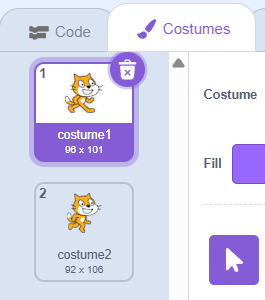
Rule 3 needs your character to look different while you hold space. That means a second costume, and you make it yourself.
- Click the Costumes tab.
- Right-click your costume in the list and choose duplicate.
- Draw the difference on the copy — a spray, a glow, anything you can see.
- Rename them No Spray and Spray, so your blocks read like English.
The new block: if / else
A plain if <> then only knows what to do when the answer is yes. When the answer is no it does nothing at all — which is why the cat in the Review got stuck.
if / else has two mouths. The top one runs when the answer is yes, the bottom one when it is no. One of them always runs.
when flag clicked
forever
  if <key [space v] pressed?> then
    switch costume to [Spray v]
  else
    switch costume to [No Spray v]
  end
end
How to use this: Click the green flag, click the stage once, then press the space bar and watch the cat change costume.
The order inside the loop
Everything goes in one forever, and the order matters:
- The four movement ifs, each one also setting which way to face (rule 5).
- The
if / elsefor the costume (rule 3). if on edge, bounce— last, and outside everything (rule 4).
Bounce goes last so it has the final word. Put it above the movement ifs and a key can shove the sprite back through the wall in the same round.
Basic — code the player, rule by rule 25 min
Five rules, five steps. Test after every single one — that is the habit this lesson is really teaching.
How to use this: Click the green flag, then click the stage once and use the arrow keys to move the Cleaner. The space bar does something as well — find out what.
Step 1 — the cast and the Stage
New project. Pick your two sprites — one you drive, one to clear. Add a backdrop. Set the sizes so both fit comfortably; the one you clear should be small.
Step 2 — rule 2, where it starts
when flag clicked, then go to x: (0) y: (0). Test: drag it away, click the flag, it comes back.
Step 3 — rule 1, the controls
Add set rotation style [left-right v], then the forever with four ifs. Test all four keys and a diagonal.
Step 4 — rule 5, facing
Add point in direction (90 v) inside the right-arrow if, and point in direction (-90 v) inside the left one. Test: it should flip, not somersault.
Step 5 — rule 3, the spray
Add the if / else underneath the four movement ifs, still inside the forever. Test: hold space, let go, hold again.
Step 6 — rule 4, the bounce
Add if on edge, bounce as the last block in the forever. Test: drive into all four walls.
Step 7 — check your work against this
when flag clicked
set rotation style [left-right v]
go to x: (0) y: (0)
point in direction (90 v)
forever
  if <key [right arrow v] pressed?> then
    point in direction (90 v)
    change x by (3)
  end
  if <key [left arrow v] pressed?> then
    point in direction (-90 v)
    change x by (-3)
  end
  if <key [up arrow v] pressed?> then
    change y by (3)
  end
  if <key [down arrow v] pressed?> then
    change y by (-3)
  end
  if <key [space v] pressed?> then
    switch costume to [Spray v]
  else
    switch costume to [No Spray v]
  end
  if on edge, bounce
end
My character sprays but never stops spraying.
You used two separate ifs instead of an if / else, and the second one is checking the wrong thing. The else half needs no question at all — it is simply “otherwise”.
It goes through the wall and gets stuck.
if on edge, bounce is not the last block in the forever. Move it to the bottom, outside every if.
Rule 6 — four of them, everywhere
Put four of the other sprite on the Stage, and make each one start somewhere different every time the flag is clicked.
Done when: there are four on the Stage, and pressing the green flag three times gives you three different arrangements.Teacher reveal — spawning at random
when flag clicked
show
go to [random position v]
Build it on one sprite, test it, then right-click and duplicate three times. The copies bring the script with them, which is the point worth making — and it sets up Topic 1.10, where duplicating stops being good enough.
Rules 7 and 8 — spraying is what counts
Finish the game rules.
- Touched while you hold space: it shouts “No!” and disappears.
- Touched without space: it says “I’m not afraid of you!” and stays right where it is.
Teacher reveal — two questions at once
This is the deck’s own Mission 1, and it is the first time a pupil needs two conditions together. Two nested ifs are the version most will find:
when flag clicked
show
go to [random position v]
forever
  if <touching [Cleaner v]?> then
    if <key [space v] pressed?> then
      say [No!] for (1) seconds
      hide
    else
      say [I'm not afraid of you!] for (1) seconds
    end
  end
end
The show at the top is doing real work — everything hides by the end of a round, and without it the second game starts empty. That is Topic 1.4 for the third time, and it is worth naming.
A pupil who finds <> and <> in Operators and writes it as one condition has done something cleverer. Accept both.
Give the game an ending
Right now the game never finishes. When the last one has gone, your character should say something and everything should stop.
Clearing three of the four must not end it. Only the fourth.
Done when: the game ends the moment the last one is cleared, never earlier, and the green flag starts a fresh round with all four back.Teacher note
There is no counting block yet, so the neat answer is sensing: wait until <not <touching [Virus v]?>> does not work, but a wait until <> on all four being hidden does — and the honest route is a Variables counter, which is Topic 1.11.
Let pupils reach for a variable if they want to. Anyone who does has just discovered why the next few lessons exist, which is worth far more than the tidy answer.
They fight back
Standing still is easy. Make them move — slowly, on their own, all the time — and make one of them come after you.
If the one chasing you touches you while you are not spraying, you lose and the game says so.
Summary 5 min
- Write the game rules down before you code. Then build them one at a time and test after each one.
- Duplicate a costume and draw on the copy to give a sprite two looks. Name them properly.
if <> thenhandles yes.if / elsehandles yes and no — one of the two always runs.- Inside the forever: movement ifs, then the costume if / else, then
if on edge, bouncelast.
- Game rule
- One sentence about what the game does. One rule, one piece of code.
- if / else
- A block with two mouths: one for yes, one for no. Exactly one of them runs.
- Duplicate
- Right-click to make a copy — of a costume, a sprite or a stack of blocks.
Hand in
Share your project and send the link to your teacher. Missions you finish at home count too — bring the link to the next class and claim your Adcoins.