- Learnt28 min · friction, a push, a top speed you can work out
- Basic25 min · the kart on the keys
- Challenge 1–327 min · a top speed of 8, reverse, a speedometer
- Extrabonus · two karts, one keyboard
Review — Brick Breaker 5 min
- The ball was two numbers,
vxandvy. Each tick it moved by both, and a wall flipped one of them. - Where the ball landed on the paddle set its
vx, so you could aim it. - The wall was rows of letters in a list, each letter a brick’s hit points, so a new level was a new save code, not new blocks.
Quick-fire
Back in Level 2’s Car Race, pressing ↑ did not move the car at all. So what did it do?
Reveal the answer
It made a variable called speed bigger. One move (speed) steps did all the moving, and friction took a little off speed every tick. Today we look at the numbers inside that — and find a top speed nobody typed in.
Today’s Topic 3 min
- One tick of a kart: friction first, then the push
- The top speed: push ÷ leak
- A
driveMy Block that takes two numbers: gas and steer - Steering that only works while the kart is moving
- Grass: not a wall, just a stronger friction
Learning outcome
By the end of this lesson you will be able to:
- Predict a kart’s top speed from its push and its friction.
- Drive a sprite from a My Block with inputs.
- Make a surface change how a sprite moves, with one colour check.
Learnt — a kart with weight 28 min
1 · One tick of a kart
A real kart does not jump to full speed. It builds up. And when you let go, it rolls on and slows down. Two rules, every tick, in this order:
- Friction: keep 95 % of the speed.
speed × 0.95 - Push: if ↑ is held, add 0.5.
| Tick | Speed before | × 0.95 | + 0.5 |
|---|---|---|---|
| 1 | 0 | 0 | 0.5 |
| 2 | 0.5 | 0.475 | 0.975 |
| 3 | 0.975 | 0.926 | 1.426 |
| 4 | 1.426 | 1.355 | 1.855 |
Look at the last column. It grows by 0.5, then 0.475, then 0.451, then 0.429. Each tick the kart gains a little less. Why? The faster it goes, the more friction takes away.
2 · The top speed falls out of the sums
Keep going and the speed stops growing. That happens when friction takes away exactly what the push puts back.
set [speed v] to ((speed) * (0.95))
change [speed v] by (0.5)
Friction leaks 5 % a tick, so the leak is 0.05. The rule is short:
top speed = push ÷ leak = 0.5 ÷ 0.05 = 10
How to use this: Click the green flag to start it. Nothing else to press — the kart draws its own speed as a graph.
3 · The drive block
All of a kart’s moving goes in one My Block. It takes two inputs. gas is 1 (↑), −1 (↓) or 0. steer is 1 (→), −1 (←) or 0.
define drive (gas) (steer)
if <touching color [#3FA34D]?> then
  set [speed v] to ((speed) * (0.8))
else
  set [speed v] to ((speed) * (0.95))
end
change [speed v] by ((gas) * (0.5))
if <([abs v] of (speed)) > (0.5)> then
  turn cw ((steer) * (5)) degrees
end
move (speed) steps
when flag clicked
go to x: (-37) y: (137)
point in direction (90)
set [speed v] to (0)
forever
  set [gas v] to (0)
  if <key (up arrow v) pressed?> then
    set [gas v] to (1)
  end
  if <key (down arrow v) pressed?> then
    set [gas v] to (-1)
  end
  set [steer v] to (0)
  if <key (right arrow v) pressed?> then
    set [steer v] to (1)
  end
  if <key (left arrow v) pressed?> then
    set [steer v] to (-1)
  end
  drive (gas) (steer) :: custom
end
How to use this: Click the green flag to start it. Nothing else to press — a little script presses the keys for this kart.
Why a My Block? Because next lesson a second driver — a script, not you — will press the same two “keys”. It calls the same drive (gas) (steer) :: custom block, so it gets exactly the same kart.
4 · No steering while parked
A parked kart cannot turn: its wheels are not rolling. So the turn sits inside if <([abs v] of (speed)) > (0.5)> then. The abs makes it work going backwards too: −3 is moving, just the other way.
How to use this: Click the green flag to start it. Nothing else to press — both karts try to steer right while standing still.
5 · Grass is just stronger friction
In Car Race, grass slowed you down. Here it is the same rule with a different number. The road keeps 95 %. The grass keeps 80 %, so its leak is 0.2. Top speed on grass: 0.5 ÷ 0.2 = 2.5.
How to use this: Click the green flag to start it. Nothing else to press — both karts get full gas for the same 40 ticks.
Basic — the kart on the keys 25 min
Start a new project. You will build the kart from the Learnt yourself.
Step 1 — the circuit and the kart
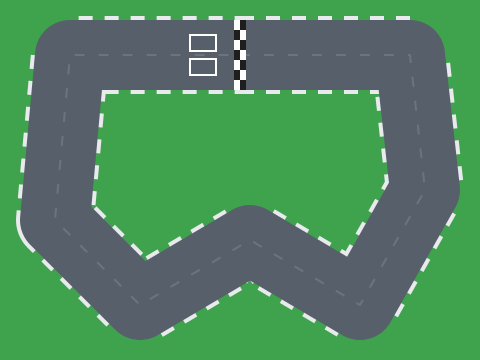
- Save our circuit, kart-circuit.svg, and use Upload Backdrop. Delete the white backdrop.
- Delete the cat. Save our kart, car-red.svg, and use Upload Sprite. Call it
Kart. - Set the Kart’s size to 40. Its nose points right, so direction 90 drives along the top straight.

Step 2 — the variables
- For all sprites:
speed. - On the Kart, for this sprite only:
gasandsteer.
Step 3 — the drive block
- In My Blocks, click Make a Block. Type
drive. - Click Add an input and name it
gas. Add another calledsteer. Click OK. - Build the body from Learnt section 3. Drag
gasandsteerout of the pinkdefineblock when you need them.
Step 4 — the keys
Build the green-flag script from Learnt section 3. It ends with drive (gas) (steer) :: custom inside the forever. Tick the speed box so you can watch it.
How to use this: Click the green flag, then click the stage once. Hold ↑ to go, ↓ to brake and reverse, ← and → to steer.
The kart spins round when it is standing still.
The turn cw ((steer) * (5)) degrees is not inside the if <([abs v] of (speed)) > (0.5)> then.
The kart never stops after I let go.
The friction is missing, or it is × 1. Every tick must keep a little less than all of the speed.
The kart is just as fast on the grass.
The colour in <touching color [#3FA34D]?> is not the grass. Click the swatch, pick the eyedropper and click the green on the Stage.
A top speed of exactly 8
Your kart is too fast for a beginner. Slow it down — with sums, not guesses.
- The top speed on the road becomes exactly 8.
- Keep the friction at 0.95. Change only the push.
- Work the number out on paper first.
How to use this: Click the green flag to start it. Nothing else to press — the kart draws the new speed curve.
speed box creeps up to 8 and stops there.Teacher reveal
top speed = push ÷ leak, so push = top speed × leak = 8 × 0.05 = 0.4.
change [speed v] by ((gas) * (0.4))
Why a plain backdrop? The circuit’s straight is too short to reach top speed from a standing start, and a kart pinned against the edge of the Stage keeps working out its speed anyway.
Reverse like a real kart
Right now ↓ makes the kart reverse as fast as it goes forwards. Real karts do not.
- While the kart is moving forwards, ↓ is a brake.
- Once it is (nearly) stopped, ↓ reverses — slowly. Top reverse speed: 2.5.
- Reversing with → turns the nose left, like a real car backing up.
How to use this: Click the green flag to start it. Nothing else to press — the kart drives forward, brakes, reverses, then reverses while steering right.
speed box never goes below −2.5.Teacher reveal
if <<(gas) < (0)> and <(speed) < (0.5)>> then
  set [speed v] to ((speed) + ((gas) * (0.125)))
else
  set [speed v] to ((speed) + ((gas) * (0.5)))
end
if <([abs v] of (speed)) > (0.5)> then
  if <(speed) < (0)> then
    turn cw ((steer) * (-5)) degrees
  else
    turn cw ((steer) * (5)) degrees
  end
end
A reverse push of 0.125 with a leak of 0.05 gives 0.125 ÷ 0.05 = 2.5. The same rule as forwards, with a smaller push.
A speedometer
A number in a box is not how racing games show speed. Build a dial.
- A
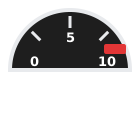
Speedosprite: a half-circle dial. Ours is speedo.svg. - A
Needlesprite on top of it, pointing up from its middle (needle.svg). - Speed 0: the needle points left. Speed 5: straight up. Speed 10: right.

How to use this: Click the green flag to start it. Nothing else to press — a script drives the kart and the needle follows its speed.
Teacher reveal
when flag clicked
go to x: (0) y: (10)
go to [front v] layer
forever
  point in direction (((speed) * (18)) - (90))
end
Speed 0 must give −90 (left), and speed 10 must give 90 (right): a 180° swing over 10 speed, so 18° for each 1 of speed, starting at −90.
Two karts, one keyboard
Race a friend at home — or race yourself with both hands.
- A second kart, blue, on the lower grid box.
- It drives on W (gas), S (brake), A and D (steer).
- Each kart has its own speed. The grass slows each one on its own.
How to use this: Click the green flag, then click the stage once. Arrows drive the red kart; W, S, A and D drive the blue one.
Teacher reveal
On Kart 2, make a variable speed 2 (for this sprite only), and use it everywhere in its drive block instead of speed:
define drive (gas) (steer)
if <touching color [#3FA34D]?> then
  set [speed 2 v] to ((speed 2) * (0.8))
else
  set [speed 2 v] to ((speed 2) * (0.95))
end
change [speed 2 v] by ((gas) * (0.5))
if <([abs v] of (speed 2)) > (0.5)> then
  turn cw ((steer) * (5)) degrees
end
move (speed 2) steps
Its key script asks <key (w v) pressed?> and so on. If both karts share speed, pressing ↑ moves both of them.
Summary 5 min
- Every tick: friction first, then the push.
- The top speed is push ÷ leak. Nobody types it in.
- One
drive (gas) (steer)My Block does all the moving. The keys only choose the two numbers. - Steering only works while the kart moves.
- Grass is a stronger friction, so a lower top speed: 2.5.
- Friction
- What takes a little speed away every tick.
- Leak
- How much friction takes, as a part: 0.05 means 5 %.
- Push
- How much the gas adds every tick.
- Top speed
- The speed where friction takes exactly what the push adds.
Hand in
Save your kart. Next lesson we open up the move (10) steps block and find two smaller moves hiding inside it — and then make the kart drift.