- Learnt28 min · open a remix, one rule, one look, credits
- Basic25 min · your own remix of Rally
- Challenge 1–327 min · lives, a remix chain, side by side
- Extrabonus · credits on a key
Review — the whole of Level 4 so far 5 min
- Snake ended the last arc: a body that is a list used as a queue, on Tile Maker’s grid.
- Brick Breaker I made a ball out of two numbers,
vxandvy. Today’s classmate’s game is built exactly that way. - You have now made eleven arcs of projects. The last arc of Level 4 is about what happens to a project after it works.
Quick-fire
In Brick Breaker I, the paddle only flips vy while the ball is coming down. Why?
Reveal the answer
Without the vy < 0 check, a ball still touching the paddle on the way up flips again — and again — and sticks. Today you will read that same check in somebody else’s code.
Today’s Topic 3 min
- A remix: your changes on top of somebody else’s project
- Changing a rule (how the game works) and a look (how it seems)
- Credits, in the project and on a credits screen
Learning outcome
By the end of this lesson you will be able to:
- Open a classmate’s project and find the blocks that make one rule.
- Change one rule and one look, and say which is which.
- Credit the person you remixed, by name, in two places.
Learnt — a remix, done right 28 min
1 · Open Jo’s game
Jo made Rally in Brick Breaker week and gave the class the file. A remix starts from a copy, never from the only one: you can do all of this without an account.
- Save Jo’s game: SCR-L04-45-rally.sb3.
- In Scratch, choose File › Load from your computer and open it.
- Straight away, choose File › Save to your computer and give it a new name:
Star Rally (remix of Jo's Rally). Jo’s file stays as Jo made it.
How to use this: Click the green flag to start it. Nothing else to press — the paddle follows the ball by itself for 240 frames.
Read the ball’s script before you change anything. The rule that counts a rally is this one:
if <<touching (Paddle v)?> and <(vy) < (0)>> then
  set [vy v] to ((0) - (vy))
  change [rally v] by (1)
end
2 · One rule
A rule changes how the game plays. Sam’s rule: every paddle hit makes the ball 10 % faster. Multiply both numbers by 1.1 inside the bounce — and put a ceiling on them, so the ball can never jump through the paddle.
if <<touching (Paddle v)?> and <(vy) < (0)>> then
  set [vy v] to ((0) - (vy))
  change [rally v] by (1)
  set [vx v] to ((vx) * (1.1))
  set [vy v] to ((vy) * (1.1))
  if <(vy) > (16)> then
    set [vy v] to (16)
  end
end
vx at 16 and −16 the same way.How to use this: Click the green flag to start it. Nothing else to press.
3 · One look
A look changes how the game seems, not how it plays. Sam gives the ball a star costume (size 40) and the paddle a colour effect.
when flag clicked
switch costume to (star v)
set size to (40) %
set [color v] effect to (140).How to use this: Click the green flag to start it. Nothing else to press.
4 · The credits
A remix that does not say whose it was is not a remix — it is taking. Credit Jo in two places:
- In the project: a comment on the Stage (right-click › Add Comment) saying “Remix of Rally by Jo. Sam changed: faster ball, star ball.”
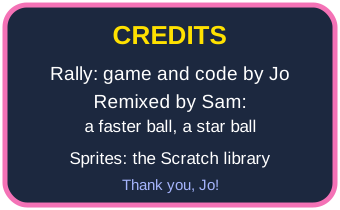
- On the Stage: a Credits sprite that slides in when the game ends.
when I receive [credits v]
go to [front v] layer
show
glide (1.2) secs to x: (0) y: (10)
credits when its rally is over.How to use this: Click the green flag to start it. Nothing else to press — the credits slide in when the game ends.
Basic — your remix of Rally 25 min
Start from Jo’s file, saved under your remix’s name.
Step 1 — the rule
- Find the paddle bounce in the Ball’s script.
- Add the 10 % rule and its ceiling — or invent your own rule (a smaller paddle after every 3 hits?).
Step 2 — the look
- Give the ball a new costume and size, and the paddle a colour effect.
- Change the title card to your remix’s name. Keep Jo’s in it: “a remix of Jo’s Rally”.
Step 3 — the credits
- Add the Stage comment.
- Paint a Credits sprite (or save ours, credits-card.svg, and write your own names on it). It hides on the green flag and glides in on
credits. - At the end of the Ball’s game,
broadcast [credits v].
How to use this: Click the green flag to start it. Nothing else to press — a paddle flown by the computer plays until three misses or 240 frames.
The credits never appear.
Check the message name is the same in both places — credits and Credits are different messages. And check the Credits sprite is shown and in the front layer.
The ball goes straight through the paddle once it is fast.
The ceiling is missing. A ball moving more than about 28 steps a frame can jump from above the paddle to below it without ever touching it.
Three lives
Jo’s Rally never ends. Make yours end.
- A
livesvariable starts at 3. - A ball below y −170 costs a life and is served again from the paddle.
- At 0 lives, the game says so and stops.
How to use this: Click the green flag to start it. Nothing else to press — this paddle moves at most 3 steps a frame, so it will miss.
Teacher reveal
repeat until <(lives) = (0)>
  change x by (vx)
  change y by (vy)
  if <(y position) < (-170)> then
    change [lives v] by (-1)
    go to x: (ball x) y: (-128)
    set [vx v] to (6)
    set [vy v] to (10)
  end
end
say (join [Game over! Rally: ] (rally))
The walls and the paddle bounce stay inside the loop, as before.
A remix of a remix
Ana remixes Sam’s Star Rally. Whose name goes on the credits now? Everybody’s, oldest first.
- Keep the credits in a list, one line per maker.
- The credits screen reads the list from the top.
- Adding yourself is adding one line — nobody is ever deleted.
How to use this: Click the green flag to start it. Nothing else to press — Kiran reads the credits list.
Teacher reveal
set [k v] to (1)
repeat (length of [credits v])
  say (item (k) of [credits v]) for (1.6) seconds
  change [k v] by (1)
end
Side by side
Prove your rule changed the game: play Jo’s rule and yours at the same time, on one Stage.
- Two balls and two paddles, each in half the arena (walls at x −8 and 8).
- Each ball keeps its own
vx,vyandrally— For this sprite only. - After the same 240 frames, each one says its rally and speed.
How to use this: Click the green flag to start it. Nothing else to press.
Teacher reveal
Duplicate the Ball and the Paddle. Make vx, vy and rally For this sprite only in each ball, and give each paddle its own name in the <touching (Jo paddle v)?> check. Only Sam’s ball has the 10 % rule.
Credits on a key
A player should not have to lose to find out who made the game.
- Press C at any time: the ball freezes and the credits show.
- Two seconds later they hide, and the ball carries on from where it stopped.
How to use this: Click the green flag, then press C while the ball is moving.
Teacher reveal
when [c v] key pressed
set [paused v] to (1)
go to [front v] layer
show
wait (2) seconds
hide
set [paused v] to (0)
The ball’s loop: forever with the whole frame inside if <(paused) = (0)> then.
Summary 5 min
- A remix starts from a copy, saved under a new name.
- A rule changes how the game plays; a look changes how it seems. A look alone is not a remix.
- Credit the original maker in the project and on the Stage, and say what you changed.
- A remix of a remix keeps every name.
- Remix
- A new project made by changing a copy of somebody else’s.
- Credit
- Naming the people whose work is in yours.
- Rule
- Something that changes how a game plays, not just how it looks.
Hand in
Save your remix with its credits. Next lesson you get it ready for a stranger: a front door, a reset, and a checklist to pass before anyone else plays it.