Introduction · What you are building
5 minBy the end of this game you will have a 3D boss fight you can play alone or with friends. It is built one part at a time, and each lesson finishes one part:
- The arena — today.
- The hero — a third-person player you control.
- Animation — idle, run, jump and punch.
- Then the boss, combat, a single-player / multiplayer menu, and going online.
Watch the whole of today's build first. It is two minutes, and every step below has its own short clip too.
Basic · From one block to a whole arena
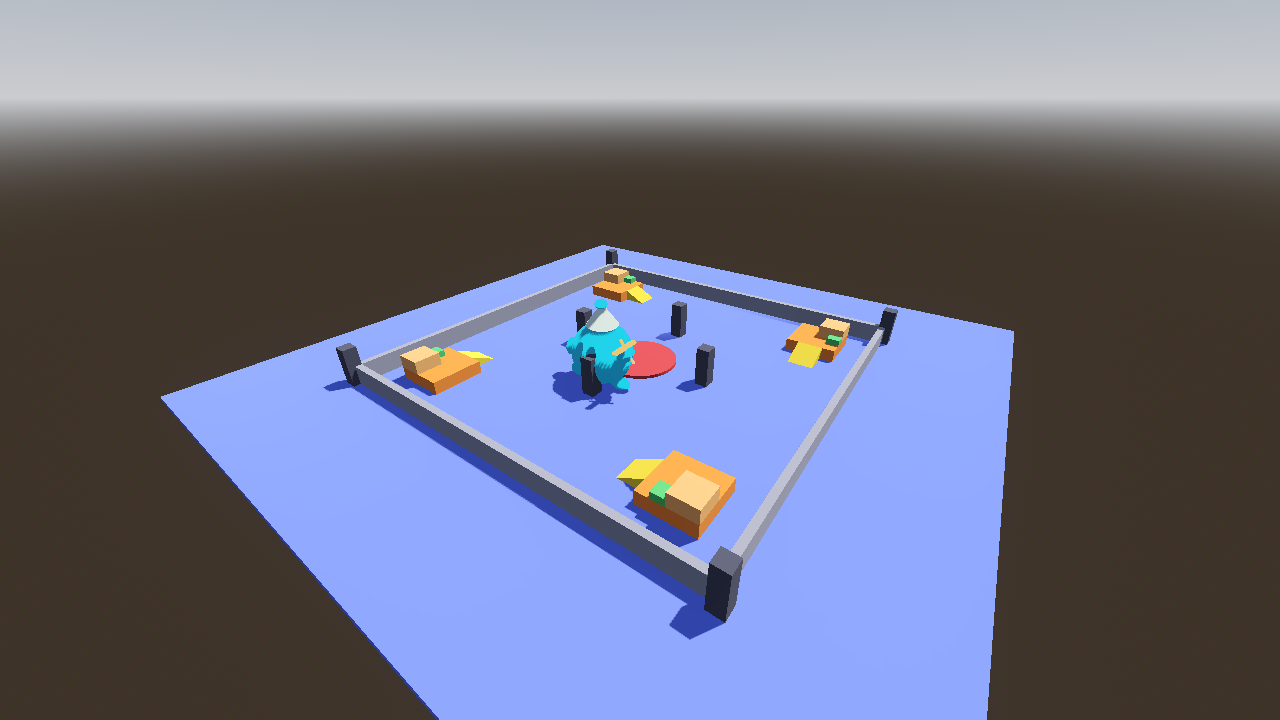
45 minYou are building: map/map1.tscn — a 60 × 60 m arena made only of block scenes you saved yourself. No player yet; that is lesson 2.
1 · Folders
In the FileSystem dock, right-click res:// and choose Create New → Folder.
map/
  blocks/     one .tscn per block type
  models/     your .glb files
map1.tscn the arena itselfmap/, then blocks/ and models/ inside it.2 · The map scene
- Scene → New Scene → Other Node → Node3D. Rename it
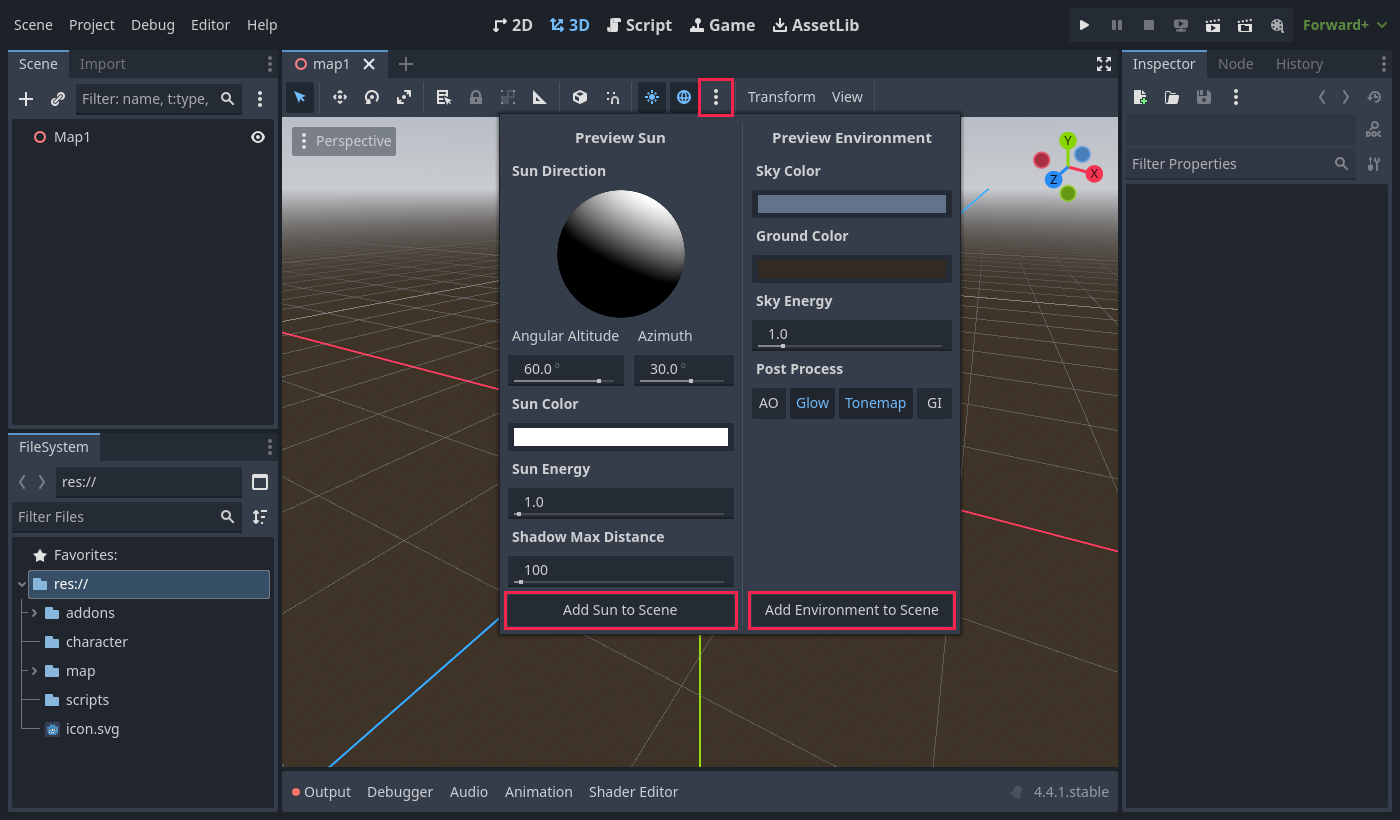
Map1. - In the 3D toolbar, click the ⋮ beside the sun and globe icons. Choose Add Sun to Scene and Add Environment to Scene.
- Add a child
Node3DcalledBlocks. Every block goes inside it. - Save as
map/map1.tscn.
3 · One block: three nodes, three jobs
- New scene with a StaticBody3D root, renamed
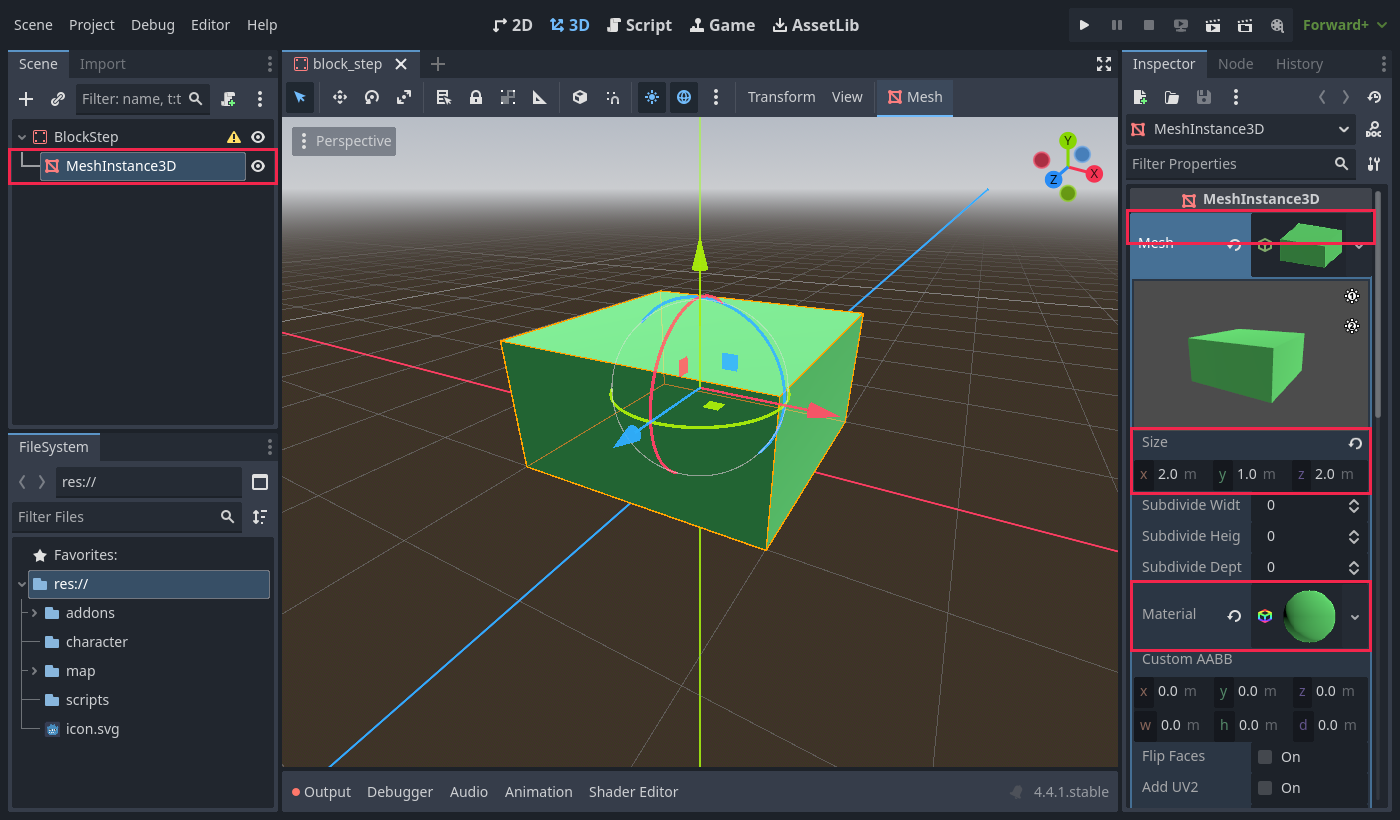
BlockStep. - Add a MeshInstance3D. Set Mesh → New BoxMesh, then click it and set Size to
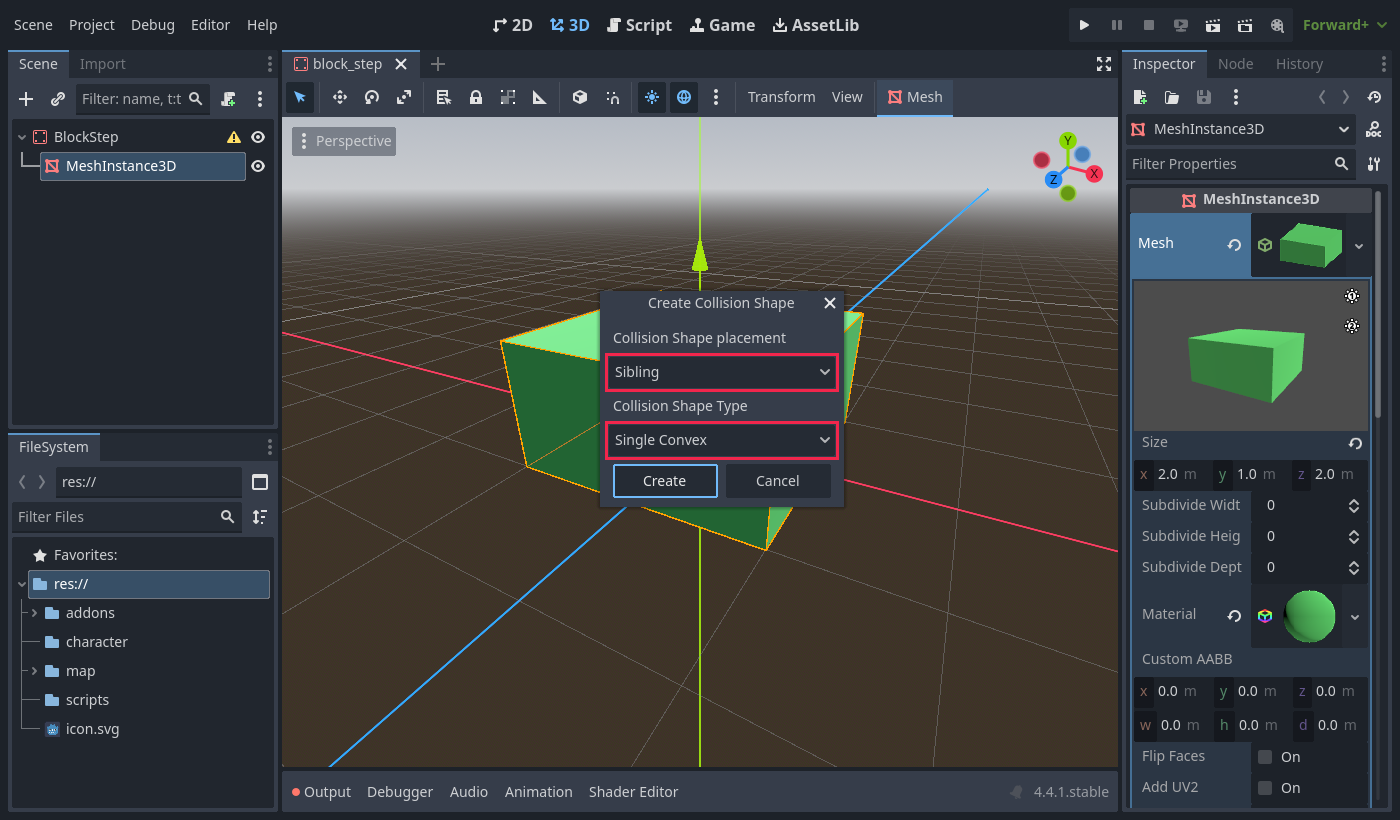
(2, 1, 2). In its Material slot choose New StandardMaterial3D and pick an Albedo → Color. - With the MeshInstance3D selected, use the viewport's Mesh → Create Collision Shape… menu. Placement Sibling, type Single Convex.
4 · Put the origin at the bottom
A BoxMesh is centred on its node, so half of it sinks into the floor. Move the MeshInstance3D and the CollisionShape3D up by half the height: Position Y = 0.5 for a 1 m block.
BlockStep (StaticBody3D)      origin at the bottom-centre
├── MeshInstance3D    y = 0.5   BoxMesh 2 × 1 × 2
└── CollisionShape3D y = 0.5 BoxShape 2 × 1 × 2Now a block's Y is the height of whatever it stands on — 0 on the floor, 2 on a 2 m platform. Save as map/blocks/block_step.tscn.
The mesh and the collision don't follow each other
Resize a mesh later and its collision stays the old size. A 100 m floor with a 10 m collision drops players everywhere except the middle. Turn on Debug → Visible Collision Shapes to catch it.
5 · The block set
Repeat step 3 for each block. Right-click a finished block and choose Duplicate… — it is much faster than starting again. Keep sizes to whole metres so blocks snap together without gaps.
6 · Your own model as a block
- Drag your
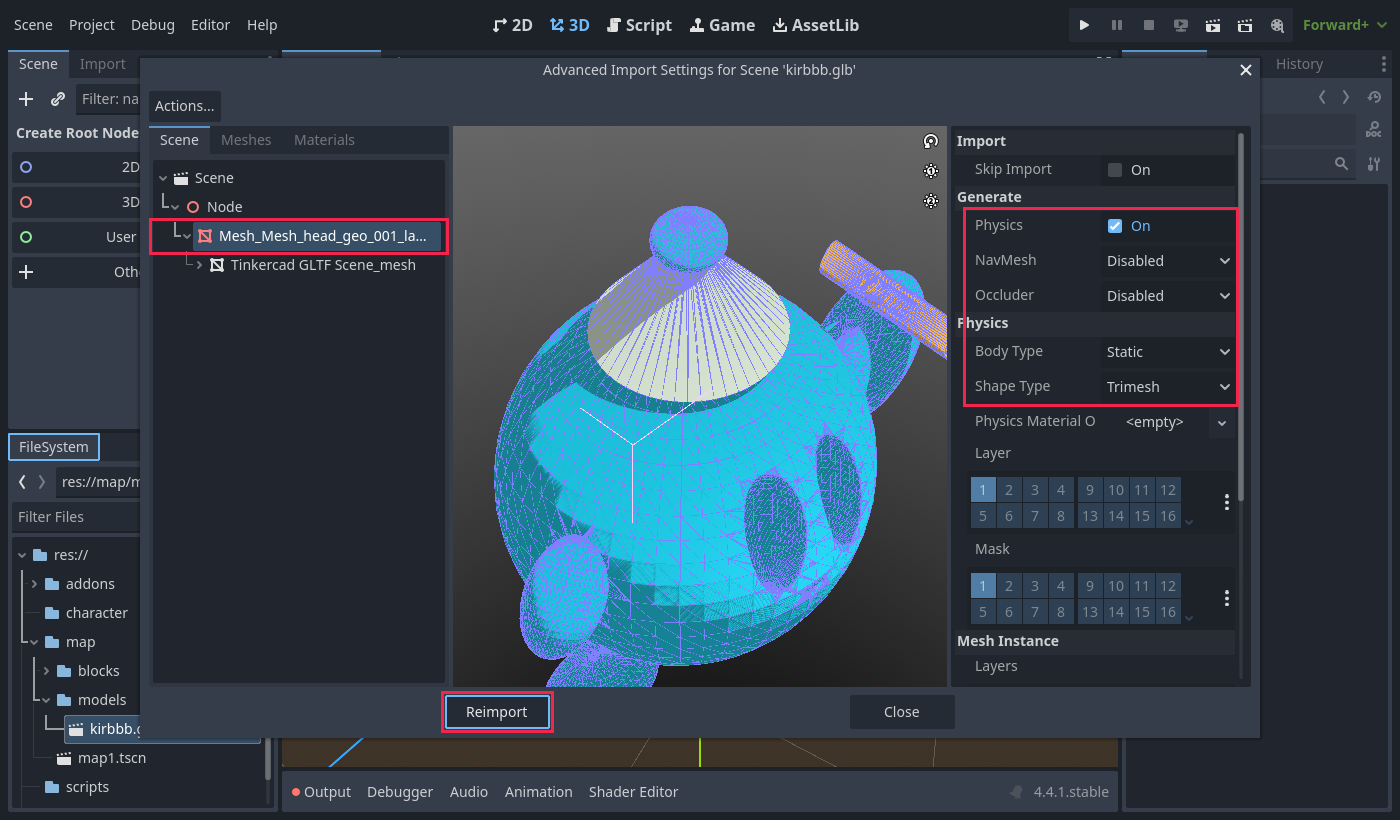
.glbintomap/models/. - Double-click it to open Advanced Import Settings. Select the mesh node, turn on Physics, set Body Type: Static and Shape Type: Trimesh, then Reimport.
- New scene with a
Node3Droot (for exampleBlockKirbbb). Drag the.glbonto it, and save it inmap/blocks/.
Scale the child, never the root
When you place a block in the map, the map's transform replaces the block's root transform. Any scale on the root is lost. Tinkercad exports in millimetres, so its models arrive huge — scale the model node inside the block (try 0.1).
7 · Build the arena
- Open
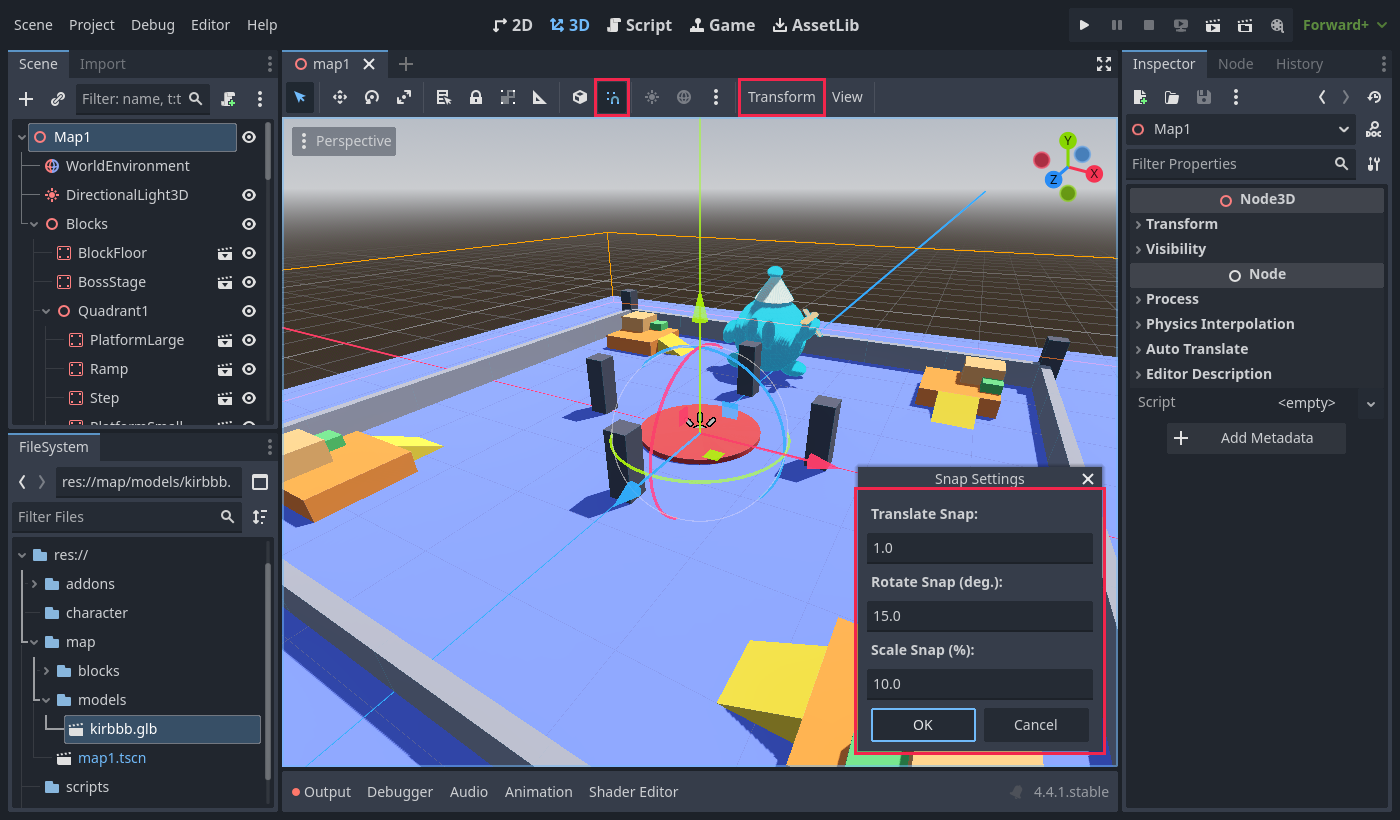
map1.tscn. Turn on Use Snap (the magnet, or Y). In Transform → Configure Snap… set Translate to1and Rotate to15. - Drag blocks from
map/blocks/into the viewport, underBlocks. W move, E rotate, Ctrl+D duplicate. Type exact numbers into Transform → Position. - Floor at
(0, -1, 0), so its top is at Y = 0. Boss stage at(0, 0, 0). - Build one corner inside a
Node3DcalledQuadrant1:
- Select
Quadrant1, press Ctrl+D three times, and set the copies' Rotation Y to90,180and270. - Put your own model in a
Decorationnode.
Why four identical corners?
In multiplayer every player starts in a different corner. If the corners are copies, nobody gets a better start. And because the map never moves while the game runs, it needs no networking code at all — every computer loads the same file.
Done when: map1.tscn has a floor, the boss stage, four identical walled quadrants and your own model — and with Visible Collision Shapes on, every block's collision outline matches its mesh.
Challenge 1 · A bridge block 🟢 Easy
10 minMake block_bridge.tscn: a Box 10 × 0.5 × 2 with its origin at the bottom-centre. Use it to join two corner platforms across one side of the arena.
- The mesh and collision are both lifted by half the height (0.25).
- The bridge top is level with the platform tops — no step up or down.
- You added it to every quadrant, so the corners stay fair.
Done when: each bridge sits flush on both platforms, and its collision outline matches its mesh.
Challenge 2 · Four crystals you made 🟡 Medium
15 minModel a rock or crystal in Tinkercad or Blender and export it as .glb. Import it with Trimesh collision and wrap it in a block scene, as in step 6.
- Place four, one per quadrant, at matching positions.
- The scale lives on the model node, not the block's root.
- Each crystal stands on the floor — no floating, no sinking.
Then answer: why does a crystal need Trimesh while your boxes were fine with Single Convex?
Done when: four crystals stand symmetrically around the arena, each showing a collision outline that follows its shape.
Challenge 3 · A second arena 🟠 Harder
20 minBuild map/map2.tscn with a different idea — a round arena, floating platforms over a pit, or a two-storey tower — using only your block scenes. It must still pass the arena rules:
- An open, flat space in the middle for the boss.
- High ground and cover for the players.
- No climb taller than 2 m — the player's jump is about 1.6 m.
- Walls all round, so nobody can fall off the map.
- Every starting corner as good as every other.
Done when: map2.tscn is built only from instanced blocks, and you can point to the part of it that meets each rule above.
Extra · Make it look like a boss arena 🔴 Open-ended
no limit- Replace a flat colour with a texture: drag an image into the material's Albedo → Texture. Change it once in the block scene and every placed copy updates.
- Click the
WorldEnvironmentand change the sky colour, add fog, or dim the sun for an evening fight. - Sketch where the boss will stand and how it attacks. Does your arena give players somewhere to hide from each attack?
- Design a block the boss could break, and write down what the game would have to send to every player when it breaks.