Basic · A hero you can control
50 minYou are building: character/player.tscn with scripts/player.gd, and a game.tscn that puts the player in your arena. This lesson is single player; the multiplayer lessons build on this exact player.
1 · Import your character
Drag your character's .glb into a new character/ folder. This time, leave Physics off — the player gets a simple capsule instead, which slides smoothly over floors, ramps and steps.
.glb in character/, with Physics left off.Check three things about your model before you use it:
2 · Name your keys in the Input Map
The code never says “the W key”. It asks for an action, and the Input Map decides which key triggers it. Open Project → Project Settings… → Input Map, type each name into Add New Action, then click its + and press the key.
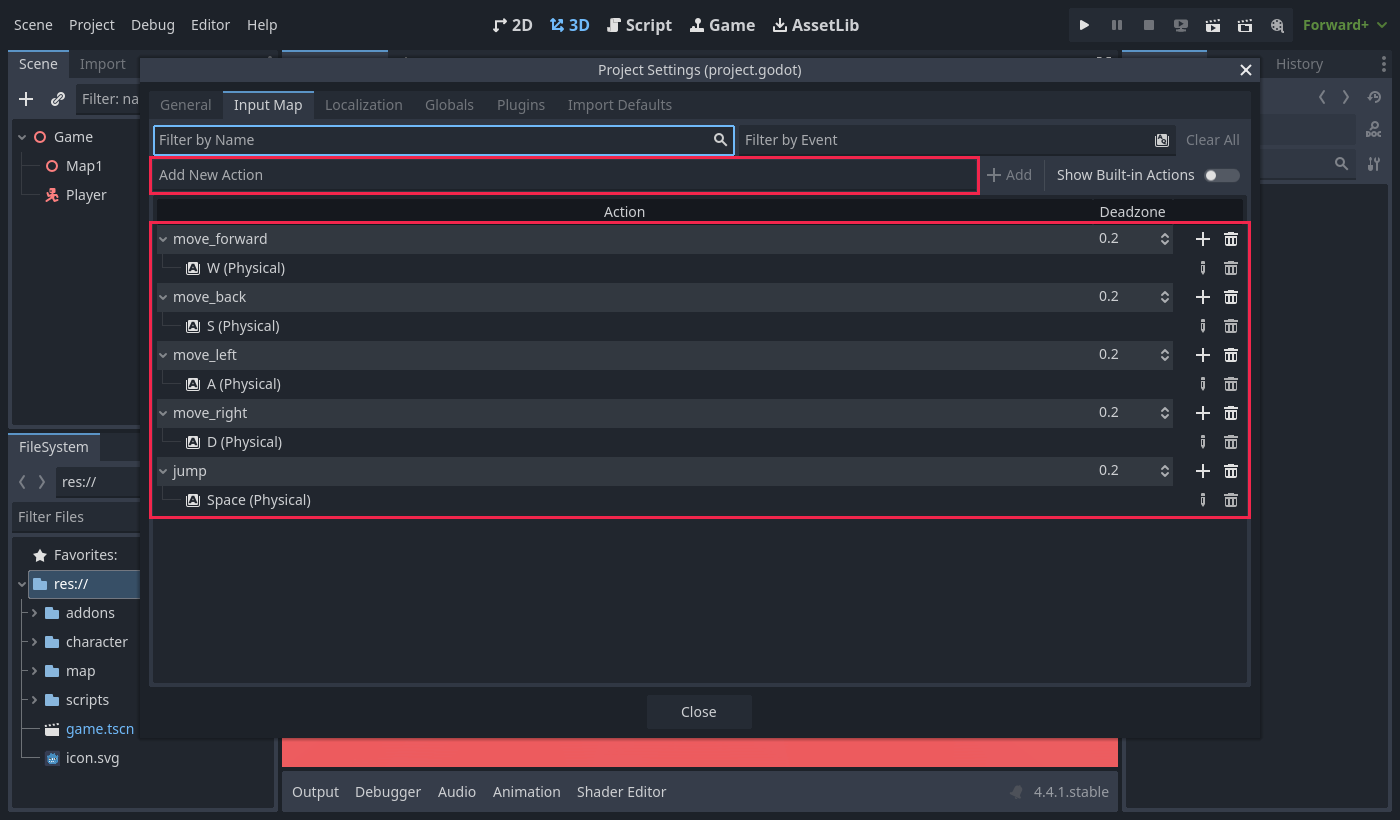
3 · The Player scene
Player (CharacterBody3D)      moves and collides
├── CollisionShape3D          capsule: the body you bump into things with
├── Model (Node3D)            turns to face the way you walk
│   └── character1            your .glb, scaled and centred
└── CameraPivot (Node3D)      turns left and right with the mouse
    └── SpringArm3D           tilts up and down, keeps the camera out of walls
└── Camera3D what the player sees- New scene, CharacterBody3D root named
Player. Add a CollisionShape3D with a New CapsuleShape3D: Radius0.4, Height1.8, Position Y0.9. - Add a
Node3DcalledModeland drag your.glbonto it. Scale and move the .glb node until it stands inside the capsule. Then set Model's Rotation Y to180. - Add a
Node3DcalledCameraPivotat Y1.5. Inside it a SpringArm3D: Spring Length4, Margin0.2, Rotation X-17. Inside that, a Camera3D. - Save as
character/player.tscn.
0.025 on the .glb node, then Model turned 180°.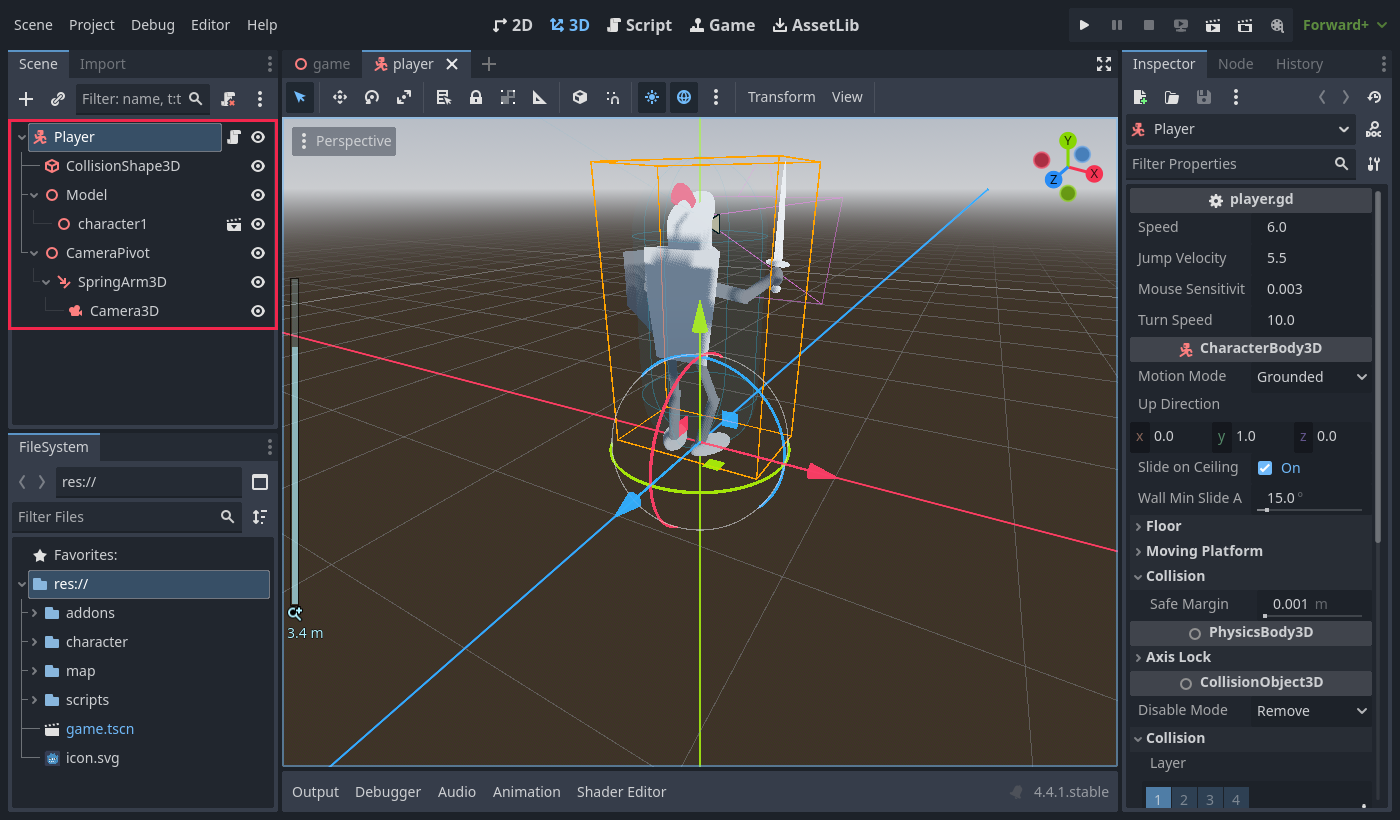
Why turn Model 180°, and not the .glb?
A .glb faces +Z, but a Godot camera looks toward −Z. Without the turn, the game starts with your hero staring back at you. Turning Model keeps the scale and position you set on the .glb node.
4 · The player script
Right-click Player → Attach Script…, path res://scripts/player.gd, template Object: Empty. Type this in:
extends CharacterBody3D

## Walking speed in meters per second.
@export var speed := 6.0
## Upward speed when jumping. Higher number = higher jump.
@export var jump_velocity := 5.5
## How fast the mouse turns the camera.
@export var mouse_sensitivity := 0.003
## How fast the character turns to face the way it walks.
@export var turn_speed := 10.0

var gravity: float = ProjectSettings.get_setting("physics/3d/default_gravity")

@onready var model: Node3D = $Model
@onready var camera_pivot: Node3D = $CameraPivot
@onready var spring_arm: SpringArm3D = $CameraPivot/SpringArm3D


func _ready() -> void:
    # Hide the mouse and lock it to the window so it can turn the camera.
    Input.mouse_mode = Input.MOUSE_MODE_CAPTURED
    # Stop the camera arm from bumping into our own body.
    spring_arm.add_excluded_object(get_rid())


func _unhandled_input(event: InputEvent) -> void:
    # Mouse left/right turns the pivot, mouse up/down tilts the arm.
    if event is InputEventMouseMotion and Input.mouse_mode == Input.MOUSE_MODE_CAPTURED:
        camera_pivot.rotate_y(-event.relative.x * mouse_sensitivity)
        spring_arm.rotate_x(-event.relative.y * mouse_sensitivity)
        spring_arm.rotation.x = clamp(spring_arm.rotation.x, deg_to_rad(-70), deg_to_rad(20))

    # Esc shows the mouse again; clicking in the game hides it again.
    if event.is_action_pressed("ui_cancel"):
        Input.mouse_mode = Input.MOUSE_MODE_VISIBLE
    elif event is InputEventMouseButton and event.pressed:
        Input.mouse_mode = Input.MOUSE_MODE_CAPTURED


func _physics_process(delta: float) -> void:
    # Gravity pulls us down while we are in the air.
    if not is_on_floor():
        velocity.y -= gravity * delta

    # Jump only when standing on something.
    if Input.is_action_just_pressed("jump") and is_on_floor():
        velocity.y = jump_velocity

    # Turn WASD into a direction based on where the camera is looking.
    var input_dir := Input.get_vector("move_left", "move_right", "move_forward", "move_back")
    var direction := camera_pivot.global_basis * Vector3(input_dir.x, 0, input_dir.y)
    direction.y = 0
    direction = direction.normalized()

    if direction:
        velocity.x = direction.x * speed
        velocity.z = direction.z * speed
        # Smoothly turn the model to face the way we are walking.
        var target_angle := atan2(direction.x, direction.z)
        model.global_rotation.y = lerp_angle(model.global_rotation.y, target_angle, turn_speed * delta)
    else:
        velocity.x = move_toward(velocity.x, 0, speed)
        velocity.z = move_toward(velocity.z, 0, speed)

move_and_slide()player.gd; every @export then shows in the Inspector.The camera jumps about, or sits inside your head
A SpringArm3D pulls the camera in whenever something is in the way — and your own capsule is in the way. That is what spring_arm.add_excluded_object(get_rid()) fixes. Leave it out and the camera fights your body every frame.
5 · The Game scene
- New scene,
Node3Droot namedGame. - Drag in
map/map1.tscn, thencharacter/player.tscn. - Player at
(-10, 0, -22), Rotation Y180. Save asgame.tscn, and make it the Main Scene (right-click it → Set as Main Scene).
Game (Node3D)
├── Map1      the arena from lesson 1
└── Player your heroWhy a separate Game scene?
The map stays just a map and the player stays just a player. For multiplayer, Game will add one Player per person — and neither the map nor the player needs to change.
Done when: F5 starts behind your hero, W walks the way the camera looks, the hero turns to face where it walks, and you can climb a ramp and jump up the steps to a lookout.
Challenge 1 · Sprint 🟢 Easy
10 minAdd a sprint action on Shift. While it is held, the hero moves at double speed.
@export var sprint_speed := 12.0

# in _physics_process, before you use speed:
var current_speed := sprint_speed if Input.is_action_pressed("sprint") else speed- Both
velocity.xandvelocity.zusecurrent_speed. sprint_speedshows up in the Inspector, so you can tune it.
Done when: holding Shift doubles your speed, and letting go returns it to normal.
Challenge 2 · Zoom with the mouse wheel 🟡 Medium
12 minScrolling the wheel should move the camera closer or further away — never nearer than 2 m, never further than 8 m.
- In
_unhandled_input, check for anInputEventMouseButtonwhosebutton_indexisMOUSE_BUTTON_WHEEL_UPorMOUSE_BUTTON_WHEEL_DOWN. - Change
spring_arm.spring_lengthby0.5, and keep it between 2 and 8 withclamp(). - Put your check before the Esc / click code. A wheel turn is also a mouse button — think about what the click branch would do with it.
Done when: the wheel zooms smoothly between 2 m and 8 m, and a pillar still pulls the camera in when it gets in the way.
Challenge 3 · Double jump 🟠 Harder
15 minAllow one extra jump in mid-air, and give it back only when the hero lands.
- A variable counts the jumps left, for example
air_jumps_left. - Landing resets it; jumping in the air spends it.
- The first jump still only works from the floor.
Then test it on your arena: which platform could you reach now that you couldn't before? Does that break any rule from lesson 1?
Done when: you can jump exactly twice before landing — never three times — and the second jump works even after walking off a ledge.
Extra · Make the controls feel good 🔴 Open-ended
no limit- Tune
speed,jump_velocityandturn_speeduntil the hero feels right. Write down the numbers you chose and why. - Add a little acceleration: move the velocity towards the target with
move_towardinstead of setting it straight away. Does it feel heavier or smoother? - Swap in a different
.glbhero. Only step 3 changes — prove it. - Try a gamepad: add stick and button events to the same five actions. The script needs no changes at all. Why?