Basic · Idle, run, jump — and punch on the move
70 minYou are building: the same Player as lesson 2, with a rigged character, an AnimationPlayer holding four clips, and an AnimationTree that runs the legs and throws punches on top. Left click punches — standing, running or in the air.
1 · A skeleton from Mixamo
To animate a model it needs a skeleton: bones inside the mesh that bend it. Tinkercad models don't have one. Mixamo (mixamo.com, free with an Adobe account) adds one automatically. Ask your teacher to sign in — Adobe accounts are for adults.
- In Tinkercad, pose your character in a T-pose: upright, facing front, arms out, legs a little apart. Select everything and Export → .OBJ. Keep the .zip.
- On Mixamo, Upload Character, pick the .zip, and rotate it until it stands upright facing you.
- Drag the markers onto the chin, wrists, elbows, knees and groin. Set Skeleton LOD to No Fingers. Auto-rigging takes 2–3 minutes.
- Find four animations: Breathing Idle, Running, Jump and a punch. Tick In Place wherever you see it.
- Download each as FBX Binary, With Skin, 30 fps. Rename them
idle.fbx,run.fbx,jump.fbx,punch.fbxand put them incharacter/mixamo/.
2 · An import script that fixes every clip
A Mixamo clip isn't quite ready for the game. A post-import script runs every time a file is imported, so it fixes all four for you:
Create scripts/mixamo_import.gd:
@tool
extends EditorScenePostImport
## Runs every time a Mixamo FBX in character/mixamo/ is imported.
## Saves its animation as character/animations/<file name>.res for the Player to play.

## Animations that repeat forever instead of playing once.
const LOOPING := ["idle", "run"]
## Animations whose hips must also stay at one height, because player.gd already moves the body up and down.
const LOCK_HEIGHT := ["jump"]


func _post_import(scene: Node) -> Object:
    var anim_name := get_source_file().get_file().get_basename()
    var anim_player: AnimationPlayer = scene.get_node("AnimationPlayer")
    var anim: Animation = anim_player.get_animation("mixamo_com").duplicate()

    if anim_name in LOOPING:
        anim.loop_mode = Animation.LOOP_LINEAR
    _keep_in_place(anim, anim_name in LOCK_HEIGHT)

    DirAccess.make_dir_recursive_absolute("res://character/animations")
    ResourceSaver.save(anim, "res://character/animations/%s.res" % anim_name)

    _pose_first_frame(scene.get_node("Skeleton3D"), anim)

    # The Player has its own AnimationPlayer, and Tinkercad leaves some empty meshes behind.
    for child in scene.get_children():
        if child is AnimationPlayer or (child is MeshInstance3D and child.mesh == null):
            scene.remove_child(child)
            child.free()
    return scene


## Stands the model in the clip's first pose. Otherwise the editor shows Mixamo's T-pose, half in the floor.
func _pose_first_frame(skeleton: Skeleton3D, anim: Animation) -> void:
    for track in anim.get_track_count():
        var bone := skeleton.find_bone(String(anim.track_get_path(track).get_subname(0)))
        if bone == -1:
            continue
        var value = anim.track_get_key_value(track, 0)
        match anim.track_get_type(track):
            Animation.TYPE_POSITION_3D:
                skeleton.set_bone_pose_position(bone, value)
            Animation.TYPE_ROTATION_3D:
                skeleton.set_bone_pose_rotation(bone, value)
            Animation.TYPE_SCALE_3D:
                skeleton.set_bone_pose_scale(bone, value)


## Pins the hips over the same spot so the model never walks away from its collider.
func _keep_in_place(anim: Animation, lock_height: bool) -> void:
    var track := anim.find_track(^"Skeleton3D:mixamorig_Hips", Animation.TYPE_POSITION_3D)
    var start: Vector3 = anim.track_get_key_value(track, 0)
    for i in anim.track_get_key_count(track):
        var pos: Vector3 = anim.track_get_key_value(track, i)
        pos.x = start.x
        pos.z = start.z
        if lock_height:
            pos.y = start.y
anim.track_set_key_value(track, i, pos)_post_import(), and the two helpers.Now click idle.fbx, open the Import tab, set Import Script → Path to the script and click Reimport. Do the same for the other three.
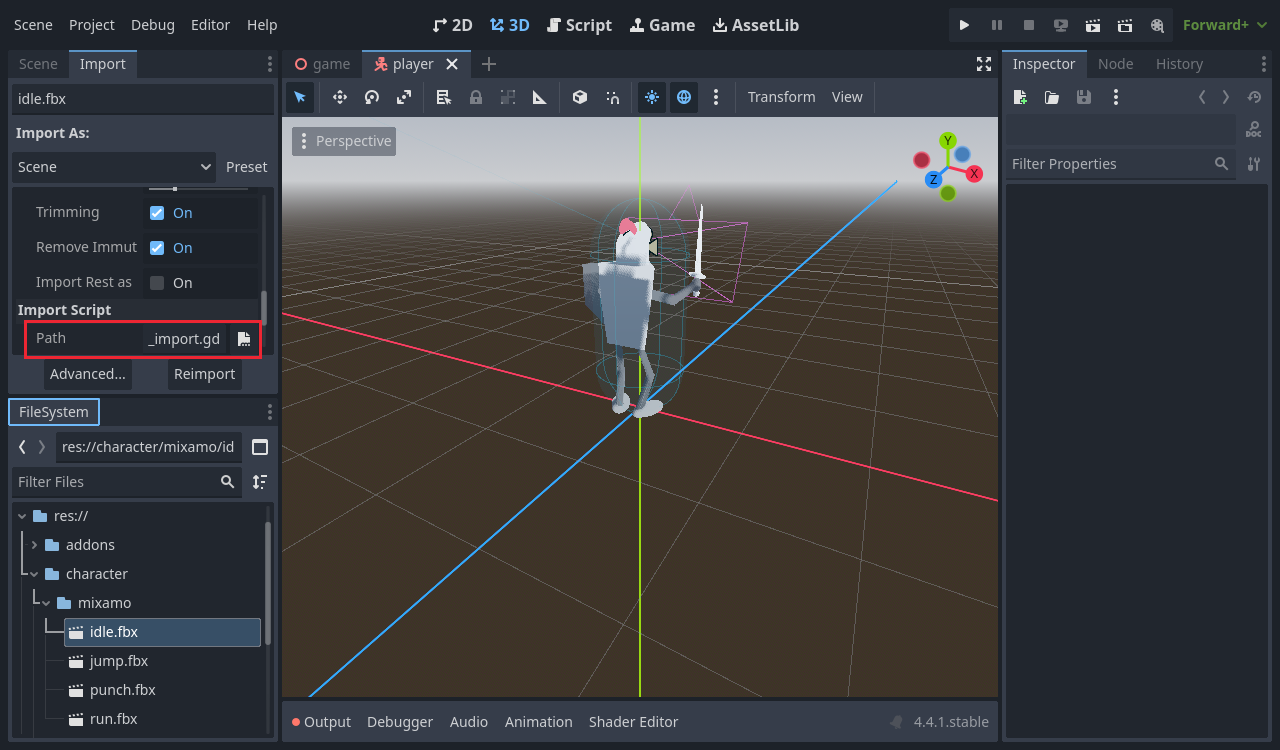
character/animations/ appears.Red “surfaces.is_empty()” errors
Tinkercad leaves empty shapes in the model. Godot complains about them while importing, then the script removes them. They are harmless — but check the Output for any other error.
3 · Swap in the new character
- In
player.tscn, delete the old model underModel. Dragidle.fbxontoModeland rename itCharacter. Mixamo works in metres, so leave its scale alone. - Fit the capsule: Height
1.6, Position Y0.8.
Character in, capsule fitted.4 · An AnimationPlayer as the clip library
- Add an AnimationPlayer under
Model. Set its Root Node toCharacter. - In the Animation panel: Animation → Manage Animations…, New Library (leave the name empty), then the folder icon to load the four
.resfiles. - Pick
runand press play to preview it in the editor. Stop it again.
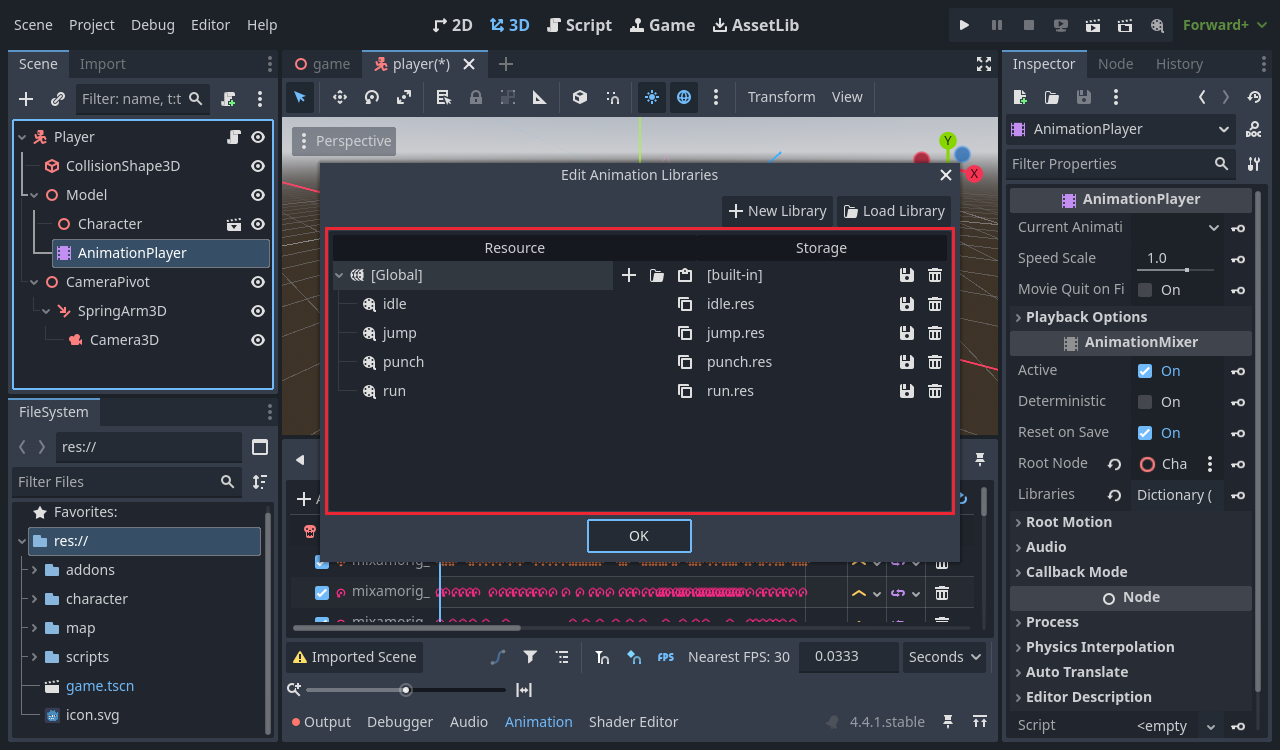
run previewing in the viewport.5 · An attack action
Input Map: add attack, click its +, and choose Mouse Buttons → Left Mouse Button.
attack = Left Mouse Button.6 · The AnimationTree
An AnimationPlayer plays one clip at a time. To punch while running you need two at once — legs from run, arms from punch. An AnimationTree mixes them.
idle ───────────────┐
run  ───────────────┤ movement ────┐
jump ── jump_seek ──┘ (Transition) │ punch ──── Output
punch_anim ────────────────────────┘ (OneShot, upper body only)- Add an AnimationTree under
Model. Set Anim Player to the AnimationPlayer, Root Node toCharacter, and Tree Root to New AnimationNodeBlendTree. - In the AnimationTree panel add three Animation nodes —
idle,run,jump— and a TimeSeek calledjump_seekafterjump. - Add a Transition called
movement, Xfade Time0.2, with inputs namedidle,runandjump. Connect them. - Add an Animation
punch_animand a OneShot calledpunch(fade in0.1, out0.2). Connectmovement→ in,punch_anim→ shot, punch → Output. - On
punch, Edit Filters: enable filtering and tick mixamorig_Spine and everything above it — neck, head, shoulders, arms, hands. Leave the hips and legs unticked.
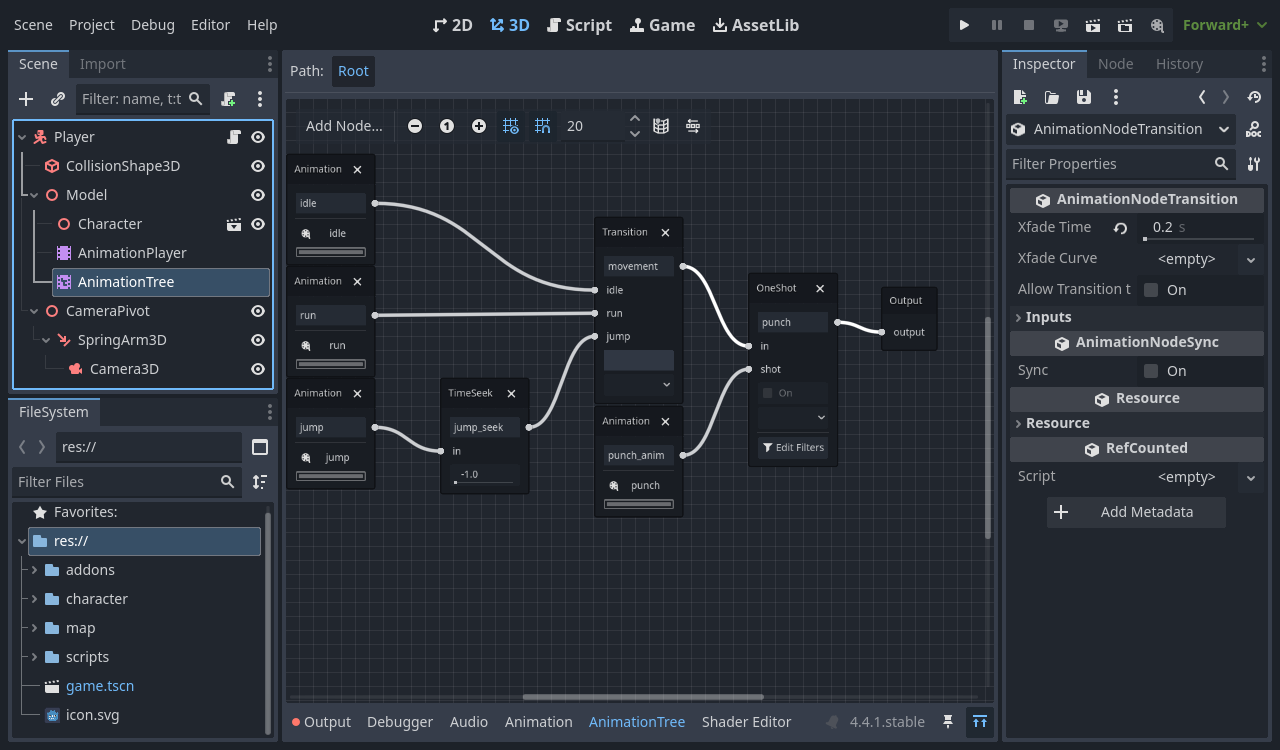
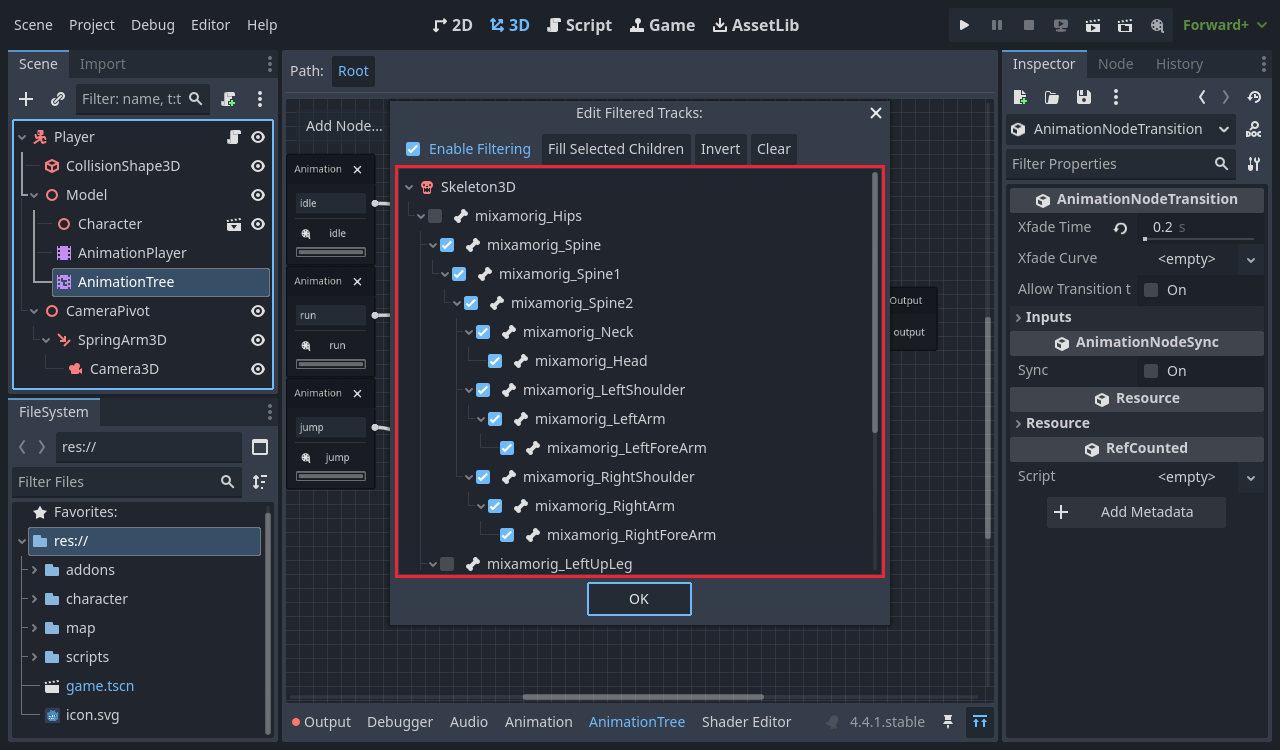
movement says.run + a punch from the tree's Parameters.The names are the contract
The script reaches the tree by name: parameters/movement/transition_request, parameters/jump_seek/seek_request, parameters/punch/request. A misspelt node doesn't raise an error — the hero just never changes animation.
7 · The player script
Update player.gd. New since lesson 2: jump_start_time, anim_tree, the attack branch, update_animation() and punch().
extends CharacterBody3D

## Walking speed in meters per second.
@export var speed := 6.0
## Upward speed when jumping. Higher number = higher jump.
@export var jump_velocity := 5.5
## How fast the mouse turns the camera.
@export var mouse_sensitivity := 0.003
## How fast the character turns to face the way it walks.
@export var turn_speed := 10.0
## Where the jump animation starts, skipping the crouch before the feet leave the ground.
@export var jump_start_time := 0.7

var gravity: float = ProjectSettings.get_setting("physics/3d/default_gravity")

@onready var model: Node3D = $Model
@onready var camera_pivot: Node3D = $CameraPivot
@onready var spring_arm: SpringArm3D = $CameraPivot/SpringArm3D
@onready var anim_tree: AnimationTree = $Model/AnimationTree


func _ready() -> void:
    # Hide the mouse and lock it to the window so it can turn the camera.
    Input.mouse_mode = Input.MOUSE_MODE_CAPTURED
    # Stop the camera arm from bumping into our own body.
    spring_arm.add_excluded_object(get_rid())


func _unhandled_input(event: InputEvent) -> void:
    # Mouse left/right turns the pivot, mouse up/down tilts the arm.
    if event is InputEventMouseMotion and Input.mouse_mode == Input.MOUSE_MODE_CAPTURED:
        camera_pivot.rotate_y(-event.relative.x * mouse_sensitivity)
        spring_arm.rotate_x(-event.relative.y * mouse_sensitivity)
        spring_arm.rotation.x = clamp(spring_arm.rotation.x, deg_to_rad(-70), deg_to_rad(20))

    # Esc shows the mouse again; clicking in the game hides it again.
    if event.is_action_pressed("ui_cancel"):
        Input.mouse_mode = Input.MOUSE_MODE_VISIBLE
    elif event is InputEventMouseButton and event.pressed and Input.mouse_mode != Input.MOUSE_MODE_CAPTURED:
        Input.mouse_mode = Input.MOUSE_MODE_CAPTURED
    # Once the mouse is captured, a left click punches, even while running or jumping.
    elif event.is_action_pressed("attack") and not anim_tree.get("parameters/punch/active"):
        punch()


func _physics_process(delta: float) -> void:
    # Gravity pulls us down while we are in the air.
    if not is_on_floor():
        velocity.y -= gravity * delta

    # Jump only when standing on something.
    if Input.is_action_just_pressed("jump") and is_on_floor():
        velocity.y = jump_velocity

    # Turn WASD into a direction based on where the camera is looking.
    var input_dir := Input.get_vector("move_left", "move_right", "move_forward", "move_back")
    var direction := camera_pivot.global_basis * Vector3(input_dir.x, 0, input_dir.y)
    direction.y = 0
    direction = direction.normalized()

    if direction:
        velocity.x = direction.x * speed
        velocity.z = direction.z * speed
        # Smoothly turn the model to face the way we are walking.
        var target_angle := atan2(direction.x, direction.z)
        model.global_rotation.y = lerp_angle(model.global_rotation.y, target_angle, turn_speed * delta)
    else:
        velocity.x = move_toward(velocity.x, 0, speed)
        velocity.z = move_toward(velocity.z, 0, speed)

    move_and_slide()
    update_animation()


## Tells the AnimationTree what the legs should do: stand, run or jump.
func update_animation() -> void:
    var state := "idle"
    if not is_on_floor():
        state = "jump"
    elif Vector2(velocity.x, velocity.z).length() > 0.1:
        state = "run"

    if anim_tree.get("parameters/movement/current_state") != state:
        anim_tree.set("parameters/movement/transition_request", state)
        # Skip the crouch at the start of the jump animation.
        if state == "jump":
            anim_tree.set("parameters/jump_seek/seek_request", jump_start_time)


## Plays the punch on the upper body only, so the legs keep doing what they were doing.
func punch() -> void:
anim_tree.set("parameters/punch/request", AnimationNodeOneShot.ONE_SHOT_REQUEST_FIRE)player.gd, one block at a time.Done when: the hero idles when still, runs when moving, uses the jump animation in the air, and a left click punches — while the legs keep running or jumping.
Challenge 1 · A quicker punch 🟢 Easy
10 minA long punch combo makes attacks slow. Download a single punch from Mixamo — for example Cross Punch — with the same settings, and save it over character/mixamo/punch.fbx.
- You changed no code and no tree node.
character/animations/punch.resupdated on its own.
Then explain in one sentence why nothing else had to change.
Done when: left click throws the new, shorter punch — still on the upper body only.
Challenge 2 · Run faster when you sprint 🟡 Medium
15 minBring back the sprint from lesson 2. Now the legs look wrong — the body moves twice as fast but the feet don't. Fix it in the tree.
- Add a TimeScale node called
run_speedbetweenrunandmovement. - In the script, set
anim_tree.set("parameters/run_speed/scale", …)to1.0normally and about1.6while sprinting.
Done when: holding Shift makes the legs visibly quicken with the speed, and they drop back when you let go.
Challenge 3 · A kick on the right mouse button 🟠 Harder
20 minAdd a second attack. Download a kick as kick.fbx, bind a kick action to the right mouse button, and play it through a second OneShot.
- Where does the new OneShot go in the graph — before or after
punch? Try both. - Which bones should its filter tick? A kick needs the legs — so what happens to the running while you kick?
- Pressing kick while a kick is playing does nothing, like the punch.
Done when: right click kicks, left click still punches, and you can explain what your kick's filter does to the run.
Extra · More life 🔴 Open-ended
no limit- Add a landing clip that plays once when you touch the ground again. Which node type fits — another Transition input, or a OneShot?
- Split jump into rising and falling using
velocity.y, so walking off a ledge doesn't play a take-off. - Untick Spine and Spine1 in the punch filter. Does an arms-only punch look better or worse on the run?
- Think ahead: when the boss arrives, which moment in the punch clip should actually hit? Write down the time in seconds.