🎯 Syllabus & Goals 3 min
Cambridge 3.2 · Input and output devices Paper 1 · Computer Systems
By the end of this lesson you can:
- Define input and output devices and classify the devices at a supermarket checkout.
- Describe how a barcode is read, and how it drives automatic stock control.
- Describe how a QR code is read, and compare QR codes with barcodes.
Textbook: Chapter 3, §3.2.1 (pp. 88–92) — barcode and QR code scanners.
Recap / Warm-Up 5 min
Lessons 1–3 looked inside the processor. Data has to get in before the CPU can process it. Results have to get out before anyone can use them. That is the job of input and output devices.
Quick starter
A barcode is a pattern of dark and light stripes. Which Unit 1 idea lets a computer store that pattern?
Reveal the answer
Binary. Each thin stripe (a module) is either dark or light, so it can be stored as 1 or 0. A barcode is just binary printed as lines.
🧠 Key Concept 14 min
1 · Input and output devices
Section 3.2 of the syllabus names every device you can be asked about. This map shows where each one is taught.
2 · Barcodes — binary printed as lines
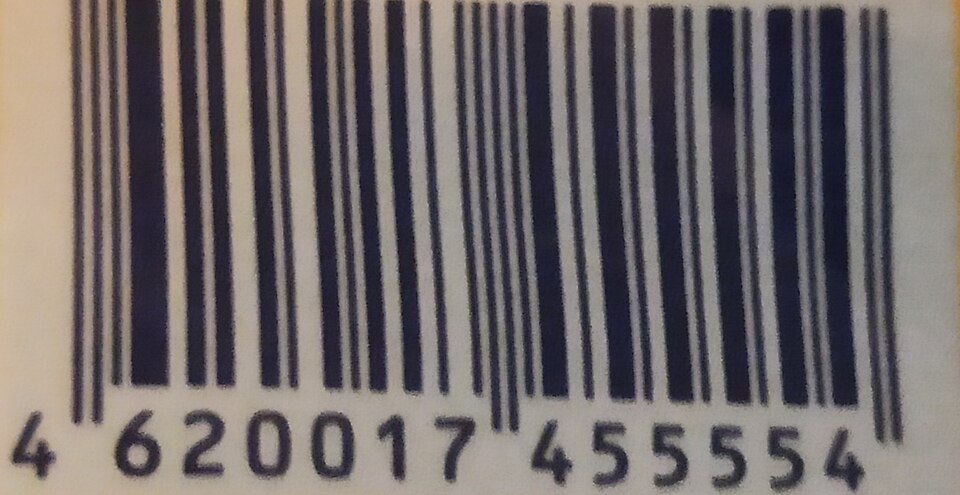
A barcode is a row of dark and light parallel lines of different widths. Each digit 0–9 has its own pattern. Every digit takes up the same width: seven thin modules, forming two dark bars and two light spaces.
- Guard bars mark the start, the centre and the end. The centre guard splits the left digits from the right digits.
- Left-hand digits always start with a light module and have an odd number of dark modules.
- Right-hand digits always start with a dark module and have an even number of dark modules.
- Because the two halves look different, the scanner can tell which way round it is reading. A barcode can be scanned in either direction.
3 · What happens when a barcode is scanned
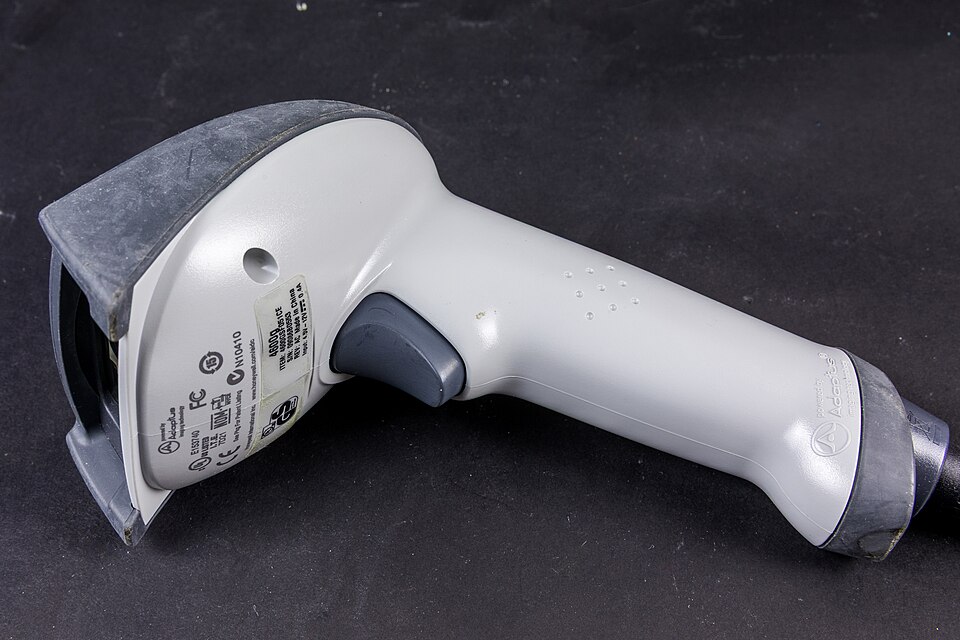
- A red laser or red LED shines light across the barcode.
- Light areas reflect a lot of light; dark bars reflect little or none.
- Sensors (photoelectric cells) detect the reflected light.
- As the light sweeps across, the pattern of light and dark is turned into digital data (light = 0, dark = 1).
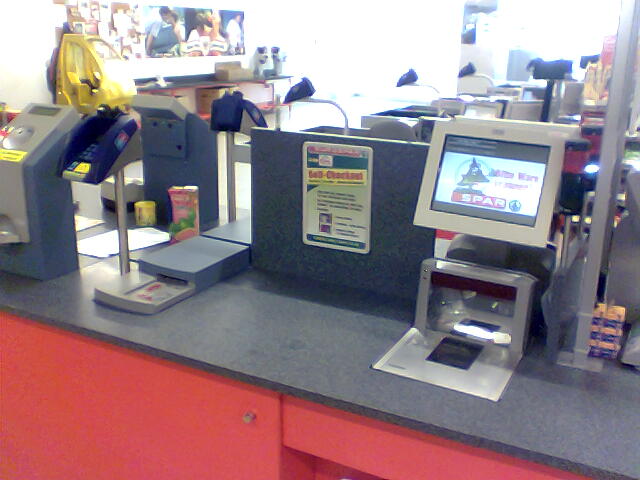
4 · The checkout: input and output devices working together
| Device | Input or output? | How it is used at the checkout |
|---|---|---|
| Barcode scanner | Input | Reads the product's barcode number. |
| Keypad | Input | Enters a quantity or a weight, or types the number under a damaged barcode. |
| Touch screen | Input (and output) | Picks loose items, such as fruit, by touching an icon. |
| Card reader / chip and PIN | Input | Reads the customer's payment card, by PIN or contactless. |
| Screen / monitor | Output | Shows each item's price and the running total. |
| Speaker | Output | Beeps once for a good read; a different sound for an error. |
| Printer | Output | Prints the itemised receipt. |
5 · Automatic stock control
The barcode number is the key field of the product's record in the stock database. It uniquely identifies that product. Each scan triggers this sequence:
Advantages to the shop's management
- Prices are quick to change — edit one database record.
- Up-to-date sales figures and trends.
- No need to price-label every item on the shelf.
- Automatic stock control.
- Buying habits can be tracked, e.g. via loyalty cards.
Advantages to customers
- Faster queues — staff do not look up prices.
- Fewer pricing errors.
- An itemised receipt.
- Savings can be passed on.
- Better tracking of sell-by dates, so fresher food.
6 · QR (quick response) codes
A QR code is a two-dimensional barcode: a square matrix of dark and light squares called pixels (or modules). Because it stores data both across and down, it holds far more.
- Up to 4296 characters (or 7089 digits), compared with about 30 digits for a barcode.
- It can hold a web address, a phone number or a whole boarding pass.
- The three large squares in the corners are for alignment. A smaller square near the fourth corner checks the size and angle of the camera shot.
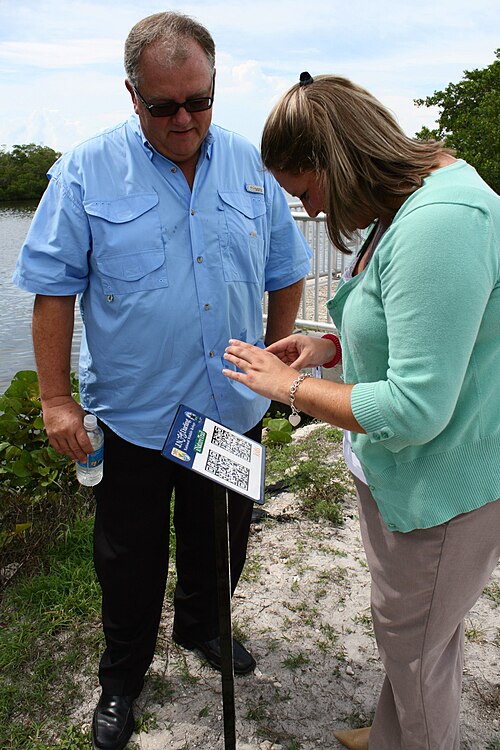
How a phone reads a QR code:
- The user points the phone's camera at the code.
- A QR app (or the camera software) processes the image and turns the squares into data.
- The phone's browser reads that data and decodes any web address in it.
- The user is taken to the website — or to the phone app if a number was stored, or the boarding pass is saved.
QR codes compared with barcodes — advantages
- Hold much more information.
- Fewer errors: spare capacity allows built-in error checking, so a damaged code can still be read.
- Easier to read — any phone camera, no laser or LED scanner.
- Easy to send as an image or text message.
- Can be encrypted for extra protection.
Disadvantages
- More than one QR format exists.
- Attagging: free apps let anyone make a code that hides malicious code.
- Scanning a bad code can send the user to a fake website, download a virus, or expose photos, contacts and passwords.
Worked Example 12 min
(a) Writing a barcode section as binary: 5 4 3 | 0 5 2
- Start guard: 101.guard bars frame the code so the scanner knows where it starts.
- Left 5 → 0110001, left 4 → 0100011, left 3 → 0111101.read each straight off the left-hand table.
- Check: dark counts are 3, 3 and 5 — all odd, and all start with 0 (light).this is the self-check that proves you used the left-hand set.
- Centre guard: 01010.it separates the two halves.
- Right 0 → invert 0001101 = 1110010; right 5 → invert 0110001 = 1001110; right 2 → invert 0010011 = 1101100.right-hand patterns are the left ones with every bit flipped.
- Check: dark counts 4, 4 and 4 — all even, all start with 1 (dark). End guard 101.even and dark-first means right-hand — correct.
(b) Automatic stock control, scan by scan
| Scan | Stock before | Stock after | ≤ 20? | Flag | Action |
|---|---|---|---|---|---|
| 1 | 23 | 22 | No | – | Price sent to checkout |
| 2 | 22 | 21 | No | – | Price sent to checkout |
| 3 | 21 | 20 | Yes | set | Order placed automatically |
| 4 | 20 | 19 | Yes | set | No new order — flag already set |
- Each scan: the barcode (key field) finds the record; the price goes to the checkout.the lookup is what every other step depends on.
- The stock level is reduced by 1 and written back: 23 → 22 → 21 → 20 → 19.one scan = one item sold.
- After scan 3, stock is 20 ≤ 20, so an order is placed and a flag is set."less than or equal to" — 20 itself triggers it.
- Scan 4 finds the flag already set, so no second order is made.the flag stops an order on every later scan.
How the marks are earned: barcode looked up in database / key field (1); stock reduced by 1 and written back (1); compared with re-order level (1); order placed and flag set to stop repeat orders (1).
(c) How much can a small QR code hold?
- A square code of 40 × 40 pixels, each 1 bit.each pixel is dark or light: 1 or 0.
- Bits: 40 × 40 = 1600 bits.it is a 2D grid, so multiply rows by columns.
- Bytes: 1600 ÷ 8 = 200 bytes.8 bits = 1 byte (Unit 1).
Try It Yourself 12 min
Goal: Sort into input or output: barcode scanner, receipt printer, speaker, card reader, keypad, customer display, QR code scanner.
Goal: Write the binary for the barcode section 9 0 0 | 3 4 0. Check each left digit has an odd dark count and each right digit an even one.
Goal: A shop stocks 15 torches with a re-order level of 12. A delivery of 30 arrives after the fifth sale. Draw the stock record after every sale and the delivery. Then explain what would go wrong if the system had no flag.
Hint
Use columns: stock before, stock after, ≤ 12?, flag, action. When the delivery arrives, add 30 and clear the flag.
📝 Exam Practice 10 min
Describe how a barcode on a product is read by a barcode scanner.
Mark scheme
- A red laser / LED shines light onto the barcode (1).
- Light is reflected back; dark bars reflect little or no light (1).
- Sensors / photoelectric cells detect the reflected light (1).
- The pattern is converted into digital data / binary for the computer (1).
A supermarket uses barcodes for automatic stock control. Explain how the stock level is kept up to date and how new stock is ordered.
Mark scheme
- The barcode number is searched for in the stock database / it is the key field (1).
- The number in stock is reduced by 1 and written back to the record (1).
- The new stock level is compared with the re-order level (1).
- If ≤ re-order level, an order is placed automatically and a flag set so it is not re-ordered (1).
A zoo puts Quick Response (QR) codes in different places. They give more information about the animals. Describe how customers obtain the information from the QR codes.
Based on Cambridge IGCSE CS (0478) Paper 11, Q4(d), Oct/Nov 2019.
Mark scheme
- The customer uses the camera on a smartphone / tablet to take an image of the QR code (1).
- An app processes the image / the squares are converted into data (1).
- The data (e.g. a web address) is decoded / read by the browser (1).
- The customer is taken to a website / the information is displayed on the device (1).
Give two advantages and one disadvantage of QR codes compared with traditional barcodes.
Mark scheme
- Advantage (1 each, max 2): hold more data · built-in error checking so fewer errors · read by a phone camera, no laser/LED scanner · easy to send as image/text · can be encrypted.
- Disadvantage (1): more than one format · can hide malicious code / attagging / lead to fake websites.
🗝️ Recap & Key Terms 3 min
Input devices bring data in; output devices present results. A barcode is binary printed as bars: light reflects (0), dark absorbs (1). Its number is the key field for automatic stock control. A QR code stores data in a 2D grid, so it holds far more and is read by a phone camera.
- Input device
- Hardware that converts external data into a form the computer can process.
- Output device
- Hardware that shows the results of processing in a form people can understand.
- Barcode
- A series of dark and light lines of varying thickness that represents data; read with a laser or LED light source.
- Key field
- The field that uniquely identifies a record in a file — here, the barcode number.
- QR code
- A matrix of dark and light squares representing data; read by a smartphone camera and a QR app.
- Frame QR code
- A QR code that includes a canvas area for advertising graphics.
- Attagging
- Hiding malicious code or a fake web link inside a QR code.
Homework 1 min
Task (≤ 15 min): An airline sends boarding passes to phones as QR codes. Explain two reasons why a QR code is used rather than a traditional barcode, and describe one risk to the passenger. [5]
Model answer
- A QR code holds far more data (up to 4296 characters), so name, flight, seat and gate all fit (1)…
- …whereas a barcode holds only about 30 digits (1).
- It can be read by a camera / screen scanner at the gate, even from a phone display, with no laser scanner (1).
- It has built-in error checking, so a slightly damaged or dim image can still be read (1).
- Risk: a fake QR code could contain malicious code / lead to a fake website that steals personal data (1).