🎯 Syllabus & Goals 3 min
Cambridge 4.1 · Types of software Paper 1 · Computer Systems
By the end of this lesson you can:
- Describe the difference between system software and application software.
- Classify a named program as system or application software, with a reason.
- Give examples of each type, including the operating system, utilities and device drivers.
Textbook: Chapter 4, §4.1.1 (pp. 147–150)
Recap / Warm-Up 5 min
Unit 3 was all about hardware: the CPU, memory, storage and input/output devices. Hardware is the physical part you can touch. This unit is about the instructions that make it useful: software.
Quick starter
A brand-new laptop has a CPU, RAM, an SSD and a screen, but no software at all. What happens when you press the power button?
Reveal the answer
Almost nothing useful. The hardware can power up, but there is no program to load, no interface to show and nothing to run. Hardware without software is useless.
🧠 Key Concept 14 min
1 · Software sits in layers on top of hardware
Every computer starts as a set of connected hardware. Software is layered on top of it. The layer nearest the hardware is system software. The layer the user works with is application software.
2 · System software
The main features of system software are that it:
- controls and manages the operation of the hardware;
- provides a platform on which other software can run;
- lets hardware and software run together without problems;
- provides a human computer interface (HCI);
- controls how hardware resources are allocated and used.
Operating system (OS)
Runs in the background and manages the basic functions: input/output, loading programs, error handling, security and the user interface.
Utility programs
Help to manage, maintain and control the computer's resources. Examples: anti-virus, back-up, defragmentation, screensavers.
Device drivers
Let a hardware device (printer, mouse, memory stick) communicate with the operating system.
Compilers & linkers
A compiler translates a high-level program into machine code. A linker joins separately compiled modules into one runnable program.
3 · Application software
The main features of application software are that it:
- performs a particular job (an application) for the user;
- uses the computer's resources to do that task;
- can be a single program or a suite of programs sold together;
- is run by the user as and when they need it.
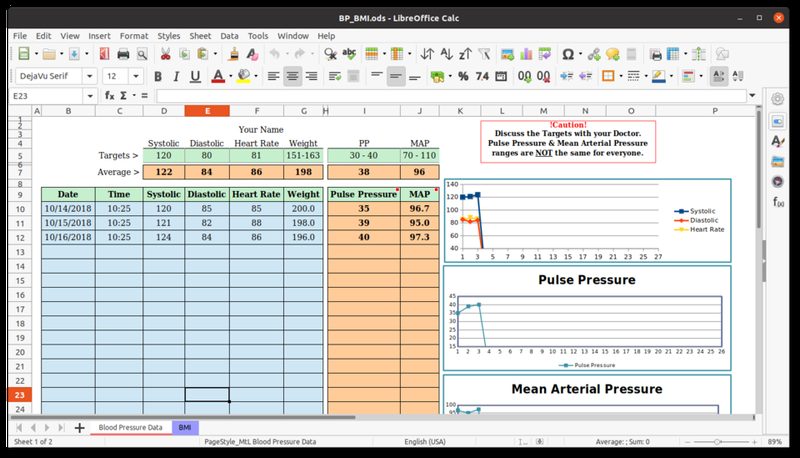
B6), uses formulas and draws graphs. It cannot run without the operating system beneath it.Photo: LibreOffice Calc 6.4 screenshot · Jasozh, CC BY-SA 4.0, via Wikimedia Commons| Application | What it lets the user do |
|---|---|
| Word processor | Create, edit, format and spell-check text documents; copy and paste; import images. |
| Spreadsheet | Calculate with formulas, draw graphs and run "what if" models. |
| Database | Store data in tables of records and fields; run queries and produce reports. |
| Apps (mobile) | Downloaded from an app store: music streaming, maps/GPS, camera, banking. |
| Control & measuring | Read sensors, compare with stored values and send signals (e.g. open a valve). |
| Video editing | Cut and rearrange clips, add titles and transitions, correct colour. |
| Graphics manipulation | Edit bitmap images (pixels) or vector images (lines, curves, text). |
| Photo editing | Change brightness, contrast and saturation; remove red-eye; combine photos. |
Worked Example 12 min
(a) Classify each program — and justify it
Decide whether each program is system software or application software.
- Printer driver → system software.It lets the OS talk to a hardware device. The user never "uses" it for a task.
- Video editing software → application software.The user runs it to do a specific job: making a new video.
- Anti-virus software → system software (a utility).It maintains and protects the computer rather than doing a user task.
- Compiler → system software.It translates programs so the hardware can run them. The textbook lists it under system software.
- On-screen calculator → application software.The user runs it to perform a task — working out a sum.
- Screensaver → system software (a utility).It manages the display and security when the computer is idle.
How the marks are earned: usually one mark per correct row in a tick table. In a written answer, the reason earns the mark, not just the label.
(b) Follow one click down through the layers
Alex clicks Print in a spreadsheet. Which software handles each step?
- The spreadsheet prepares the page to print.This is the task the user wanted — application software.
- It hands the job to the operating system.Applications cannot drive hardware themselves; the OS is their platform.
- The OS loads the printer driver.The driver translates the data into commands this model of printer understands.
- The printer hardware receives the commands and prints.Only now does the physical device act.
Try It Yourself 12 min
Goal: List three pieces of system software and three pieces of application software on a phone or laptop you use. Use generic names.
Goal: Classify these and give a one-line reason for each: QR code reader, back-up software, database, mouse driver, control and measuring software, linker.
Goal: A smart thermostat shows the room temperature and lets a user set a target on its touch screen. Explain which of its software is system software and which is application software.
Hint
Split it into "the job the user wants" (showing and setting temperatures) and "what keeps the device running" (managing the screen, the sensor and memory).
📝 Exam Practice 10 min
Tick (✓) one box in each row to show whether the software is system software or application software.
| Software | System | Application |
|---|---|---|
| Operating system | ||
| Photo editing software | ||
| Device driver | ||
| Spreadsheet |
Mark scheme
- Operating system — system (1).
- Photo editing software — application (1).
- Device driver — system (1).
- Spreadsheet — application (1).
Describe the differences between system software and application software.
Mark scheme
Any four, max 2 for one type only:
- System software controls/manages the hardware (1).
- System software provides a platform for other software to run on (1).
- System software provides the human computer interface (1).
- System software allocates hardware resources (1).
- Application software lets the user perform a specific task (1).
- Application software is run by the user when they need it (1).
- Application software needs system software to run (1).
A student records a school play, cuts it into a short film, and then emails it to parents. Identify three different types of application software the student uses.
Mark scheme
- Camera app / video recording app (1).
- Video editing software (1).
- Email software / email client / web browser (1).
Explain why a word processor cannot run on a computer that has no operating system.
Mark scheme
- The word processor relies on the OS to provide a platform / environment to run in (1)…
- …and to access hardware such as memory, storage, keyboard and screen for it (1).
🗝️ Recap & Key Terms 3 min
Hardware needs software. System software runs the computer: it manages the hardware and gives other programs a platform. Application software does a job for the user and relies on the system software underneath.
- System software
- Programs that control and manage the hardware and provide a platform for other software to run.
- Application software
- Programs that allow the user to carry out a specific task.
- Operating system
- Software that provides an environment in which applications run and an interface between the user and the computer.
- Utility program
- System software that helps manage, maintain and control computer resources (e.g. anti-virus, back-up).
- Device driver
- Software that communicates with the OS and translates data into a format a device understands.
- Linker
- A program that combines separately compiled modules (object files) into a single program.
Homework 1 min
Task (≤ 15 min): A photographer takes photos on a camera, copies them to a laptop over USB, touches them up, and keeps a copy in the cloud. Identify two items of application software and two items of system software the photographer relies on. Give a reason for each. [4]
Model answer
- Photo editing software (application) — used to change brightness/contrast and remove red-eye.
- Web browser / cloud storage app (application) — used to upload the photos.
- Device driver for the camera (system) — lets the OS recognise the camera over USB.
- Operating system or back-up utility (system) — manages the files / schedules the copies.