🎯 Syllabus & Goals 3 min
Cambridge 4.1 · Utility software Paper 1 · Computer Systems
By the end of this lesson you can:
- Describe what anti-virus, defragmentation, back-up, security and screensaver utilities do.
- Explain how defragmentation speeds up access to files on a hard disk drive.
- Describe the role of a device driver when a device is plugged in.
Textbook: Chapter 4, §4.1.1 (pp. 150–155)
Recap / Warm-Up 5 min
Last lesson split software into system software (runs the computer) and application software (does a job for the user). Today we zoom in on two kinds of system software: utilities and device drivers.
Quick starter
Your laptop is slow to open files, and a memory stick shows "device not recognised". Which type of software would you blame for each problem?
Reveal the answer
Slow file access on a hard disk can mean fragmented files, fixed by a defragmentation utility. "Device not recognised" means the OS cannot find a suitable device driver.
🧠 Key Concept 14 min
1 · What is a utility program?
Some utilities are started by the user. Others, such as virus checkers, run quietly in the background. Common utilities are virus checkers, defragmentation software, disk analysis and repair, file compression and management, back-up software, security software and screensavers.
2 · Virus checkers (anti-virus software)
Any device, including phones and tablets, can be attacked by a virus. Anti-virus software is the best defence, but only if it is kept up to date.
- Files are checked before they are run or loaded.
- A possible virus is compared against a database of known viruses.
- Heuristic checking looks for behaviour that suggests a virus.
- Suspect files go into quarantine. They are deleted automatically, or the user decides. The file may be a false positive — flagged but actually safe.
- The software must be updated often, because new viruses appear all the time.
- A full system scan (say, weekly) finds viruses lying dormant.
3 · Defragmentation software
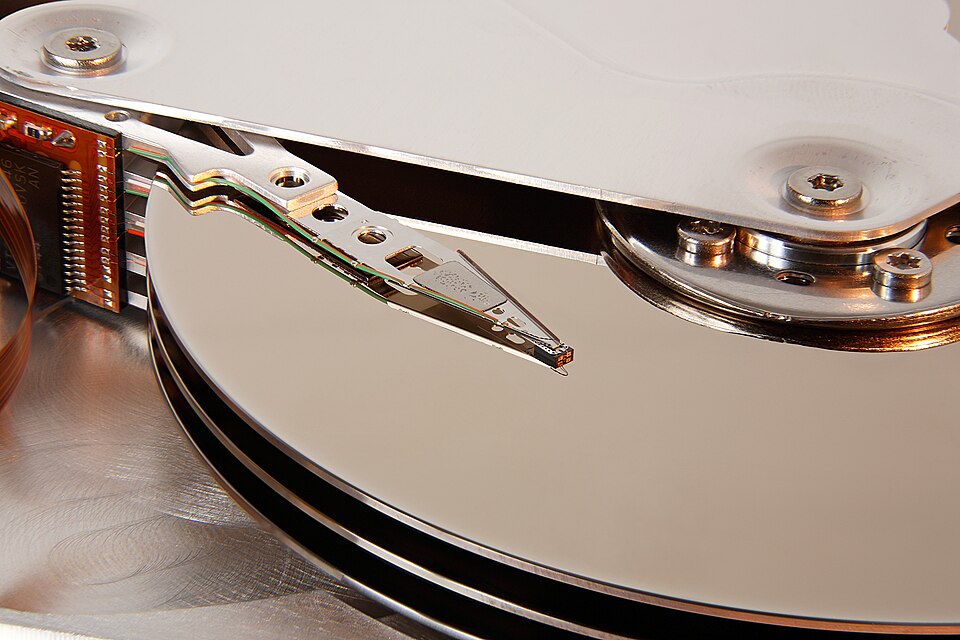
A hard disk drive (HDD) stores files in blocks on tracks and sectors. Over time, files are deleted and extended. Their blocks become scattered across the disk. The read-write head then has to move many times to read one file, so access is slower.
A defragmenter rearranges the blocks so each file sits in contiguous (next to each other) sectors. Fewer head movements means faster reading and writing.
4 · Back-up software
A back-up utility can set a schedule for back-ups and only copy files that have changed. It can also restore files, or create a restore point to roll the whole computer back to an earlier state.
Copy 1 · Working
The current version on the internal HDD or SSD.
Copy 2 · Local back-up
A copy on a portable SSD or external drive.
Copy 3 · Remote back-up
A copy stored well away, e.g. in cloud storage.
5 · Security software and screensavers
Security software
- manages access control and user accounts (IDs and passwords)
- links to anti-virus and anti-spyware
- protects network interfaces, e.g. with a firewall
- uses encryption so intercepted data is meaningless
- checks that software updates come from a legitimate source
Screensavers
- show still or moving images after a period of inactivity
- first made to stop "phosphor burn" on old CRT monitors
- now used for security: log the user out and lock the screen
- trigger background tasks while idle, e.g. virus scans
6 · Device drivers
When a device is plugged into a USB port, the OS looks for the right driver. Without one, you see "device not recognised". USB devices carry descriptors: a vendor ID (VID), a product ID (PID) and a unique serial number. These let the USB bus ask a new device what it is.
Worked Example 12 min
(a) Watch a disk become fragmented, then defragmented
One track of an HDD has 12 sectors (0–11). Three files, A, B and C, are stored on it.
- At the start, each file occupies neighbouring sectors: A in 0–3, B in 4–6, C in 7–9.A fresh disk writes files in order, so each read is one smooth sweep.
- B is deleted, leaving sectors 4–6 free. A grows by two blocks, which are written to 10–11.The drive writes new data in the next free space it finds, not back beside A.
- C grows by three blocks, which fill the gap at 4–6.C is now in two pieces, and A is in two pieces: both are fragmented.
- Reading A now needs the head to jump from sector 3 to sector 10 and back.Extra head movement adds seek time, so file access is slower.
- The defragmenter moves blocks so A is in 0–5 and C is in 6–11.Contiguous blocks can be read in one sweep, so access is faster.
How the marks are earned: "files are scattered" (1), "blocks are moved together / made contiguous" (1), "fewer head movements, so faster access" (1).
(b) An anti-virus scan of a downloaded file
Jordan downloads a game add-on. Follow what the anti-virus software does.
- The file is scanned before it is opened.A virus is only dangerous once it runs, so checking first stops it early.
- Its code is compared against the database of known viruses. No match is found.This only catches viruses already in the database.
- Heuristic checking notices the file tries to change system files.This behaviour is typical of a virus, even an unknown one.
- The file is placed in quarantine.It is isolated so it cannot run or spread.
- Jordan is asked to delete it or allow it.It might be a false positive; the user may know the file is safe.
Try It Yourself 12 min
Goal: Name five utility programs and write one sentence on what each does.
Goal: A 10-sector track holds X X Y · X Z Z Y · X (· = free). Draw the track after defragmentation and state how many separate runs file X had before.
Goal: A small design studio keeps all its work on one office PC. Write a back-up plan that uses a back-up utility. Explain why each part of your plan protects the data.
Hint
Think about when back-ups run (a schedule), what is copied (only changed files), and where the copies live (local and remote). Then think about fire and theft.
📝 Exam Practice 10 min
Identify the utility or system software described by each statement.
- (a) Moves blocks of data on an HDD so that each file is stored in contiguous sectors.
- (b) Isolates suspect files and checks for behaviour typical of malware.
- (c) Displays moving images and locks the computer after a period of inactivity.
- (d) Translates data from the OS into a format a printer can understand.
Mark scheme
- (a) Defragmentation software / defragmenter (1).
- (b) Anti-virus software / virus checker (1).
- (c) Screensaver (1).
- (d) (Printer) device driver (1).
Explain how defragmentation software can improve the performance of a computer with a hard disk drive.
Mark scheme
- Over time, file blocks become scattered / fragmented across the disk (1).
- The defragmenter rearranges blocks so each file is in contiguous sectors (1).
- The read-write head needs fewer movements, so data is accessed faster (1).
Describe how anti-virus software helps to protect a computer.
Mark scheme
Any four:
- Checks files/software before they are run or loaded (1).
- Compares files against a database of known viruses (1).
- Carries out heuristic checking for virus-like behaviour (1).
- Quarantines infected/suspect files (1).
- Deletes the virus automatically or lets the user decide (1).
- Runs in the background / carries out regular full-system scans (1).
A user plugs a new camera into a USB port and sees "device not recognised". Explain why.
Mark scheme
- The OS could not find / load a suitable device driver for the camera (1)…
- …so data could not be translated into a format the camera/OS understands / they cannot communicate (1).
🗝️ Recap & Key Terms 3 min
Utilities keep a computer healthy: anti-virus protects it, defragmentation speeds up HDD access, back-up protects data, security software controls access, and screensavers lock idle machines. Device drivers let the OS talk to each piece of hardware.
- Anti-virus software
- Software that quarantines and deletes files or programs infected by a virus; it can run in the background.
- Heuristic checking
- Checking software for behaviour that could indicate a possible virus.
- Quarantine
- To isolate a file identified as infected, so it can later be deleted.
- Defragmentation
- Rearranging blocks of data on an HDD so that files are stored in contiguous sectors.
- Back-up
- Copies of files on another storage medium in case the original is lost or corrupted.
- Descriptor
- Information a USB device supplies about itself: vendor ID, product ID and serial number.
Homework 1 min
Task (≤ 15 min): A school office PC with an HDD has become slow, and staff worry about losing records. Describe two utility programs the technician could use, and how each helps. [4]
Model answer
- Defragmentation software — rearranges scattered file blocks into contiguous sectors (1), so the read-write head moves less and files open faster (1).
- Back-up software — copies files on a schedule, e.g. only changed files each hour (1), to another device or the cloud so lost records can be restored (1).
- Also accept: anti-virus (removes malware that slows the PC and corrupts data).