🎯 Syllabus & Goals 3 min
Cambridge 4.1 · The role and functions of an operating system Paper 1 · Computer Systems
By the end of this lesson you can:
- State the role of an operating system and list its main functions.
- Compare a command line interface (CLI) with a graphical user interface (GUI).
- Describe how the OS carries out memory management and security management.
Textbook: Chapter 4, §4.1.2 (pp. 155–158)
Recap / Warm-Up 5 min
So far: system software runs the computer; utilities maintain it; drivers connect devices. The most important piece of system software is the operating system.
Quick starter
Name the operating system on (a) a school desktop PC, (b) your phone. What is the first thing you see from it when the device starts?
Reveal the answer
Typical answers: Microsoft Windows or macOS on a desktop; Android or iOS on a phone. The first thing you see is its user interface — a log-in screen or a home screen of icons.
🧠 Key Concept 14 min
1 · What the operating system does
The OS also hides the complexity of the hardware from the user. Because it is a large program, a computer keeps its OS on an HDD or SSD. Phones and tablets keep it in solid-state storage.
2 · The human computer interface (HCI)
Command line interface (CLI)
The user types commands on a keyboard to open software, copy files or change settings. Each command must be spelt and formatted exactly.
Graphical user interface (GUI)
The user selects icons, menus and windows with a pointing device or a finger. Nothing needs to be typed.
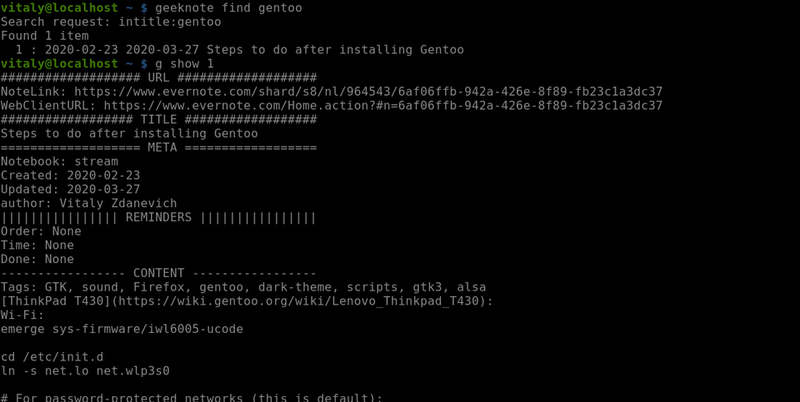
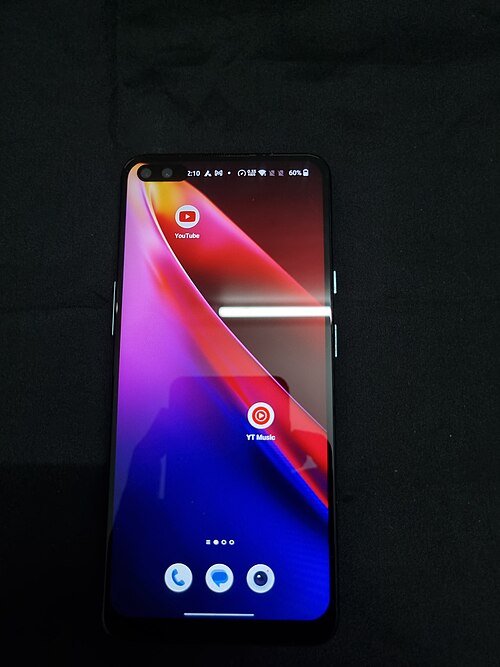
A GUI on a desktop PC usually follows WIMP: windows, icons, menus and a pointing device. A mouse moves a cursor; clicking an icon opens a window. A windows manager handles how windows, applications, the pointer and the cursor interact. Touch-screen devices use post-WIMP interaction, such as pinching and rotating.
| Interface | Advantages | Disadvantages |
|---|---|---|
| CLI | User communicates directly with the computer · not limited to pre-set options · can change configuration settings · uses little memory | Must learn many commands · typing is slow and error-prone · each command needs exact format and spelling |
| GUI | No commands to learn · more user-friendly · icons represent applications · point and click, or touch | Uses much more memory · user limited to the icons provided · needs an OS such as Windows, which itself uses a lot of memory |
3 · Memory management
- Manages RAM and moves data between RAM and the HDD/SSD while programs run.
- Keeps track of every memory location — which is used, and by whom.
- Carries out memory protection, so two applications cannot use the same locations at once.
4 · Security management
The OS does this by:
- installing OS updates as they become available;
- making sure anti-virus and other security software is up to date;
- working with a firewall to check traffic to and from the computer;
- using user accounts, user IDs and passwords to set privileges and access rights;
- offering data recovery and system restore after loss or corruption;
- helping to prevent illegal intrusion into the system.
Worked Example 12 min
(a) The same job in a CLI and a GUI
Task: copy the file report.txt into a folder called backup.
CLI
copy report.txt backup
One typed line. It only works if the user knows the command name, the order of the parts, and the exact spelling.
GUI
- Open the file manager window.
- Right-click the report.txt icon and choose Copy.
- Double-click the backup folder icon.
- Right-click and choose Paste.
- Spot what the CLI user needed: knowledge of the
copycommand.This is the CLI's big disadvantage — commands must be learned. - Spot what the GUI user needed: only to recognise icons and menus.This is why a GUI suits an end-user with little technical knowledge.
- Consider repeating it for 500 files.One CLI command with a wildcard can do it; the GUI needs many clicks. The CLI is not limited to pre-set options.
- Consider memory use.Drawing windows and icons needs much more memory than showing text.
Conclusion
A technician managing many files would choose the CLI. A new user would choose the GUI.
(b) What if there were no memory protection?
A photo editor and a spreadsheet are both running. Both try to use memory location 6000.
- The photo editor stores a pixel value at location 6000.It believes the location belongs to it.
- The spreadsheet overwrites location 6000 with a cell total.The pixel data is now lost.
- The photo editor reads 6000 back and draws a wrong colour.Applications produce incorrect results from the wrong data.
- If 6000 held a password, the spreadsheet could now read it.Data in the wrong place is a security risk.
- If 6000 held an instruction, the program may jump to nonsense.In extreme cases the computer crashes.
How the marks are earned: each consequence (data lost, incorrect results, security issue, crash) is typically one mark.
Try It Yourself 12 min
Goal: Expand the letters W, I, M and P and give one example of each on a desktop computer.
Goal: For each user, choose CLI or GUI and give a reason: (a) a server technician changing network settings; (b) a 9-year-old playing a game on a tablet; (c) a programmer taking a memory dump.
Goal: A hospital PC is shared by doctors and receptionists. Explain four ways the OS's security management keeps patient records confidential and available.
Hint
Think about who can see what (accounts, access rights), what comes in over the network (firewall), what happens if data is lost (recovery), and keeping software patched (updates).
📝 Exam Practice 10 min
Explain the differences between a graphical user interface (GUI) and a command line interface (CLI).
Mark scheme
Any three:
- A CLI needs commands to be typed; a GUI uses icons/menus/windows selected with a pointer or touch (1).
- A CLI user must learn the commands; a GUI user does not (1).
- A CLI uses less memory than a GUI (1).
- A CLI gives direct communication / is not limited to pre-set options; a GUI limits the user to the icons provided (1).
Give one advantage and one disadvantage of a command line interface.
Mark scheme
- Advantage, e.g. uses little memory / direct communication with the computer / can alter configuration settings / not restricted to pre-set options (1).
- Disadvantage, e.g. commands must be learned / typing is slow or error-prone / exact format and spelling needed (1).
Describe how an operating system manages memory.
Mark scheme
- Manages primary storage / RAM and allocates memory to programs (1).
- Moves data between RAM and HDD/SSD while programs run (1).
- Keeps track of all memory locations (1).
- Carries out memory protection so two applications cannot use the same location (1).
Max 3.
Explain why memory protection is needed when several applications run at the same time.
Mark scheme
- Without it, two applications could use the same memory location (1).
- Data could be overwritten / lost, or applications give incorrect results (1).
- Data could be read by other software — a security risk — or the computer could crash (1).
🗝️ Recap & Key Terms 3 min
The OS provides a platform for applications and an interface for the user. The HCI is a CLI (typed commands, little memory) or a GUI (icons, easy but memory-hungry). Memory management tracks and protects RAM. Security management protects the integrity, confidentiality and availability of data.
- Operating system
- Provides an environment in which applications run and an interface between the human and the computer.
- Command line interface (CLI)
- An interface where the user types commands on a keyboard to communicate with the computer.
- Graphical user interface (GUI)
- An interface that uses icons to represent apps and tasks, selected with a pointing device or touch screen.
- WIMP
- Windows, icons, menus and pointing device — a GUI style that uses a mouse to select from icons and menus.
- Post-WIMP
- A touch-screen interface that allows actions such as pinching and rotating.
- Memory management
- The part of the OS that controls main memory, including memory protection.
- Security management
- The part of the OS that ensures the integrity, confidentiality and availability of data.
Homework 1 min
Task (≤ 15 min): A tablet uses a touch-screen GUI. A web server in a data centre is managed through a CLI. Explain why each device uses a different interface. [4]
Model answer
- Tablet users are end-users with little technical knowledge (1); a GUI means they do not need to learn commands and can tap icons (1).
- The server is managed by a technician who needs direct communication and access to configuration settings (1); a CLI uses less memory and is not limited to pre-set options (1).