Syllabus & Goals 3 min
Cambridge 5.3 · Cyber security threats Paper 1 · Computer Systems
By the end of this lesson you can:
- Describe how a brute-force attack cracks a password, and why long, varied passwords resist it.
- Describe data interception (packet sniffing, wardriving) and DDoS attacks, including their aims.
- Describe hacking and state ways to reduce the risk of each threat.
Textbook: Chapter 5, §5.3.1 (pp. 189–191)
Recap / Warm-Up 5 min
Last lesson showed how blockchain resists hackers. Now we look at the attacks themselves. Remember from Unit 2: data travels in packets, and encryption makes data meaningless without the key.
Quick starter
Which is harder to guess: a 4-digit bike-lock code or a 4-letter word? Why?
Reveal the answer
The letters. Each position has 26 options instead of 10, so there are 26 × 26 × 26 × 26 = 456 976 possibilities against 10 000. More possible characters per position means more guesses — the idea behind resisting brute-force attacks.
Key Concept 14 min
Data can be lost or damaged by accident or on purpose. Cambridge lists eight cyber security threats. This lesson covers the first four; Lessons 6 and 7 cover the rest.
Brute-force attack
This lesson
Data interception
This lesson
DDoS attack
This lesson
Hacking
This lesson
Malware (6 types)
Lesson 6
Phishing
Lesson 7
Pharming
Lesson 7
Social engineering
Lesson 7
1 · Brute-force attacks
A hacker trying to crack a password can systematically try every combination of letters, numbers and symbols until one works. This is a brute-force attack. It needs no clever technique, only time and computing power.
Attackers cut the number of attempts with a logical order:
- Try the most common passwords first, such as
123456,password,qwerty,111111andabc123. - Then use a word list: a text file of likely words, sometimes a million long. This is still faster than pure trial and error.
- Only then fall back on every possible combination.
The longer the password and the more kinds of character it uses, the longer it takes to crack.
2 · Data interception
Data interception is stealing data by tapping into a wired or wireless communication link. The aim is to compromise privacy or obtain confidential information.
- Packet sniffing (common on wired networks): a packet sniffer examines the data packets travelling on a network and sends what it finds back to the hacker.
- Wardriving (also called access point mapping): the attacker uses a laptop or phone, an antenna, a GPS device and software outside a building to intercept its Wi-Fi signals. The victim is often unaware.
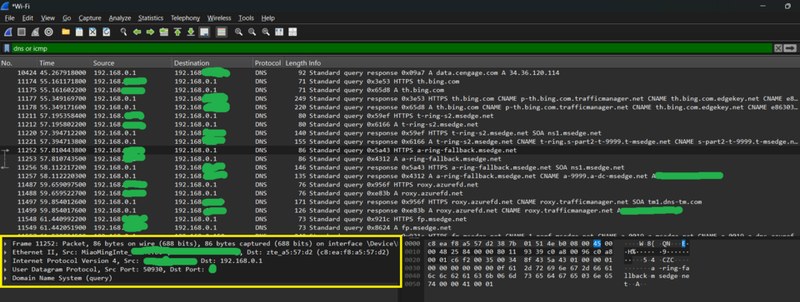
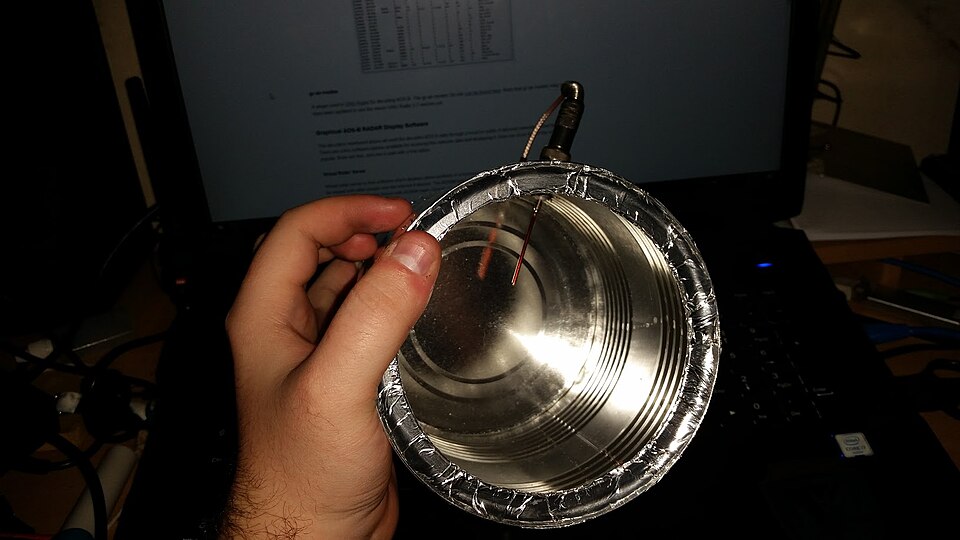
Reducing the risk of interception:
- Encrypt the data. It does not stop interception, but the data is meaningless without the decryption key.
- Use a wireless encryption protocol together with a firewall. (The textbook names WEP; modern routers use WPA2 or WPA3.)
- Protect the wireless router with a complex password.
- Avoid unencrypted public Wi-Fi, for example in an airport, for anything private.
3 · Denial of service (DoS) and distributed denial of service (DDoS)
A DoS attack tries to stop users reaching part of a network, usually an internet server. It can stop people using their email, websites or online services such as banking. The usual method is to flood the server with useless traffic.
A web server can only handle a finite number of requests. If an attacker sends thousands, it is overloaded and cannot answer genuine users. In a DDoS attack the traffic comes from many different computers, which makes it much harder to block.
The same idea works on an email account. Internet service providers give each user a data quota. Thousands of spam emails fill it, so genuine emails cannot arrive.
Guard against DoS / DDoS
- Use an up-to-date malware checker
- Set up a firewall to restrict traffic to and from the server or computer
- Apply email filters to remove spam
Signs you are a victim
- Slow network performance (opening files, loading sites)
- Unable to access certain websites
- Large amounts of spam arriving in your inbox
4 · Hacking
Hacking is gaining illegal access to a computer system without the owner's permission. It can lead to identity theft or the theft of personal data. Data can be deleted, passed on, changed or corrupted.
Encryption does not stop hacking. It makes stolen data meaningless, but a hacker inside the system can still delete or corrupt it. Hacking is reduced by:
- Firewalls;
- user names with strong passwords that are changed frequently;
- anti-hacking and intrusion-detection software.
Worked Example 12 min
(a) How long would a brute-force attack take?
Scenario: an attacker's computer tries one billion (10⁹) passwords per second. Compare three passwords.
- Count the characters available for each position. Digits: 10. Lower-case letters: 26. All keyboard characters (upper, lower, digits, symbols): about 94.each position can be any one of these.
- Combinations = choiceslength. A 4-digit PIN: 10⁴ = 10 000.each extra position multiplies the total by the number of choices.
- 6 lower-case letters: 26⁶ = 308 915 776 (about 3 × 10⁸).
- 8 characters from all 94: 94⁸ ≈ 6.1 × 10¹⁵.
- Divide by 10⁹ guesses per second. PIN: 0.00001 s. Six letters: 0.3 s. Eight mixed: 6.1 × 10⁶ s ≈ 70 days.time = combinations ÷ guessing rate.
- Conclusion: adding length and character types grows the work enormously. But a common password such as
passwordfalls in step 1 of the attack, however long it is.attackers try common passwords and word lists before anything else.
(b) Identify the threat from the symptoms
Question: for each scenario, name the threat and one way to reduce it.
| Scenario | Clue | Threat | Reduce it by |
|---|---|---|---|
| A ticket website crashes on the morning tickets go on sale; its logs show requests from 40 000 addresses. | Flood of requests, many sources | DDoS | Firewall to restrict traffic |
| Someone parks outside an office every evening with a laptop and aerial. | Wi-Fi picked up from outside | Data interception (wardriving) | Encrypt the Wi-Fi; strong router password |
| A user's account is locked after thousands of failed log-ins overnight. | Repeated guesses | Brute-force attack | Long, complex password; limit attempts |
| Student grades are changed in a school database by an outsider. | Illegal access and altered data | Hacking | Firewall; strong, regularly changed passwords; intrusion detection |
Method: find the clue word first — "flood", "outside", "repeated", "changed" — then match it to the threat.
Try It Yourself 12 min
Goal: state two signs that a computer user might be the victim of a DDoS attack.
Goal: rank these passwords from easiest to hardest to brute-force and justify each place: qwerty, 7391, Tr4!n$tat10n, sunflower.
Goal: a café offers free, unencrypted Wi-Fi. Explain two risks to customers who check their bank balance there, and two things the customer (not the café) can do about it.
Hint
Which interception method works on wireless networks? For the fixes, think about what protects data in transit even on an open network — look for the padlock from Lesson 1.
📝 Exam Practice 10 min
Describe what is meant by a brute-force attack and how a user can reduce the risk of one succeeding.
Mark scheme
- Trial-and-error attempts to crack a password (1)…
- …by trying all possible combinations of characters / common passwords / a word list (1).
- Reduce risk: use a long password with a mix of upper case, lower case, numbers and symbols / avoid common words (1).
Explain how a distributed denial of service (DDoS) attack stops users from accessing a website.
Mark scheme
- The attacker floods the web server with (useless / spam) requests / traffic (1).
- The requests come from many different computers (1).
- The server can only handle a finite number of requests, so it becomes overloaded (1).
- Genuine users' requests cannot be serviced / the website is unavailable (1).
- Because traffic comes from many sources, it is hard to block (1).
Max 4.
Describe data interception and one method used to carry it out.
Mark scheme
- Stealing data by tapping into a wired or wireless communication link (1).
- Aim: to obtain confidential information / compromise privacy (1).
- Method, e.g. packet sniffer examines packets on a network and sends them to the hacker / wardriving uses a laptop, antenna and GPS to intercept Wi-Fi signals (1).
A company encrypts its data. Explain why encryption does not prevent hacking.
Mark scheme
- Encryption makes the data meaningless / unreadable without the key (1)…
- …but the hacker can still gain access and delete / corrupt / pass on the data (1).
Recap & Key Terms 3 min
Brute force guesses passwords by trial and error. Interception copies data from wired links (packet sniffing) or Wi-Fi (wardriving). DDoS floods a server from many computers. Hacking is illegal access. Encryption hides data but does not stop any of them.
- Brute-force attack
- A trial-and-error method of cracking passwords by trying all possible combinations until the password is found.
- Word list
- A text file containing a collection of words used in a brute-force attack.
- Data interception
- An attempt to eavesdrop on a wired or wireless transmission, e.g. by packet sniffing or wardriving.
- Wardriving
- Using a laptop, antenna, GPS device and software to intercept Wi-Fi signals; also called access point mapping.
- DDoS attack
- A denial of service attack where the fake requests come from many different computers, making it harder to stop.
- Hacking
- The act of gaining illegal access to a computer system without the owner's permission.
Homework 1 min
Task (≤ 15 min): an online bank's website becomes unreachable for three hours. Its logs show millions of requests from computers in many countries. Identify the attack, describe how it works, and give two ways the bank could reduce the risk. [5]
Model answer
- Distributed denial of service (DDoS) attack (1).
- Many computers send huge numbers of requests to the bank's web server (1).
- The server is overloaded and cannot respond to genuine customers' requests (1).
- Use a firewall to restrict / filter traffic to the server (1).
- Keep up-to-date malware checking / use traffic filters, e.g. email filters for spam (1).