Syllabus & Goals 3 min
Cambridge 5.3 · Cyber security threats — phishing, pharming, social engineering Paper 1 · Computer Systems
By the end of this lesson you can:
- Describe phishing and pharming, and explain the key difference between them.
- Describe how DNS cache poisoning is used in pharming.
- Describe social engineering: its five common forms, the emotions it exploits and its four stages.
Textbook: Chapter 5, §5.3.1 — Phishing to social engineering (pp. 194–198)
Recap / Warm-Up 5 min
Lesson 6 showed that a Trojan horse or ransomware usually needs the user to run it. Today's threats attack the person rather than the computer. Recall Lesson 2: the DNS turns a URL into an IP address.
Quick starter
An email from "your bank" says your account is frozen and you must log in within 1 hour. Name two things that should make you suspicious.
Reveal the answer
The urgency (rushing you) and the request to log in via a link. Genuine banks do not pressure you like this. Also check the sender's address and any spelling mistakes.
Key Concept 14 min
1 · Phishing
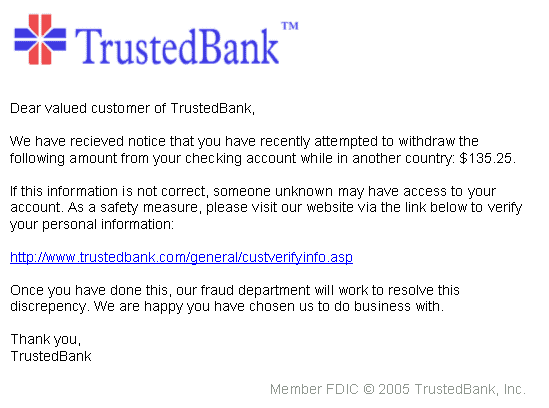
In phishing, a cybercriminal sends out legitimate-looking emails. They may contain links or attachments that take the user to a fake website. Or they trick the user into replying with personal data, such as bank or card details. The email usually seems to come from a known bank or service provider.
The key point: the recipient must act (click, open or reply) before any harm is done. If a suspicious email is deleted unopened, it causes no problem.
Ways to prevent phishing:
- Security awareness training so staff can recognise phishing (and pharming) scams.
- Do not click email links unless certain they are safe; be wary of generic greetings such as "Dear Customer".
- Run anti-phishing toolbars in browsers (including on phones and tablets) to flag malicious sites.
- Look for https and the padlock in the address bar.
- Check online accounts regularly and change passwords regularly.
- Keep the browser up to date and run a firewall: a desktop (software) firewall plus a network (hardware) firewall.
- Block pop-ups. If one gets through, close it with the small cross in its corner — not a "Cancel" button inside it.
2 · Pharming
Pharming is malicious code installed on a user's computer or on an infected web server. It redirects the browser to a fake website without the user's knowledge. Unlike phishing, the user does not need to take any action. The fake site looks trusted, and the criminal collects personal data such as bank details. This can lead to fraud and identity theft.
One method is DNS cache poisoning. Normally the DNS returns the real IP address for a URL. Poisoning replaces that IP address with the fake website's. The user types the correct URL, yet the browser connects to the fake site.
Reducing the risk of pharming:
- Anti-virus software can detect unauthorised changes to a website address and warn the user.
- If the DNS server itself is infected, it is much harder for the user to protect themselves.
- Many modern browsers alert users to pharming and phishing sites.
- Check the spelling of the web address carefully.
- Look for https and the padlock.
3 · Social engineering
Social engineering happens when a cybercriminal creates a social situation that makes a victim drop their guard. It manipulates people into breaking normal security procedures. No hacking is needed: the user willingly gives access, downloads the malware or visits the fake site. Five common forms:
| Form | What happens | Emotion exploited |
|---|---|---|
| Instant messaging | Malicious link in a message, e.g. an 'important software upgrade'. | curiosity |
| Emails / phishing scams | A genuine-looking email links to a fake website. | trust |
| Baiting | An infected memory stick is left to be found and plugged in. | curiosity |
| Phone calls | A fake 'IT professional' says the device is compromised and asks the user to install software. | fear |
| Scareware | A pop-up claims a virus and pushes a fake anti-virus download. | fear |
The three emotions most often exploited:
Fear
The user is panicked into believing their computer is in danger, with no time to think.
Curiosity
"You've won a car!", or "whose memory stick is this?" — interest beats caution.
Empathy and trust
Belief that any genuine-sounding company must be safe to deal with.
Worked Example 12 min
(a) Phishing or pharming?
Scenario: Sam types www.northbank.com correctly. The page looks normal, and Sam logs in. Next day, money is missing. Sam received no emails. Which threat is it?
- Did Sam click a link in a message? No — Sam typed the address. phishing depends on the user acting on a message.
- Did Sam still reach a fake site? Yes — the login details were stolen. so the browser was redirected somewhere wrong.
- How can a correct URL lead to a wrong site? The IP address returned for it was wrong: DNS cache poisoning, or malicious code on Sam's computer. recall Lesson 2 — the browser trusts whatever IP address it is given.
- Conclusion: pharming. Suggested protection: anti-virus to detect altered addresses; check for https and the padlock. a full answer names the threat, the mechanism and a defence.
(b) Walk a baiting attack through the four stages
Scenario: a criminal wants access to a company's network.
| Stage | What the criminal does | Why it works |
|---|---|---|
| 1 · Identify | Finds the company's car park and staff entrance; decides on baiting. | Planning picks the method most likely to succeed. |
| 2 · Target | Drops memory sticks labelled "Salaries 2026" in the car park. | Exploits curiosity — who can resist that label? |
| 3 · Execute | An employee plugs one in; hidden malware installs and opens a way in. | No hacking needed — the victim did it willingly. |
| 4 · Cover tracks | The malware deletes itself after sending data out. | Hides how the breach happened. |
Defence: staff training, and a rule never to plug in unknown storage devices. Anti-malware scans help, but the real fix is changing human behaviour.
Try It Yourself 12 min
Goal: name the social engineering form in each case: (a) a pop-up warns of a virus and offers a download; (b) a caller claims to be from IT support; (c) a USB stick is found in a corridor.
Goal: give four things a company could do to protect staff from phishing emails, and explain how each one helps.
Goal: explain why pharming is harder for a user to spot than phishing, and why it is even harder when the DNS server itself (rather than the user's computer) is infected.
Hint
What does the user see in the address bar in each case? Which defences sit on the user's own computer, and can they detect a problem on someone else's server?
📝 Exam Practice 10 min
Explain the difference between phishing and pharming.
Mark scheme
- Phishing: legitimate-looking email is sent to the user (1)…
- …the user must click a link / open an attachment / reply to be taken to a fake site (1).
- Pharming: malicious code on the computer / web server redirects the user to a fake website (1)…
- …without the user's action or knowledge, e.g. using DNS cache poisoning (1).
Describe four ways cybercriminals can use social engineering to trick a user into downloading malicious code.
Mark scheme
Any four from (one mark each, with a brief description):
- Instant messaging containing a malicious link (1).
- Phishing email with a link / attachment to a fake website (1).
- Baiting: an infected memory stick left to be found and plugged in (1).
- Phone call from a fake IT professional asking the user to install software (1).
- Scareware: a pop-up claiming a virus, offering fake anti-virus (1).
Describe the four stages a cybercriminal follows when targeting someone with social engineering.
Mark scheme
- Stage 1: victims are identified, information gathered and the method of attack chosen (1).
- Stage 2: the victim is targeted, e.g. by email, phone call or Trojan horse (1).
- Stage 3: the attack is executed and the information obtained / disruption caused (1).
- Stage 4: the criminal removes traces of the malware to cover their tracks (1).
State two ways a user can reduce the risk of pharming.
Mark scheme
Any two from:
- Use anti-virus software that detects altered website addresses (1).
- Use a browser that warns about fake / malicious websites (1).
- Check the spelling of the web address (1).
- Check for https / the padlock symbol (1).
Recap & Key Terms 3 min
Phishing tricks users with genuine-looking emails and needs them to act. Pharming redirects users to fake sites without their knowledge, for example through DNS cache poisoning. Social engineering manipulates people through fear, curiosity and trust, in four stages.
- Phishing
- Sending legitimate-looking emails designed to trick recipients into giving their personal details to the sender.
- Spear phishing
- Phishing that targets specific people or organisations rather than a blanket attack.
- Pharming
- Redirecting a user to a fake website to obtain personal data without their knowledge; no user action is needed.
- DNS cache poisoning
- Altering IP addresses on a DNS server to redirect a user's browser to a fake website.
- Social engineering
- Manipulating people into breaking normal security procedures to gain illegal access or place malware.
Homework 1 min
Task (≤ 15 min): a company has offices in four countries that share data over the internet. Describe two security threats from this lesson they might face, explain why each is a threat, and give one way to reduce each. [6]
Model answer
- Phishing: staff receive fake emails that look like they come from a partner office or bank (1).
- Threat: a click takes them to a fake site where they give away passwords / data (1).
- Reduce: security awareness training / do not click unverified links / anti-phishing toolbar (1).
- Pharming: staff are redirected to a fake copy of a company site without knowing (1).
- Threat: log-in details or company data are captured, leading to fraud (1).
- Reduce: anti-virus that detects altered addresses / check for https and the padlock (1).