Syllabus & Goals 3 min
Cambridge 5.3 · Keeping data safe — updates, checking communications, firewalls Paper 1 · Computer Systems
By the end of this lesson you can:
- Explain why automatic software updates improve security, and their one drawback.
- Check an email's spelling, tone, sender address and URL links to spot a scam.
- Describe what a firewall does, and what it cannot prevent.
Textbook: Chapter 5, §5.3.2 — Automatic software updates to firewalls (pp. 204–208)
Recap / Warm-Up 5 min
Last lesson: access levels, anti-malware and authentication. Today adds three more defences. Recall Lesson 7: phishing needs the user to act, so spotting a fake email is itself a defence.
Quick starter
Your phone says "Update available: security fixes". Give one reason to install it tonight rather than next month.
Reveal the answer
The update probably contains a patch for a known security weakness. Until it is installed, malware can exploit that weakness.
Key Concept 14 min
1 · Automatic software updates
Automatic software updates keep the software on computers, phones and tablets up to date without the user remembering to do it. They often run overnight or when the user logs off.
They matter because an update may contain a patch that:
- fixes security weaknesses, protecting against malware; or
- improves performance — removing bugs and adding new features.
The one downside: an update can occasionally disrupt the device. The user then waits for another patch, or rolls the system back to a point before the update (Unit 4).
2 · Checking the spelling, tone and links in communications
Before opening an email or clicking any of its links, check three things: the spelling, the tone, and the links. Genuine organisations do not send emails full of spelling or grammar errors. A tone that rushes you, or feels wrong, suggests phishing. Five things to look for:
- The sender's address. The part after the
@should match the company's real domain. A free email service or an odd domain is a warning sign. - Tone and spelling. Urgency, threats and poor grammar are clear clues.
- Misspelt domain names in links, e.g.
www.bankk-online.com. Criminals register names close to real ones — this is typo squatting. - Suspicious links. Hover over a link to see its real destination. It should match the company in the email.
- Other errors in the address:
httpinstead ofhttpsfor a site that takes payments, or an unexpected domain type.
3 · Firewalls
A firewall can be software or hardware. It sits between the user's computer (or internal network) and an external network such as the internet. It filters information in and out. It is the primary defence against hacking, malware, phishing and pharming.
| Example firewall rules (set by the user or network manager) |
|---|
✗ block traffic from IP 203.0.113.9 |
✗ block the site bad-downloads.example |
✓ allow web traffic (HTTPS) |
! warn when an app connects out |
≡ log all traffic in and out |
The main tasks of a firewall:
- Examine the traffic between the user's computer (or internal network) and a public network.
- Check whether incoming and outgoing data meets a set of criteria (rules).
- Block traffic that fails, and warn the user or network manager.
- Log all incoming and outgoing traffic for later checking.
- Prevent access to undesirable websites, keeping a list of blocked IP addresses.
- Help prevent viruses or hackers entering the computer or network.
- Warn the user if software on their system tries to access an external source, and let them allow or deny it.
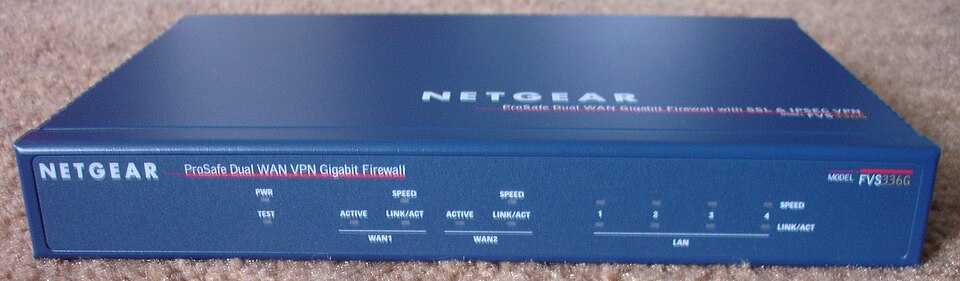
What a firewall cannot prevent:
- People inside the network using their own devices (e.g. a phone or modem) to bypass it.
- Employee misconduct or carelessness, such as sharing passwords.
- Users on stand-alone computers disabling it.
These need management control, or personal self-discipline on a home computer.
Worked Example 12 min
(a) Inspect a suspicious email
From: CloudBox Support <support@cloudbox-alerts-24.net>
To: customer 88213
Subject: URGENT!! Your acount will be deleted
Dear Valued Customer,
We has detected unusual activity in you're account. All your files will be deleted within 24 hours unless you verify your details now.
[ VERIFY NOW ] ← hovering shows http://www.cloudbx-verify.com/login
Thank you, The CloudBox Team
(CloudBox is a made-up company whose real site is https://www.cloudbox.com.)
- Sender address: the domain after
@is cloudbox-alerts-24.net, not cloudbox.com. a genuine company emails from its own domain. - Greeting: "Dear Valued Customer" — generic. a real account email would use your name.
- Spelling and grammar: "acount", "We has", "you're account". professional organisations check their emails.
- Tone: "URGENT!!" and "within 24 hours". rushing the reader stops them thinking — the fear tactic from Lesson 7.
- Link: hovering shows cloudbx-verify.com — a misspelt domain (typo squatting) — and http, not https. the destination must match the real company, and a log-in page should be secure.
- Verdict: a phishing email. Do not click; delete it or report it; if worried, type the real address yourself. a full answer ends with the correct action.
(b) Firewall true or false?
| Statement | True / False | Why |
|---|---|---|
| A firewall can only be a piece of hardware. | False | It can be software or hardware. |
| A firewall lets a user set rules for network traffic. | True | Traffic is checked against criteria. |
| A firewall examines outgoing as well as incoming traffic. | True | It filters information in and out. |
| A firewall encrypts data sent across a network. | False | That is SSL/TLS, not a firewall. |
| A firewall stops every possible threat. | False | It cannot stop bypassing, carelessness or being disabled. |
| A firewall can block access to certain websites. | True | It can keep a list of undesirable IP addresses. |
Try It Yourself 12 min
Goal: give two reasons software updates are installed automatically, and one possible drawback.
Goal: for each address, say whether it looks genuine for a big online shop called "ShopWorld" and why: https://www.shopworld.com, http://www.shopwrold.com, https://www.shopworld.xyz, https://shopworld.com.pay-check.info.
Goal: a school has a hardware firewall, yet malware still reached its network. Suggest three ways this could have happened, and one non-technical fix for each.
Hint
Use the list of things a firewall cannot prevent. Also think about what a user might carry in, or be tricked into running.
📝 Exam Practice 10 min
A company has installed a firewall. Describe how the firewall can help protect against unauthorised access to data.
Mark scheme
Any four from:
- Sits between the computer / internal network and the external network / internet (1).
- Monitors / examines incoming and outgoing traffic (1).
- Checks traffic against a set of rules / criteria (1).
- Blocks traffic that does not meet the criteria (1).
- Can block specific IP addresses / websites (1).
- Warns the user / network manager of a possible security issue (1).
- Keeps a log of traffic (1).
Identify three features of an email that suggest it may be a phishing scam.
Mark scheme
Any three from:
- Sender's email domain does not match the company (1).
- Generic greeting, e.g. "Dear Customer" (1).
- Spelling / grammar errors (1).
- Urgent / threatening tone (1).
- Link destination does not match the company / misspelt domain (typo squatting) (1).
- Asks for personal details (1).
Explain why automatic software updates help keep data safe.
Mark scheme
- Updates contain patches that fix security weaknesses / vulnerabilities (1)…
- …so malware / hackers cannot exploit them; updates happen without relying on the user to remember (1).
State two situations in which a firewall cannot prevent harmful traffic.
Mark scheme
Any two from:
- Users bypass it with their own devices, e.g. a phone / modem (1).
- Employee misconduct or carelessness, e.g. with passwords (1).
- The user disables the firewall (1).
Recap & Key Terms 3 min
Automatic updates install security patches without relying on memory. Checking spelling, tone, the sender and links exposes phishing and typo squatting. A firewall filters traffic both ways against rules, but cannot stop people bypassing or disabling it.
- Patch
- An update for software developed to improve it and/or remove bugs.
- Typo squatting
- Using subtle spelling errors in website addresses to trick users into visiting fake websites.
- Firewall
- Software or hardware between a computer and an external network that monitors and filters all incoming and outgoing traffic.
- Automatic software update
- Updates downloaded and installed without user action, keeping software secure and up to date.
Homework 1 min
Task (≤ 15 min): write a short guide for a younger student called "Five checks before you click", based on this lesson. Then answer: "Describe what is meant by typo squatting and how a user can protect themselves from it." [3]
Model answer (the 3-mark question)
- Criminals register web addresses with small spelling differences from real ones (1)…
- …to trick users into visiting fake websites and entering personal details (1).
- Protect: check the spelling of URLs carefully / hover over links / type the known address yourself (1).