Challenge 1
Make the wiper click only on the outward sweep, not on the way back. Ten sweeps out and back should give exactly ten clicks, each at the same point in the cycle. Count them out loud on the run to prove it.
Quick Learn — the model, the instructions, the program and the challenges. The theory is in Full Lesson.
EV3 Robotics›Level 1 · Beginner›Lesson 2
Level 1 · Lesson 2 · EV3-L01-0260 minutes · Ages 9–16 · Model: Wipers
The Wipers: a motor geared to an arm that sweeps across and back, across and back, exactly like the pair on a car’s windscreen.
It is a small build and a quick one. What makes it worth a whole lesson is that a wiper is the first machine you have met whose entire job is repetition — not one sweep, but the same sweep for as long as it is raining.
You have used repeat since the Stegosaurus in Lesson 7. Today you find out something about it that catches almost everybody: a block can be in your program, spelled perfectly, sitting in the right order — and never run at all.
Every car has them, and where you live they earn their keep. A tropical downpour can drop more water in ten minutes than some countries see in a month, and a windscreen goes from clear to useless in about two seconds.

A wiper arm does not spin. It sweeps out and back through an arc, because the glass has edges and the driver’s view is a fixed shape. Inside the mechanism a motor does spin, all the way round, and a linkage converts that turning into a back-and-forth sweep.
The gearing matters too. Look at your model: a small gear on the motor driving a big one on the arm. That is geared down — slower, but strong enough to drag a rubber blade across wet glass, which takes more force than you would think.
Now the part that concerns the program. A wiper that sweeps once is useless. Rain does not stop after one wipe.
And a wiper that sweeps a hundred times but only clicks its motor once, at the very end, is a machine whose feedback has come adrift from what it is doing. Whatever the wiper does per sweep has to happen per sweep — not once when everything is over.
“Every time round” and “once at the end” are different behaviours, and in a block program the only thing that tells them apart is where the block sits.
A loop block is not a line. It is a C shape with a mouth, and blocks go either inside the mouth or underneath the whole thing. Those two places behave completely differently.
| Where the block sits | How often it runs |
|---|---|
| Inside the mouth of repeat (10) | Ten times — once per turn of the loop. |
| Underneath the loop, after its end | Once, after all ten turns have finished. |
| Underneath a forever loop | Never. Forever does not finish, so nothing below it is ever reached. |
That last row is the one that costs people an afternoon. The block is there. It is correct. It will simply never run, and nothing on the Brick will tell you so — no error, no warning, no red mark. The program is doing exactly what you built.
repeat (3)
forever
↑ this block never runs
Both programs contain the same green-light block. Let it run as long as you like — the right-hand ring will never turn green.
Both programs in that demo end with the same block. Only one of the rings ever lights, and the difference between them is not a spelling mistake or a wrong number — it is two studs of indentation.
Before you blame a block, check whether it is inside the loop or under it. Under a forever loop is a place where blocks go to be ignored.
Machines repeat. A wiper sweeps, a conveyor runs, a ride goes round — and none of that should mean copying the same blocks over and over. A loop says “do this again” once.
| Block | What it does |
|---|---|
repeat (10) end | Runs the blocks inside a set number of times, then carries on below. |
forever end | Runs the blocks inside over and over, and never carries on below. |
repeat until <> end | Repeats until a condition becomes true — a loop with a sensor as its exit. |
Anything placed after a forever loop will never run. Not “runs late” — never. Both programs below end with the same block: set the status light green.
repeat (3)
forever
↑ this block never runs
Both programs contain the same green-light block. Let it run as long as you like — the right-hand ring will never turn green.
The repeat loop counts its three passes, stops, and moves on to the block underneath, so its light turns green. The forever loop reaches the bottom of its own blocks and jumps straight back to the top, so the block underneath is never reached — however long you leave it. If a program seems to stop half way through, look for a forever loop above the blocks that are not happening.
A program is a list, and the Brick works down it once. Every block runs, in order, and when the last one is done the program is over. That is fine for a list of instructions — drive, turn, beep, stop — because each is a thing you do once.
A sensor is not a thing you do once. Asking is 1 pressed? gives you an answer about this instant, and an instant later it may be wrong. Checking a sensor once tells you what the world was like at the moment the program started — which is almost never what you wanted to know.
So a program that has to react must ask again, and again, for as long as it is running. That is the whole job of the loop: not to repeat an action, but to keep the question being asked.
Wrap a sensor check and the motor it controls in a forever loop and you have built a closed-loop control system — the pattern behind every line follower, thermostat and cruise control:
It is called closed because the output feeds back round to the input: the motors move the robot, moving the robot changes what the sensor sees, and what the sensor sees changes the motors. Break the circle at any point and the robot stops responding.
when program starts :: events hat
forever
  if <[1 v] is pressed? :: sensors> then
    [A v] start motor [clockwise v] :: motors
  else
    [A v] stop motor :: motors
  end
end
Read it as a sentence and it is almost too simple to need explaining: for ever, if the button is pressed run the motor, otherwise stop it. The motor now follows the button for as long as the program is running.
This is the mistake nearly everybody makes first, and it is a hard one to spot because nothing about it looks wrong:
when program starts :: events hat
if <[1 v] is pressed? :: sensors> then
  [A v] start motor [clockwise v] :: motors
else
  [A v] stop motor :: motors
end
The logic is perfect. The ports are right. Nothing is misspelled. And the robot will ignore the button completely — because the Brick reaches that if/else a few milliseconds after you press Run, finds the button not pressed, takes the else branch, stops the motor, runs out of blocks and ends. By the time a finger arrives, there is no program left to notice it.
with forever — a closed loop
without it — the common mistake
↑ running — for the only time
Both programs contain exactly the same if/else. The only difference is the forever block around one of them.
Both programs contain exactly the same if/else. The counter is what gives it away: one keeps checking for as long as it runs, the other is stuck on the single check it made before anybody touched anything. A student who has seen this once stops writing it.
The tell on a real robot is a program that ends the instant you start it — the Brick returns to its menu almost immediately. If a sensor program finishes rather than waits, the loop is what is missing.
The Brick has a small speaker. It can play one of the built-in sound files, or beep a note you choose. Sound is what makes a machine feel finished — and it is also a way for the robot to tell you something without you having to look at it.
| Block | What it does |
|---|---|
play sound [Communication / Hello v] until done :: sound | Plays the sound and waits for it to finish before the next block runs. |
start sound [Communication / Hello v] :: sound | Starts the sound and moves straight on to the next block, so the sound plays while the robot keeps working. |
play beep (60) for (0.5) seconds :: sound | Plays a single note for a set time — useful for short alerts. The number is a note, not a volume: bigger means higher. |
set volume to (100) % :: sound | Sets how loud everything after it will be. Worth putting at the top of a program — the Brick remembers the last volume it was given, even from somebody else’s program. |
stop all sounds :: sound | Cuts off anything that is still playing, including a long sound started earlier. |
These two blocks play the very same file. The difference is what the rest of the program does while it plays — so it cannot be heard on its own, only seen. Here are both, each lifting a barrier.
play sound until done
start sound
Watch the barriers, not the clock. On the left the warning finishes before anything moves; on the right it sounds while the barrier lifts.
The bars underneath are when the speaker was on and when the motor was turning. On the left they never overlap: the program is stuck at the sound block until the file has finished, and only then does the barrier lift. On the right they overlap almost completely, and the whole job is done in half the time.
Real machines warn before they move, not after: a lift chimes before the doors close, a reversing lorry beeps while it rolls back, a level crossing sounds before the barrier drops. Getting the order right is the difference between a warning and an apology.
Say this back before moving on: “Inside the mouth means every time round. Under the loop means afterwards — and after a forever loop there is no afterwards.”
Two electronic parts, and a gear pair doing quiet work.
| Part | What it is doing here |
|---|---|
| EV3 Intelligent Brick | Runs the program, and is also the speaker for the click on each sweep. |
| Medium Motor | Drives the wiper arm. The flat slab one, with the small red boss on the end face. |
| The gear pair (no cable) | Geared down: the motor turns a lot, the arm turns a little, and the arm gets the force it needs. |
Brick off. You need to know the arc before you can program it.
Sensors go in ports 1, 2, 3, 4. Motors go in ports A, B, C, D. They are not interchangeable, and nothing will tell you politely if you swap them.
| Part | Port | Why this one |
|---|---|---|
| Medium Motor (drives the wiper) | A | A single working motor takes A, and every program on this page says A. |
| The speaker | none | Built into the Brick, like the screen and the light. |
Check your own build now:
Two routes, and either is fine. USB is the reliable one and the one to fall back on when a room’s Bluetooth is busy; Bluetooth leaves the robot free to move, which some models need.
Do these in order. Naming the Brick after you go looking for it in the list is how groups end up driving each other’s robots.
EV3 until somebody changes it.EV3.The two failures, every class, every time. The Brick has gone to sleep while you were building — press the centre button to wake it. Or you have paired with the group at the next table, which is why the name matters.
The long version, including Port View and how to read the port tiles, is in the Brick & Bluetooth guide.
Today USB is genuinely handy. This lesson involves a forever loop on purpose, and a program that never ends is one you will want to stop from the computer.
Most of today’s changes move a block rather than change a number. Predict before each run — say out loud how many times you expect to hear the sound.
Step 5 is the one to carry with you for the rest of the course. Nothing is broken and nothing is misspelled. There is simply no after for that block to happen in.
A block that never seems to run is nearly always this. Check the loop before you check anything else — it is faster than re-reading the block you are sure about.
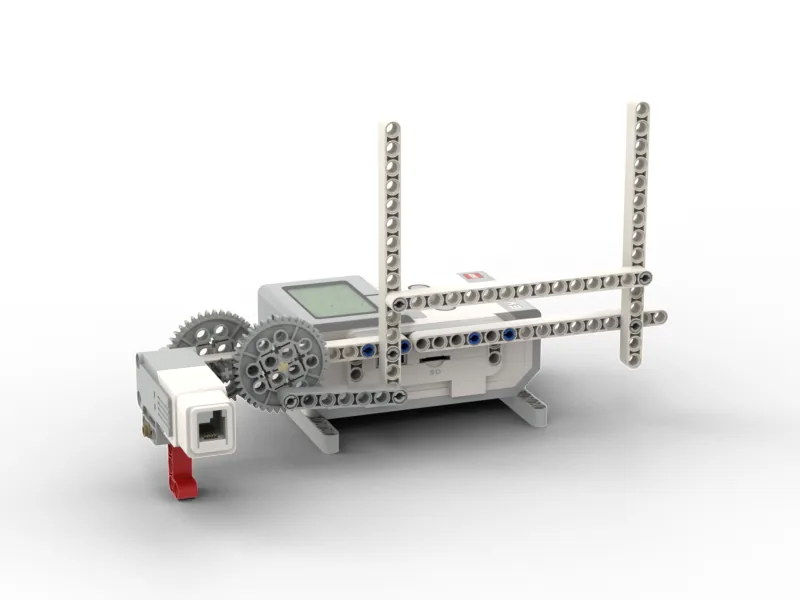
Six blocks, and three of them are inside the loop’s mouth. Use your own measured number in place of the 90.
when program starts :: events hat
[A v] set speed to (40) % :: motors
repeat (10)
  [A v] run [clockwise v] for (90) [degrees v] :: motors
  [A v] run [counterclockwise v] for (90) [degrees v] :: motors
  play sound [Information / Blip 1 v] until done :: sound
end
Walk it in the order the Brick runs it:
Look at step 1 next to step 5. Both are single blocks; one is above the loop and one is inside it, and that is the only difference between “once” and “ten times”.
What success looks like: ten even sweeps with a click at the end of each, the arm finishing where it started, and no banging at either end of the arc.
Work through them in order — each is harder than the last. The extra challenge comes after all three, and it is meant to make you plan before you build.
Make the wiper click only on the outward sweep, not on the way back. Ten sweeps out and back should give exactly ten clicks, each at the same point in the cycle. Count them out loud on the run to prove it.
Build an intermittent wiper: one sweep, a pause, one sweep, a pause, for as long as it runs. Then make the pause a length you chose for a reason — time a real drizzle if you can — and say why you picked it.
Two speeds, one machine. Your wiper must do three slow sweeps for light rain and then five fast ones for heavy rain, without stopping in between, and it must sound different in each phase so a passenger could tell which mode it is in with their eyes shut.
Build the wiper a driver would actually want, and prove nothing is stranded. Your wiper must run continuously for at least a minute, sweep evenly, give feedback on every sweep, and end tidily when you stop it — with the arm parked at one end rather than stopped halfway across the glass, which is where a real wiper always ends up. Plan on paper before you build. A forever loop has no afterwards, so if anything must happen at the end you have to decide now how the program is going to get there at all. Two questions when you demonstrate it. Point at every block in your program and say how many times it runs — once, once per sweep, or never. And if any block runs never, why is it still in your program?
Build the model before you read any further. Everything after this is about making it do something, and none of it will make much sense with nothing on the table in front of you.
Use the viewer's own controls to zoom and turn pages. Fullscreen makes it big enough to build from.
The same build on Google Drive — sometimes a video, sometimes a scan:
Use the viewer's own controls to zoom and turn pages. Fullscreen makes it big enough to build from.
Check the finished build against the picture before you switch anything on. A motor mounted the wrong way round is far easier to spot now than it is to debug later, when it looks like a program fault.