Challenge 1
Build a show that uses movement, the screen and at least two different kinds of sound. Any order you like, but somebody watching must be able to tell where one part ends and the next begins.
Quick Learn — the model, the instructions, the program and the challenges. The theory is in Full Lesson.
EV3 Robotics›Level 1 · Beginner›Optional extra
Level 1 · Optional extra · EV3-L01-OPT-E60 minutes · Ages 9–16 · Model: Tyrannosaurus (T-Rex) — an optional Level 1 model, outside the numbered 48
The Tyrannosaurus: two legs driven through a linkage by one Medium Motor, a heavy head, and a long tail holding the whole thing upright. It stomps forward — and it roars.
You have met every block this lesson uses. Motors, the screen, the status light, sound — all of it is Level 1, all of it is behind you.
So this lesson is not about a new block. It is about the order you put them in. The same six blocks arranged two different ways are a dinosaur stomping past, or a dinosaur roaring at you, and nothing but the sequence decides which.
Tyrannosaurus rex was a meat-eating dinosaur of the late Cretaceous, about 66 million years ago. It walked on two powerful hind legs, carried a skull well over a metre long, and had arms shorter than yours. You meet it in films, and you meet its skeleton in museums — usually mounted mid-stride, with its tail off the ground.
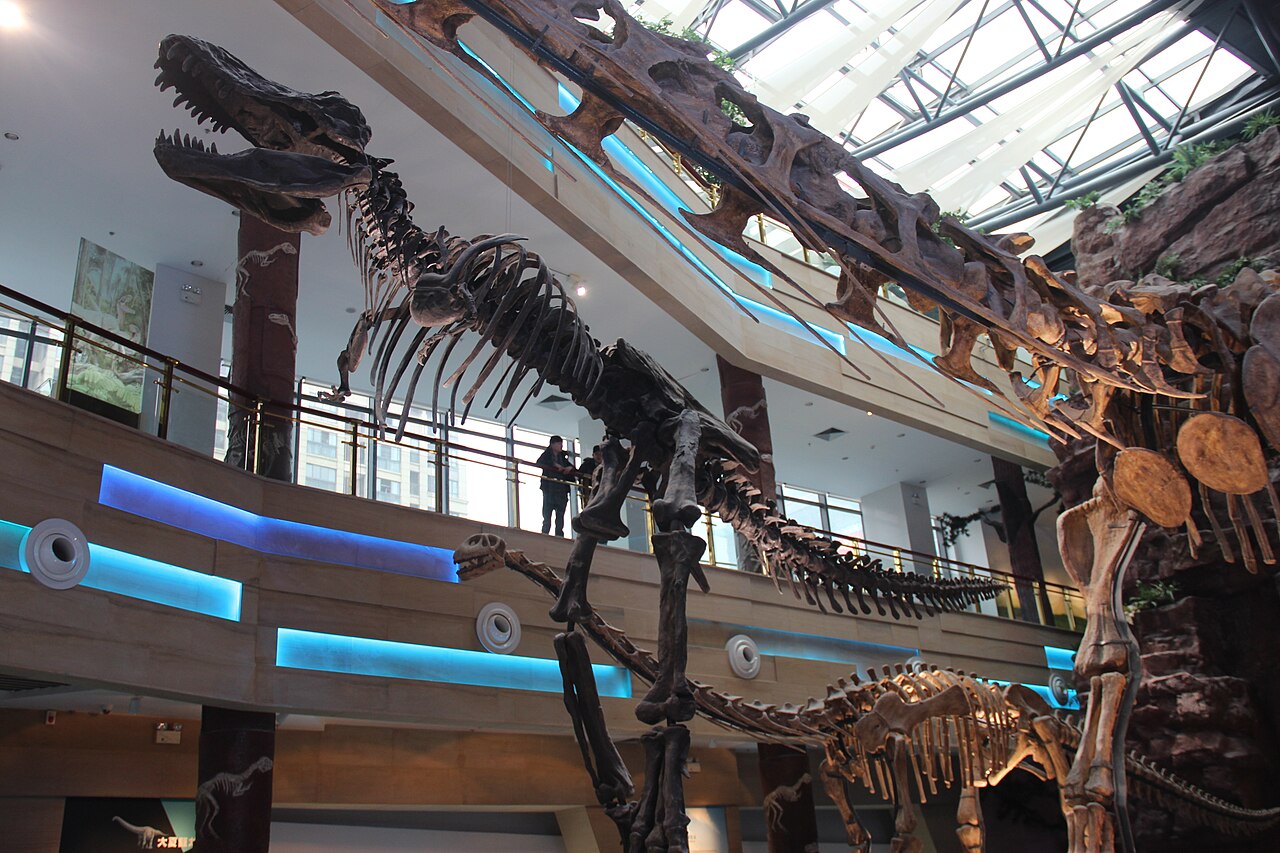
Look at how that skeleton is balanced. The head is enormous and hangs out in front of the legs; the tail is just as long and hangs out behind. The legs are underneath, near the middle. The tail is not decoration — it is the counterweight that lets the animal carry its head out in front without falling on its face.
Your model has the same problem and the same solution. Build it with a short tail and it will nose-dive the first time it steps.
The animatronic dinosaurs in museums have a second problem you are about to share. They move, light up and make noise — and if those three things happen in the wrong order the illusion collapses. A roar that arrives after the jaws have shut is not frightening. It is funny.
A performance is not a list of things that happen. It is a list of things that happen in an order.
Blocks run top to bottom, one after another. You have known that since your first program. Today it stops being a rule about how the Brick works and becomes the thing you are actually designing.
Here are two programs. They contain exactly the same blocks.
when program starts :: events hat
write [ROAR] at line (1) :: display
set status light to [red v] :: display
play beep (40) for (0.2) seconds :: sound
play beep (55) for (0.2) seconds :: sound
play beep (70) for (0.2) seconds :: sound
[A v] run [clockwise v] for (2) [rotations v] :: motors
when program starts :: events hat
[A v] run [clockwise v] for (2) [rotations v] :: motors
write [ROAR] at line (1) :: display
set status light to [red v] :: display
play beep (40) for (0.2) seconds :: sound
play beep (55) for (0.2) seconds :: sound
play beep (70) for (0.2) seconds :: sound
Same seven blocks. Same numbers. Completely different animal — and you did not change a single value to get there.
There is no roar block. A roar is several short notes played straight after one another, each higher than the last, so the sound seems to build:
| Note number | What you hear |
|---|---|
| 40 → 55 → 70 | A growl rising into a roar. Higher number, higher pitch. |
| 70 → 55 → 40 | The same notes falling — a groan, not a roar. |
| 40 → 60 → 75 → 60 → 40 | Up and back down. A longer, more animal noise, because real roars do not stop at their loudest. |
You do not have a roar block. You have an order of beeps, and the order is the roar.
The Brick has a small speaker. It can play one of the built-in sound files, or beep a note you choose. Sound is what makes a machine feel finished — and it is also a way for the robot to tell you something without you having to look at it.
| Block | What it does |
|---|---|
play sound [Communication / Hello v] until done :: sound | Plays the sound and waits for it to finish before the next block runs. |
start sound [Communication / Hello v] :: sound | Starts the sound and moves straight on to the next block, so the sound plays while the robot keeps working. |
play beep (60) for (0.5) seconds :: sound | Plays a single note for a set time — useful for short alerts. The number is a note, not a volume: bigger means higher. |
set volume to (100) % :: sound | Sets how loud everything after it will be. Worth putting at the top of a program — the Brick remembers the last volume it was given, even from somebody else’s program. |
stop all sounds :: sound | Cuts off anything that is still playing, including a long sound started earlier. |
These two blocks play the very same file. The difference is what the rest of the program does while it plays — so it cannot be heard on its own, only seen. Here are both, each lifting a barrier.
play sound until done
start sound
Watch the barriers, not the clock. On the left the warning finishes before anything moves; on the right it sounds while the barrier lifts.
The bars underneath are when the speaker was on and when the motor was turning. On the left they never overlap: the program is stuck at the sound block until the file has finished, and only then does the barrier lift. On the right they overlap almost completely, and the whole job is done in half the time.
Real machines warn before they move, not after: a lift chimes before the doors close, a reversing lorry beeps while it rolls back, a level crossing sounds before the barrier drops. Getting the order right is the difference between a warning and an apology.
Say this back before moving on: “Same blocks, different order, different show.”
| Part | What it is doing here |
|---|---|
| EV3 Intelligent Brick | Runs the show, and is the body of the dinosaur. Its weight is part of the balance — move it and the T-Rex’s walk changes. |
| Medium Motor — the legs | Drives both legs through one linkage, so a single motor makes two feet take turns. One rotation is one full stride. |
| The Brick screen | Part of the performance, not a debug tool. It is how the show tells the audience what is happening. |
| The status light | The cheapest drama in the whole kit. Red during a roar reads as danger without a word being said. |
| The tail (not electronic) | The counterweight. Without it the head wins and the model tips forward on the first step. |
Sensors go in ports 1, 2, 3, 4. Motors go in ports A, B, C, D. They are not interchangeable, and nothing will tell you politely if you swap them.
| Part | Port | Why this one |
|---|---|---|
| Leg motor (Medium) | A | A single job motor, not half of a driving pair — so it takes a Motor block on A rather than the Movement blocks. |
| Sensors | none | The T-Rex cannot see, hear or feel anything. It performs the same show to an empty room, which is worth remembering when you reach the mission. |
Check your own build now:
Two routes, and either is fine. USB is the reliable one and the one to fall back on when a room’s Bluetooth is busy; Bluetooth leaves the robot free to move, which some models need.
Do these in order. Naming the Brick after you go looking for it in the list is how groups end up driving each other’s robots.
EV3 until somebody changes it.EV3.The two failures, every class, every time. The Brick has gone to sleep while you were building — press the centre button to wake it. Or you have paired with the group at the next table, which is why the name matters.
The long version, including Port View and how to read the port tiles, is in the Brick & Bluetooth guide.
Bluetooth if you can. This model walks, and a USB cable trailing off one side pulls it off its line — which on a two-legged model is the difference between striding and toppling.
Every change below is a reordering or a small addition. Run the show after each one and decide, out loud, whether it is better or worse — that judgement is the skill.
wait (1) seconds between the walk and the roar. One second of a dinosaur standing still doing nothing. Watch how much that empty second adds.set status light to [green v] as the very last block, so the show ends calm. Now run it twice in a row and watch what the light does at the start of the second run.Step 4 is the one worth keeping. The most effective thing in the whole show is the moment where nothing happens at all — and wait is the only block in this lesson that produces nothing.
Step 5 sets up the third challenge. The light is still red when the second run begins, because nothing told it to go back — and a show that opens differently the second time is not finished.
Silence is a block. So is stillness. Use them on purpose.
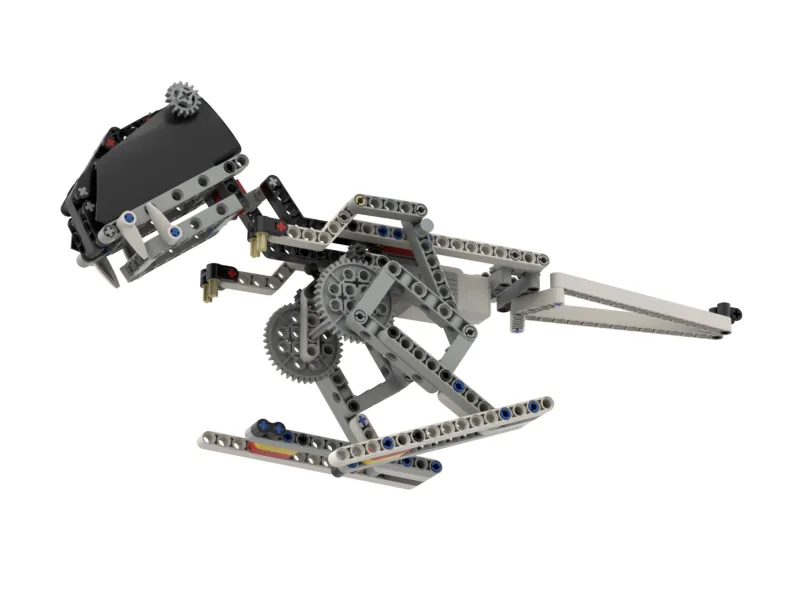
Build the model before you read any further. Everything after this is about making it do something, and none of it will make much sense with nothing on the table in front of you.
Use the viewer's own controls to zoom and turn pages. Fullscreen makes it big enough to build from.
The same build on Google Drive — sometimes a video, sometimes a scan:
Use the viewer's own controls to zoom and turn pages. Fullscreen makes it big enough to build from.
Check the finished build against the picture before you switch anything on. A motor mounted the wrong way round is far easier to spot now than it is to debug later, when it looks like a program fault.
The first show: announce it, turn the light red, roar up the scale, then stomp forward.
when program starts :: events hat
write [ROAR] at line (1) :: display
set status light to [red v] :: display
play beep (40) for (0.2) seconds :: sound
play beep (55) for (0.2) seconds :: sound
play beep (70) for (0.2) seconds :: sound
[A v] run [clockwise v] for (2) [rotations v] :: motors
What success looks like: a title on screen, a red light, a growl that climbs, and then a dinosaur walking towards you. In that order, every time.
If it roars while it walks, you have put the motor block above the beeps. Nothing is broken — but you have made the other show, and you have just proved the point of the lesson.
Work through them in order — each is harder than the last. The extra challenge comes after all three, and it is meant to make you plan before you build.
Build a show that uses movement, the screen and at least two different kinds of sound. Any order you like, but somebody watching must be able to tell where one part ends and the next begins.
Make the T-Rex stalk before it roars. It should move quietly first — slowly, no sound — then stop, then roar. The pause between the two is what makes it work, so get the timing right before you worry about the noise.
Make the same show run twice in a row without a difference. Press the green flag, watch it, press it again straight away and watch it again. Anything that is not identical the second time is state your program left behind — find it, fix it, and say what it was.
Put on a performance for an audience that has not seen it. A museum animatronic has one job: to make somebody who is walking past stop and watch. Your T-Rex has to do the same, and the test is not whether your program runs — it is whether a stranger reacts. Plan the show on paper as a running order before you build it. Write down each beat, how long it lasts, and what the screen, the light, the sound and the legs are each doing during it. A show is a schedule, not a pile of blocks. Then perform it for somebody from another group. Say nothing at all — no explanation, no warning about what it does. Watch their face rather than the robot. Two questions when you present it. Where exactly did your audience react, and was it the moment you designed the show around? And your T-Rex performs the same show whether anybody is standing there or not — describe what you would add to the model so it only roared when there was somebody to roar at.