- Learnt28 min · a cue sheet, a director, dispatchers, credits
- Basic25 min · Pip’s Big Day
- Challenge 1–327 min · a new scene, skip, double speed
- Extrabonus · recast a role
Review — Cartoon Studio III 5 min
- Every actor stands at
(my x) - (camera x)and hides when far away. - A pan worked out from the timer, eased with cos.
- A follow camera closes a tenth of the gap each frame.
- Zoom multiplies distances, sizes and Pip’s offsets — up to 1.4.
Quick-fire
Pip’s mouth read a list of times and a list of mouths. What would you need to add to that idea so the same loop could make anyone do anything?
Reveal the answer
A third list: who. Time, actor, action — that is a cue sheet, and it is how a film studio, a theatre or a concert lighting desk runs a show. Today the Stage reads one, and the whole film plays from it.
Today’s Topic 3 min
- A cue sheet: three lists — time, actor, action
- A director that reads it against the timer
- Dispatchers: short cue scripts that start the long actions
- A title card, The End, and credits that roll
Learning outcome
By the end of this lesson you will be able to:
- Drive a whole project from data in lists.
- Send one message that only the right sprite acts on.
- Change a film by changing rows, not scripts.
Learnt — the director’s chair 28 min
1 · The cue sheet
Three lists that stay in step. Row 3 says: at 2.5 seconds, the foley desk plays Boing.
| Row | cue time | cue actor | cue action |
|---|---|---|---|
| 1 | 0.5 | Pip | wave |
| 2 | 2.5 | Pip | jump |
| 3 | 2.5 | foley | Boing |
| 4 | 4.5 | Pip | bow |
| 5 | 6 | Pip | hello |
2 · The director
The Stage reads the sheet. For each row it waits for the time, puts the actor and the action into two variables, and sends one message: cue.
when flag clicked
set [start v] to (timer)
set [i v] to (1)
repeat until <(i) > (length of [cue time v])>
  wait until <((timer) - (start)) > (item (i) of [cue time v])>
  set [actor v] to (item (i) of [cue actor v])
  set [action v] to (item (i) of [cue action v])
  broadcast (cue v) and wait
  change [i v] by (1)
end
Every actor hears cue, checks whether it is for them, and acts:
when I receive [cue v]
if <(actor) = [Pip]> then
  if <(action) = [wave]> then
    broadcast (pip wave v)
  end
  if <(action) = [jump]> then
    broadcast (pip jump v)
  end
  if <(action) = [bow]> then
    broadcast (pip bow v)
  end
end
when I receive [cue v]
if <(actor) = [foley]> then
  set [sfx v] to (action)
  broadcast (foley play v)
end

when I receive [foley play v]
start sound (sfx)
How to use this: Click the green flag to start it. Nothing else to press — watch the three lists and Pip.
3 · Why a dispatcher?
Why not put the wave straight into Pip’s cue script? Because a broadcast restarts every script that answers it. The next cue — even one for the Speaker — would start Pip’s cue script again from the top, and the wave would be cut off halfway.
So the cue script only dispatches: it sends a second message, such as pip wave, and finishes at once. The long action lives under when I receive [pip wave v], where no other cue can reach it.
The dispatchers finish at once, so broadcast (cue v) and wait costs just one frame. That frame matters: two rows with the same time are read one after the other, and neither is lost.
4 · Title, The End, credits
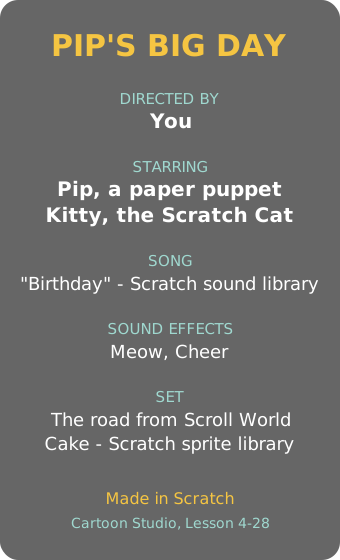
A film opens on a title card and closes with credits — and, as in Boss Tower, the credits name everything you borrowed. Ours is a tall costume that glides up the Stage.
when I receive [credits roll v]
go to x: (0) y: (-460)
go to [front v] layer
show
glide (8) secs to x: (0) y: (450)
hide
broadcast (credits done v)
How to use this: Click the green flag to start it. Nothing else to press — The End shows, then the credits roll.
Basic — Pip’s Big Day 25 min
Open last lesson’s road, with the zooming camera. Everything you have built this arc goes into one short film.
Step 1 — the cast
- Upload a
Titlesprite with two costumes: title card and the end, and a Credits sprite. - Add the
Cakesprite at size 40, standing in the world at x 1240 between Pip and Kitty. It stays hidden until its cue. - Give the Mouth the song from Lesson 26 (with a
song startclock), and aSpeakersprite theCheersound. The Speaker can be hidden — a hidden sprite still plays sounds.


Step 2 — the sheet
- Make the lists
cue time,cue actorandcue action, and import film-cue-time.txt, film-cue-actor.txt and film-cue-action.txt. That is these 14 rows:
| Time | Actor | Action |
|---|---|---|
| 0 | title | show |
| 3 | title | hide |
| 3 | camera | follow |
| 3 | Pip | walk |
| 11.5 | Cat | meow |
| 12.5 | Pip | wave |
| 14.5 | cake | show |
| 15 | camera | close-up |
| 16.5 | Pip | sing |
| 24 | foley | Cheer |
| 24 | Cat | jump |
| 25.5 | camera | wide |
| 27.5 | title | the end |
| 30 | credits | roll |
Step 3 — direct
- Build the director from Learnt part 2 on the Stage.
- Give every actor a dispatcher for its rows. The Stage is an actor too: for
camerait switches the follow loop on, or plays ashot(1240, 1.4) for the close-up and (1240, 1) for the wide shot. - Pip walks 39 steps of 5, as in Lesson 27. Kitty jumps twice by changing a
cat ythat the draw adds on.
How to use this: Click the green flag to start it. Nothing else to press — the film runs for about 40 seconds, ending with the credits.
Nothing happens after the title.
The director is stuck waiting. Check that start is set to the timer once, at the top, and that nothing else sets it again.
An actor ignores its cue.
Its name in the sheet and in its if are different. Look for a capital letter or a space.
Pip’s walk stops halfway.
The walk is inside the cue script, so the next cue restarts it. Move it to its own when I receive [pip walk v].
A new scene, without a new script
Add a moment to the short sheet from Learnt part 1.
- At 1.5 seconds, Pip trips: a little hop, and “Whoa!”
- At the same moment, the Speaker plays “Slide Whistle”.
- The two rows go in at row 2, so the sheet stays in time order.
How to use this: Click the green flag to start it. Nothing else to press — watch the lists grow by two rows, then the film play.
Teacher reveal
insert (1.5) at (2) of [cue time v]
insert [Pip] at (2) of [cue actor v]
insert [trip] at (2) of [cue action v]
insert (1.5) at (3) of [cue time v]
insert [foley] at (3) of [cue actor v]
insert [Slide Whistle] at (3) of [cue action v]
Our demo does it with blocks so you can see the lists change. Typing the rows into the list boxes is just as good. The only script change is one more if in Pip’s dispatcher, for trip.
Skip to the next scene
A film has scenes. Let the viewer jump ahead.
- Rows with actor
directorand actionscenemark where each scene starts. - Pressing → jumps the film to the next scene row.
- Every cue after the jump still plays, at its right place in the scene.
How to use this: Click the green flag, then click the stage once and press → to skip a scene. Our demo presses → for you at 1.5 seconds.
Teacher reveal
when [right arrow v] key pressed
repeat until <<(i) > (length of [cue time v])> or <(item (i) of [cue action v]) = [scene]>>
  change [i v] by (1)
end
if <not <(i) > (length of [cue time v])>> then
  set [start v] to ((timer) - (item (i) of [cue time v]))
end
Moving start back makes the film’s clock jump forward to that row’s time. The director is still waiting on row i, so it plays at once.
Rehearsal speed
Directors watch rehearsals fast. Add a speed control.
- A
speedvariable: 1 is normal, 2 is double speed. - At speed 2, the cues come twice as fast.
- The cue sheet is not changed at all.
How to use this: Click the green flag to start it. Nothing else to press — the short sheet plays at speed 2.
Teacher reveal
Only the director’s clock changes:
wait until <(((timer) - (start)) * (speed)) > (item (i) of [cue time v])>
The actions themselves — a 1.8-second wave — still take their own time. A full rehearsal mode would divide their waits by speed too.
Recast a role
Kitty is busy today. The Dog will play the friend — and no script may change.
- The sheet’s actor column names roles:
heroandfriend. - Two more lists:
roles(hero, friend) andcast(Pip, Dog). - The director turns each role into a sprite name before it sends the cue.
- Only the friend who is cast is on the Stage.
How to use this: Click the green flag to start it. Nothing else to press — watch who plays the friend.
Teacher reveal
set [actor v] to (item (item # of (item (i) of [cue actor v]) in [roles v]) of [cast v])
One block replaces the director’s actor line. And on the Cat:
when flag clicked
if <(item (2) of [cast v]) = [Cat]> then
  show
else
  hide
end
Summary 5 min
- A cue sheet is three lists in step: time, actor, action.
- The director waits for each time and sends one
cue; each actor checks if it is for them. - A cue script only dispatches. A broadcast restarts its answers, so long actions live under their own message.
- Change the film by changing rows: insert, skip, speed up, recast.
- Cue sheet
- The plan of a show: when, who, and what.
- Director
- The script that reads the plan and calls each cue.
- Dispatcher
- A short script that only passes a job on to the right place.
- Credits
- The list of who and what made the film.
Hand in
Save Pip’s Big Day — the Cartoon Studio arc is finished, and you have made a film. Next lesson the games come back: an old arcade classic, Brick Breaker.