- Learnt27 min · costumes, the flipbook, parallel scripting, walking left
- Basic25 min · animate the cat, then a bear, then send it back
- Challenge 1–327 min · three animals, a crossing, an animated story
- Extrabonus · meet in the middle
Review — where we got to 5 min
Last lesson your sprites learnt to talk. You did three things:
- Timed a conversation with
wait (1) seconds. - Found out how badly that breaks when you edit one line.
- Rebuilt it with
broadcast [message1 v]andwhen I receive [message1 v], so each character acts on a cue instead of a stopwatch.
Quick-fire
The Dog has this stack and nothing else. Click the green flag. What does the Dog do?
when I receive [dog 1 v]
say [Hi Catty!] for (1.5) seconds
Reveal the answer
Nothing at all. The green flag does not start this stack — only the message dog 1 does. If no other sprite ever broadcasts it, the Dog stands there in silence, and Scratch gives you no warning. A missing broadcast is silent, which is why it is worth checking first when a sprite refuses to speak.
Today’s Topic 3 min
- The concept of animation — what a costume actually is
- Create an animation for a sprite
- Combine motion with animation
- Animate different sprites, including ones that walk the other way
- Start an animation on a specific costume
Learning outcome
By the end of this lesson you will be able to:
- Open the Costumes tab, name what you find there, and switch costume with a block.
- Build two stacks under two
when flag clickedhats that run at the same time — one moving the sprite, one animating it. - Make a sprite walk from right to left with
set rotation style [left-right v]without it ending up upside down.
Learnt — costumes, and two scripts at once 27 min
What a costume is
- Click the Costumes tab, top left, above the Blocks Panel.
- Look down the left. The cat has two costumes.
- Click each one and watch the big picture change.
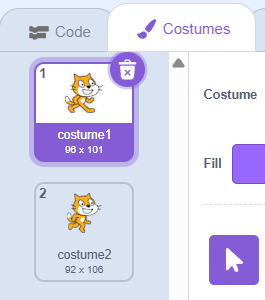
Flip between them quickly and the cat looks like it is walking. That is the whole trick.
It is the same trick as a flipbook. Draw a stick man on the corner of every page. Move him a little each time. Then riffle the pages. Nothing really moves — your eye fills in the rest.
How to use this: Click the green flag to start it. Nothing else to press — watch it through, then use ↺ Reset to run it again.
| Block | Category | What it does |
|---|---|---|
next costume | Looks | Steps to the following costume in the list; after the last one it wraps back to the first |
switch costume to [costume1 v] | Looks | Jumps straight to one particular costume, by name |
wait (1) seconds | Control | Holds the script. This is what slows an animation down to a speed you can watch |
The animation stack
next costume on its own flickers once. Put it inside a repeat (10) and it flickers ten times.
But you cannot see it. One trip round a repeat takes about 0.03 seconds, so ten trips are over in a third of a second.
when flag clicked
repeat (10)
  next costume
end
Add a wait (0.1) seconds after the costume swap and each pose gets a tenth of a second on screen. Now it is a walk.
when flag clicked
switch costume to [costume1 v]
repeat (20)
  next costume
  wait (0.1) seconds
end
switch costume to [costume1 v] at the top is the same idea as go to x: (0) y: (0) was last-but-one lesson: start from a known state, so every run looks the same.The repeat number is how long the animation lasts. Twenty repeats at 0.1 seconds each is two seconds of walking. Want four seconds? Repeat 40.
Two scripts at the same time
You now have an animation that goes nowhere, and — from Topic 1.1 — a movement that has no legs. You want both. The tempting move is to jam them into one stack, and it does not work: blocks in one stack run strictly one after another, so the cat would move, then animate, then move.
Instead build a second stack with its own when flag clicked hat. One green flag starts both, and they run side by side. This is called parallel scripting, and it is the most useful idea in the lesson.
when flag clicked
go to x: (-200) y: (-40)
point in direction (90 v)
repeat (20)
  move (10) steps
  wait (0.1) seconds
end

when flag clicked
switch costume to [costume1 v]
repeat (20)
  next costume
  wait (0.1) seconds
end
Make the two stacks last the same time
Look closely at those two stacks: repeat 20 and wait 0.1 in both. That is deliberate. If the motion runs 20 repeats and the animation runs 40, the cat arrives and then stands there paddling its legs — which looks broken, because it is.
How to use this: Click the green flag to start it. Nothing else to press — watch it through, then use ↺ Reset to run it again.
Animating somebody who is not the cat
Click Choose a Sprite and add a Bear, Avery Walking or a Bat. Then open their Costumes tab.
- Avery Walking has four costumes.
- The Bat has four.
- Bear-walking has eight.
More costumes means a smoother walk. It also means your wait (0.1) seconds should come down, because there are more poses to get through in the same time.
Walking the other way
Every library sprite faces right. To send one from the right edge to the left, you have two options.
Option 1 — flip every costume by hand. Open the Costumes tab, pick a costume, and click Flip Horizontal in the paint editor.

Option 2 — set the rotation style. One block, and Scratch does the mirroring for you:
when flag clicked
set rotation style [left-right v]
go to x: (200) y: (-40)
point in direction (-90 v)
repeat (20)
  move (10) steps
  wait (0.1) seconds
end
set rotation style [left-right v], direction −90 turns the bear upside down. With it, the bear simply faces the other way.How to use this: Click the green flag to start it. Nothing else to press — watch it through, then use ↺ Reset to run it again.
Notice that move (10) steps did not change. Move always goes whichever way the sprite is pointing. So pointing it left is all it takes to reverse the journey.
Basic — now build it yourself 25 min
Three builds, each one a small step past the last: an animated cat, an animated bear, and a bear that walks home again.
Step 1 — the animation on its own
New project, named T1.3 – your name. On the Cat, build the animation stack: when flag clicked, switch costume to [costume1 v], then repeat (20) holding next costume and wait (0.1) seconds. Click the flag. The cat marches on the spot.
Step 2 — take the wait out
Drag wait (0.1) seconds out of the repeat and run it again. The cat blurs and it is over almost before it starts. Put the wait back. That is what the wait is for.
Step 3 — the motion stack beside it
In an empty part of the Script Area, build the second stack: when flag clicked, go to x: (-200) y: (-40), point in direction (90 v), then repeat (20) holding move (10) steps and wait (0.1) seconds.
Click the flag. The cat walks across the Stage. Both stacks ran on one click.
How to use this: Click the green flag to start it. Nothing else to press — watch it through, then use ↺ Reset to run it again.
Step 4 — break the timing on purpose
Change the animation stack’s repeat from 20 to 40 and run it. The cat stops at the far side and keeps working its legs for another two seconds. Change it back.
Step 5 — add a bear
Choose a Sprite → Bear-walking. It has eight costumes, so use wait (0.05) seconds and repeat (40) in both of its stacks. Start it at (−200, 60) and give it move (5) steps.
Step 6 — send the bear back
Add set rotation style [left-right v] to the top of the bear’s motion stack, change the start to (200, 60), and set point in direction (-90 v). Click the flag. The cat goes right, the bear goes left, both animated, all from one click.
How to use this: Click the green flag to start it. Nothing else to press — watch it through, then use ↺ Reset to run it again.
My bear is upside down — what did I miss?
set rotation style [left-right v]. Without it, direction −90 means “rotate the costume 180°”, which for a walking animal means flipping it onto its back. With it, Scratch mirrors the costume instead. It only needs setting once, at the top of the stack.
Animate three new sprites
Find three sprites you have not used yet and animate each one walking forward at least 200 steps. Different animals, different numbers of costumes.
How to use this: Click the green flag to start it. Nothing else to press — watch it through, then use ↺ Reset to run it again.
Teacher note
The differing costume counts are the point. A four-costume sprite at wait (0.1) seconds looks fine; an eight-costume one at the same wait looks like it is wading. Pupils who notice and drop the wait have understood that the wait sets the pace of the poses, not of the journey. 200 steps can be reached many ways — repeat (20) of move (10) steps, or 40 of 5 — and both are correct, as long as the animation stack matches.
Two characters, passing
Put two sprites on the Stage. The first walks left to right; the second walks right to left. Both animated, both moving at the same time, so they pass each other in the middle.
How to use this: Click the green flag to start it. Nothing else to press — watch it through, then use ↺ Reset to run it again.
Teacher note
Four stacks now — two per sprite — and this is where “which sprite am I editing?” starts to bite. Pupils who build the second character’s stacks while the first is still selected end up with four stacks on one sprite and an empty second sprite, which looks exactly like nothing happening. Give them different y positions so the two do not overlap when they cross; that also makes the bug obvious when it happens.
Put animation into your story
Go back to last lesson’s conversation and give it legs. The cat walks into the scene, then talks to a penguin. Try animating while the talking happens too.
How to use this: Click the green flag to start it. Nothing else to press — watch it through, then use ↺ Reset to run it again.
Teacher reveal — how the walk hands over to the talk
when flag clicked
go to x: (-230) y: (-40)
point in direction (90 v)
repeat (20)
  move (10) steps
  wait (0.1) seconds
end
broadcast [arrived v]
This is the lesson’s real payoff: last week’s broadcast is what joins the two halves. The walk finishes, sends arrived, and every line of the conversation hangs off when I receive [arrived v] instead of when flag clicked. Pupils who instead guess a wait (2) seconds before the first line get something that works today and breaks the moment they change the walk — worth pointing out rather than marking wrong.
Meet in the middle
Two characters walk in from opposite edges of the Stage. They meet in the middle, stop, have a short conversation, and then both walk off the same side together.
The hard part is the standing still. While they are talking their legs must stop moving — and start again when they set off.
How to use this: Click the green flag to start it. Nothing else to press — watch it through, then use ↺ Reset to run it again.
Summary 3 min
- A costume is one drawing of a sprite. Switching between them quickly is animation — the flipbook trick.
next costumeinside arepeat (10)with await (0.1) secondsis the standard walk cycle. The repeat count sets how long it lasts; the wait sets how fast the poses change.- Two stacks under two
when flag clickedhats run at the same time. That is parallel scripting, and it is how a sprite moves and animates at once. - Give both stacks the same repeat count and the same wait, or the legs outlive the walk.
set rotation style [left-right v]pluspoint in direction (-90 v)sends a sprite the other way without turning it upside down.
- Costume
- One of the drawings a sprite can wear. Switching between them is how it animates.
- Parallel scripting
- Two or more stacks running at the same time, each with its own hat block.
- Walk cycle
- A short loop of costumes that reads as walking when it repeats.
- Rotation style
- How a sprite shows its direction — all-round, left–right only, or not at all. Left–right is what walking animals want.
Hand in
Share your project and send the link to your teacher. Missions finished at home count — bring the link next class and claim your Adcoins.