One motor, on and off
Everything an EV3 does begins with a motor turning. Before worrying about how far or how fast, there are only two things to say to a motor: start and stop. The blocks are the same whichever motor you use — only the port letter changes.
Blocks reference
| Block | What it does |
|---|---|
[A v] start motor [clockwise v] :: motors | Starts the motor and immediately carries on to the next block. The motor keeps turning on its own. |
[A v] stop motor :: motors | Stops the motor. |
wait (2) seconds | Holds the program here, which is how you control how long a motor runs. |
Start, wait, stop
Because start motor does not wait, a motor started on its own would run until the program ended. The pattern that gives a motor a length is three blocks:
when program starts :: events hat
[A v] start motor [clockwise v] :: motors
wait (2) seconds
[A v] stop motor :: motors
Read it aloud: start it, leave it two seconds, stop it. Change the wait and you change how far the motor gets.
Watch it run
The highlight below follows the block the Brick is running, and the shaft turns only while the program is between start motor and stop motor. Notice that the count keeps climbing all the way through the wait — the wait does not pause the motor, it pauses the program.
0.00rotations so farnoshaft turning
The count does not pause when the program does. A wait holds up the blocks, and the motor carries on turning underneath it.
This is the whole idea behind start motor: it hands the motor its instruction and moves on, leaving the motor running behind it. Nothing stops the shaft until a block tells it to.
Which way is clockwise?
The direction dropdown says clockwise or counterclockwise — but clockwise seen from where? Always from the axle end: look straight at the shaft coming towards you, and clockwise is the way a clock’s hands go.
On the Medium Motor
Here the Medium Motor faces you, so its output axle points straight out of the page. This is the view to picture when you are choosing a direction.
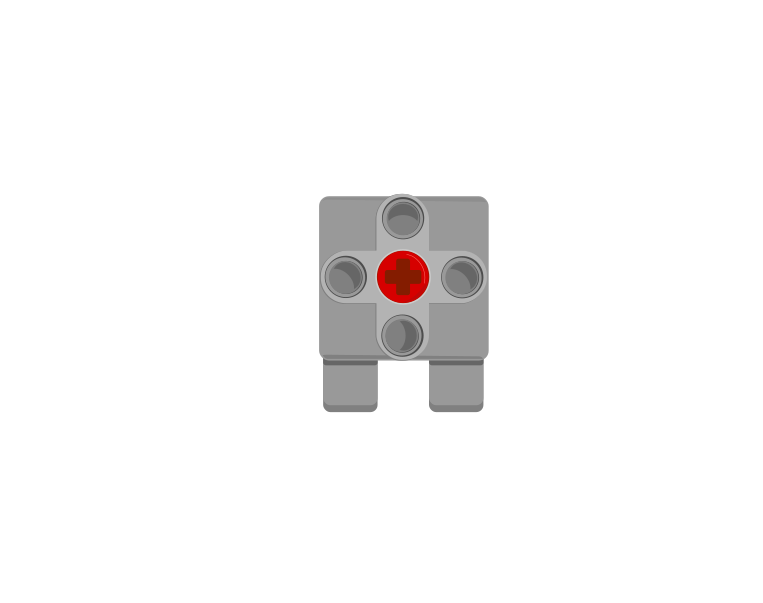
when program starts :: events hat
[A v] start motor [clockwise v] :: motors
wait (2) seconds
[A v] stop motor :: motors
A Medium Motor normally lives in port A or D.
On the Large Motor
The Large Motor is shown from the side, which is the face its axle comes out of — so once again you are looking straight down the shaft.
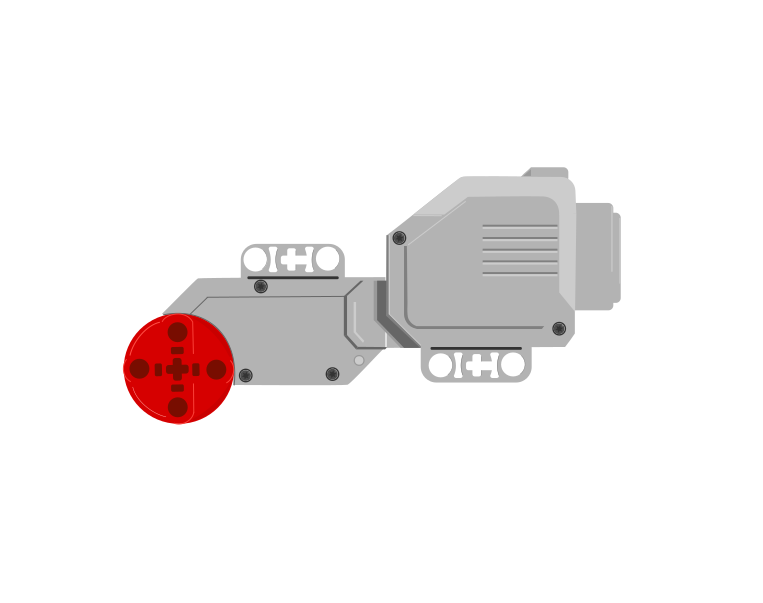
when program starts :: events hat
[B v] start motor [clockwise v] :: motors
wait (2) seconds
[B v] stop motor :: motors
A Large Motor normally lives in port B or C. Compare the two programs: they are the same three blocks, and only A has become B.
Same blocks, different motor
Medium · port ALarge · port BWhy it matters
A fan, a conveyor belt or a spinning ride does not need to stop at an exact position — it just needs to run while something is happening. For those, timing the motor is simpler and perfectly good enough.
More motion tutorials
- The Medium Motor — The small, fast motor that drives arms, gates, jaws and winches.
- The Large Motor — The big, strong motor used for wheels and heavy lifting.
- Driving with two motors — Drive a robot in a straight line, and turn it, using two Large Motors.
- Rotations and degrees — Measure how far a motor turns, so the same movement repeats exactly.
- Speed and power — Make a motor go faster or slower.
- Brake or coast — Stop a motor dead, or let it roll to a halt.
- Moving to an exact angle — Send a motor to an exact position instead of a distance from here.